
1. Introduction
Thank you for choosing the HOMCOM Kitchen Pantry Storage Cabinet, Model 838-429V80CF. This manual provides essential instructions for the safe assembly, operation, and maintenance of your new storage cabinet. Please read this manual thoroughly before assembly and retain it for future reference.

Image 1.1: The HOMCOM Kitchen Pantry Storage Cabinet (Model 838-429V80CF) in a modern living room environment, showcasing its design and utility.
2. Safety Information
Important: Always follow the assembly instructions carefully to avoid injury. Be aware of the soft-close doors to prevent pinching. Ensure the cabinet is properly installed and secured to the wall to prevent tipping. Do not exceed the maximum weight capacity of 110 pounds to maintain the cabinet's stability and safety.
- Keep all small parts and packaging materials away from children.
- Assemble the unit on a soft, clean surface to prevent scratches.
- Periodically check all fasteners to ensure they remain tight.
- Do not stand on the cabinet or use it as a ladder.

Image 2.1: Illustration of the anti-tipping hardware, which must be installed to secure the cabinet to a wall, preventing accidental tipping.
3. Package Contents
Before beginning assembly, verify that all components listed in the assembly guide are present and undamaged. This cabinet requires full assembly.
Included Components:
- Cabinet panels (top, bottom, sides, back)
- Doors (2)
- Adjustable shelves (4)
- Soft-close hinges
- Handles
- Anti-tipping hardware
- Assembly hardware (screws, dowels, etc.)
4. Assembly Instructions
Basic assembly instructions are provided with the product. Please refer to the detailed step-by-step guide included in your package for specific assembly procedures. It is recommended to have two people for assembly.
- Unpack all components and lay them out on a protected surface.
- Identify each part using the provided labels and diagrams.
- Follow the numerical sequence in the assembly guide to connect panels and install shelves.
- Attach the soft-close hinges to the doors and cabinet frame.
- Install the handles on the doors.
- Secure the back panel. Note that the back panel may not have pre-drilled holes, requiring careful alignment and fastening.
- Once assembled, attach the anti-tipping hardware to the top rear of the cabinet and secure it to a wall stud using appropriate wall anchors (not always included).

Image 4.1: The cabinet with its doors open, illustrating the interior layout and the multiple adjustable shelves for versatile storage.

Image 4.2: A visual guide demonstrating how the shelves can be adjusted to different heights using the pre-drilled holes, offering three possible positions per section.
5. Operating Instructions
The HOMCOM Kitchen Pantry is designed for convenient and organized storage.
- Adjustable Shelves: The cabinet features four adjustable shelves. To change a shelf's height, remove the shelf, reposition the shelf pins to the desired level, and then place the shelf back onto the pins. Ensure all four pins are securely in place before loading the shelf.
- Soft-Close Doors: The cabinet is equipped with soft-close hinges. These hinges allow the doors to close gently and quietly, preventing slamming and extending the lifespan of the cabinet. Simply push the door gently, and the mechanism will engage to close it smoothly.
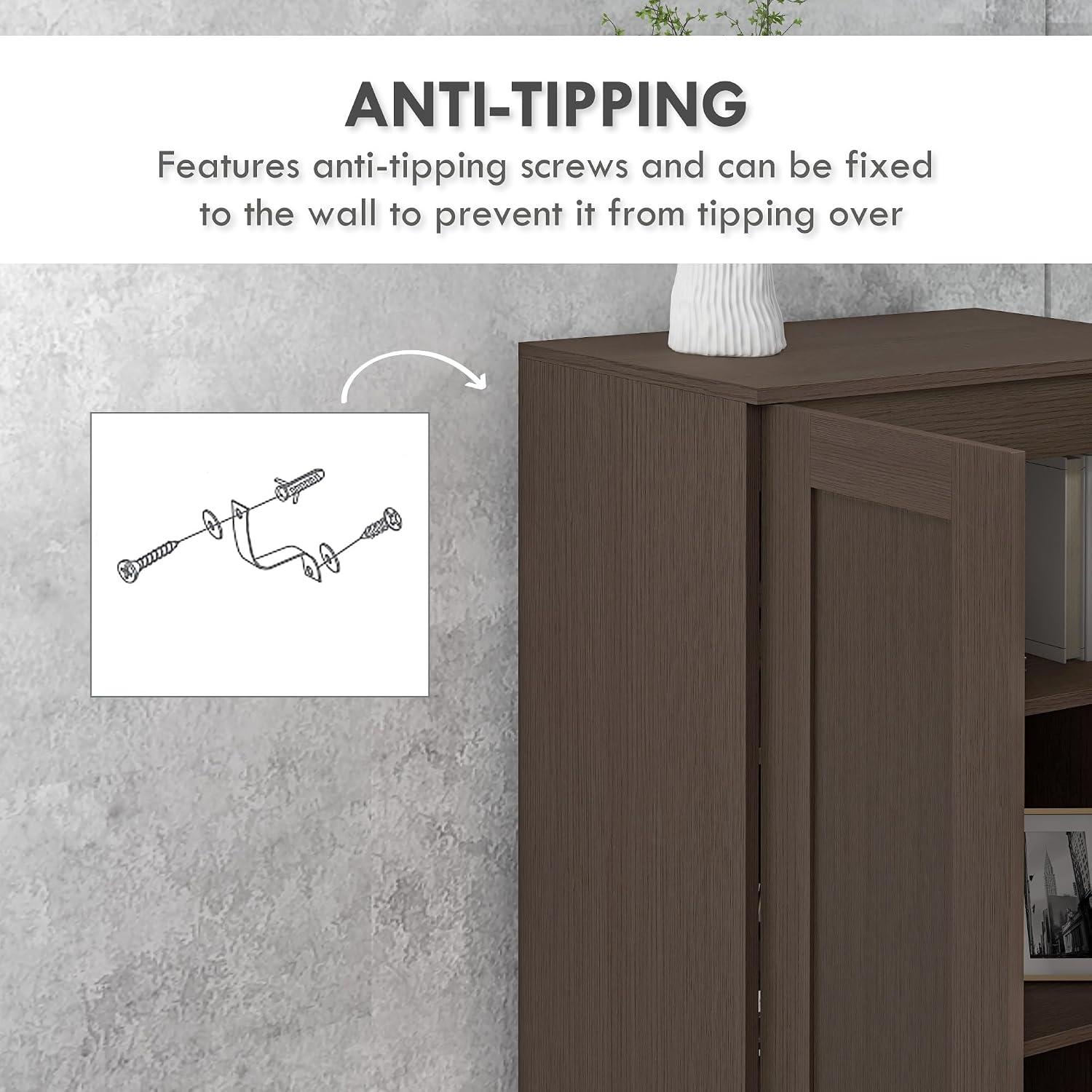
Image 5.1: A detailed view of the soft-close hinge mechanism, designed for quiet and gentle door closure.

Image 5.2: A close-up of the cabinet's handles, illustrating their design and placement for easy access.
6. Maintenance
To ensure the longevity and appearance of your HOMCOM Kitchen Pantry, follow these maintenance guidelines:
- Cleaning: Wipe surfaces with a soft, damp cloth. Avoid abrasive cleaners or harsh chemicals, as they can damage the engineered wood finish.
- Spills: Clean up spills immediately to prevent moisture damage or staining.
- Hardware: Periodically check all screws and fasteners to ensure they are tight. Loose hardware can affect the cabinet's stability and door alignment.
- Sunlight: Avoid prolonged exposure to direct sunlight, which can cause fading or discoloration of the finish.
7. Troubleshooting
If you encounter issues with your cabinet, refer to the following common solutions:
- Wobbly Cabinet: Ensure all screws are tightened. Verify that the cabinet is placed on a level surface. If necessary, use shims under the base.
- Doors Not Aligning: Check the hinge adjustments. Most hinges allow for minor adjustments to align doors horizontally, vertically, and in depth. Refer to the hinge manufacturer's instructions or a general guide for hinge adjustment.
- Difficulty Closing Doors: Ensure nothing is obstructing the door's path. Check if the soft-close mechanism is functioning correctly. If a hinge is damaged, it may need replacement.
- Missing Parts: If any parts were missing upon delivery, contact HOMCOM customer support immediately with your purchase details.
8. Specifications
| Brand | HOMCOM |
| Model Number | 838-429V80CF |
| Color | Coffee |
| Material | Engineered Wood |
| Product Dimensions (D x W x H) | 14.25" x 23.5" x 69" |
| Item Weight | 74.8 Pounds |
| Weight Capacity Maximum | 110 Pounds |
| Number of Shelves | 4 (Adjustable) |
| Number of Doors | 2 |
| Features | Adjustable Shelf, Anti-Tipping, Soft-Close Doors |
| Assembly Required | Yes |

Image 8.1: Detailed dimensions of the cabinet, indicating a height of 69 inches, width of 23.5 inches, and depth of 14.25 inches.
9. Warranty and Support
For any questions, concerns, or assistance with your HOMCOM Kitchen Pantry Storage Cabinet, please contact HOMCOM customer support. Refer to your purchase documentation for specific warranty details and contact information.
You can also visit the official HOMCOM store for more product information and support: HOMCOM Store on Amazon