
Introduction
The PATCHBOX Setup.exe 3 is an innovative installation tool designed to simplify the mounting and maintenance of 19-inch rack equipment. This manual provides detailed instructions for its proper use, ensuring efficient and safe operation.
Product Overview
The Setup.exe 3 acts as a temporary support for heavy equipment during installation, reducing physical strain and the need for additional personnel. It also functions as a convenient workshelf for laptops or diagnostic tools.

Image: The PATCHBOX Setup.exe 3 installation tool, showcasing its two main arms.
Setup and Installation
The Setup.exe 3 is designed for quick and tool-free installation into 19-inch server racks with square or threaded holes.
- Identify Mounting Points: Locate the desired U-space in your 19-inch rack for hardware installation.
- Insert Pins: The tool features adjustable pins. Ensure they are correctly aligned with the rack's mounting holes.
- Secure the Tool: Insert the Setup.exe 3 into the rack. The spring-loaded pins will secure it in place. No tools are required for this step.
- Verify Stability: Gently pull on the installed tool to ensure it is firmly seated before placing any equipment on it.
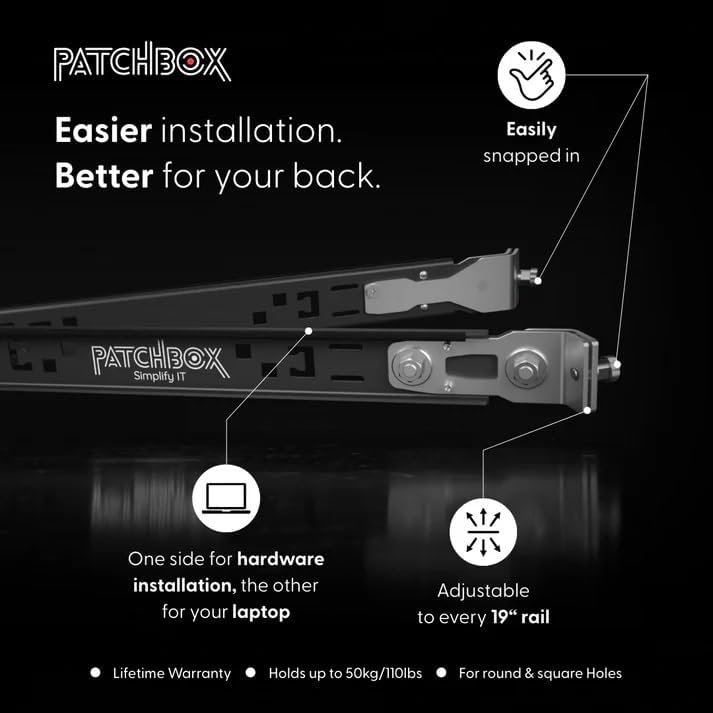
Image: Close-up view of the tool's pins being inserted and secured into a rack rail.
Video: This video demonstrates the quick and easy installation process of the PATCHBOX Setup.exe tool into a server rack, highlighting its use as a rack installation wizard.
Operating Instructions
Using as a Hardware Support
When installing network equipment such as patch panels or servers, mount the Setup.exe 3 with its arms facing inwards. This configuration provides a stable platform to rest the hardware on while you secure it with screws. The tool can support up to 110 lbs (50 kg).

Image: The Setup.exe 3 positioned to support a patch panel, facilitating single-person installation.
Using as a Workshelf
For a convenient workspace, mount the Setup.exe 3 with its arms facing outwards. The rubberized surface on top provides a secure area for placing laptops, diagnostic devices, or tools. This allows for hands-free operation while working within the rack environment.

Image: The Setup.exe 3 configured as a workshelf, holding a laptop for convenient access during rack maintenance.
Maintenance
The PATCHBOX Setup.exe 3 is constructed from durable aluminum, stainless steel, and powder-coated steel, requiring minimal maintenance. Periodically inspect the pins and moving parts for any signs of wear or damage. Clean with a soft, dry cloth as needed.
Troubleshooting
- Tool does not fit rack: Ensure the adjustable pins are correctly configured for your rack type (square or threaded holes). Some older racks may have non-standard hole spacing.
- Tool feels unstable: Verify that both pins are fully engaged in the rack rails. Gently push and pull the tool to confirm a secure fit before placing equipment.
Specifications
| Feature | Detail |
|---|---|
| Product Dimensions | 1.77 x 2.11 x 1.77 inches (45mm x 53.5mm x 45mm) |
| Item Weight | 2.25 pounds (0.88 kg) |
| Material | Aluminum, Stainless Steel, Powder-coated Steel |
| Compatible Devices | Desktop, Laptop, Server, Patch Panels |
| Mounting Type | Rack Mount (19" rails, square and threaded holes) |
| Weight Capacity | Up to 110 lbs (50 kg) |
Warranty and Support
The PATCHBOX Setup.exe 3 includes a lifetime manufacturer warranty, ensuring peace of mind regarding its quality and reliability. For technical support or warranty claims, please contact PATCHBOX customer service through their official website or your point of purchase.