
1. Introduction
Thank you for choosing the Phonak Unitron Moxi R 3 Combi Charger. This device is designed to provide a convenient and efficient solution for charging and maintaining your Discover Moxi Jump R Lithium-Ion hearing instruments. It functions as a combined charging station, protective case, and drying unit, ensuring your hearing aids are always ready for use and well-preserved. This manual provides essential information for the proper setup, operation, and care of your Combi Charger.
2. Package Contents
Please verify that all items are present in your package:
- Phonak Unitron Moxi R 3 Combi Charger Unit
- Charging Cable
- Power Plug (AC Adapter)
- User Manual (this document)
Note: Hearing aids are not included with the charger and must be purchased separately.
3. Product Features
The Phonak Unitron Moxi R 3 Combi Charger offers several key features:
- Integrated Charging: Designed specifically for Discover Moxi Jump R Lithium-Ion hearing instruments.
- Protective Case: Securely stores hearing aids when not in use or during transport.
- Drying Function: Helps remove moisture from hearing aids, contributing to their longevity and performance.
- Compact Design: Sleek and portable for easy travel and storage.
- Compatibility: Also compatible with Unitron Moxi Jump, Moxi Move, and Moxi Blu hearing aids.
4. Setup
Follow these steps to set up your Combi Charger for the first time:
- Unpack the Charger: Carefully remove the Combi Charger and all accessories from its packaging.
- Connect Power:
- Insert the small end of the charging cable into the charging port on the back of the Combi Charger.
- Connect the large end of the charging cable to the power plug (AC adapter).
- Plug the power plug into a standard electrical outlet.
- Initial Charge: It is recommended to fully charge the Combi Charger before its first use, even if it appears to have some charge. A full charge typically takes several hours. The charging indicator lights on the charger will provide status.

5. Operating Instructions
5.1. Charging Hearing Aids
To charge your hearing aids:
- Open the Charger: Lift the lid of the Combi Charger.
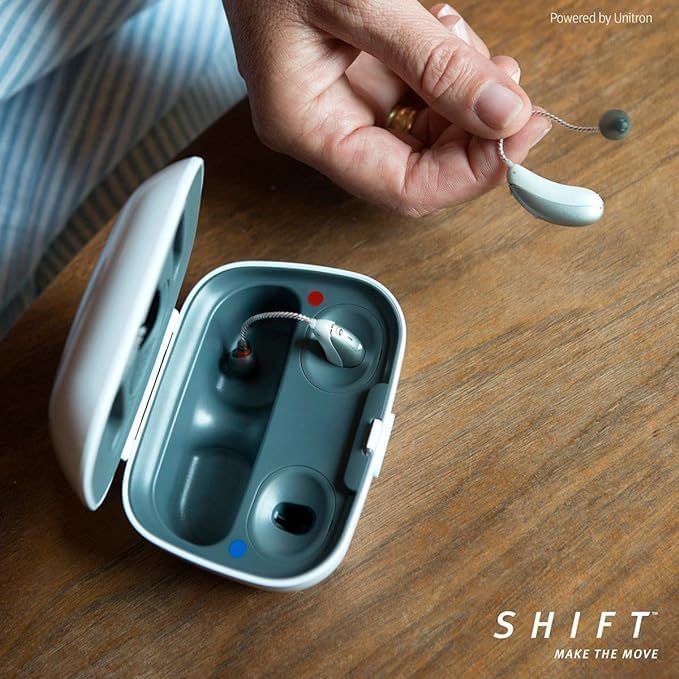
- Insert Hearing Aids: Place each hearing aid into its designated charging slot. Ensure the hearing aids are correctly oriented, typically with the receiver/earpiece facing the front of the charger. You will notice a red indicator for the right hearing aid and a blue indicator for the left.
- Verify Connection: The indicator lights on the charger will illuminate to confirm that the hearing aids are properly seated and charging has begun. Refer to the charger's specific light patterns for charging status (e.g., solid light for charging, blinking for error, green for full).
- Close the Lid: Close the lid of the charger to initiate the drying function and protect the hearing aids during charging.

5.2. Drying Function
The Combi Charger includes an automatic drying function that activates when the hearing aids are placed inside and the lid is closed. This feature helps to remove moisture and condensation from your hearing aids, which is crucial for their performance and longevity. The drying cycle typically runs concurrently with the charging process.
6. Maintenance and Care
Proper maintenance ensures the longevity and optimal performance of your Combi Charger:
- Cleaning the Charger:
- Disconnect the charger from the power outlet before cleaning.
- Wipe the exterior of the charger with a soft, dry, or slightly damp cloth. Do not use abrasive cleaners, solvents, or excessive moisture.
- Gently clean the charging contacts with a dry cotton swab if necessary, ensuring no debris interferes with the connection.
- Storage:
- Store the charger in a cool, dry place away from direct sunlight and extreme temperatures.
- When not in use for extended periods, disconnect it from the power source.
- Avoid Liquids: Do not immerse the charger in water or any other liquid.
- Protect from Damage: Avoid dropping the charger or subjecting it to strong impacts.
7. Troubleshooting
If you encounter issues with your Combi Charger, refer to the following common problems and solutions:
| Problem | Possible Cause | Solution |
|---|---|---|
| Charger not powering on / No indicator lights | Not plugged in correctly; Power outlet issue; Faulty cable/adapter | Ensure cable is securely connected to charger and power plug. Try a different power outlet. Check if the power plug is working with another device. |
| Hearing aids not charging | Hearing aids not seated correctly; Dirty charging contacts; Charger not powered | Re-seat hearing aids firmly in their slots. Clean charging contacts on both hearing aids and charger with a dry cotton swab. Ensure charger is powered on. |
| Drying function not working | Lid not closed; Charger not powered | Ensure the charger lid is fully closed. Verify the charger is connected to power. |
| Unusual noises or smells from charger | Internal malfunction | Immediately disconnect the charger from power. Do not attempt to repair. Contact customer support. |
If the problem persists after attempting these solutions, please contact customer support for further assistance.
8. Specifications
| Attribute | Value |
|---|---|
| Product Name | Phonak Unitron Moxi R 3 Combi Charger |
| Model | Moxi R 3 Combi Charger |
| Brand | Phonak / Unitron |
| Compatible Hearing Aids | Discover Moxi Jump R Lithium-Ion, Unitron Moxi Jump, Moxi Move, Moxi Blu |
| Output Voltage | 5 Volts (DC) |
| Color | White |
| Manufacturer | Sonova AG |
9. Warranty and Support
Your Phonak Unitron Moxi R 3 Combi Charger comes with a 3-month warranty through the manufacturer. This warranty covers defects in materials and workmanship under normal use. Please retain your proof of purchase for warranty claims.
For technical support, warranty claims, or further inquiries, please contact the retailer or the manufacturer's authorized service center.
This product is also known as the Kirkland Signature 10.0 hearing aid charger.


