1. Introduction
Thank you for choosing the Pamray 43 Inch L-Shaped Computer Desk. This manual provides essential information for the safe and efficient assembly, operation, and maintenance of your new desk. Please read it thoroughly before beginning assembly.

Image: The Pamray 43 Inch L-Shaped Computer Desk in white, set up with a monitor, keyboard, and other office accessories.
2. Safety Information
Important Safety Precautions:
- Always assemble the desk according to the provided instructions.
- Ensure the desk is properly anchored to the floor to prevent tipping, especially when in use.
- Keep the work area clear of items that could cause the desk to tip over.
- Do not allow children to play on or around the desk.
- Maximum weight recommendation for the desktop is 150 pounds.
3. Package Contents
Before assembly, verify that all parts are present and undamaged. Refer to the included parts list in your packaging. All necessary installation tools are included.
Note: Components may be labeled with letters or numbers for easy identification during assembly.
4. Setup and Assembly
Assembly is required for this product. It is recommended that 2 people assemble the desk for ease and safety.
Key Assembly Features:
- Reversible Shelves: The side storage shelves can be installed on either the left or right side of the desk to suit your space layout.
- Adjustable Feet: Six adjustable feet are included to ensure stability on uneven surfaces.
Assembly Steps:
- Unpack all components and lay them out on a clean, soft surface to prevent scratches.
- Identify all parts using the provided parts list and hardware pack.
- Follow the step-by-step instructions in the included manual. Pay close attention to the orientation of parts, especially for the reversible shelves.
- Secure all screws and fasteners firmly, but do not overtighten until the desk is fully assembled and aligned.
- Once assembled, tighten all fasteners securely.
- Adjust the leveling feet at the bottom of the desk legs to ensure stability.

Image: Diagram illustrating the reversible shelf configuration options for the Pamray L-shaped desk.

Image: Detailed dimensions of the Pamray 43 Inch L-Shaped Computer Desk, showing length, width, and height measurements for both the desktop and the shelving unit.
5. Operating Instructions
Your Pamray L-Shaped Computer Desk is designed for versatile use in various settings such as home offices, bedrooms, or study rooms.
- Ample Desktop Space: The L-shaped design provides a spacious workstation suitable for computers, monitors, printers, and other office essentials.
- Reversible Side Storage Shelves: Utilize the two open shelves for organizing books, files, or decorative items. These shelves can be positioned on either the left or right side during assembly to best fit your room layout.
- Convenient Hook: A hook is included for hanging bags, headphones, or other accessories, helping to keep your desktop clutter-free.
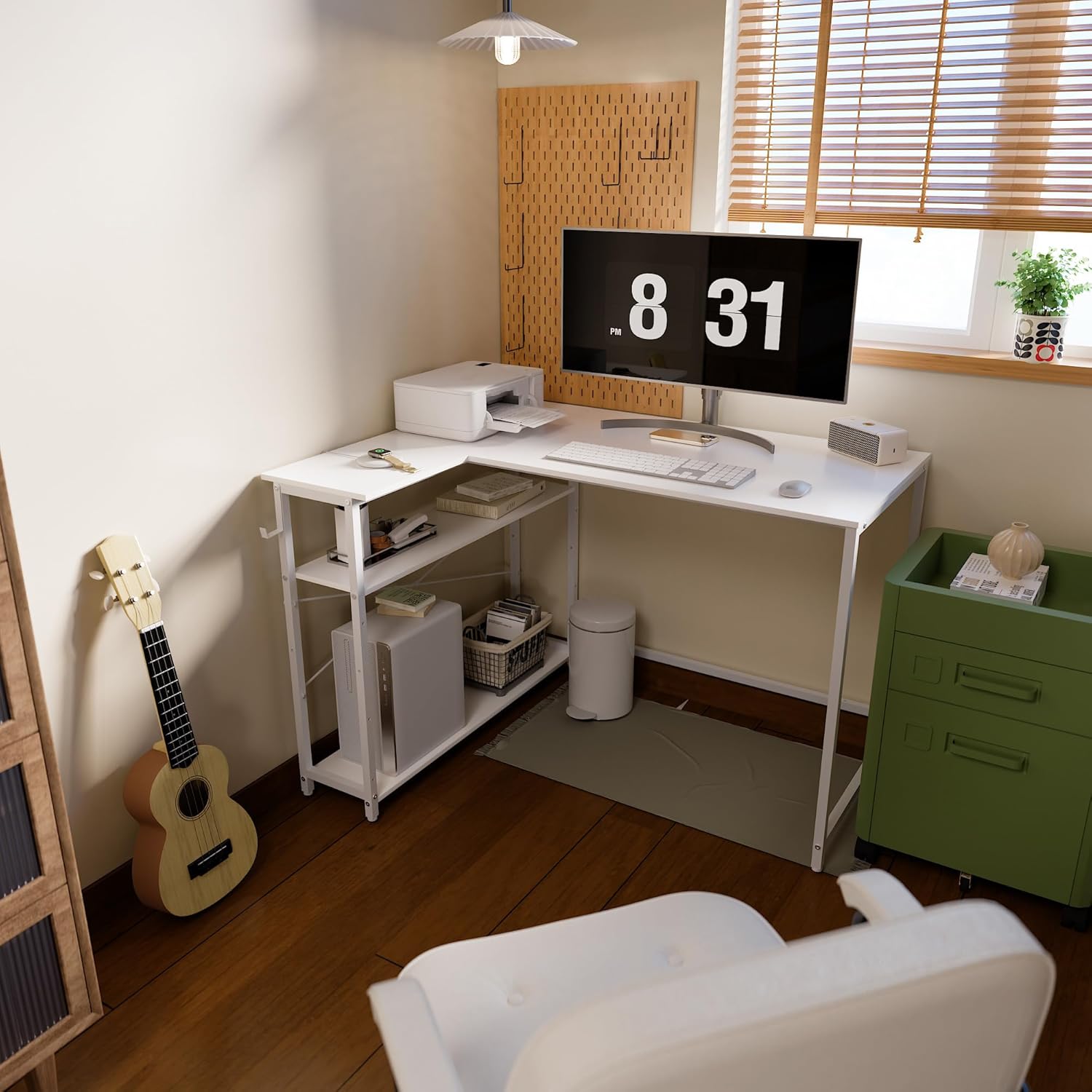
Image: The Pamray L-shaped desk in a home office, demonstrating its use with a computer setup and organized shelves.

Image: Close-up view of the Pamray L-shaped desk's mobile shelving unit, highlighting the adjustable shelves and the integrated hook for headphones or bags.
6. Maintenance
To ensure the longevity and appearance of your Pamray desk, follow these maintenance guidelines:
- Cleaning: Wipe surfaces with a soft, damp cloth. Avoid harsh chemicals or abrasive cleaners that may damage the finish.
- Spills: Clean up spills immediately to prevent staining or damage to the engineered wood top.
- Fasteners: Periodically check all screws and fasteners to ensure they remain tight. Retighten if necessary to maintain stability.
- Weight Distribution: Distribute weight evenly across the desktop and shelves to prevent stress on the structure.
- Environment: Avoid placing the desk in direct sunlight or near heat sources, as this can cause warping or discoloration.
7. Troubleshooting
If you encounter any issues with your Pamray L-Shaped Computer Desk, refer to the following common solutions:
| Problem | Possible Cause | Solution |
|---|---|---|
| Desk is wobbly or unstable. | Loose fasteners; uneven floor; incorrect assembly. | Ensure all screws are tightened securely. Adjust the leveling feet at the bottom of the legs. Review assembly instructions to confirm all parts are correctly installed. |
| Parts do not align during assembly. | Incorrect orientation of parts; overtightened screws too early. | Loosen all screws slightly, realign parts, then gradually tighten. Double-check part labels and diagrams in the manual. |
| Missing parts or damaged components. | Packaging error; shipping damage. | Contact Pamray customer support immediately with your purchase details and a description of the issue. |
8. Specifications
| Feature | Detail |
|---|---|
| Brand | Pamray |
| Model Number | A7white43 |
| Product Dimensions (D x W x H) | 42.91"D x 30.7"W x 29.53"H |
| Color | White |
| Style | Modern |
| Base Material | Metal |
| Top Material Type | Engineered Wood |
| Finish Type | Powder Coated |
| Special Feature | Compact, Reversible Shelves, Headphone Hook |
| Room Type | Bedroom, Dormitory, Living Room, Office, Study Room |
| Item Weight | 11.69 Kilograms |
| Number of Shelves | 2 (open shelves) |
| Maximum Weight Recommendation | 150 Pounds |
| Required Assembly | Yes |
| Recommended People for Assembly | 2 |
| Includes All Assembly Tools | Yes |
9. Warranty and Support
This Pamray product comes with a Limited Warranty. For specific details regarding warranty coverage, please refer to the warranty information included in your product packaging or contact Pamray customer support.
For further assistance, missing parts, or troubleshooting not covered in this manual, please contact Pamray customer service through the retailer where you purchased the product.


