
1. Introduction
This manual provides essential information for the safe and efficient installation, operation, and maintenance of your RWRAPS 1KW 80AST-A1C04025 AC Servo Motor Kit. This kit includes a high-performance AC servo motor, a T3D-L20A AC driver, and necessary cabling, designed for precision control in various industrial applications such as machining, food processing, material handling, and engraving equipment.
Please read this manual thoroughly before attempting to install or operate the servo motor kit. Retain this manual for future reference.
2. Package Contents
Upon unpacking, verify that all components listed below are present and undamaged. If any items are missing or damaged, contact your supplier immediately.
- 1 x 1KW 80AST-A1C04025 AC Servo Motor (with 17-bit absolute encoder)
- 1 x T3D-L20A AC Servo Driver
- 1 x 3-Meter Encoder Cable
- 1 x 3-Meter Power Cable
- 1 x Control Signal Cable (optional 5V or 24V)
- 1 x RS485 Communication Cable
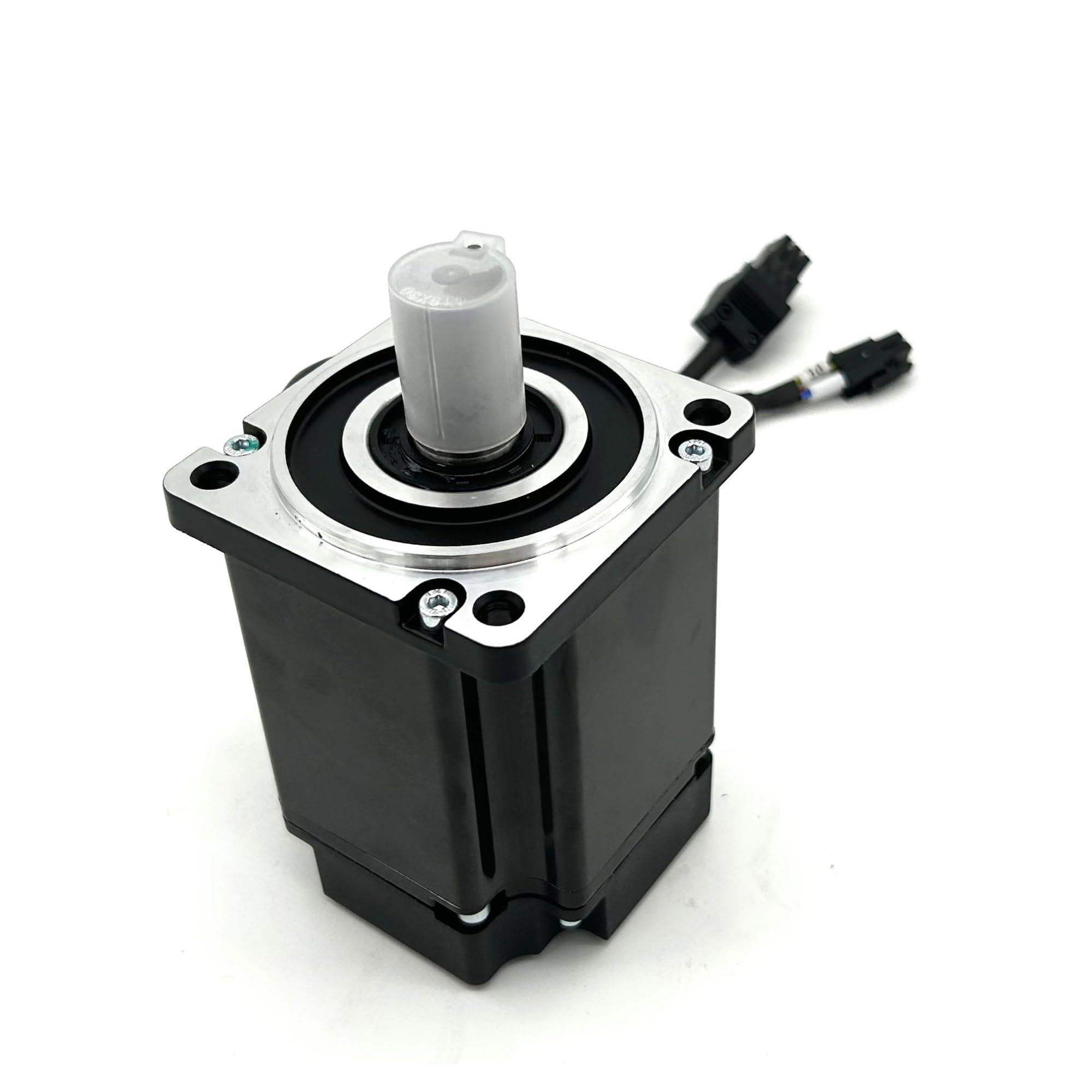
Image 2.1: Complete RWRAPS 1KW AC Servo Motor Kit showing the motor, driver, and cables.
3. Features
The RWRAPS 1KW 80AST-A1C04025 AC Servo Motor Kit offers advanced features for precise and reliable motion control:
- High Applicability: All input/output ports are freely definable, allowing for flexible configuration and easy debugging.
- Comprehensive Protection: Built-in safeguards against under voltage, over voltage, overload, over current, encoder exceptions, and position errors.
- Versatile Control Modes: Supports position control, speed control, and torque control communication to meet diverse application requirements.
- Wide Application Range: Ideal for industrial manipulators, semiconductor equipment, engraving/carving machinery, measuring equipment, industrial robots, and other automated systems.
4. Specifications
Key technical specifications for the RWRAPS 1KW 80AST-A1C04025 AC Servo Motor Kit:
| Component | Specification |
|---|---|
| Motor Model | 80AST-A1C04025 |
| Driver Model | T3D-L20A |
| Rated Power | 1 KW |
| Rated Voltage | 220 V |
| Rated Speed | 2500 RPM |
| Rated Torque | 3.8 N.m |
| Encoder Type | Magnetic 17-bit Absolute Encoder |
| Pulse Signal Selection | 5V or 24V |
| Motor Flange | Nema32 (80mm x 80mm) |
| Motor Shaft Diameter | 19mm with 6mm Key |
| Efficiency | IE2 |
| Protection Feature | Waterproof |
| Item Weight (Kit) | Approximately 17.64 pounds (8 kg) |
5. Setup and Wiring
Proper installation and wiring are crucial for the safe and correct operation of the servo motor kit. Ensure all power is disconnected before making any connections.
5.1. Driver Overview

Image 5.1: Side view of the T3D-L20A AC Servo Driver.
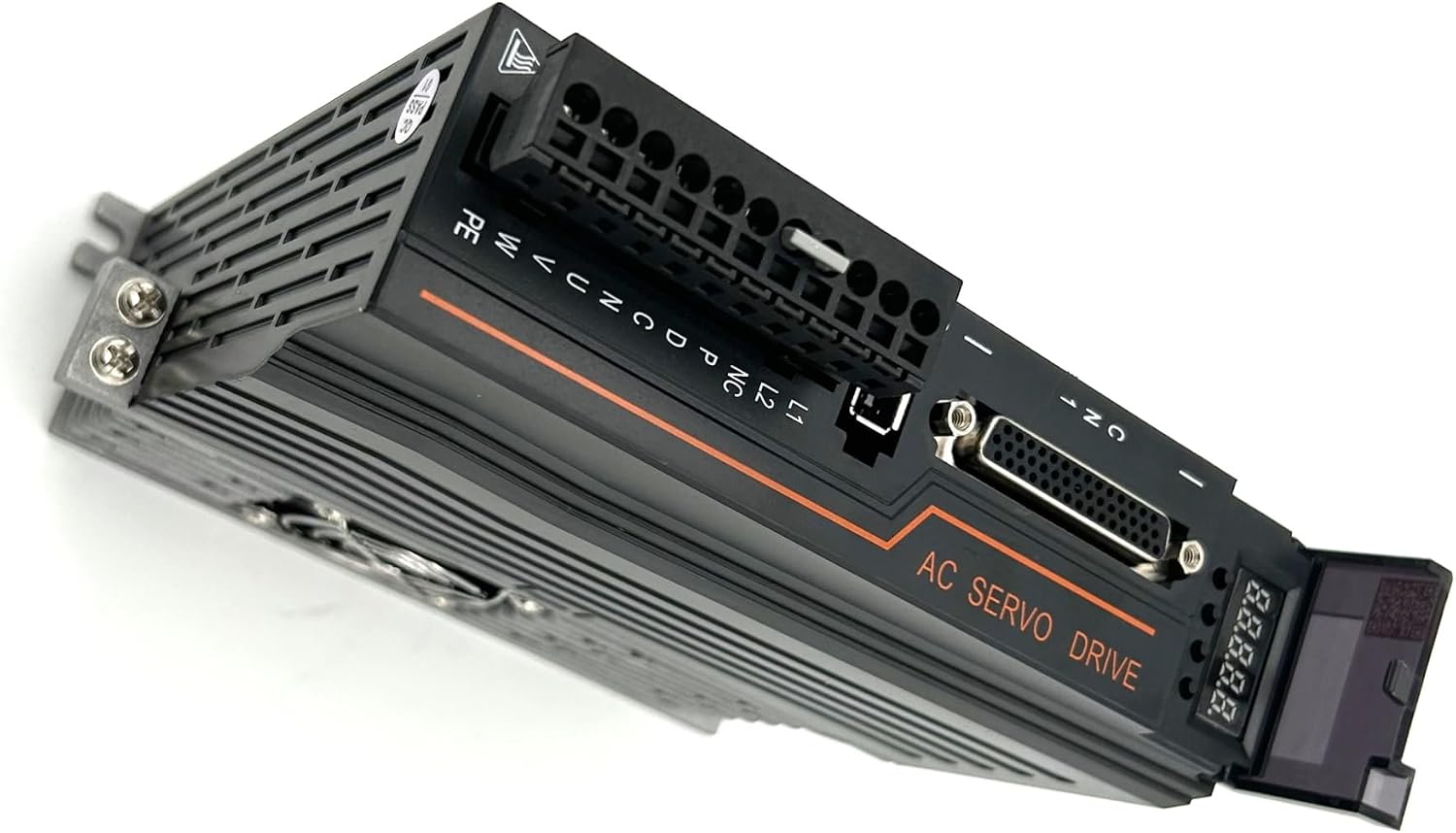
Image 5.2: Angled view of the T3D-L20A AC Servo Driver, highlighting various connection terminals.

Image 5.3: Bottom view of the T3D-L20A AC Servo Driver, showing the cooling fan.
5.2. Wiring Diagram (T3D-L15A/L20A)
Refer to the detailed wiring diagram below for connecting the servo motor, power supply, and control signals to the T3D-L20A driver.

Image 5.4: Wiring diagram for the T3D-L20A AC Servo Driver.
Connection Points Explained:
- CN1: Upper Computer Command Port - Connects to a CNC, PLC, or other upper-level control device for command input.
- CN2: Motor Encoder Port - Connect the provided encoder cable from the servo motor to this port.
- CN3/CN4: RS485 Communication Port (Top of Drive) - Used for RS485 communication.
- CHARGE: Drive Power Indicator - Illuminates when the drive is powered.
- L1/L2 Terminal: Main Power Input - Connect to a single-phase 220V AC power supply.
- NC Terminal: Do not connect to this terminal.
- P/D/C Terminal: Braking Resistor Connection - P and D are connected together. Use the internal braking resistor.
- N Terminal: Do not connect to this terminal. Incorrect connection may cause damage to the drive.
- U/V/W/PE Terminal: Motor Power Line - Connect the four wires U, V, W, and PE of the motor power line to their corresponding terminals. Ensure correct polarity and connection to avoid damage.
6. Operating Instructions
After successful installation and wiring, the servo motor kit is ready for operation. The T3D-L20A driver supports various control modes:
- Position Control: For precise positioning applications.
- Speed Control: For applications requiring constant or variable speed.
- Torque Control: For applications where constant torque is required.
Refer to the specific programming guide or software manual for your upper-level control device (CNC, PLC) to configure the desired control mode and parameters. The freely definable I/O ports allow for customization to match your system's requirements.
7. Maintenance
Regular maintenance helps ensure the longevity and optimal performance of your servo motor kit.
- Cleaning: Keep the motor and driver free from dust, debris, and moisture. Use a soft, dry cloth for cleaning. Ensure ventilation openings on the driver are clear.
- Connection Inspection: Periodically check all electrical connections for tightness and signs of wear or corrosion. Re-tighten as necessary.
- Environmental Conditions: Ensure the operating environment remains within the specified temperature and humidity ranges to prevent damage.
- Cable Integrity: Inspect cables for any signs of damage, fraying, or kinks. Replace damaged cables immediately.
8. Troubleshooting
The T3D-L20A driver is equipped with protection features that can help diagnose common issues. If an error occurs, the driver's display or your control system may indicate a fault code.
| Symptom/Error | Possible Cause | Corrective Action |
|---|---|---|
| Under Voltage Error | Input power voltage is too low. | Check the 220V AC power supply voltage. Ensure stable power. |
| Over Voltage Error | Input power voltage is too high or regenerative voltage. | Check the 220V AC power supply voltage. Verify braking resistor connection if applicable. |
| Overload Error | Motor load exceeds rated capacity. | Reduce mechanical load or check for mechanical binding. Verify motor sizing. |
| Over Current Error | Excessive current draw, possibly due to short circuit or motor issue. | Inspect motor wiring for shorts. Check motor for damage. |
| Encoder Exception | Encoder signal loss or malfunction. | Check encoder cable connection (CN2). Inspect encoder for damage. |
| Position Error | Motor not reaching commanded position or excessive deviation. | Check mechanical system for binding. Adjust PID gains or tuning parameters. |
For persistent issues or errors not listed, consult the detailed driver manual (if available) or contact RWRAPS technical support.
9. Warranty and Support
RWRAPS products are manufactured to high-quality standards. For specific warranty terms and conditions, please refer to the documentation provided at the time of purchase or contact your vendor. In case of technical difficulties or questions regarding your RWRAPS 1KW 80AST-A1C04025 AC Servo Motor Kit, please reach out to your authorized dealer or RWRAPS customer support for assistance.