
1. Introduction
This manual provides essential instructions for the safe and effective installation, operation, and maintenance of the ClimaTek PCBBF162S OEM Upgraded Furnace Circuit Board. This circuit board is designed as a direct replacement for part # PCBBF162S and is compatible with various Goodman furnace models. Please read this manual thoroughly before proceeding with installation or any service to ensure proper function and safety.
2. Safety Information
WARNING: Electrical shock hazard. Disconnect all power to the furnace before installing or servicing this circuit board. Failure to do so can result in serious injury or death.
- Installation should only be performed by a qualified HVAC technician or a licensed electrician.
- Always wear appropriate personal protective equipment (PPE), including safety glasses and insulated gloves.
- Verify that the replacement board matches the specifications of the original board.
- Ensure all wiring connections are secure and correctly matched according to the furnace manufacturer's wiring diagram.
- Do not bypass any safety devices.
3. Package Contents
Upon opening the package, please verify that all components are present and undamaged:
- One (1) ClimaTek PCBBF162S OEM Upgraded Furnace Circuit Board
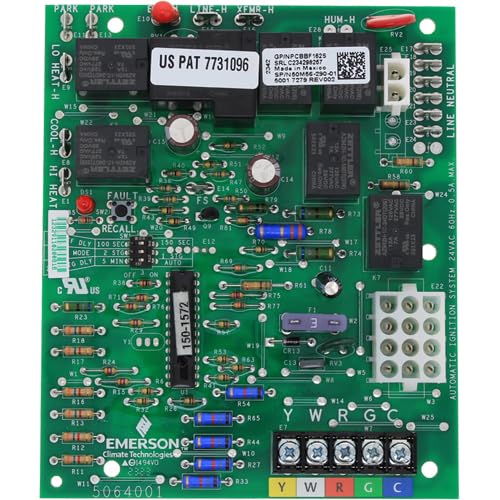
Figure 1: The ClimaTek PCBBF162S furnace circuit board. This image shows the front view of the circuit board with various connectors and components visible.
4. Setup and Installation
Follow these steps carefully to replace your furnace circuit board. Refer to your furnace's specific wiring diagram for detailed connections.
- Disconnect Power: Locate the main power switch for your furnace and turn it OFF. Additionally, turn off the circuit breaker supplying power to the furnace. Verify power is off using a voltage tester.
- Access the Control Board: Open the furnace access panel to expose the existing circuit board.
- Document Wiring: Before disconnecting any wires, take clear photographs of all connections to the existing circuit board. Label each wire and its corresponding terminal on the old board. This step is crucial for correct reinstallation.
- Disconnect Wires: Carefully disconnect all wires and connectors from the old circuit board.
- Remove Old Board: Unscrew or unclip the old circuit board from its mounting standoffs.
- Install New Board: Position the ClimaTek PCBBF162S circuit board onto the mounting standoffs and secure it with the appropriate screws or clips.
- Reconnect Wires: Using your photographs and labels, carefully reconnect all wires and connectors to the new ClimaTek PCBBF162S circuit board. Ensure all connections are firm and correctly seated. Double-check against the furnace's wiring diagram.
- Close Access Panel: Securely close the furnace access panel.
- Restore Power: Turn on the circuit breaker and then the main power switch for the furnace.
- Test Operation: Initiate a heating cycle to verify that the furnace operates correctly. Observe for any unusual noises, smells, or error codes.
5. Operating Instructions
The ClimaTek PCBBF162S furnace circuit board is an automatic control component. Once correctly installed, it manages the various functions of your furnace, including ignition, fan operation, and safety shutdowns, based on signals from the thermostat and other sensors. There are no user-adjustable settings on the board itself.
After installation and power restoration, the furnace should resume normal operation as dictated by your thermostat settings. Monitor the furnace for the first few cycles to ensure proper functionality.
6. Maintenance
The circuit board itself requires minimal maintenance. However, regular maintenance of your overall furnace system is crucial for its longevity and efficient operation. This includes:
- Annual Professional Inspection: Have a qualified HVAC technician inspect your furnace annually.
- Filter Replacement: Replace or clean your furnace air filter regularly as recommended by your furnace manufacturer.
- Visual Inspection: Periodically, with power disconnected, visually inspect the circuit board and its connections for any signs of wear, corrosion, or loose wiring.
- Keep Clean: Ensure the area around the circuit board is free from dust and debris.
7. Troubleshooting
If your furnace is not operating correctly after installing the new circuit board, consider the following common issues:
| Problem | Possible Cause | Solution |
|---|---|---|
| Furnace does not turn on. | No power, loose wiring, thermostat issue, safety switch tripped. | Check circuit breaker. Ensure all wires are securely connected. Verify thermostat settings. Check furnace safety switches (e.g., door switch). |
| Fan runs continuously. | Thermostat fan setting, faulty fan relay on board, wiring error. | Check thermostat fan setting (should be "Auto"). Re-check fan wiring connections. If problem persists, professional diagnosis may be needed. |
| No heat. | Ignition failure, gas supply issue, sensor problem, wiring error. | Ensure gas supply is on. Check for error codes on the board (if applicable). Verify all sensor connections. Consult a professional. |
If you are unable to resolve the issue after following these steps, it is recommended to contact a qualified HVAC technician for further diagnosis and repair.
8. Specifications
- Model: PCBBF162S
- Brand: ClimaTek
- Product Dimensions: 3 x 9 x 7 inches
- Item Weight: 11 ounces
- Compatibility: Direct OEM replacement for part # PCBBF162S, compatible with Goodman furnaces.
9. Warranty and Support
This ClimaTek product is covered by the manufacturer's standard warranty. For specific warranty terms and conditions, please refer to the documentation provided with your purchase or contact ClimaTek customer support. Keep your proof of purchase for warranty claims.
For technical assistance or support, please visit the ClimaTek official website or contact their customer service department. When contacting support, please have your product model number (PCBBF162S) and purchase details readily available.