Introduction
The SVBONY SV172 430mm Lens Warmer Dew Heater Strip is designed to prevent dew, fog, and condensation from forming on the optical surfaces of telescopes, camera lenses, and other optical equipment during cold or humid conditions. This manual provides essential information for the proper setup, operation, and maintenance of your device.
What's in the Box
- 1X SV172 Lens Warmer

Image showing the contents of the SVBONY SV172 package, including the lens warmer, controller, and mesh storage bag.
Key Features
- USB Interface: Easily plug into a USB power adapter, portable charger, or other USB power sources for versatile indoor and outdoor use.
- Adjustable Temperature Range: Working temperature can be adjusted from 25°C to 70°C (77°F to 158°F) to suit various environmental conditions.
- Fastener Design: Equipped with handy fasteners for secure attachment around your lens or telescope, allowing for easy adjustment.
- 430mm Effective Heater Length: Specifically designed to eliminate dew, fog, and condensation on optical surfaces during cold weather.
- Multipurpose Use: With a total length of 550mm, it can also be used to keep bottles and coffee cups warm in winter.
Setup & Installation
Follow these steps to properly set up and install your SVBONY SV172 Lens Warmer:
- Unpack the Device: Carefully remove the lens warmer and its components from the packaging.
- Identify Components: Familiarize yourself with the heater strip, temperature controller, and USB cable.
- Wrap Around Lens/Telescope: Securely wrap the heater strip around the optical tube of your telescope or camera lens using the integrated fasteners. Ensure the effective heating length covers the area prone to dew formation.
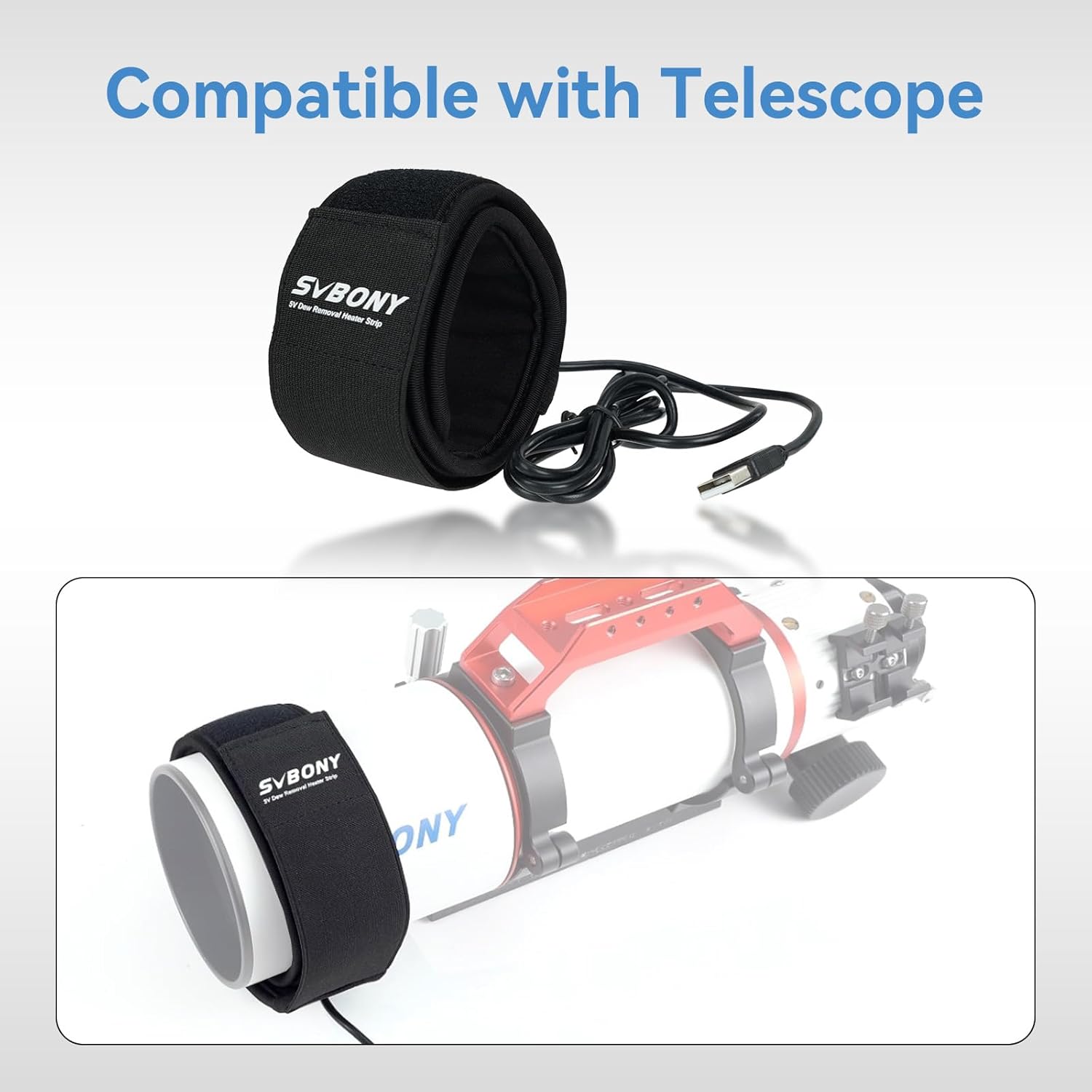
The SVBONY SV172 Dew Heater Strip wrapped around a telescope, demonstrating its compatibility and application.
- Connect Power: Connect the USB cable from the heater strip to the temperature controller, then connect the controller's USB plug to a compatible USB power source (e.g., power bank, laptop, car charger).

Diagram illustrating various USB power sources compatible with the lens warmer, including power banks, laptops, and car chargers.
Video demonstrating the installation and basic function of the SVBONY SV172 dew heater strip on a telescope. It shows how the strip wraps around the optical tube and connects to power.
Video demonstrating the general use and installation of a USB lens warmer, showing how it attaches to a camera lens.
Operating Instructions
The SVBONY SV172 features a PWM (Pulse Width Modulation) function for precise temperature control.
- Power On/Off: Press the ON/OFF button on the temperature controller to turn the device on or off.
- Adjust Temperature: Use the '+' and '-' buttons to adjust the working temperature. The temperature range is 25°C to 70°C (77°F to 158°F). The current temperature setting will be displayed on the controller's screen.

Close-up of the SVBONY SV172's PWM function, indicating intelligent defogging and heating capabilities with temperature display.
Video illustrating the Pulse Width Modulation (PWM) function of the SVBONY SV172 430mm dew heater strip, showing how to adjust heating levels for efficient dew prevention.
Specifications
| Feature | Detail |
|---|---|
| Product Dimensions | 4.8 x 1.4 x 3.7 inches |
| Item Weight | 5.6 ounces |
| Item Model Number | FCAW9132D |
| Manufacturer | SVBONY |
| Effective Heater Length | 430mm |
| Total Length | 550mm |
| Interface Type | USB Type-A |
| Input Voltage | DC 5V |
| Input Current | 2A |
| Power | 10W |
| PWM Function | Supported |
| Power Cable Length | 1.2m |
| Dew Heater Strip Material | Imitation OK cloth + SBR + Black-T + Aluminum Film + Pure cotton |
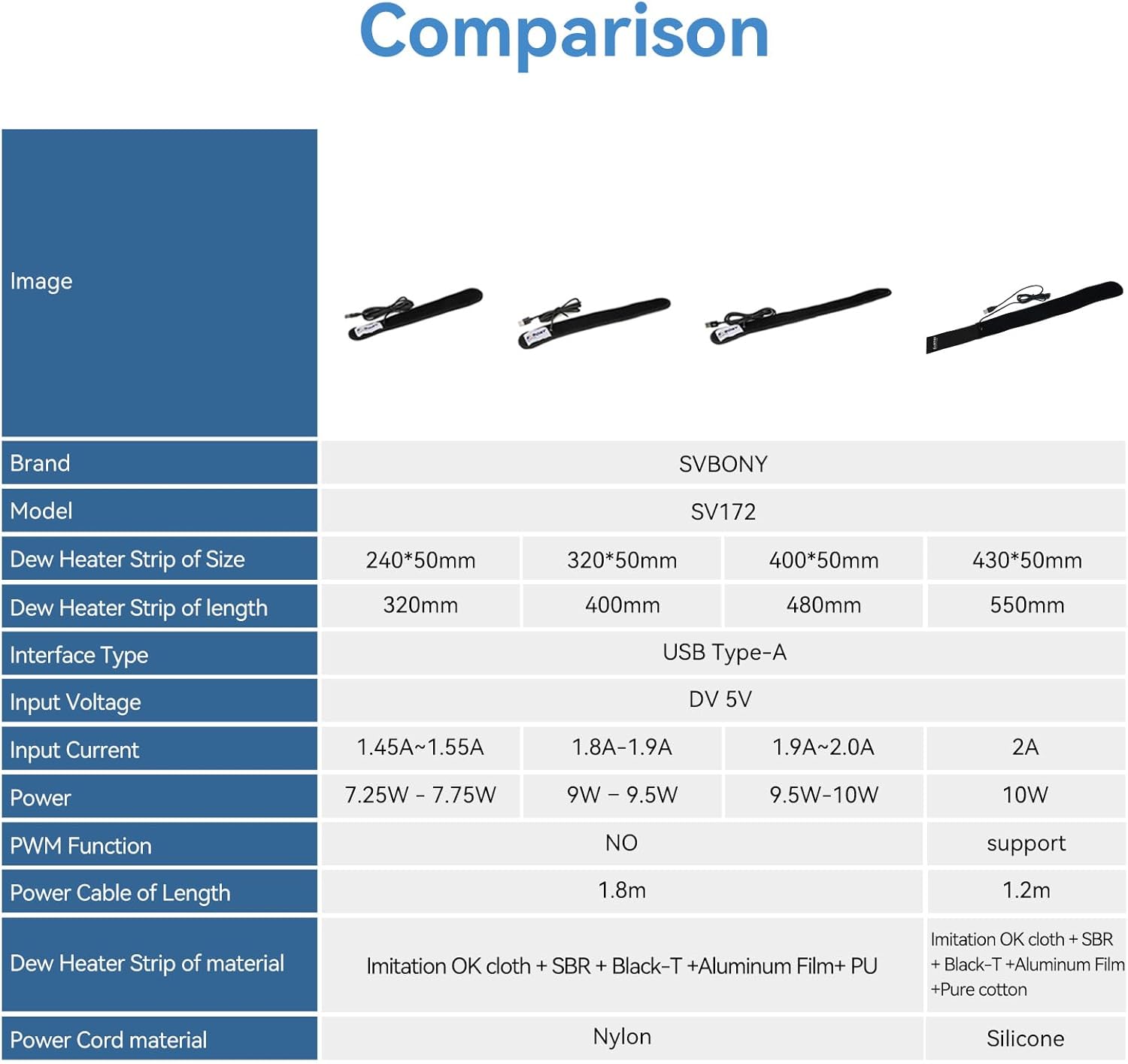
Comparison table of SVBONY SV172 dew heater strip specifications across different sizes, highlighting features like PWM function and material.
Maintenance
To ensure the longevity and optimal performance of your SVBONY SV172 Lens Warmer, follow these maintenance guidelines:
- Cleaning: Gently wipe the exterior of the heater strip with a soft, dry cloth. Do not use harsh chemicals or abrasive materials.
- Storage: When not in use, store the lens warmer in a cool, dry place, away from direct sunlight and extreme temperatures. The included mesh bag is ideal for storage.
- Cable Care: Avoid bending or kinking the USB cable excessively to prevent internal damage.
Troubleshooting
If you encounter issues with your SVBONY SV172 Lens Warmer, consider the following:
- Device Not Heating: Ensure the USB cable is securely connected to both the heater strip and the power source. Verify that the power source is active and providing sufficient power (DC 5V, 2A). Check if the device is turned on via the controller.
- Insufficient Heating: Adjust the temperature setting using the '+' button on the controller to a higher level. Ensure the heater strip is snugly wrapped around the optical tube for efficient heat transfer.
- Controller Malfunction: If the controller display is unresponsive or shows erratic readings, try disconnecting and reconnecting the power. If the issue persists, contact customer support.
Warranty & Support
For warranty information, technical support, or service inquiries, please refer to the official SVBONY website or contact their customer service directly. Keep your purchase receipt as proof of purchase for warranty claims.


