
Introduction
This manual provides instructions for the safe and efficient operation of your FOL TWS R-206 Bluetooth Speaker. Please read this manual thoroughly before use and retain it for future reference. This speaker features True Wireless Stereo (TWS) technology, allowing two units to connect for an immersive audio experience, and is designed for portability with splash resistance.
Product Overview
The FOL TWS R-206 is a portable Bluetooth speaker designed for high-quality audio output. It features a robust design with a convenient carrying handle and is equipped with multiple connectivity options.
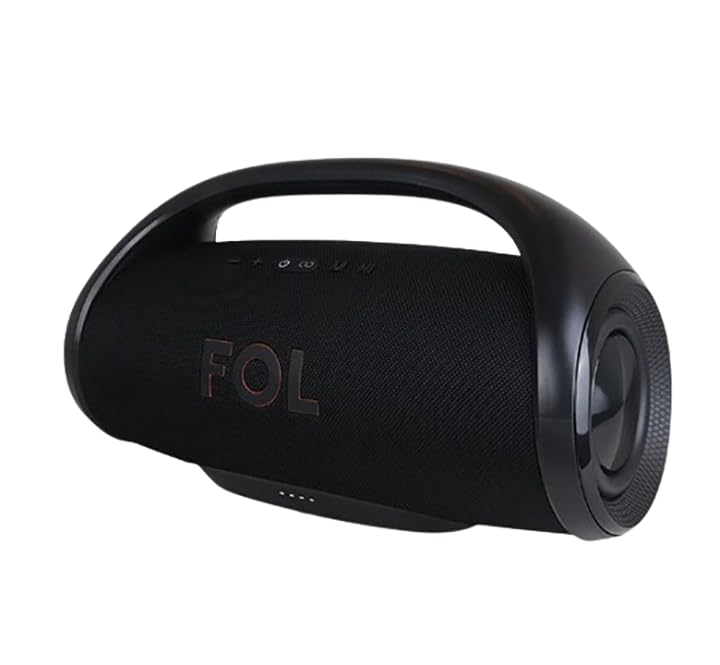
Figure 1: Front view of the FOL TWS R-206 Bluetooth Speaker.
Key Features:
- True Wireless Stereo (TWS): Connect two R-206 speakers for a stereo sound experience.
- High Power Output: 70 watts total, with a 4-inch main horn and two 2.25-inch satellite speakers.
- Long Battery Life: Up to 3 hours of playback on a single charge from its 14.8V/2200mAh rechargeable battery.
- Splash Resistant: Suitable for outdoor use, but do not submerge in water.
- Multiple Connectivity: Bluetooth, USB, and Radio functionality.
- Portable Design: Integrated handle for easy transport.
Setup
1. Unboxing and Initial Inspection
Carefully remove the speaker and all accessories from the packaging. Ensure the following items are present:
- FOL TWS R-206 Bluetooth Speaker
- Charging Cable
Inspect the speaker for any signs of damage. If any damage is found, do not use the product and contact customer support.
2. Charging the Speaker
Before first use, fully charge the speaker. The charging port is located at the rear of the device, protected by a cover.
- Locate the charging port cover on the rear of the speaker.
- Open the cover to reveal the charging input.
- Connect the provided charging cable to the speaker's charging input.
- Plug the other end of the charging cable into a standard 100-240V AC power outlet.
- The charging indicator light will illuminate. Charging typically takes approximately 1.5 hours for a full charge.
- Once fully charged, disconnect the charging cable and securely close the port cover to maintain splash resistance.
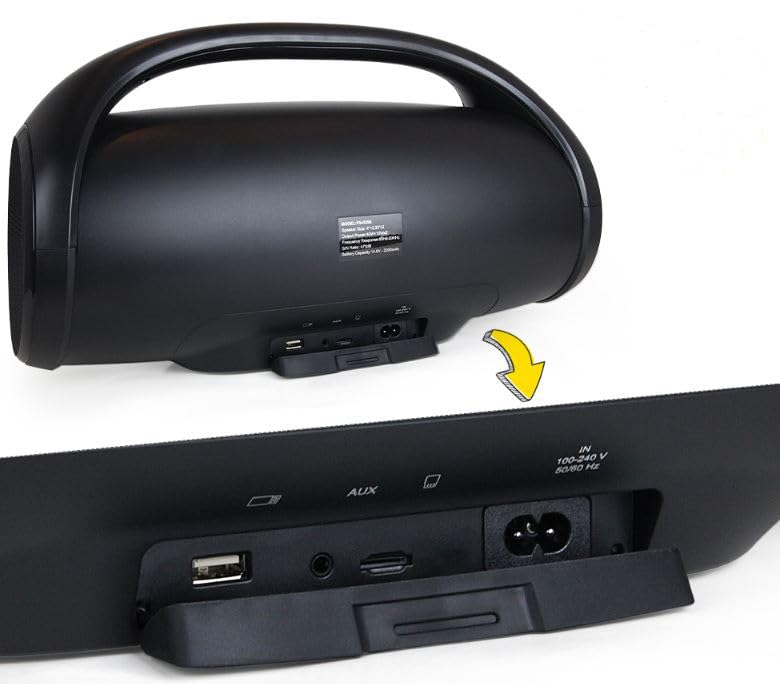
Figure 2: Rear panel with charging and input ports.
3. Powering On/Off
- To power on, press and hold the Power button (usually indicated by a power symbol) on the top panel until you hear an audible prompt or see an indicator light.
- To power off, press and hold the Power button again until the speaker shuts down.
4. Bluetooth Pairing
To connect your speaker to a Bluetooth-enabled device:
- Ensure the speaker is powered on and in Bluetooth pairing mode (an indicator light may flash, or an audible prompt may sound).
- On your device (smartphone, tablet, laptop), go to the Bluetooth settings.
- Search for available devices. You should see "FOL R-206" or a similar name appear in the list.
- Select "FOL R-206" to initiate pairing.
- Once paired, the speaker will indicate a successful connection (e.g., solid indicator light, audible prompt).
5. True Wireless Stereo (TWS) Pairing (Optional)
To achieve a stereo sound experience, you can pair two FOL TWS R-206 speakers together:
- Ensure both R-206 speakers are powered on and not connected to any other Bluetooth device.
- On one of the speakers (this will be the primary speaker), press and hold the TWS pairing button (refer to the speaker's control panel for the specific button, often indicated by a chain link or TWS symbol).
- The primary speaker will search for the secondary speaker.
- Once connected, both speakers will indicate a successful TWS pairing (e.g., audible prompt, specific indicator light pattern).
- Now, connect your Bluetooth device to the primary speaker as described in the "Bluetooth Pairing" section. Audio will play in stereo through both speakers.
Operating Instructions
1. Playing Audio via Bluetooth
After successful Bluetooth pairing, simply start playing audio on your connected device. The sound will be transmitted wirelessly to the FOL TWS R-206 speaker.
- Volume Control: Adjust the volume using the touch controls on the speaker's top panel or directly from your connected device.
- Playback Control: Use the touch controls on the speaker (e.g., Play/Pause, Next Track, Previous Track) or your connected device to manage playback.
2. Using USB Input
The speaker supports audio playback from a USB drive:
- Insert a USB flash drive containing audio files (e.g., MP3) into the USB port on the rear panel.
- The speaker should automatically switch to USB mode and begin playing audio. If not, press the Mode button (if available) to select USB mode.
- Use the speaker's playback controls to navigate tracks and adjust volume.
3. Using FM Radio
To use the built-in FM radio function:
- Press the Mode button (if available) to switch to FM Radio mode.
- The speaker will typically start scanning for available stations automatically.
- Use the playback controls (e.g., Next/Previous Track buttons) to change stations.
- For better reception, ensure the speaker is in an open area.
Maintenance
1. Cleaning
- Wipe the speaker's exterior with a soft, dry, or slightly damp cloth.
- Do not use abrasive cleaners, alcohol, benzene, or other chemical solvents, as these may damage the surface.
- Ensure all port covers are closed before cleaning with a damp cloth.
2. Battery Care
- To prolong battery life, avoid fully discharging the speaker frequently.
- If storing the speaker for an extended period, charge it to approximately 50% every few months.
- Do not expose the battery to extreme temperatures (hot or cold).
3. Water Resistance Precautions
The FOL TWS R-206 speaker is designed to withstand splashes, making it suitable for outdoor use. However, it is not waterproof and should not be submerged in water. Always ensure the charging and input port covers are securely closed when using the speaker near water or in damp conditions.
Troubleshooting
| Problem | Possible Cause | Solution |
|---|---|---|
| Speaker does not power on. | Battery is depleted. | Charge the speaker using the provided charging cable. |
| No sound from the speaker. | Volume is too low or muted. Device not paired. | Increase volume on both the speaker and the connected device. Ensure Bluetooth is paired correctly. |
| Cannot pair via Bluetooth. | Speaker is not in pairing mode. Device is too far. Interference. | Ensure speaker is in pairing mode. Move device closer to speaker. Turn off other Bluetooth devices. |
| TWS pairing fails. | Speakers are already connected to another device. | Disconnect both speakers from any other Bluetooth devices before attempting TWS pairing. Ensure both are R-206 models. |
| Poor FM radio reception. | Weak signal. Obstructions. | Move the speaker to an open area. Try adjusting its position. |
Specifications
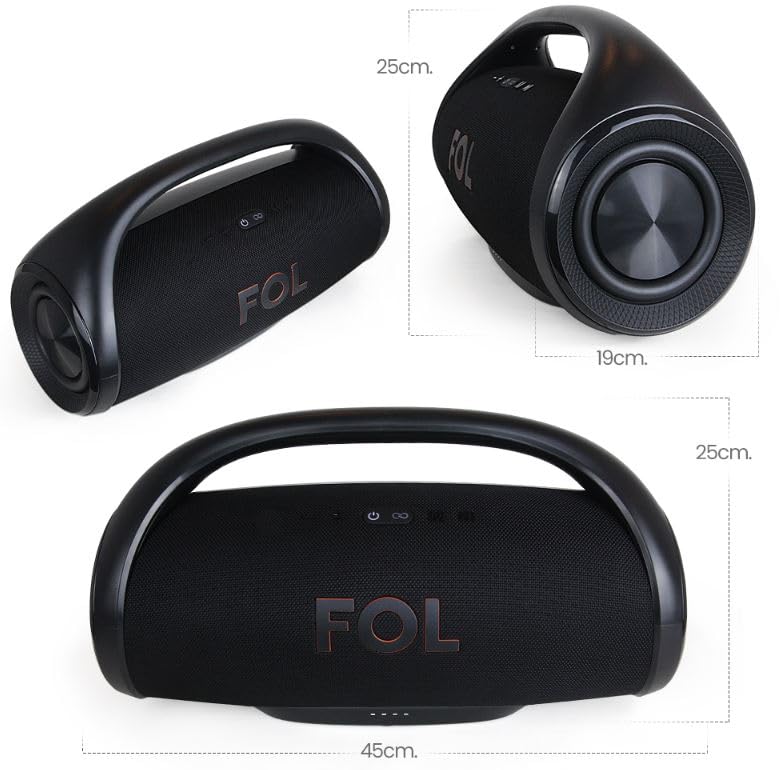
Figure 3: Product dimensions.
| Feature | Detail |
|---|---|
| Model Name | fs-r206 |
| Brand | FOL |
| Speaker Type | Satellite |
| Connectivity Technology | Bluetooth |
| Wireless Communication | Bluetooth |
| Speaker Configuration | 1 x 4-inch main horn, 2 x 2.25-inch satellites |
| Speaker Maximum Output Power | 70 Watts |
| Audio Output Mode | Stereo (with TWS) |
| Power Source | Battery Powered (14.8V/2200mAh rechargeable) |
| Battery Life | Up to 3 hours |
| Charging Input | 100-240V, 50/60Hz |
| Control Method | Touch |
| Special Feature | Waterproof (Splash Resistant) |
| Material | Silicone or rubber |
| Colour | Black |
| Product Dimensions (L x W x H) | 45D x 17W x 25H Centimeters |
| Included Components | Charging Cable |
| Compatible Devices | Smartphone, Tablet, Laptop, Television |
| Mounting Type | Tabletop Mount |
Warranty and Support
The FOL TWS R-206 Bluetooth Speaker comes with a Limited Warranty. Please refer to the warranty card included in your product packaging for specific terms and conditions, including coverage duration and claim procedures.
For technical support, troubleshooting assistance beyond this manual, or warranty inquiries, please contact FOL customer service. Contact information can typically be found on the product packaging or the official FOL website.
Please retain your proof of purchase for warranty claims.


