
1. Introduction
This manual provides detailed instructions for the proper use and maintenance of your BAOFENG K5M Two-Way Radio. The K5M is a handheld dual-band walkie-talkie designed for reliable communication, featuring 999 channels, VOX, DTMF, and NOAA weather service capabilities. It operates within the 144-148MHz and 430-450MHz frequency ranges.
2. What's in the Box
Upon unpacking, please ensure all items are present:
- BAOFENG K5M 5W Two-Way Radio with Antenna (x1)
- 1500mAh Type-C Rechargeable Battery (x1)
- Desktop Charger (x1)
- Belt Clip (x1)
- Hand Strap (x1)
- User's Manual (x1)
3. Product Overview
Familiarize yourself with the components of your BAOFENG K5M radio:
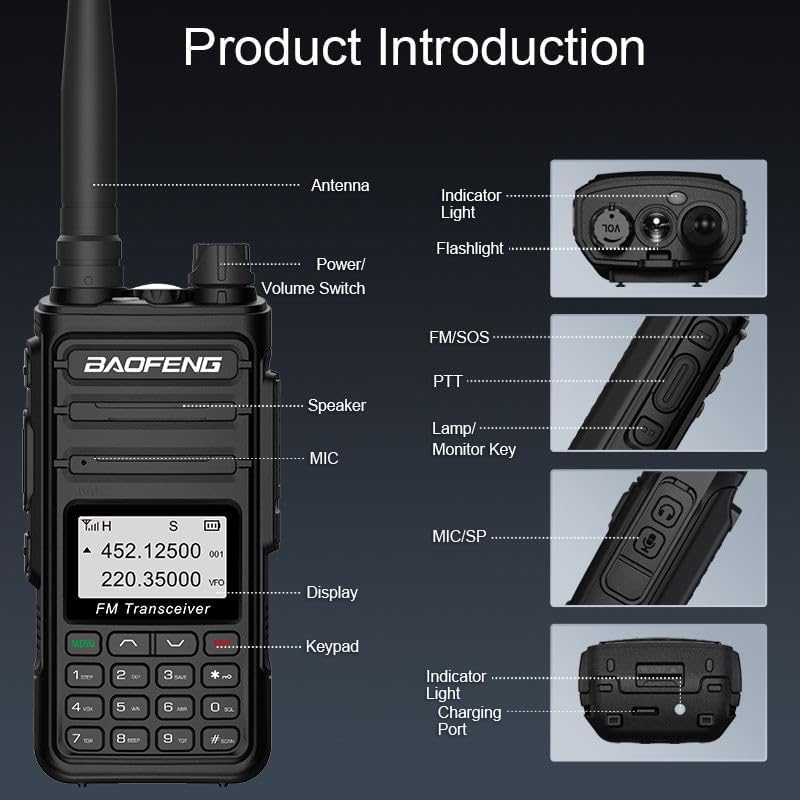
Figure 3.1: BAOFENG K5M Component Diagram
- Antenna: For transmitting and receiving signals.
- Power/Volume Switch: Rotates to turn the radio on/off and adjust volume.
- Indicator Light: Shows radio status (e.g., transmitting, receiving, charging).
- Flashlight: Integrated LED light for illumination.
- Speaker: Outputs received audio.
- Microphone (MIC): For voice input during transmission.
- PTT (Push-to-Talk) Button: Press and hold to transmit, release to receive.
- Lamp/Monitor Key: Activates the flashlight or monitors channels.
- Display: Shows frequency, channel, battery status, and menu options.
- Keypad: For entering frequencies, selecting channels, and navigating menus.
- Charging Port: Type-C port for direct charging.
4. Setup
4.1 Battery Installation and Charging
Before initial use, fully charge the battery.
- Align the 1500mAh Li-ion battery with the battery compartment on the back of the radio and slide it into place until it clicks securely.
- To charge, you have two options:
- Type-C USB Charging: Connect a Type-C USB cable to the radio's charging port and a compatible USB power source.
- Desktop Charger: Place the radio into the desktop charging cradle. Ensure the charging contacts align. The indicator light on the charger will show charging status.
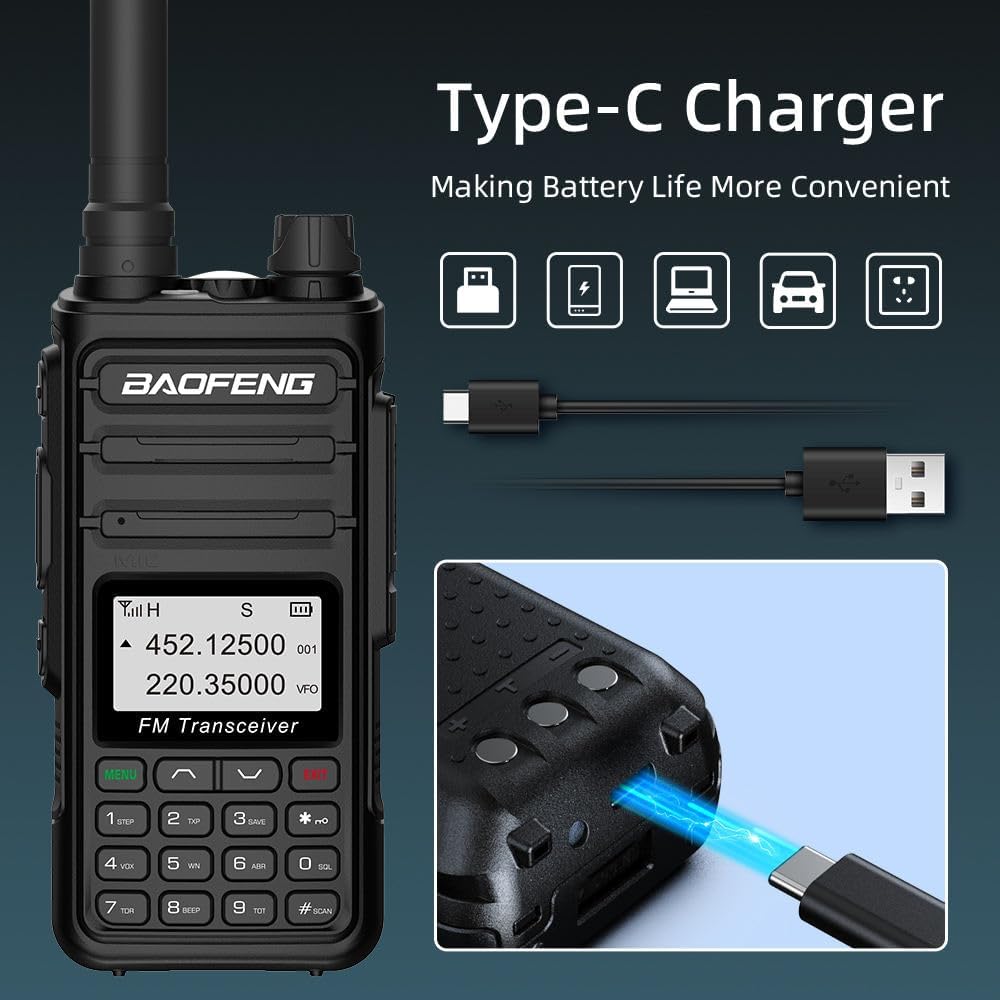
Figure 4.1: Type-C Charging Method
4.2 Antenna Attachment
Screw the antenna clockwise onto the connector at the top of the radio until it is finger-tight. Do not overtighten.
5. Operating Instructions
5.1 Basic Operation
- Power On/Off & Volume: Rotate the Power/Volume switch clockwise to turn on the radio. Continue rotating to increase volume. Rotate counter-clockwise to decrease volume and turn off.
- Channel/Frequency Selection: Use the keypad to directly enter frequencies or the UP/DOWN arrow keys to navigate through the 999 memory channels.
- Push-to-Talk (PTT): Press and hold the PTT button on the side of the radio to transmit your voice. Release the button to receive.
- Dual Band, Dual Display, Dual Standby: The radio supports simultaneous monitoring of two different frequencies (A/B band independent operation) and can display both.

Figure 5.1: Key Features of BAOFENG K5M
5.2 Advanced Features
- VOX Mode: For hands-free operation. Activate VOX through the menu, and the radio will transmit automatically when it detects your voice. Adjust VOX sensitivity (1-9) as needed.
- One Key Frequency Match: This feature allows for easy pairing and grouping by copying channel configuration parameters from another BAOFENG device. This simplifies setup with other radios.

Figure 5.2: Wireless Copy Frequency in action
- FM Radio (65-108MHz): The K5M can receive FM broadcast radio. Access this function via the menu.

Figure 5.3: FM Radio Functionality
- NOAA Weather Service: The radio supports scanning 10 NOAA Weather channels to receive important weather alerts.
- CTCSS/DCS: Continuous Tone-Coded Squelch System / Digital Coded Squelch. These codes help filter out unwanted signals and allow for private group communication.
- Auto Keypad Lock: Prevents accidental key presses.
- SOS Function: Activates an emergency alert.
- LED Spotlight: Use the dedicated key to turn on the built-in flashlight.
- Scan Function: Scans through channels or frequencies to find active transmissions.
- H/L Power: Adjust transmit power between High (5W) and Low (1W) to conserve battery or extend range.
5.3 Video Demonstrations
The following videos provide general demonstrations of BAOFENG radio features that may apply to your K5M model:
Video 5.1: BAOFENG Radio Walkie Talkies Long Range Two Way Radio. This video demonstrates general features and capabilities of BAOFENG two-way radios, including long-range communication.
Video 5.2: BAOFENG 5RX Walkie Talkies Ham Radio Long Range. This video showcases aspects of BAOFENG ham radios, which may share operational similarities with the K5M.
6. Maintenance
- Cleaning: Use a soft, damp cloth to clean the radio's exterior. Do not use harsh chemicals or solvents.
- Battery Care: To prolong battery life, avoid overcharging and completely discharging the battery. Store the radio and battery in a cool, dry place when not in use for extended periods.
- Antenna: Ensure the antenna is securely attached but not overtightened. Avoid bending or stressing the antenna.
- Water Resistance: The BAOFENG K5M is Not Water Resistant. Avoid exposure to water or high humidity.
7. Troubleshooting
| Problem | Possible Cause | Solution |
|---|---|---|
| Radio does not power on | Battery is low or not installed correctly. | Charge the battery fully. Ensure the battery is securely installed. |
| Cannot transmit (no voice heard by others) | Incorrect frequency/channel, CTCSS/DCS mismatch, or PTT button not pressed correctly. | Verify frequency and CTCSS/DCS settings match the receiving radio. Ensure PTT button is held down during transmission. Check if the radio is in transmit mode. |
| Poor sound quality or no reception | Weak signal, incorrect frequency/channel, or antenna issue. | Move to an area with better signal. Verify frequency and CTCSS/DCS settings. Ensure antenna is properly attached. |
| Battery drains quickly | High transmit power setting, frequent transmission, or aging battery. | Use low transmit power (1W) when possible. Reduce transmission time. Consider replacing the battery if it's old. |
| Keypad is locked | Auto Keypad Lock feature is active. | Refer to the radio's menu for instructions on disabling or temporarily unlocking the keypad. |
8. Specifications
- Model Number: K5M
- Brand: BAOFENG
- Frequency Range: 144-148MHz, 430-450MHz (Transmit and Receive)
- Power Output: 5W (High), 1W (Low)
- Number of Channels: 999
- Battery: 1500mAh Lithium Ion (included)
- Charging: Type-C USB, Desktop Charger
- Special Features: Dual Band, Dual Display, Dual Standby, VOX, DTMF, NOAA Weather Service, CTCSS/DCS, FM Radio (65-108MHz), Auto Keypad Lock, SOS Function, LED Spotlight, Scan Function, One Key Frequency Match
- Voltage: 7.4 Volts (DC)
- Product Dimensions: 18D x 22W x 6H Centimetres
- Weight: 480 g
- Water Resistance Level: Not Water Resistant
- Country of Origin: China
9. Warranty & Support
9.1 Warranty Information
This product comes with a 30-day warranty from the date of purchase. Please retain your proof of purchase for any warranty claims. The warranty covers manufacturing defects but does not cover damage caused by misuse, accidents, unauthorized modifications, or exposure to water.
9.2 Customer Support
For technical assistance, troubleshooting, or warranty inquiries, please contact the manufacturer:
- Manufacturer: BAOFENG
- Address: Changfu Industrial Zone, Xiamei Town, Nanan, Quanzhou City, Fujian, China
- Telephone: 0595-86752889


