Introduction
This manual provides detailed instructions for assembling and operating your ROBOTIME Miniature House Kit, which includes both the Garage Workshop and the Sunset Carnival Music Box 3D Puzzles. Please read all instructions carefully before beginning assembly to ensure a smooth and enjoyable building experience.
Safety Information
- This product contains small parts and is not suitable for children under 14 years of age without adult supervision.
- Keep all parts out of reach of small children to prevent choking hazards.
- Use tools carefully. Sharp edges may be present on some components.
- Avoid direct contact with glue or paint if included. Work in a well-ventilated area.
- Dispose of packaging materials responsibly.
Package Contents
Before starting, verify that all components listed below are present in your kit. If any parts are missing or damaged, please contact customer support.
- Pre-cut wooden sheets for Garage Workshop components.
- Pre-cut wooden sheets for Sunset Carnival Music Box components.
- LED light components and wiring.
- Music box mechanism.
- Various miniature accessories (e.g., tools, furniture, decorative items).
- Assembly tools (e.g., tweezers, sandpaper, glue).
- Detailed graphical instruction booklet.
Setup and Assembly
General Preparation
- Unpack all components and organize them by type or number as indicated in the instruction booklet.
- Ensure you have a clean, well-lit workspace.
- Familiarize yourself with the instruction booklet's symbols and step-by-step diagrams.
Garage Workshop Assembly
Follow the dedicated instruction booklet for the Garage Workshop. The assembly typically involves:
- Carefully detaching wooden pieces from their sheets.
- Sanding edges if necessary for a smooth fit.
- Assembling the main structure using interlocking pieces and glue.
- Wiring and installing LED lights according to the diagram.
- Adding miniature furniture and accessories to complete the scene.

Image: Exquisite details of the Garage Workshop, highlighting the universal workbench, car modification area, parts storage, and versatile storage rack.
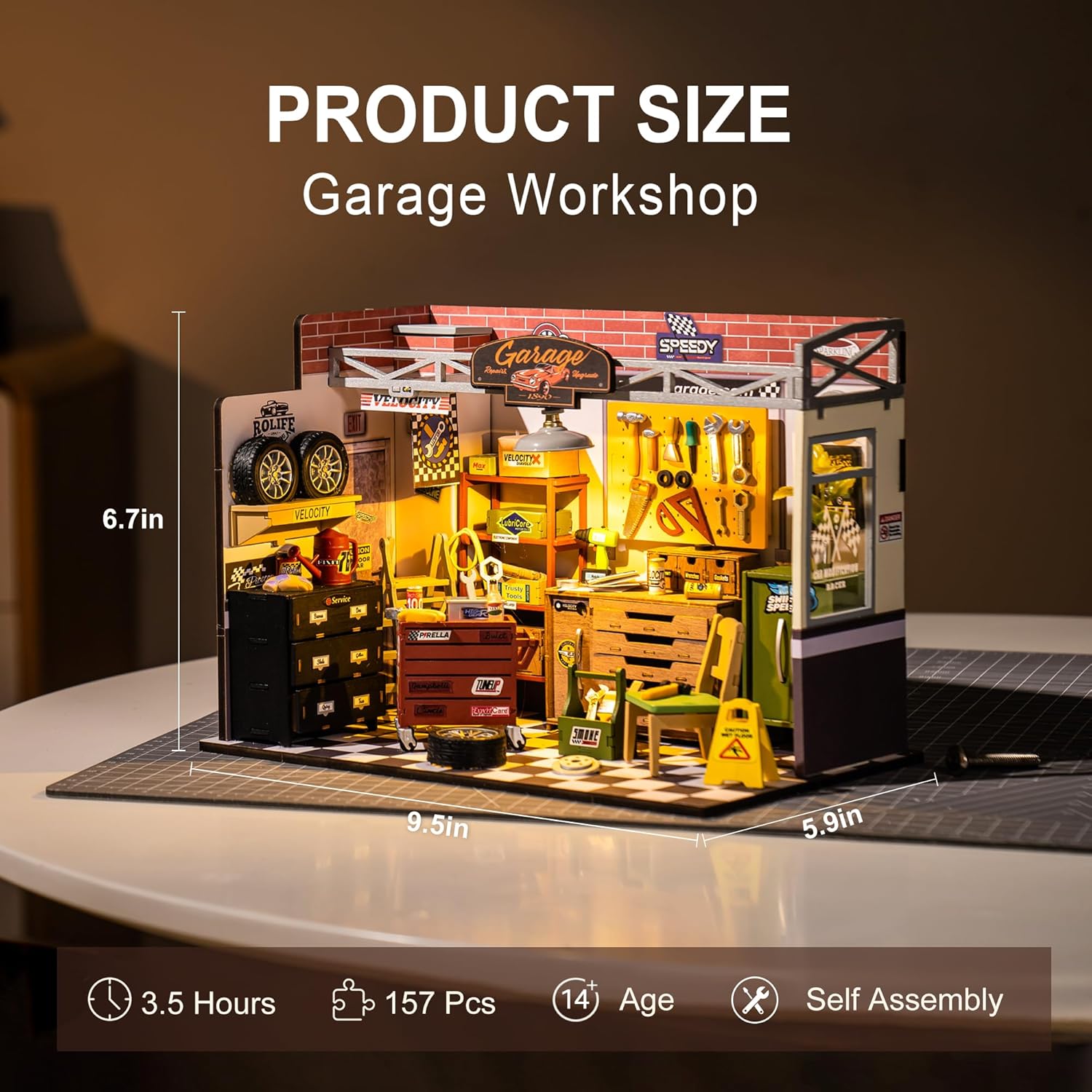
Image: Product size and assembly details for the Garage Workshop, including dimensions, piece count, and estimated assembly time.
Sunset Carnival Music Box Assembly
Refer to the specific instruction booklet for the Sunset Carnival Music Box. Key steps include:
- Carefully removing wooden pieces.
- Assembling the main TV-shaped casing.
- Integrating the music box mechanism and ensuring it functions correctly.
- Installing the Ferris wheel, circus tent, and other carnival elements.
- Connecting and concealing LED lighting.

Image: Exquisite details of the Sunset Carnival Music Box, showcasing the Ferris wheel, control switch, and intricate circus elements.

Image: Product size and assembly details for the Sunset Carnival Music Box, including dimensions, piece count, and estimated assembly time.
Operating Instructions
Activating Lights
Both the Garage Workshop and Sunset Carnival Music Box are equipped with LED lights. Locate the battery compartment (usually on the back or bottom) and insert the required batteries (not included, typically AAA or button cells). Turn on the lights using the designated switch, which is often a small button or toggle switch.
Playing Music (Sunset Carnival)
The Sunset Carnival model features a wind-up music box mechanism. Gently turn the winding key located on the side or back of the model clockwise until you feel slight resistance. Release the key, and the music will begin to play, accompanied by the movement of internal elements like the Ferris wheel.

Image: The assembled Garage Workshop displayed as an excellent home decor item.

Image: The assembled Sunset Carnival Music Box displayed as an excellent home decor item, resembling a vintage TV.
Maintenance
- Cleaning: Use a soft, dry cloth or a small brush to gently remove dust from the model. Avoid using water or chemical cleaners, as they may damage the wooden components or electronic parts.
- Storage: Store the assembled model in a dry place away from direct sunlight and extreme temperatures to prevent warping or fading of materials.
- Battery Replacement: If the lights dim or stop working, replace the batteries with new ones of the correct type and polarity.
Troubleshooting
| Problem | Possible Cause | Solution |
|---|---|---|
| Missing or damaged parts | Manufacturing error or shipping damage. | Contact ROBOTIME customer support with your purchase details and a description of the missing/damaged parts. |
| Pieces do not fit together | Excess material, incorrect orientation, or insufficient sanding. | Gently sand the edges of the pieces. Double-check the instruction diagrams for correct orientation. Do not force pieces. |
| Lights not working | Batteries incorrectly installed, dead batteries, or loose wiring. | Check battery polarity and replace with fresh batteries. Ensure all wire connections are secure as per the diagram. |
| Music box not playing | Not wound sufficiently, mechanism obstructed, or damaged. | Gently wind the key clockwise until resistance is felt. Ensure no parts are obstructing the mechanism. If still not working, contact support. |
Specifications
- Brand: ROBOTIME
- Model: Miniature House Kit Garage Workshop & Sunset Carnival
- Material: Wood, paper, plastic, electronic components
- Recommended Age: 14+ years
- Assembly Time (Garage Workshop): Approximately 3.5 hours
- Number of Pieces (Garage Workshop): 157 pieces
- Dimensions (Garage Workshop): 9.5 in (W) x 5.9 in (D) x 6.7 in (H)
- Assembly Time (Sunset Carnival): Approximately 3 hours
- Number of Pieces (Sunset Carnival): 174 pieces
- Dimensions (Sunset Carnival): 7.0 in (W) x 5.6 in (D) x 16.3 in (H)
- Power Source for Lights: Batteries (not included)
Warranty and Support
ROBOTIME products are designed for quality and enjoyment. If you encounter any issues or require assistance, please refer to the contact information provided with your purchase or visit the official ROBOTIME website for customer support. Please retain your proof of purchase for warranty claims.


