
Retevis HD2
Retevis Ailunce HD2 Ham Radio User Manual
Model: HD2 | Brand: Retevis
Introduction
The Retevis Ailunce HD2 is a versatile dual-band DMR handheld radio designed for amateur radio enthusiasts and emergency communication. It features a robust IP67 waterproof design, a long-lasting 3200mAh battery, and extensive contact and channel capacity, making it suitable for various demanding environments. This manual provides essential information for setting up, operating, and maintaining your HD2 radio.

Figure 1: Retevis Ailunce HD2 Ham Radio and included accessories.
What's in the Box
Upon unboxing your Retevis Ailunce HD2, please ensure all the following items are present:
- Retevis Ailunce HD2 Radio Body
- USB Type-C Charging Cable
- Battery
- Type-C Desktop Charger
- Antenna
- User's Manual
- Belt Clip
- Sling
- Bluetooth Earpiece

Figure 2: All components included in the product package.
Key Features
The Retevis Ailunce HD2 offers a range of advanced features to enhance your communication experience:
- Dual Band DMR Radio: Supports both analog and digital communication modes, offering versatility for various radio systems. It includes 3000 channels and 500K contacts, supporting both data and voice communication, including text messaging.
- Integrated Bluetooth Capabilities: Connects to various wireless earpieces for hands-free communication, allowing use of any Bluetooth-enabled headset or ear protection while remaining totally wireless.
- Emergency Radio Functionality: The HD2 can receive emergency information during natural disasters or accidents, and quickly scan emergency channels to keep you informed and connected with others.
- IP67 Waterproof Rating: The protection level of HD2 is as high as IP67, ensuring stable and smooth communication even in harsh climate conditions and complex environments, such as heavy rain and watery environments.
- Long Range Communication: High power output provides a strong signal to transmit and extends the communication range.
- Multiple Calling Methods: Flexible options to choose suitable communication methods based on actual needs, including individual, group, and team communication. The digital ham radio provides adapted communication modes like CTCSS and CDCSS.
- User-Friendly Interface: Features an alarm key for local or remote alarms, enhancing security. A night mode is convenient for protecting your eyes when operating the DMR ham radio at night.
- Global Connectivity: Connect to DMR hotspots or DMR repeaters with internet access to communicate with hams around the world and connect to talkgroups globally.
Video 1: Highlights of the Retevis Ailunce HD2, showcasing its key functionalities and design.
Setup
1. Charging the Battery
Before first use, fully charge the radio's 3200mAh Li-ion battery using the provided USB Type-C charging cable or the desktop charger. The charging indicator on the desktop charger will typically show red when charging and green when fully charged. The radio also supports direct USB-C charging on the battery itself.

Figure 3: The HD2 is equipped with a 3200mAh Li-ion battery for extended use.
2. Attaching the Antenna
Screw the antenna firmly onto the top connector of the radio. Ensure it is securely fastened to optimize signal transmission and reception.
3. Initial Power On
Press and hold the power button (usually located on the side or top) to turn on the radio. The display will illuminate, and the radio will perform a self-check.
4. Programming the Radio
The radio can be programmed directly from the front panel for basic settings and channel entry. For more advanced configurations, such as managing a large number of contacts or channels, it is recommended to use Computer Programming Software (CPS). Connect the radio to your computer using a programming cable and refer to the separate CPS guide for detailed instructions on software installation and usage.
Operating Instructions
VFO Mode Operation
The VFO (Variable Frequency Oscillator) mode allows for direct frequency input and on-the-fly setting changes. This is useful for quickly tuning to new frequencies or adjusting parameters without needing pre-programmed channels. Use the keypad to input desired frequencies directly.

Figure 4: Easy frequency input and setting changes in VFO Mode.
Analog & Digital Mode Switching
The HD2 supports both analog and digital (DMR) modes. You can switch between these modes depending on the type of signal you wish to transmit or receive. This flexibility allows for communication across different radio systems.

Figure 5: The HD2 supports both Analog and Digital modes for versatile communication.
Bluetooth Connectivity
The integrated Bluetooth functionality allows connection to various wireless earpieces or headsets for hands-free operation. To activate, navigate to the Bluetooth settings in the menu and turn it 'ON'. Pair your Bluetooth device as per its instructions. This feature enhances convenience and safety during use.

Figure 6: Support for wireless connection via Bluetooth.
Emergency Features
The HD2 includes an emergency alarm function. Pressing the designated alarm key can activate a local audible siren or send a remote alarm to your partners, signaling a need for assistance. This feature is crucial for personal safety in emergency situations.

Figure 7: The radio's emergency alarm feature.
Encryption (AES-128 & AES-256)
The radio supports AES-128 and AES-256 encryption for secure communications. Users should be aware of and comply with local laws and regulations regarding the use of encryption in radio transmissions.
Memory Capacity and Contacts
The HD2 boasts a large memory capacity, capable of storing up to 500,000 contacts and 3,000 DMR channels, facilitating extensive communication networks.

Figure 8: The HD2's extensive memory capacity for channels and contacts.
SUB-PTT Functionality
The SUB-PTT feature allows for transmitting on dual band frequencies for convenient communication, enabling simultaneous monitoring and transmission on two different bands.

Figure 9: The SUB-PTT feature allows for dual-band transmission.
Night Mode
A night mode feature is available to adjust display brightness, protecting your eyes during operation in low-light conditions.
Long Range Communication
The high power output of the HD2 provides a strong signal, extending the communication range for reliable performance over greater distances.

Figure 10: The HD2 offers long-range communication capabilities.
Maintenance
General Care
To ensure the longevity and optimal performance of your Retevis Ailunce HD2, follow these general care guidelines:
- Keep the radio clean by wiping it with a soft, damp cloth. Avoid using harsh chemicals or abrasive cleaners.
- Protect the radio from extreme temperatures and direct sunlight.
- Ensure all port covers are securely closed when not in use, especially in wet or dusty environments, to maintain its IP67 rating.
- Avoid dropping the radio or subjecting it to severe impacts.
Battery Care
Proper battery care is essential for maximizing battery life:
- Fully charge the battery before first use.
- Do not overcharge or deep discharge the battery.
- If storing the radio for an extended period, charge the battery to approximately 50% and store it in a cool, dry place.
- Replace the battery if you notice a significant decrease in operating time.

Figure 11: The IP67 waterproof and dustproof design allows for use in challenging conditions.
Troubleshooting
If you encounter issues with your Retevis Ailunce HD2, refer to the following common problems and solutions:
- No Audio or Garbled Audio:
- Check the volume level and ensure it is not set to minimum.
- Verify that the radio is in the correct mode (Analog or Digital) for the signal being received.
- Ensure the frequency or channel settings are correct.
- If using a Bluetooth earpiece, ensure it is properly paired and connected to the radio.
- Cannot Transmit or Receive:
- Confirm that the correct frequency or channel is selected.
- Check the power level setting (High/Low).
- Ensure the antenna is securely attached to the radio.
- Verify that you are within the communication range of the other radio or repeater.
- For DMR, check that the talkgroup and color code settings match the network.
- Programming Issues:
- Ensure you are using the correct Computer Programming Software (CPS) version compatible with your radio's firmware.
- Verify the programming cable connection to both the radio and the computer.
- Consult the CPS manual for specific error messages and troubleshooting steps.
- Battery Drains Quickly:
- Reduce transmit power if high power is not required for your communication.
- Disable unnecessary features such as continuous scanning or excessive display backlight.
- Ensure the battery is fully charged before each use.
- Consider replacing the battery if it no longer holds a charge effectively.
Specifications
| Feature | Specification |
|---|---|
| Model Number | HD2 |
| Item Weight | 12.9 ounces |
| Product Dimensions | 2.56 x 5.91 x 1.38 inches |
| Batteries | 1 C batteries required (included) |
| Color | Black |
| Number of Channels | 3000 |
| Frequency Range | VHF 136-174Mhz, UHF 400-520Mhz |
| Talking Range Maximum | 5 Mile |
| Voltage | 7.4 Volts |
| Water Resistance Level | Waterproof (IP67) |
| FCC ID | 2A3OOHD2 |
Table 1: Technical Specifications of the Retevis Ailunce HD2.
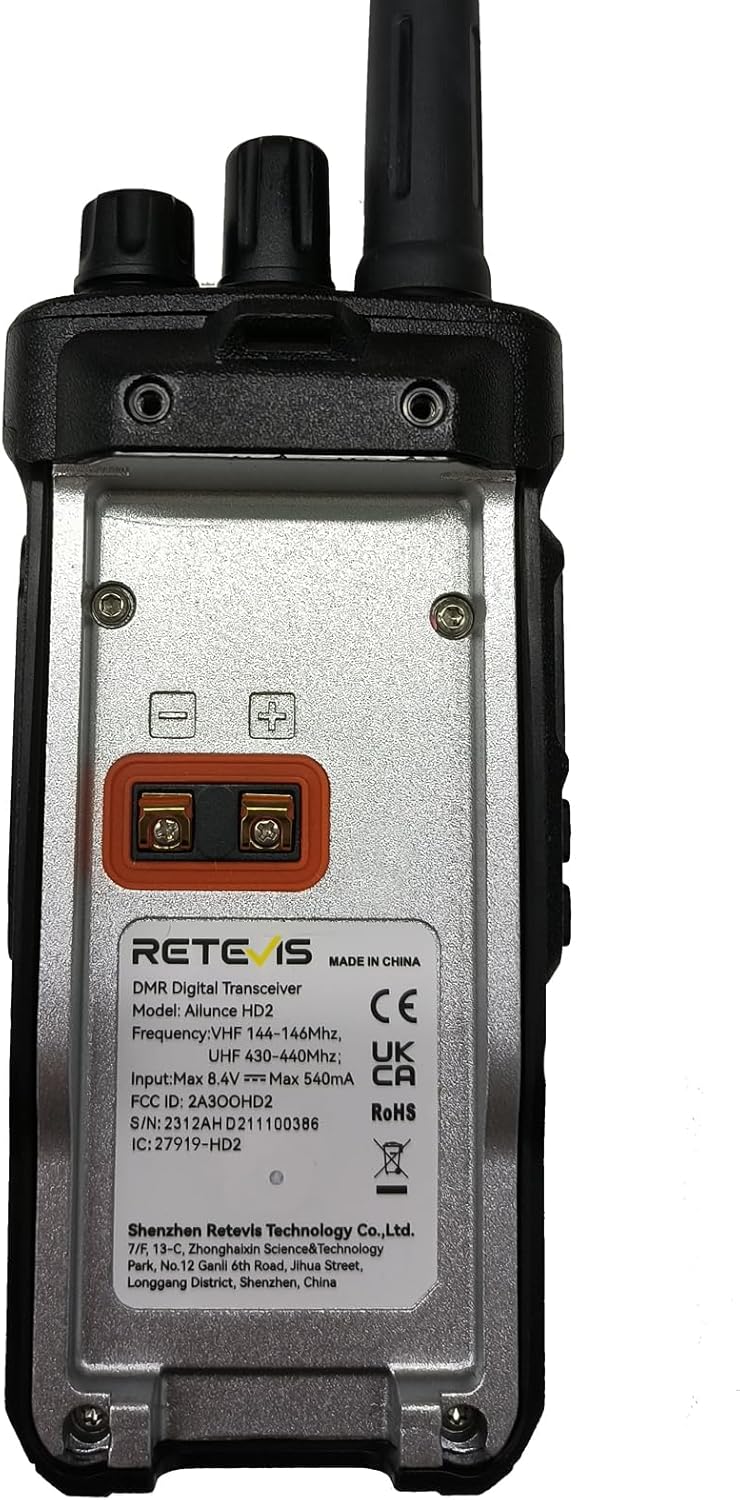
Figure 12: Rear view of the HD2, displaying model and FCC ID information.
Warranty & Support
Warranty Information
Retevis provides a 2-year warranty for the radio body and a 1-year warranty for accessories from the date of purchase. Additionally, a 30-day no-reason return policy is offered. Beyond the warranty period, maintenance services are still available, with buyers responsible for associated costs.
Customer Support
For any support, service inquiries, or questions regarding your Retevis Ailunce HD2, please contact Retevis customer service directly via Amazon. They aim to respond to inquiries within 12 hours to provide the most hassle-free assistance possible.
Related documentsHD2


Ask a question about this manual
Ask about setup, troubleshooting, compatibility, parts, safety, or missing instructions. Manuals+ will review the question and use this page’s manual context to help answer it.