
1. Introduction
The CG MOBILE Guess Bluetooth Wireless Earbuds combine sophisticated design with advanced audio technology, reflecting the iconic Guess brand DNA. Experience superior sound quality with clear, powerful audio, deep bass, and crisp highs. Equipped with Bluetooth 5.3, they offer universal compatibility with iOS and Android devices for a stable and seamless connection. Enjoy up to 6 hours of listening time, with the charging case providing additional power and fully recharging in just 2 hours.
2. Safety Information
- Do not expose the earbuds or charging case to extreme temperatures, humidity, or liquids.
- Avoid dropping or applying excessive force to the device.
- Do not attempt to disassemble or modify the earbuds or charging case. This may void the warranty and cause damage.
- Keep out of reach of children and pets.
- Use only the provided charging cable or a certified equivalent.
- Prolonged listening at high volume levels may cause hearing damage. Adjust volume to a safe level.
3. Package Contents
Please check the package for the following items:
- CG MOBILE Guess Bluetooth Wireless Earbuds (Left and Right)
- Charging Case
- Charging Cable
- User Manual (this document)
4. Product Overview
Familiarize yourself with the components of your CG MOBILE Guess Bluetooth Wireless Earbuds.

Figure 4.1: Earbuds in open charging case. This image displays the left and right earbuds nestled within their charging case, which is open. The Guess logo is visible on each earbud, along with the charging contacts. The interior of the case also shows model information.
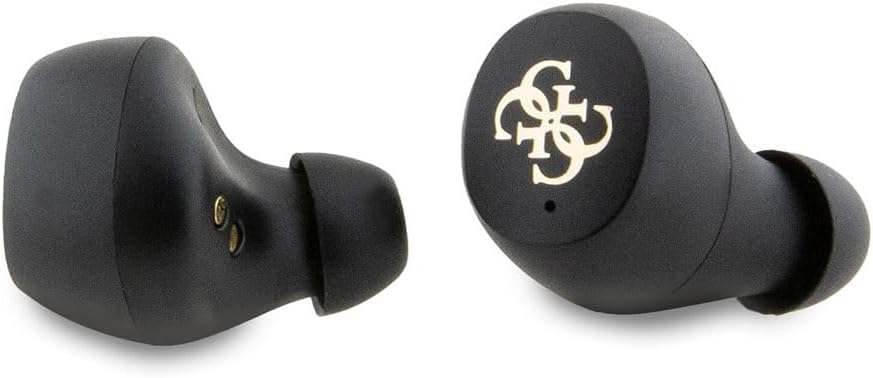
Figure 4.2: Individual earbuds. This close-up image highlights the design of the individual left and right earbuds, showcasing their ergonomic shape and the Guess logo on the outer surface.
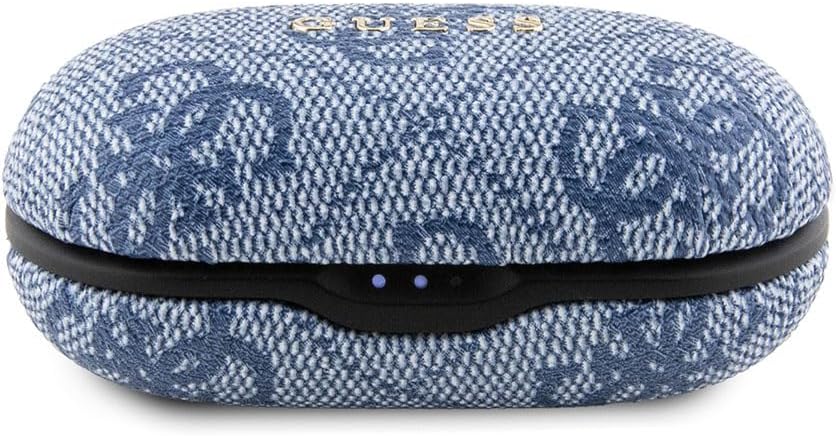
Figure 4.3: Closed charging case. This image shows the charging case in its closed state, featuring its distinctive textured exterior and the front-facing LED indicators that display charging status.
5. Setup
5.1 Charging the Earbuds and Case
- Initial Charge: Before first use, fully charge the earbuds and charging case.
- Connect: Plug the provided charging cable into the charging port on the case and connect the other end to a USB power source (e.g., computer, wall adapter).
- Charging Indicators: The LED indicators on the charging case will illuminate to show the charging status. A full charge for the case takes approximately 2 hours.
- Earbud Charging: Place the earbuds into the charging case. They will automatically begin charging. The case holds multiple charges for the earbuds, providing up to 6 hours of listening time per earbud charge.
5.2 Pairing with a Bluetooth Device
- Power On: Open the charging case. The earbuds will automatically power on and enter pairing mode.
- Activate Bluetooth: On your device (smartphone, tablet, etc.), enable Bluetooth.
- Select Device: In your device's Bluetooth settings, search for available devices. Select "CG MOBILE Guess Earbuds" (or similar name) from the list.
- Confirm Connection: Once connected, you will hear an audible confirmation from the earbuds, and they will appear as "Connected" on your device.
- Automatic Reconnection: After initial pairing, the earbuds will automatically connect to the last paired device when removed from the case, provided Bluetooth is enabled on the device.
6. Operating Instructions
The CG MOBILE Guess Earbuds feature touch controls for easy management of music and calls.
6.1 Music Control
- Play/Pause: Tap once on either earbud.
- Next Track: Double-tap the right earbud.
- Previous Track: Double-tap the left earbud.
- Volume Up: Triple-tap the right earbud.
- Volume Down: Triple-tap the left earbud.
6.2 Call Control
- Answer/End Call: Tap once on either earbud.
- Reject Call: Press and hold either earbud for 2 seconds.
6.3 Voice Assistant
- Activate Voice Assistant: Press and hold either earbud for 3 seconds (e.g., Siri, Google Assistant).
7. Maintenance
- Cleaning: Use a soft, dry, lint-free cloth to clean the earbuds and charging case. Do not use abrasive cleaners or solvents.
- Storage: When not in use, store the earbuds in their charging case to protect them from dust and damage. Store in a cool, dry place.
- Water Resistance: The earbuds are rated as "Waterproof" (Étanche). However, this typically refers to resistance against splashes and sweat, not full submersion. Avoid prolonged exposure to water.
8. Troubleshooting
| Problem | Solution |
|---|---|
| Earbuds not pairing |
|
| No sound or low volume |
|
| Earbuds not charging |
|
| Intermittent connection |
|
9. Specifications
| Model Number | GUTWSP4EGB |
| Brand | CG MOBILE |
| Wireless Technology | Bluetooth 5.3 |
| Earbud Type | True Wireless, In-ear |
| Control Type | Touch Control |
| Battery Composition | Lithium-ion |
| Charging Time (Case) | Approximately 2 hours |
| Battery Life (Earbuds) | Up to 6 hours |
| Weight | 80 Grams |
| Material | Plastic |
| Water Resistance Level | Waterproof (Étanche) |
| Special Features | Noise Cancellation |
| Frequency Response | 20000 Hz |
| Impedance | 16 Ohms |
10. Warranty Information
CG MOBILE products are manufactured to the highest quality standards. This product is covered by a limited warranty against manufacturing defects from the date of purchase. Please retain your proof of purchase for warranty claims. For specific warranty terms and conditions, refer to the warranty card included in your product packaging or contact CG MOBILE customer support.
11. Customer Support
If you encounter any issues or have questions regarding your CG MOBILE Guess Bluetooth Wireless Earbuds, please contact our customer support team. Contact information can typically be found on the product packaging or on the official CG MOBILE website.


