1. Introduction
The Lomeho AM-AKS1 is a versatile 6-channel audio mixer designed for a wide range of applications, including recording studios, live performances, DJ sets, karaoke, parties, and educational or religious events. It features 4 mono input channels and 1 stereo input channel, along with integrated Bluetooth connectivity and USB playback capabilities. This manual provides detailed instructions for setting up, operating, and maintaining your AM-AKS1 mixer to ensure optimal performance and longevity.
2. Safety Information
- Power Supply: Use only the provided power adapter. Ensure the voltage matches your local power supply. Disconnect power during thunderstorms or when unused for long periods.
- Water and Moisture: Do not expose the mixer to rain, moisture, or any liquids. Do not place objects filled with liquids on the mixer.
- Ventilation: Ensure proper ventilation. Do not block ventilation openings. Install the mixer in a location with adequate airflow.
- Heat: Keep the mixer away from heat sources such as radiators, heat registers, stoves, or other apparatus that produce heat.
- Cleaning: Clean only with a dry cloth. Do not use liquid cleaners or aerosol cleaners.
- Servicing: Do not attempt to service this product yourself. Refer all servicing to qualified service personnel.
- Cables: Protect power cords from being walked on or pinched, particularly at plugs, convenience receptacles, and the point where they exit from the apparatus.
3. Product Features
- 6-channel mixer: 4 mono input channels (XLR/TRS combo jacks) and 1 stereo input channel (TRS).
- Built-in Bluetooth for wireless audio streaming from compatible devices.
- USB interface for direct playback of audio files from a USB drive.
- Individual channel controls: GAIN, HIGH, MID, LOW (3-band EQ), AUX/EFF, PAN, and LEVEL.
- +48V Phantom Power for condenser microphones on mono channels.
- Main stereo output (TRS), REC output (RCA), and Headphone output (TRS).
- Integrated digital effects processor (DELAY/EFF).
- LED peak indicators on each channel and main output level meters.
4. Package Contents
- Lomeho AM-AKS1 Audio Mixer
- Power Adapter
- User Manual (this document)

Image: Lomeho AM-AKS1 Mixer and its power adapter, illustrating the typical contents of the product package.
5. Setup
5.1 Unpacking and Placement
Carefully remove the mixer and all accessories from the packaging. Place the mixer on a stable, flat surface, ensuring adequate space for ventilation around the unit.
5.2 Connecting Power
Connect the provided power adapter to the DC 5V input port on the rear of the mixer. Plug the other end of the adapter into a suitable power outlet. The mixer will power on automatically.
5.3 Connecting Inputs
The AM-AKS1 features 4 mono input channels (1-4) with XLR/TRS combo jacks and 1 stereo input channel (5/6) with TRS jacks. Each mono channel also has a dedicated 48V phantom power switch for condenser microphones.
- Microphones: Connect dynamic or condenser microphones to the XLR inputs of channels 1-4. If using a condenser microphone, ensure the +48V phantom power is activated for that specific channel.
- Instruments/Line-level Devices: Connect instruments (e.g., guitars, keyboards) or line-level devices (e.g., CD players, media players) to the TRS inputs of channels 1-4 or the stereo TRS inputs of channel 5/6.
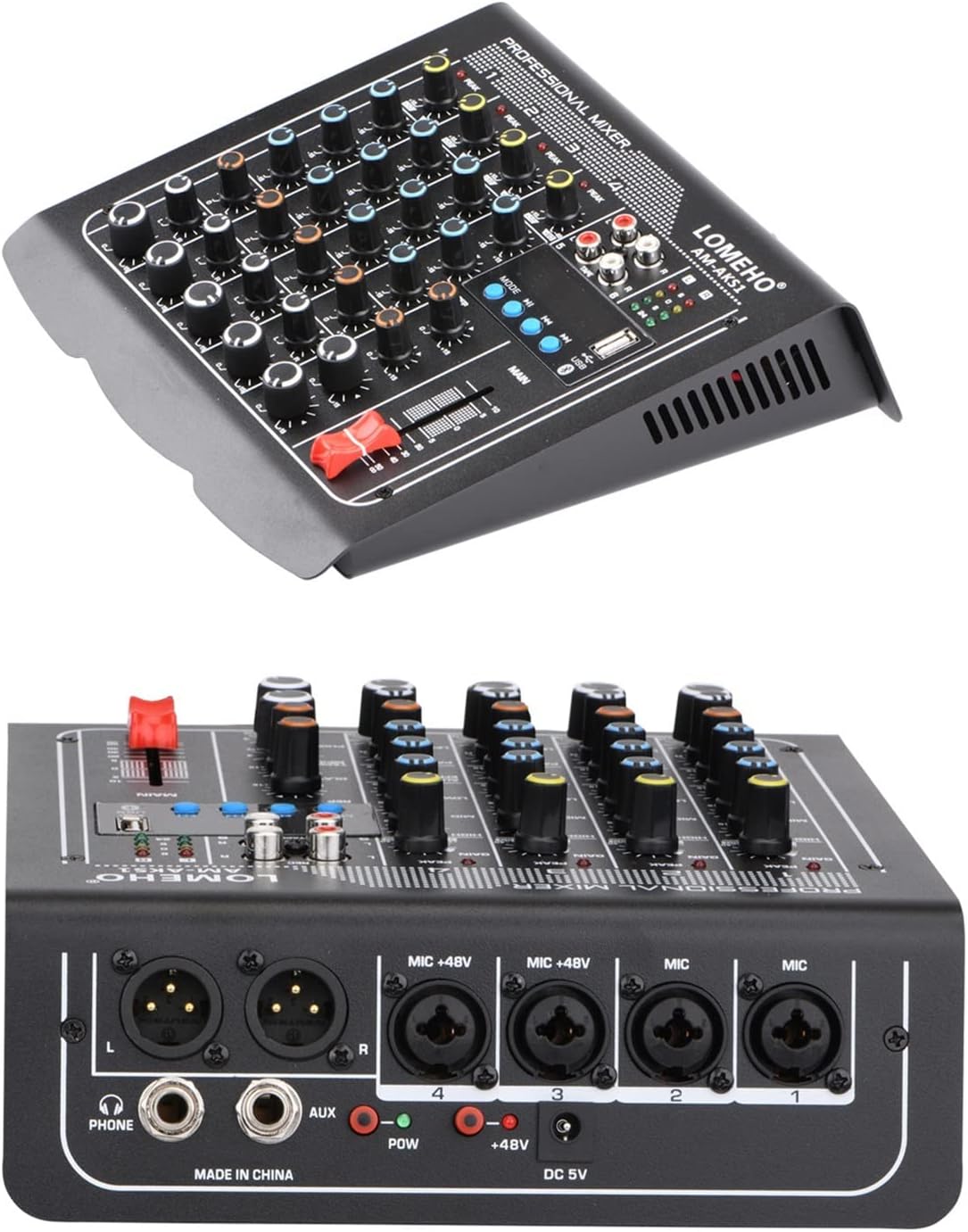
Image: Rear panel of the Lomeho AM-AKS1 mixer, highlighting the various input (XLR/TRS combo, AUX) and output (L/R, Phone) connections, along with the DC 5V power input and +48V phantom power switches.
5.4 Connecting Outputs
- Main Output: Connect the MAIN L/R TRS outputs to your power amplifier or active speakers.
- Headphone Output: Connect your headphones to the PHONE TRS output for monitoring.
- REC Output: Use the REC RCA outputs to connect to a recording device.

Image: A comprehensive connection diagram for the Lomeho AM-AKS1 mixer, illustrating how to connect various audio devices such as condenser microphones, dynamic microphones, wireless microphones, power amplifiers, passive speakers, and headphones.
6. Operating Instructions
6.1 Overview of Controls
Familiarize yourself with the control layout of the mixer. Each channel has dedicated controls for input gain, equalization, auxiliary send, pan, and level. The main section includes master volume, effects controls, and media player controls.

Image: Top-down view of the Lomeho AM-AKS1 professional mixer, clearly displaying all input channels with their respective GAIN, HIGH, MID, LOW, AUX/EFF, PAN, and LEVEL controls, as well as the main output fader, REC section, and USB/Bluetooth media player controls.
6.2 Channel Controls
- GAIN: Adjusts the input sensitivity for each channel. Set this to achieve a strong signal without clipping (indicated by the PEAK LED).
- HIGH/MID/LOW (EQ): 3-band equalizer to shape the tone of each channel. Adjust these knobs to boost or cut high, mid, and low frequencies.
- AUX/EFF: Controls the amount of signal sent from the channel to the internal effects processor or an external auxiliary send.
- PAN: Pans the channel's signal between the left and right stereo outputs.
- LEVEL: Adjusts the output volume of the individual channel to the main mix.
- PEAK LED: Illuminates when the input signal is too high, indicating potential clipping. Reduce the GAIN if this LED lights up frequently.
6.3 Main Section Controls
- MAIN Fader: Controls the overall output volume of the mixer.
- DELAY/EFF: Adjusts the level of the internal digital effects (e.g., delay, reverb) applied to the mix.
- TAPE/MP3: Controls the volume of the USB/Bluetooth media player input.
- PHONE: Adjusts the volume of the headphone output.
- REC: RCA outputs for connecting to a recording device.
- Level Meters: LED indicators showing the main output level. Aim for levels around 0dB to avoid distortion.
6.4 Bluetooth Operation
To connect a Bluetooth device:
- Press the MODE button on the media player section until "Bluetooth" mode is selected. The Bluetooth indicator will flash.
- On your Bluetooth-enabled device (e.g., smartphone, tablet), search for available Bluetooth devices.
- Select "BT-MUSIC" or a similar name from the list of devices.
- Once paired, the Bluetooth indicator on the mixer will stop flashing and remain solid. You can now play audio from your device through the mixer.
- Adjust the TAPE/MP3 knob to control the Bluetooth audio volume.

Image: A visual representation of the Lomeho AM-AKS1 mixer establishing a Bluetooth connection with a smartphone, demonstrating the wireless audio streaming capability.
6.5 USB Playback
To play audio from a USB drive:
- Insert a USB flash drive containing audio files (e.g., MP3, WAV) into the USB port on the mixer.
- The mixer will automatically switch to USB mode and begin playing the first compatible audio file. If not, press the MODE button to select USB mode.
- Use the playback control buttons (PREV, PLAY/PAUSE, NEXT) to navigate and control playback.
- Adjust the TAPE/MP3 knob to control the USB audio volume.
7. Maintenance
- Cleaning: Disconnect the power before cleaning. Use a soft, dry, lint-free cloth to wipe the surface of the mixer. Do not use abrasive cleaners, waxes, or solvents.
- Storage: When not in use for extended periods, store the mixer in a cool, dry place, away from direct sunlight and extreme temperatures. Cover the unit to protect it from dust.
- Knobs and Faders: Avoid excessive force when operating knobs and faders. Periodically check for any looseness.
8. Troubleshooting
| Problem | Possible Cause | Solution |
|---|---|---|
| No sound output from main speakers. |
|
|
| Distorted sound. |
|
|
| Bluetooth connection fails. |
|
|
| USB playback not working. |
|
|
9. Specifications
| Feature | Detail |
|---|---|
| Model | AM-AKS1 |
| Channels | 6 (4 Mono, 1 Stereo) |
| Inputs | XLR/TRS Combo, TRS (Stereo), USB, Bluetooth |
| Outputs | Main L/R (TRS), Headphone (TRS), REC (RCA) |
| Phantom Power | +48V (selectable for mono channels) |
| EQ | 3-band (HIGH, MID, LOW) per channel |
| Digital Effects | Built-in (DELAY/EFF) |
| Connectivity | Bluetooth, USB Playback |
| Dimensions (approx.) | 3 x 2 x 1 cm (Package dimensions, actual product dimensions not specified) |
| Weight (approx.) | 10 g (Item weight, likely package weight, actual product weight not specified) |
Note: Specifications are subject to change without notice.


