
1. Introduction
Thank you for choosing the SUPERJARE Bakers Rack with Power Outlets. This manual provides essential information for the safe assembly, operation, and maintenance of your new kitchen storage solution. Please read these instructions carefully before use and retain them for future reference.
2. Product Overview
The SUPERJARE Bakers Rack is designed to enhance your kitchen's functionality and organization. It features a robust construction and thoughtful design elements to accommodate various kitchen appliances and accessories.
Key Features:
- Integrated Power Outlets: Equipped with 3 AC outlets and 1 safety switch, providing convenient power access for small appliances. The power cord measures 6.5 feet.
- Spacious Desktop: A large 31.5 x 16.5 inch desktop offers ample space for microwaves, coffee machines, or food preparation.
- Adjustable Middle Shelf: The middle shelf can be adjusted to two different height levels, allowing for flexible storage of items of varying sizes.
- S-Shaped Hooks: Includes 6 S-shaped hooks for hanging kitchen utensils, mugs, or towels, keeping them within easy reach.
- Durable Construction: Constructed from sturdy steel and engineered wood (particleboard) for stability and longevity.
- Enhanced Stability: Features an anti-tip device for secure wall attachment and adjustable feet to ensure stability on uneven floors.
Product Visuals:
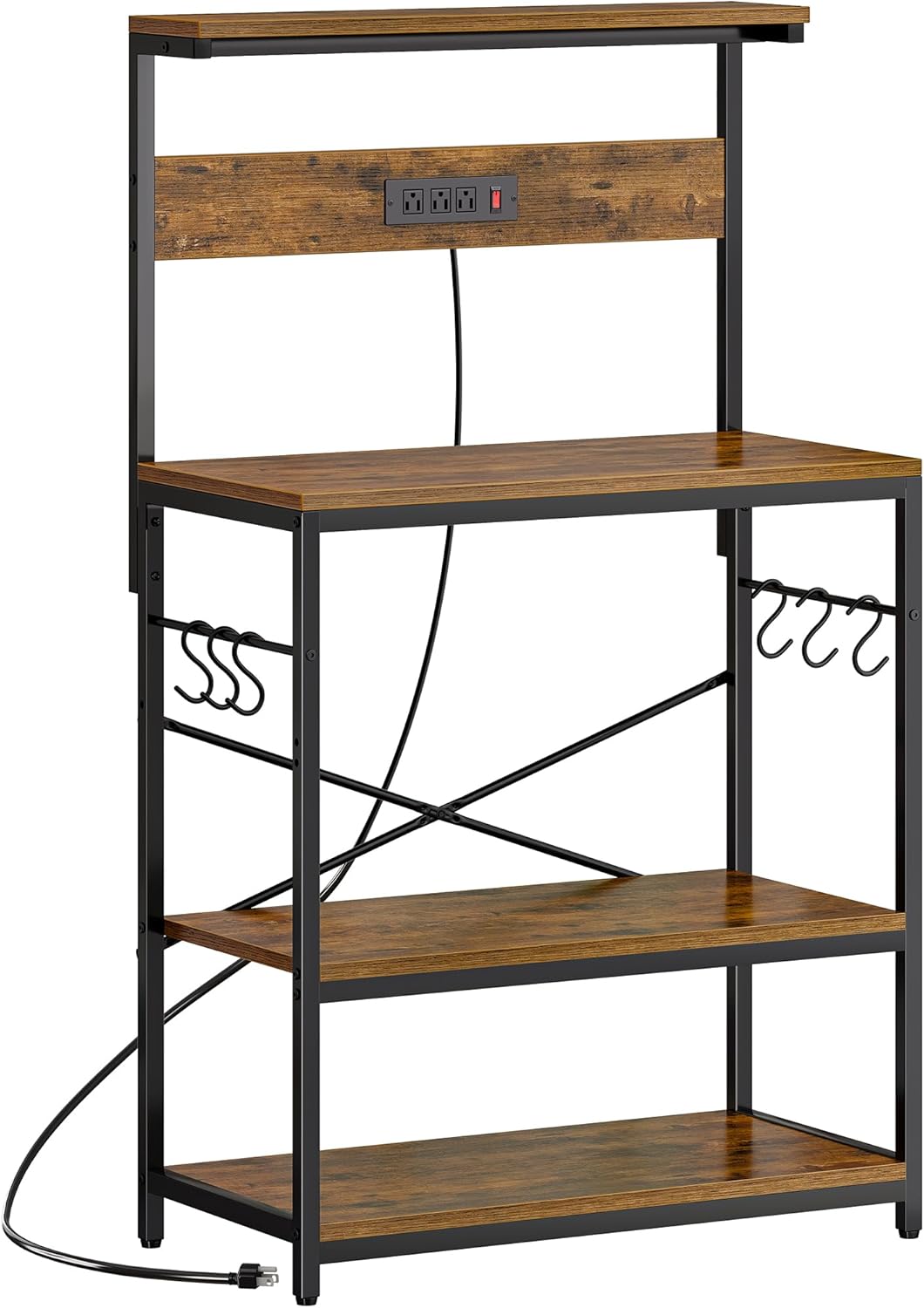


3. Safety Information
- Always attach the anti-tip device to a wall stud to prevent accidental tipping, especially in households with children or pets.
- Do not overload the shelves. Refer to the specifications for maximum weight capacity per shelf.
- Ensure all electrical appliances plugged into the integrated outlets are within the specified power limits (1800W max).
- Keep liquids away from electrical outlets and appliances to prevent electrical hazards.
- Regularly check all screws and connections to ensure they remain tight and secure.
4. Assembly Instructions
The assembly of your SUPERJARE Bakers Rack is designed to be straightforward. All necessary assembly hardware is included. Please follow the clear, numbered instructions provided in the separate assembly guide that came with your product. Minimal tools are required for completion.
5. Operating Instructions
5.1 Using the Power Outlets
The bakers rack includes a built-in power strip with 3 AC outlets and a safety switch for convenient access to power. To use:
- Plug the main power cord of the bakers rack into a grounded wall outlet.
- Ensure the safety switch on the power strip is in the 'ON' position (illuminated red light).
- Plug your small kitchen appliances (e.g., coffee maker, blender, kettle) into the available AC outlets.
- Always turn off the safety switch when not in use or when leaving the area for extended periods.

5.2 Adjusting the Middle Shelf
The middle shelf offers two adjustable height positions to accommodate items of different sizes. To adjust:
- Remove all items from the middle shelf.
- Carefully lift the shelf to disengage it from its current support pins.
- Align the shelf with the desired set of holes on the side frames.
- Lower the shelf, ensuring it is securely seated on the support pins at the new height.
5.3 Utilizing S-Shaped Hooks
The included 6 S-shaped hooks can be hung on the side bars of the rack. These hooks are ideal for organizing kitchen tools, mugs, or dishcloths, keeping your countertop clear and items easily accessible.
6. Maintenance
To ensure the longevity and appearance of your bakers rack, follow these maintenance guidelines:
- Cleaning: Wipe surfaces with a soft, damp cloth. Avoid harsh chemicals or abrasive cleaners that may damage the finish.
- Regular Checks: Periodically inspect all fasteners and connections to ensure they are tight. Re-tighten if necessary.
- Stability: Verify that the adjustable feet are properly set to maintain stability and prevent wobbling.
7. Troubleshooting
7.1 Rack is Unstable/Wobbling
- Ensure all assembly screws are securely tightened.
- Adjust the leveling feet at the bottom of the rack to compensate for uneven floor surfaces.
- Verify that the anti-tip device is correctly installed and securely anchored to a wall stud.
7.2 Power Outlets Not Working
- Check if the main power cord of the bakers rack is securely plugged into a functional wall outlet.
- Ensure the safety switch on the power strip is in the 'ON' position (red light illuminated).
- If the switch is on but there is no power, check your household circuit breaker.
8. Specifications
| Brand | SUPERJARE |
| Model Number | 80932ZC |
| Product Dimensions | 16.5 x 31.5 x 50.59 inches |
| Item Weight | 33.7 pounds (15.31 Kilograms) |
| Material | Engineered Wood |
| Color | Rustic Brown |
| Finish Type | Black (Frame) |
| Number of Shelves | 4 |
| Shelf Type | Tiered Shelf |
| Special Features | Adjustable Middle Shelf, Durable, Heavy Duty, Power Outlets, Anti-tip Device, Adjustable Feet |
| Assembly Required | Yes |
| Mounting Type | Floor Mount |
| Recommended Uses | Kitchen, Study Room |
9. Warranty and Support
For warranty information or customer support, please refer to the documentation included with your purchase or contact SUPERJARE customer service directly. Keep your purchase receipt for any warranty claims.