
1. Introduction
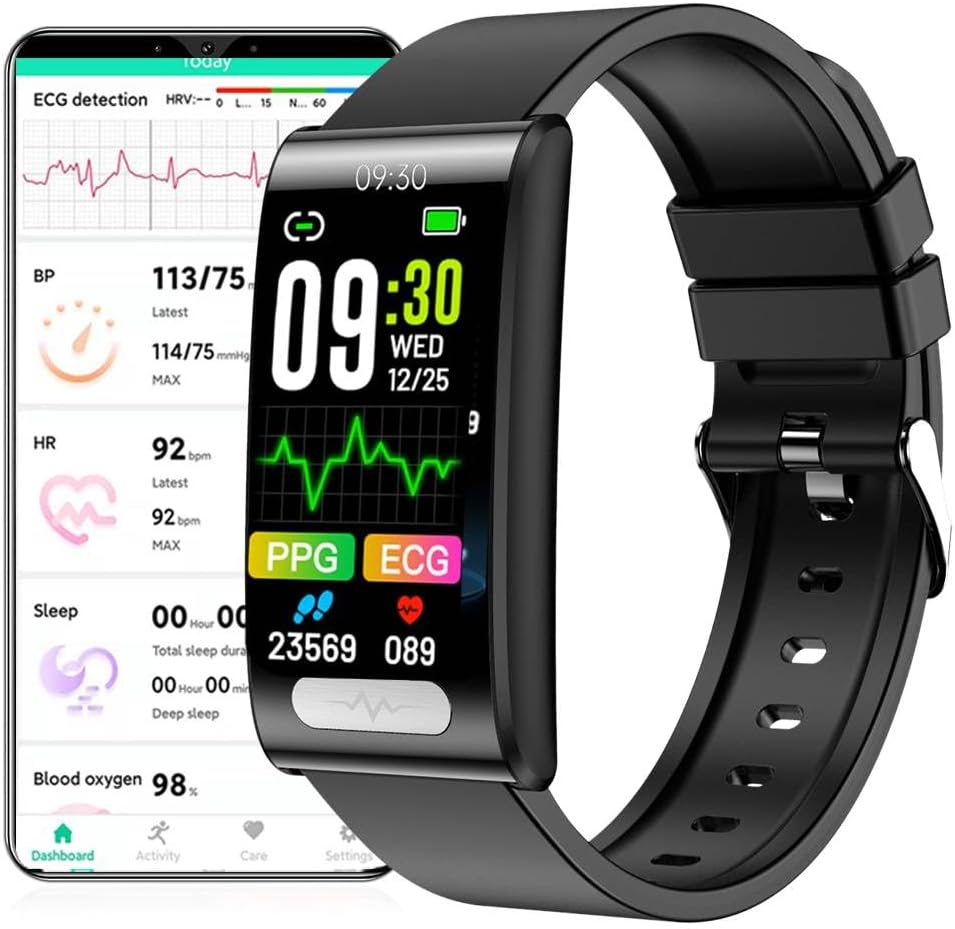
Thank you for choosing the DigiKuber ECG Smartwatch. This device is designed to help you monitor various health metrics and enhance your daily activities. It features advanced health tracking capabilities including ECG, heart rate, blood pressure, blood oxygen (SpO2), and body temperature measurement, alongside multiple sport modes and smart notifications. This manual provides detailed instructions to help you set up, operate, and maintain your smartwatch for optimal performance.
2. Safety Information
- The data provided by this smartwatch is for reference only and should not be used for medical diagnosis or treatment. Consult a medical professional for any health concerns.
- Do not wear the watch while diving, in hot water baths, or saunas, as this may damage the device despite its IP68 waterproof rating.
- Keep the device away from extreme temperatures and direct sunlight.
- Do not attempt to disassemble or repair the watch yourself. This will void the warranty.
- Use only the provided magnetic charging cable.
3. Package Contents
Please check the package contents upon unboxing:
- DigiKuber ECG Smartwatch (Model TK70)
- Magnetic Charging Cable
- User Manual (this document)
4. Product Overview
The DigiKuber ECG Smartwatch features a 1.47-inch color TFT IPS touch screen. Its compact design (49 x 25 x 11 mm) and durable construction with a metal alloy case and PC+ABS bottom cover ensure comfort and longevity. The 20mm silicone TPU strap is interchangeable.
Key components include:
- Touch Screen: For navigation and interaction.
- Sensors: Located on the back for health monitoring (ECG, PPG, Heart Rate, SpO2, Temperature).
- Charging Contacts: Magnetic contacts on the back for charging.
- Strap: Removable 20mm strap.
5. Setup
5.1 Charging the Smartwatch
Before first use, fully charge the smartwatch.
- Connect the magnetic charging cable to a USB power adapter (not included) or a computer's USB port.
- Align the magnetic end of the cable with the charging contacts on the back of the smartwatch. The magnets will snap into place.
- The watch screen will display a charging indicator. A full charge takes approximately 3-4 hours.
5.2 App Installation (Deepfit)
To access all features and synchronize data, download the "Deepfit" app on your smartphone.
- For Android devices (Android 6.0 and above): Search for "Deepfit" on the Google Play Store.
- For iOS devices (iOS 10 and above): Search for "Deepfit" on the Apple App Store.
- Alternatively, scan the QR code provided in the quick start guide (if available) to download the app.
- Install the app and grant necessary permissions.
5.3 Pairing with Your Smartphone
Ensure Bluetooth is enabled on your smartphone.
- Open the "Deepfit" app on your smartphone.
- Create an account or log in if prompted.
- Navigate to the "Device" or "My Device" section within the app.
- Tap "Add Device" or "Scan for Device". The app will search for your smartwatch.
- Select "TK70" or the corresponding device name from the list of found devices.
- Confirm the pairing request on both your phone and the smartwatch if prompted.
- Once paired, the watch's time and date will automatically synchronize with your phone.
6. Operating Instructions
6.1 Basic Navigation
- Wake Screen: Raise your wrist or press the side button (if available) to wake the screen.
- Swipe Up/Down: Scroll through menus or notifications.
- Swipe Left/Right: Access different function screens (e.g., health data, sport modes).
- Tap: Select an item or confirm an action.
- Long Press: May activate certain functions or change watch faces.
6.2 Health Monitoring
The smartwatch offers comprehensive health monitoring features. Ensure the watch is worn snugly on your wrist for accurate readings.
- ECG + PPG: Navigate to the ECG/PPG interface on the watch. Follow on-screen instructions, typically involving placing a finger on the side electrode (if present) or keeping still. Data will be recorded and can be viewed in the Deepfit app, where you can also export ECG reports.
- Heart Rate (HR): Swipe to the heart rate screen. The watch will automatically start measuring your heart rate.
- Blood Pressure (BP): Swipe to the blood pressure screen. Remain still during measurement.
- Blood Oxygen (SpO2): Swipe to the SpO2 screen. Keep your arm still.
- Body Temperature: The watch can measure your body temperature. Access this function via the watch interface.
- Sleep Monitor: Wear the watch to bed. It will automatically track your sleep patterns (deep sleep, light sleep, wake-up times) and synchronize data to the Deepfit app.
- Pedometer/Calories/Distance: These metrics are tracked automatically throughout the day. View your daily progress on the watch or in the app.
6.3 Sport Modes
The smartwatch supports various sport modes to track your exercise data.
- Access the "Sport" or "Exercise" menu on the watch.
- Select your desired activity (e.g., Running, Cycling, Jumping, Basketball, Table Tennis, Badminton).
- Tap to start the activity. The watch will record duration, calories burned, and other relevant metrics.
- Tap to pause or end the activity. Data will be saved and synced to the Deepfit app.
6.4 Notifications and Other Functions
- Message & Call Notifications: Once paired with your phone, the watch will display incoming call alerts and messages from social apps. You can dismiss messages directly from the watch. Ensure app notifications are enabled in the Deepfit app settings.
- Remote Care Function: Share your real-time health data with family members through the Deepfit app. Refer to the app's settings for details on enabling this feature.
- Camera Control: Use the watch as a remote shutter for your phone's camera. Activate this feature in the Deepfit app.
- Music Control: Control music playback on your phone (play, pause, skip tracks) directly from the watch.
- Stopwatch & Timer: Access these utility functions from the watch's menu.
- Sedentary Reminder: Set reminders in the Deepfit app to prompt you to move after periods of inactivity.
- Alarm Clock: Set alarms via the Deepfit app, and the watch will vibrate to alert you.
- Find My Phone: If your phone is connected via Bluetooth, use this function on the watch to make your phone ring.
7. Maintenance
Proper maintenance ensures the longevity and accuracy of your smartwatch.
- Cleaning: Wipe the watch screen and strap regularly with a soft, damp cloth. Avoid using harsh chemicals or abrasive materials.
- Water Resistance: The watch is IP68 waterproof, meaning it can withstand splashes, rain, and brief immersion. However, do not use it for swimming, diving, or in hot water/steam environments. Dry the watch thoroughly if it gets wet.
- Battery Care: To prolong battery life, avoid fully discharging the battery frequently. Charge the watch when the battery level is low. Store the watch in a cool, dry place if not used for extended periods.
- Sensor Care: Keep the sensors on the back of the watch clean and free from debris to ensure accurate health readings.
8. Troubleshooting
If you encounter issues with your smartwatch, refer to the following common problems and solutions:
| Problem | Solution |
|---|---|
| Watch does not turn on. | Ensure the watch is fully charged. Connect it to the charger and wait a few minutes. |
| Cannot pair with the Deepfit app. |
|
| Time/Date is incorrect. | Ensure the watch is successfully paired and synchronized with the Deepfit app. The time and date will update automatically upon successful connection. |
| Health data readings are inaccurate. |
|
| Notifications are not received. |
|
9. Specifications
| Feature | Detail |
|---|---|
| Model | TK70 (DK70A) |
| Brand | DigiKuber |
| Screen Size | 1.47 inches TFT IPS Color Touch Screen (172 x 320 resolution) |
| Dimensions | 49 x 25 x 11 mm (Length x Width x Height) |
| Waterproof Level | IP68 |
| Battery Type | Polymer Lithium Battery |
| Battery Capacity | 180 mAh |
| Charging Type | Magnetic Absorption |
| Charging Time | Approx. 3-4 hours |
| Endurance Time | 5-7 days (usage), 20-30 days (standby) |
| Bluetooth | 5.0 BLE (Low Energy) |
| Compatible Systems | Android 6.0 and above, iOS 10 and above |
| Companion App | Deepfit |
| Strap Material | 20mm Silicone TPU or 20mm Metal |
| Case Material | Metal Alloy |
| Bottom Cover Material | PC + ABS |
| Special Features | ECG Monitor, Body Temperature, Blood Pressure, Blood Oxygen, Sleep Monitor, Heart Rate Monitor, Stress, Message/Call/SNS Notifications, Alarm, Timer, Stopwatch, Music Controller, Find My Phone |
10. Warranty and Support
The DigiKuber ECG Smartwatch (Model TK70) comes with a one-year warranty from the date of purchase. This warranty covers manufacturing defects and malfunctions under normal use. It does not cover damage caused by misuse, accidents, unauthorized repairs, or failure to follow the instructions in this manual.
For technical support, warranty claims, or further assistance, please contact DigiKuber customer service through the platform where you purchased the product or refer to the contact information provided on the official DigiKuber website. Please have your product model number (TK70) and proof of purchase ready when contacting support.

