
1. Introduction
Thank you for purchasing the GARVEE Automatic Meat Slicer, Model YQR-300C. This manual provides essential information for the safe and efficient operation, maintenance, and troubleshooting of your new appliance. Please read this manual thoroughly before initial use and retain it for future reference.
The GARVEE Automatic Meat Slicer is designed for precision slicing of various food items, including frozen meat, deli meats, vegetables, fruits, and bread. Its robust construction and powerful dual motors ensure consistent performance for both commercial and home environments.
2. Important Safety Instructions
WARNING: Failure to follow these safety instructions may result in serious injury or damage to the appliance.
- Always ensure the slicer is placed on a stable, level, and non-slip surface before operation.
- Keep hands and fingers away from the blade at all times, especially during operation and cleaning.
- Use the food carriage and pusher to hold food items. Never use bare hands to push food towards the blade.
- Ensure all safety guards and covers are correctly installed before operating the slicer.
- Unplug the slicer from the power outlet before cleaning, maintenance, or when not in use.
- Do not immerse the motor unit in water or other liquids. Clean with a damp cloth.
- Do not operate the slicer with a damaged cord or plug, or if the appliance malfunctions or has been damaged in any manner.
- This appliance is not intended for use by persons with reduced physical, sensory, or mental capabilities, or lack of experience and knowledge, unless they have been given supervision or instruction concerning use of the appliance by a person responsible for their safety.
- Children should be supervised to ensure they do not play with the appliance.
- Only use accessories and attachments recommended by the manufacturer.
- Do not attempt to slice bones or other hard, non-food items.
- Wear cut-resistant gloves when handling or cleaning the blade.
- In case of emergency, press the emergency stop button immediately.
3. Product Components
Familiarize yourself with the main parts of your GARVEE Automatic Meat Slicer:
- Blade: 12-inch carbon steel blade for precise cutting.
- Food Carriage/Pusher: Holds food securely and pushes it towards the blade.
- Thickness Adjustment Knob: Controls slice thickness from 0 to 14 mm.
- Blade Guard: Protective cover for the blade.
- Built-in Sharpener: For maintaining blade sharpness.
- Control Panel: Includes ON/OFF switches for blade and meat pusher, and an emergency stop button.
- Anti-Slip Bases: Provide stability during operation.
- Motor Unit: Houses the 550W dual motors.

Figure 3.1: Main components of the GARVEE Automatic Meat Slicer.

Figure 3.2: Detailed view of key features such as the 21cm extra wide meat loading board, fixtures board locking knob, thickness adjustment knob, and dual control switch with emergency stop button.
4. Setup and Assembly
- Unpacking: Carefully remove the slicer from its packaging. Inspect for any damage.
- Placement: Place the slicer on a clean, stable, and dry countertop. Ensure the anti-slip bases are firmly gripping the surface.
- Initial Cleaning: Before first use, clean all parts that will come into contact with food. Refer to the "Maintenance and Cleaning" section for detailed instructions.
- Blade Installation (if necessary): Ensure the 12-inch carbon steel blade is securely installed. The blade guard should be in place.
- Power Connection: Plug the slicer into a grounded electrical outlet. Ensure the voltage matches the specifications.

Figure 4.1: The automatic meat feeding device, which should be properly installed before use.
5. Operating Instructions
5.1 Preparing for Slicing
- Load Food: Place the food item (e.g., meat, vegetables) onto the food carriage. Use the food pusher to secure it against the back plate.
- Adjust Thickness: Rotate the thickness adjustment knob to select the desired slice thickness (0-14 mm). Turn clockwise for thicker slices, counter-clockwise for thinner slices.

Figure 5.1: The thickness adjustment knob allows precise control over slice thickness from 0 to 14 mm.
5.2 Slicing Procedure
- Power On: Press the green ON button for the blade to start the motor and blade rotation.
- Engage Food Pusher: Press the green ON button for the meat pusher to activate the automatic feeding mechanism.
- Slicing: The food carriage will automatically move back and forth, pushing the food against the rotating blade to produce slices.
- Collect Slices: Place a tray or plate beneath the blade to collect the sliced food.
- Stop Slicing: To stop the slicing process, press the red STOP button. For complete power off, press the OFF buttons for both the blade and meat pusher.
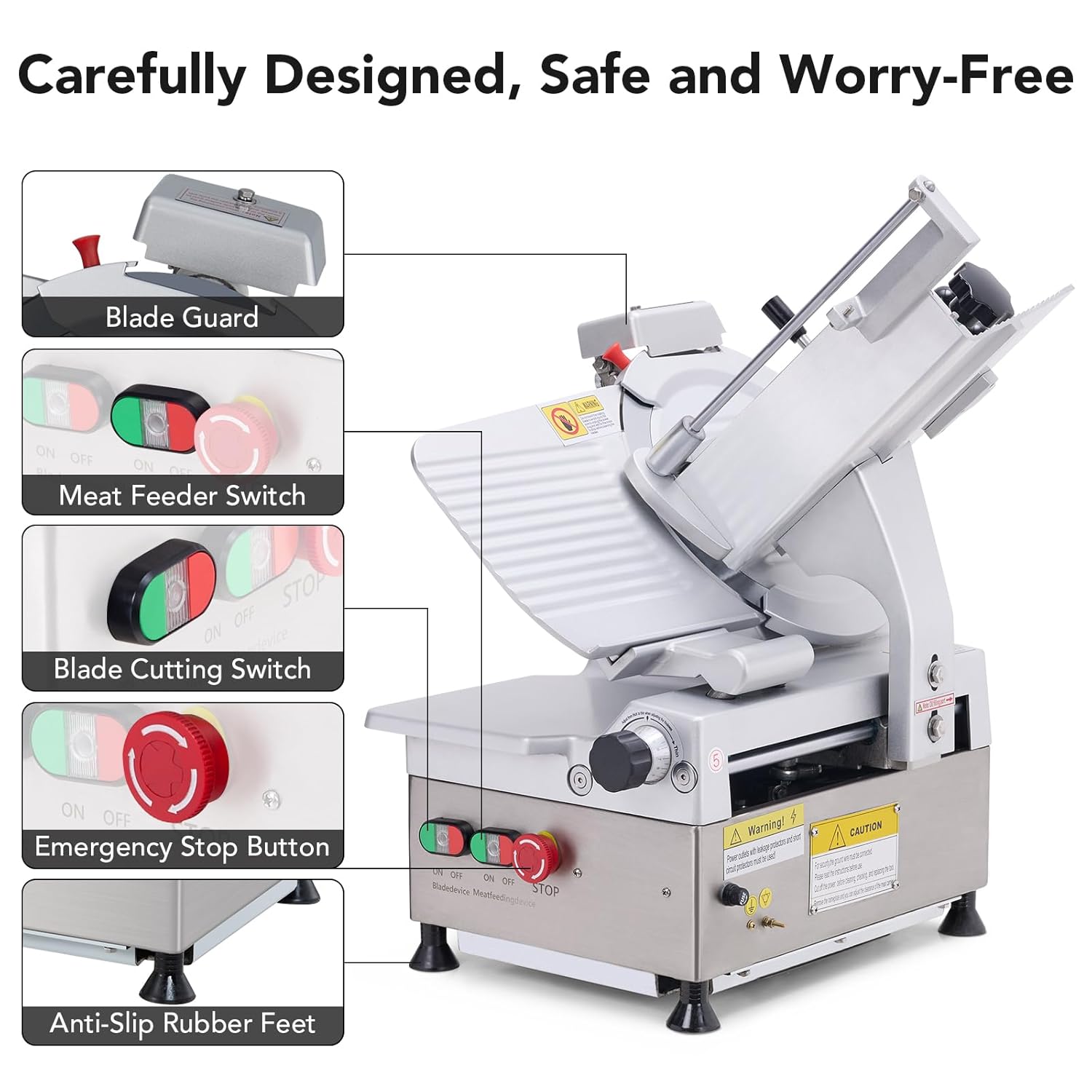
Figure 5.2: Control panel with independent blade and meat pusher switches, and the emergency stop button.
5.3 Video Demonstration
Video 5.1: This video demonstrates the automatic slicing effect of the GARVEE Meat Slicer on various food items, showcasing its efficiency and precision.
6. Maintenance and Cleaning
Regular cleaning and maintenance are essential for the longevity and safe operation of your slicer.
6.1 Daily Cleaning
- Unplug: Always unplug the slicer from the power outlet before cleaning.
- Remove Food Residue: Carefully remove any large food particles from the blade and food carriage.
- Wipe Down: Use a damp cloth with mild detergent to wipe down all surfaces of the slicer. Avoid excessive water near electrical components.
- Blade Cleaning: With extreme caution and wearing cut-resistant gloves, carefully wipe both sides of the blade. Some parts may be removable for thorough cleaning.
- Rinse and Dry: Rinse with a clean, damp cloth and dry all parts thoroughly to prevent rust.
6.2 Blade Sharpening
The slicer is equipped with a built-in sharpener to maintain blade sharpness.
- Ensure Safety: Unplug the slicer. Ensure the blade guard is in place.
- Position Sharpener: Place the built-in sharpener in contact with the edge of the blade as instructed by the mechanism.
- Activate Sharpening: Turn on the designated sharpening switch (if applicable, refer to specific model instructions) or manually engage the sharpening stones.
- Sharpen: Allow the sharpener to operate for a short period (e.g., 30-60 seconds) to sharpen the blade automatically.
- Clean Blade: After sharpening, clean the blade thoroughly to remove any metal particles.

Figure 6.1: The built-in sharpener allows for convenient and automatic blade sharpening.
7. Troubleshooting
| Problem | Possible Cause | Solution |
|---|---|---|
| Slicer does not turn on. | No power, loose plug, emergency stop engaged. | Check power connection. Ensure emergency stop button is disengaged. |
| Blade is not slicing effectively. | Dull blade, incorrect thickness setting, food not properly secured. | Sharpen the blade using the built-in sharpener. Adjust thickness. Ensure food is firmly held by the pusher. |
| Slicer makes unusual noise. | Loose components, motor issue, foreign object. | Unplug and inspect for loose parts or obstructions. If noise persists, contact customer support. |
| Slices are uneven. | Food not secured, blade dull, thickness setting unstable. | Ensure food is tightly secured. Sharpen blade. Verify thickness knob is stable. |
8. Product Specifications
- Model: YQR-300C
- Brand: Garvee
- Power: 550W Dual Motors
- Blade Material: High Carbon Steel
- Blade Diameter: 12 Inches (300mm)
- Adjustable Thickness: 0 - 14 mm
- Product Dimensions: 21.5"L x 18.5"W x 26"H (545mm L x 470mm W x 660mm H)
- Material: Magnesium Aluminum Alloy
- Item Weight: 132.7 pounds
- Operation Mode: Automatic
- Recommended Uses: Meat, Vegetable, Fruit, Bread

Figure 8.1: Detailed dimensions and key specifications of the GARVEE Automatic Meat Slicer.
9. Warranty and Customer Support
GARVEE products are manufactured to high-quality standards. For information regarding warranty coverage, please refer to the warranty card included with your product or contact GARVEE customer support.
If you encounter any issues or have questions about your GARVEE Automatic Meat Slicer, please contact our customer support team. Provide your model number (YQR-300C) and purchase date for faster service.
Customer Support: Refer to your product packaging or the official Garvee website for contact details.
Protection Plans: Extended protection plans may be available for purchase. Please check with your retailer for options.