
Introduction
The i8 Pro Max Series 8 Smart Watch is designed to help you stay active, connected, and on track with your health and wellness goals. This manual provides essential information on setting up, operating, and maintaining your smart watch to ensure optimal performance. Featuring a 1.73-inch full-touch HD display, Bluetooth 5.0 connectivity, and comprehensive health monitoring capabilities, this device is compatible with both iOS and Android smartphones.

Figure 1: The i8 Pro Max Series 8 Smart Watch in white, showcasing its sleek design and full-touch display.
What's in the Box
Upon unboxing your i8 Pro Max Series 8 Smart Watch, please verify that all the following components are included:
- i8 Pro Max Series 8 Smart Watch
- Watch Band
- Magnetic Charger
- User Manual (this document)
Setup Guide
1. Charging the Device
Before initial use, fully charge your smart watch. Connect the magnetic charger to the charging points on the back of the watch. Plug the USB end of the charger into a standard USB power adapter (not included) or a computer's USB port. The watch display will indicate charging status.
2. Installing the Watch Band
Align the watch band with the slots on either side of the watch body. Slide the band into place until you hear a click, indicating it is securely fastened. Ensure both sides of the band are properly attached before wearing.
3. Pairing with Your Smartphone
- Download the App: Scan the QR code provided in the watch's interface or manual, or search for the recommended companion app (e.g., "FitPro" or similar, as implied by common smartwatches) in your smartphone's app store (Google Play Store for Android, Apple App Store for iOS).
- Enable Bluetooth: Ensure Bluetooth is enabled on your smartphone.
- Open the App: Launch the companion app on your smartphone.
- Add Device: Within the app, navigate to the "Add Device" or "Pair Device" section. The app will search for available devices.
- Select Your Watch: Select "I8 Pro Max" or a similar identifier from the list of found devices.
- Confirm Pairing: Follow any on-screen prompts on both your watch and smartphone to confirm the pairing. A successful connection will be indicated on both devices.
Note: For optimal functionality, ensure the app is running in the background and Bluetooth remains active on your smartphone.
Operating Instructions
Display and Navigation
The i8 Pro Max features a 1.73-inch full-touch HD display (320x240 pixels) for intuitive interaction. Swipe across the screen to navigate through menus and functions. The side button typically serves as a power button, back button, or to access the main menu.

Figure 2: The i8 Pro Max Smart Watch's light and slim design, contributing to comfortable wear.
Connectivity (Bluetooth 5.0)
Utilizing Bluetooth 5.0, the watch maintains a stable connection with your smartphone. This enables features such as call and message notifications, remote camera control, and music playback control directly from your wrist.

Figure 3: The i8 Pro Max Smart Watch's capability to handle phone calls and online music playback when connected to a smartphone.
Health Monitoring
The watch is equipped with sensors to monitor various health metrics:
- Heart Rate Monitoring: Tracks your heart rate throughout the day, providing insights into your cardiovascular health.
- Sleep Tracking: Automatically monitors your sleep patterns, including light, deep, and wake phases, to help you understand and improve your sleep quality.
- Sedentary Reminders: Alerts you when you've been inactive for too long, encouraging you to move and maintain an active lifestyle.

Figure 4: The i8 Pro Max Smart Watch showing real-time heart rate and blood pressure data, demonstrating its health monitoring features.
Fitness Tracking Modes
The i8 Pro Max supports multiple sport modes to accurately track your workouts, including walking, running, cycling, and more. It records steps, distance, estimated energy use, and active minutes to help you achieve your fitness goals.

Figure 5: The i8 Pro Max Smart Watch in a sports tracking mode, illustrating its ability to monitor various physical activities.
Notifications and Other Functions
Receive vibration notifications for incoming calls, messages, and alerts from popular social media applications (e.g., WhatsApp, Facebook) directly on your wrist. The watch also offers features like multi-language display, alarm, music control, and a "Find My Device" function.

Figure 6: The i8 Pro Max Smart Watch showing real-time message notifications, keeping you informed at a glance.

Figure 7: A visual summary of key features, including the high-precision knob switch, light and slim design, heart rate measurement, and support for a healthy lifestyle.

Figure 8: The i8 Pro Max Smart Watch's multi-language menu display, demonstrating its global accessibility.
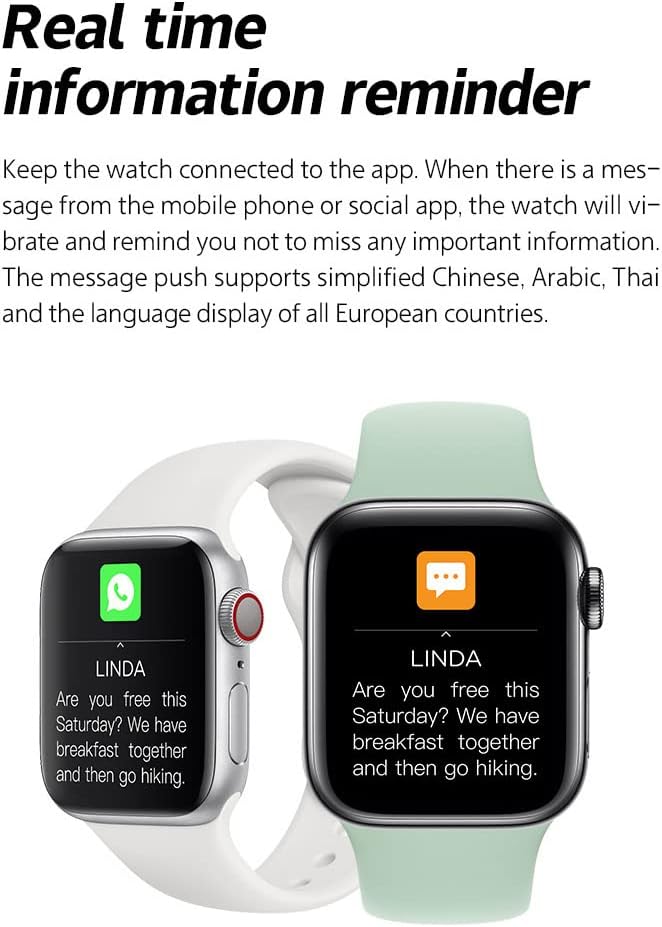
Figure 9: An overview of the i8 Pro Max Smart Watch's comprehensive functions, including fitness tracking, communication, and health monitoring.
Maintenance
Cleaning Your Watch
Regularly clean your watch and band to prevent skin irritation and maintain appearance. Use a soft, lint-free cloth. If necessary, dampen the cloth slightly with water. Avoid using harsh chemicals, abrasive materials, or strong detergents, as these can damage the watch's finish and internal components.
Water Resistance
The i8 Pro Max Series 8 Smart Watch is water-resistant for daily use (splash-proof only). It is suitable for activities like hand washing or light rain. It is NOT suitable for swimming, showering, or diving. Exposure to hot water, steam, or submersion can damage the device and void the warranty.
Battery Care
To prolong battery life, avoid fully discharging the watch frequently. Charge it when the battery level is low. Store the watch in a cool, dry place when not in use for extended periods. The 150mAh battery offers 5-7 days of typical use and up to 15 days of standby time.
Troubleshooting
| Problem | Possible Cause | Solution |
|---|---|---|
| Watch does not turn on | Low battery; device malfunction. | Charge the watch for at least 30 minutes. If it still doesn't turn on, contact customer support. |
| Cannot pair with smartphone | Bluetooth off; app not running; watch not discoverable; previous pairing issues. | Ensure Bluetooth is on. Restart both watch and phone. Forget previous pairings in phone's Bluetooth settings. Re-open the app and try pairing again. |
| Notifications not received | App permissions; app not running in background; watch not connected. | Check app notification permissions on your phone. Ensure the app is running and the watch is connected via Bluetooth. Verify notification settings within the watch app. |
| Inaccurate health data | Improper fit; sensor obstruction; movement during measurement. | Ensure the watch is worn snugly on your wrist, not too tight or too loose. Clean the sensor area on the back of the watch. Remain still during measurements. |
| Watch frequently disconnects from app | App issues; phone's power saving settings; Bluetooth interference. | Ensure the app is updated. Disable aggressive power-saving modes for the app on your phone. Keep the watch and phone within Bluetooth range. Try re-pairing the device. |
Specifications
| Feature | Detail |
|---|---|
| Model Number | I8 pro max |
| Display Size | 1.73 inches (visible screen diagonal 2" / 5 cm) |
| Battery Capacity | 150mAh Lithium Ion |
| Battery Life | 5-7 days (typical use), up to 15 days (standby) |
| Connectivity | Bluetooth 5.0 |
| Compatibility | iOS & Android |
| Water Resistance | Splash-proof (not for swimming/showering) |
| Item Weight | 2.39 ounces |
| Operating System | Wear OS |
| Special Features | Heart Rate Monitor, Sleep Monitor, Activity Tracker, Sedentary Reminders, Call/Message Notifications |
Warranty and Support
This product comes with a standard manufacturer's warranty against defects in materials and workmanship. For specific warranty terms and conditions, please refer to the documentation included with your purchase or contact the seller directly. If you encounter any issues or require technical assistance, please reach out to the customer support provided by the retailer or manufacturer.
For further assistance, please visit the product's support page on the retailer's website or contact the manufacturer, Surplus design.