1. Introduction
This manual provides comprehensive instructions for the Skechers Holmby SR6287 digital watch. Designed for daily wear, this 34mm square watch features a two-tone black and gray plastic case, a comfortable black silicone strap, and a negative digital display. Key functions include time, date, alarm, chronograph, and backlight.

Figure 1: Skechers Holmby SR6287 digital watch on a wrist, displaying the time and date.
2. Safety Information and Water Resistance
The Skechers Holmby SR6287 watch is water resistant up to 100 meters (10 ATM). This means it is suitable for bathing, swimming, snorkeling, and shallow diving. However, it is not recommended for scuba diving. To maintain water resistance, do not operate the buttons while the watch is submerged in water. Avoid exposing the watch to extreme temperature changes, as this can compromise the water seals.
Keep the watch away from strong magnetic fields, as this may affect its accuracy. Avoid exposing the watch to harsh chemicals, solvents, or detergents, which can damage the case and strap materials.
3. Getting Started: Button Functions and Initial Setup
Familiarize yourself with the watch buttons and their primary functions. The watch features four buttons: MODE, RESET, ST/STP, and LIGHT.
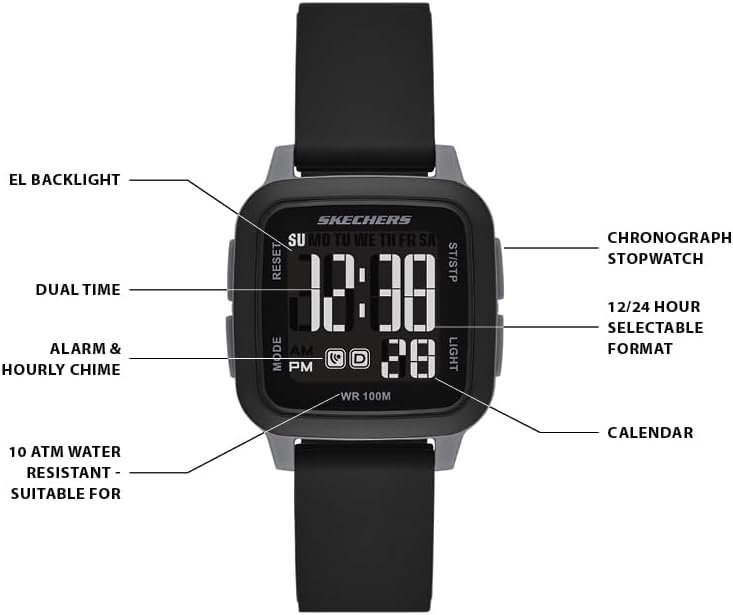
Figure 2: Watch face diagram indicating button functions and display elements.
- MODE Button: Cycles through display modes (Time, Alarm, Stopwatch).
- RESET Button: Used to reset values or adjust settings in setting mode.
- ST/STP Button: Starts/stops the stopwatch; used to select or confirm settings.
- LIGHT Button: Activates the EL backlight for improved visibility in low light conditions.

Figure 3: Side view of the watch, highlighting the physical buttons.
3.1. Setting Time and Date
- From the normal time display, press the MODE button three times to enter time setting mode. The seconds digits will flash.
- Press the RESET button to set the seconds to zero.
- Press the ST/STP button to move to the hour setting. The hour digits will flash.
- Press the RESET button to adjust the hour. Press and hold to advance rapidly.
- Press the ST/STP button to move to the minute setting. The minute digits will flash.
- Press the RESET button to adjust the minutes.
- Continue pressing ST/STP to cycle through month, date, and day of the week settings, adjusting each with the RESET button.
- Once all settings are correct, press the MODE button to exit setting mode and return to the normal time display.
3.2. Setting the Alarm
- From the normal time display, press the MODE button twice to enter alarm setting mode. The hour digits of the alarm will flash.
- Press the RESET button to adjust the alarm hour.
- Press the ST/STP button to move to the alarm minute setting. The minute digits will flash.
- Press the RESET button to adjust the alarm minutes.
- Press the MODE button to exit alarm setting mode.
- To activate/deactivate the alarm, press the RESET button while in alarm display mode. An alarm icon will appear/disappear.
3.3. Using the Stopwatch (Chronograph)
- From the normal time display, press the MODE button once to enter stopwatch mode. The display will show '00:00:00'.
- Press the ST/STP button to start the stopwatch.
- Press the ST/STP button again to stop the stopwatch.
- To reset the stopwatch to zero, press the RESET button while the stopwatch is stopped.
- Press the MODE button to return to the normal time display.
3.4. Activating the Backlight
Press the LIGHT button at any time to illuminate the display for a few seconds. This feature is useful in dark environments.
4. Care and Maintenance
Proper care will ensure the longevity and performance of your Skechers Holmby SR6287 watch.
4.1. Cleaning Your Watch
Wipe the watch case and strap regularly with a soft, damp cloth. For silicone straps, mild soap and water can be used, then rinse thoroughly and dry. Avoid using abrasive cleaners or chemical solvents.
4.2. Battery Information
The watch is powered by a standard watch battery. When the display becomes dim or functions become erratic, it may be time to replace the battery. Battery replacement should ideally be performed by a qualified watch technician to ensure proper sealing and maintain water resistance.
4.3. Strap Adjustment and Buckle
The silicone strap is designed for comfort and durability. Adjust the buckle to a comfortable fit on your wrist. Ensure the strap is not too tight to allow for proper circulation.

Figure 4: Rear view of the watch, showing the buckle with the Skechers logo.
5. Troubleshooting
If you encounter issues with your watch, refer to the following common problems and solutions.
- Incorrect Time Display: If the time is incorrect or changes unexpectedly, ensure you have followed the time setting instructions carefully (Section 3.1). A low battery can also cause timekeeping inaccuracies; consider professional battery replacement.
- Display Readability Issues: If the digital display appears dim or difficult to read, try activating the backlight (Section 3.4). Ensure the watch face is clean and free from smudges. If the display remains consistently dim, the battery may be low.
- Buttons Not Responding: Check if the watch is submerged in water, as buttons should not be operated underwater. If the buttons are still unresponsive, a reset may be required (consult a service center if a simple reset isn't effective).
- Water Inside Watch: If you notice condensation or water inside the watch, immediately take it to a qualified watch technician for inspection and repair to prevent further damage.
6. Specifications
- Model: SR6287
- Case Size: 34 mm
- Band Width: 18 mm
- Movement: Digital with LCD display
- Crystal: Mineral
- Case Material: Two-tone plastic (black and gray)
- Strap Material: Black silicone
- Water Resistance: 100 meters (10 ATM) - Suitable for bathing, swimming, snorkeling, and shallow diving.
- Functions: Time, Date, Alarm, Chronograph (Stopwatch), EL Backlight, 12/24 Hour Selectable Format, Calendar.

Figure 5: General watch case size guide for reference.
7. Warranty and Support
Your Skechers Holmby SR6287 watch is covered by a manufacturer's warranty against defects in materials and workmanship. For specific warranty terms and conditions, please refer to the warranty card included with your purchase or visit the official Skechers website.
For technical support, service, or warranty claims, please contact Skechers customer service through their official channels. Keep your proof of purchase for any warranty-related inquiries.


