
Einhell FREELEXO Kit 500 (Model 3413942)
Einhell FREELEXO Kit 500 Robotic Lawnmower User Manual
Model: FREELEXO Kit 500 (3413942)
1. Introduction
Thank you for choosing the Einhell FREELEXO Kit 500 Robotic Lawnmower. This manual provides essential information for the safe and efficient operation, installation, and maintenance of your new robotic lawnmower and the included grass trimmer. Please read this manual thoroughly before first use and keep it for future reference.
The FREELEXO Kit 500 is part of the powerful Power X-Change family, offering maximum flexibility within the system. It is designed for lawns up to 500 m² and features Bluetooth app control, multi-zone mowing, and advanced safety sensors.
2. Safety Instructions
Always observe the following safety precautions to prevent injury and damage:
- Read all instructions carefully before operating the device.
- Keep children and pets away from the working area.
- Do not operate the robotic lawnmower in wet conditions or rain. The integrated rain sensor will stop operation automatically.
- Ensure the boundary wire is correctly installed to define the mowing area.
- Never lift or carry the robotic lawnmower while the blades are rotating.
- Regularly inspect the blades for wear and replace them as needed.
- Use only original Einhell spare parts and accessories.
- Disconnect the battery before performing any maintenance or cleaning.
3. Product Overview
The Einhell FREELEXO Kit 500 includes the robotic lawnmower, a GC-CT 18-24 Li P grass trimmer, a 2.5 Ah Power X-Change battery, a charger, and all necessary installation accessories.


4. Setup
4.1. Charging Station Placement
Place the charging station on a flat, level surface in an area with good access to power and away from direct sunlight or excessive moisture. Ensure there is enough clear space around the station for the robotic lawnmower to dock easily.
4.2. Boundary Wire Installation
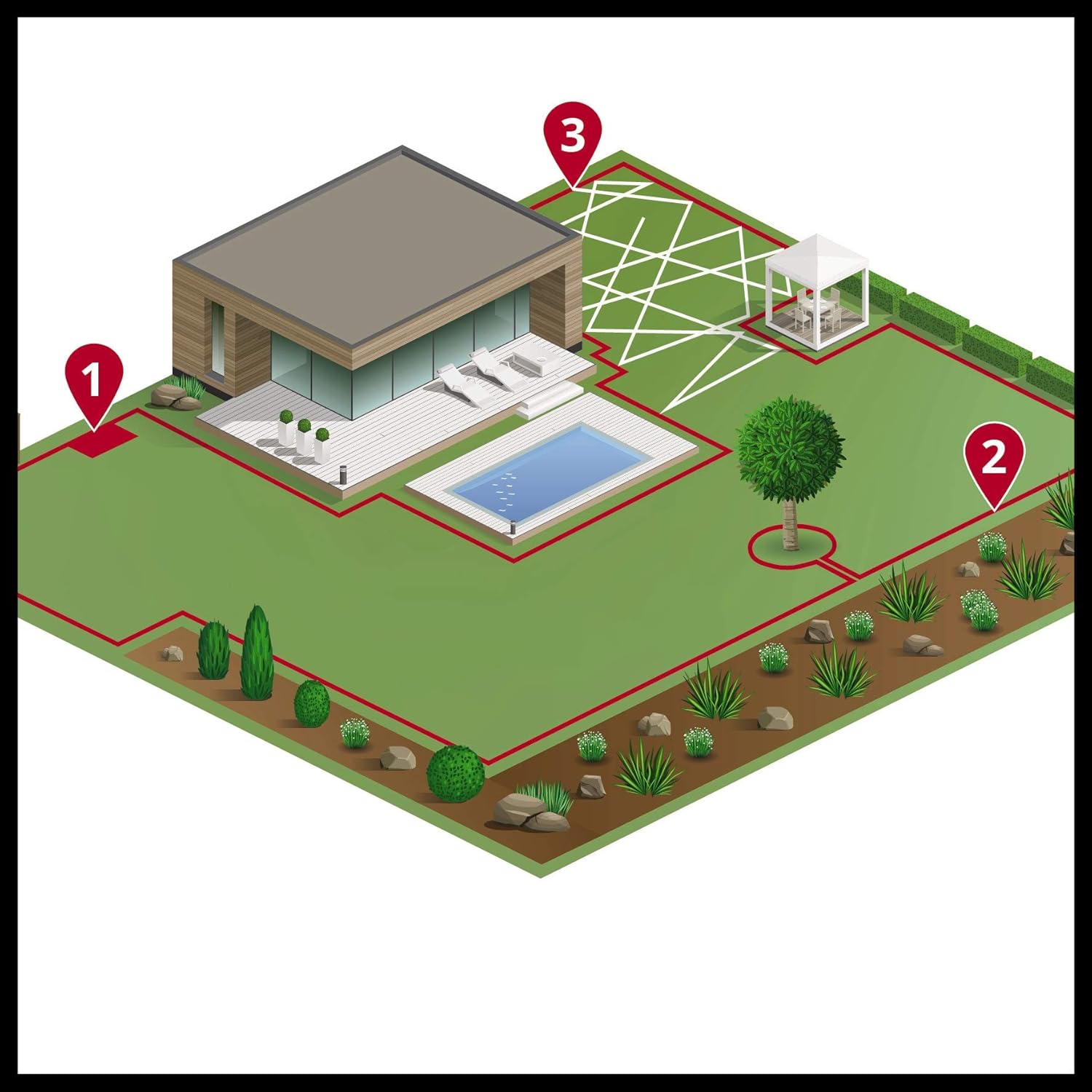
The boundary wire defines the mowing area for your robotic lawnmower. Lay the wire around the perimeter of your lawn, ensuring it is securely fastened to the ground using the provided fixing hooks. Maintain a minimum distance from obstacles as specified in the detailed installation guide.
4.3. Initial Charging
Before first use, fully charge the Power X-Change battery. Insert the battery into the robotic lawnmower, then place the lawnmower into the charging station. The charging indicator will show the battery status.

5. Operating
5.1. Starting and Stopping
To start the robotic lawnmower, press the 'START' button on the control panel or initiate mowing via the app. To stop, press the 'STOP' button. The lawnmower will automatically return to the charging station when the battery is low or its schedule is complete.

5.2. Bluetooth App Control
The FREELEXO can be conveniently controlled via a Bluetooth app on your smartphone. Download the Einhell FREELEXO app from your app store. The app allows you to set mowing schedules, define multi-zones, adjust cutting height, and monitor the lawnmower's status.

5.3. Multi-Zone Mowing
For complex or multi-area gardens, the multi-zone mowing feature allows the robotic lawnmower to navigate and mow different sections of your lawn efficiently. Configure these zones within the app based on your boundary wire setup.
5.4. Cutting Height Adjustment
The cutting height can be adjusted from 20 mm to 60 mm. Use the adjustment dial on the robotic lawnmower to set your desired grass length.
5.5. Safety Sensors
The robotic lawnmower is equipped with collision, tilt, and lift sensors to ensure safe operation. If an obstacle is detected, the mower will stop and change direction. If lifted or tilted, the blades will immediately stop rotating.


6. Maintenance
6.1. Blade Replacement
The robotic lawnmower uses three sharp blades for efficient cutting. Regularly check the blades for wear and damage. Replace all three blades simultaneously for balanced cutting. Always wear protective gloves when handling blades.

6.2. Cleaning
Keep the robotic lawnmower clean for optimal performance. Use a brush to remove grass clippings from the chassis, wheels, and cutting deck. Do not use a high-pressure washer or immerse the device in water.
6.3. Battery Care
Store the battery in a cool, dry place when not in use. For long-term storage, ensure the battery is partially charged (around 50%). Avoid fully discharging the battery for extended periods.
7. Troubleshooting
This section addresses common issues you might encounter with your Einhell FREELEXO Kit 500.
| Problem | Possible Cause | Solution |
|---|---|---|
| Lawnmower does not start | Battery not charged; STOP button pressed; Boundary wire issue. | Charge battery; Release STOP button; Check boundary wire connection. |
| Uneven cutting result | Dull or damaged blades; Incorrect cutting height. | Replace blades; Adjust cutting height. |
| Lawnmower gets stuck frequently | Obstacles in mowing area; Uneven terrain. | Remove obstacles; Improve terrain if possible; Adjust boundary wire. |
| Cannot connect via Bluetooth app | Bluetooth off; App not updated; Distance too far. | Ensure Bluetooth is on; Update app; Move closer to lawnmower. |
If the problem persists after attempting these solutions, please contact Einhell customer support.
8. Specifications
| Feature | Specification |
|---|---|
| Model Number | 3413942 |
| Product Dimensions | 5.3 x 8.4 x 3.3 cm (packaging); 21.6 Kilograms |
| Operating Mode | Automatic |
| Cutting Height Adjustment | 20 mm - 60 mm |
| Max. Slope | 35% |
| Battery Type | Power X-Change (2.5 Ah PXC Akku included) |
| Control | Bluetooth App / Control Panel |
| Safety Sensors | Collision, Tilt, Lift, Rain |
9. Warranty and Support
Einhell products are manufactured with high quality standards. In the unlikely event of a defect, please contact your retailer or Einhell customer service. Keep your proof of purchase for warranty claims.
For further assistance, technical support, or to order spare parts, please visit the official Einhell website or contact their customer service department.
- Official Einhell Website: www.einhell.de
- Customer Service Contact: Refer to your regional Einhell website for specific contact details.
Related documentsFREELEXO Kit 500 (Model 3413942)


Ask a question about this manual
Ask about setup, troubleshooting, compatibility, parts, safety, or missing instructions. Manuals+ will review the question and use this page’s manual context to help answer it.