Introduction
This manual provides essential information for the assembly, operation, and maintenance of your MOTIONGREY Electric Motor Height Adjustable Standing Desk. Please read this manual thoroughly before use to ensure proper function and safety.
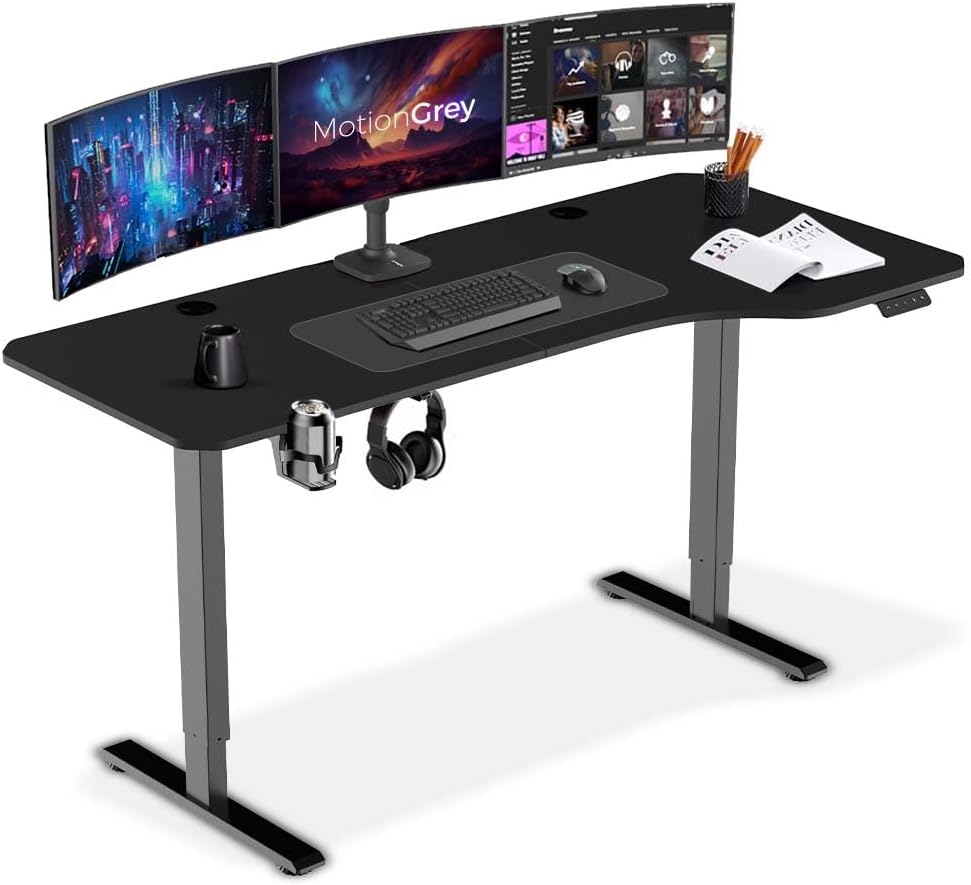
Figure 1: MOTIONGREY Electric Motor Height Adjustable Standing Desk setup with dual monitors.
Safety Information
To ensure safe operation and prevent damage, please observe the following safety guidelines:
- Weight Limit: Do not exceed the maximum weight capacity of 80 kg (176.4 lbs) on the desk surface. Overloading can cause instability and damage to the motor or frame.
- Keep children and pets away from the desk during operation.
- Ensure no obstacles are in the path of the desk's movement (up or down).
- Do not sit or stand on the desk.
- Only use the desk indoors in a dry environment.
- Disconnect power before cleaning or maintenance.
Setup and Assembly
The MOTIONGREY Electric Motor Height Adjustable Standing Desk requires assembly. It is recommended that two people assemble the desk for ease and safety.
Before You Begin:
- Unpack all components and verify against the parts list (not provided in this manual, refer to packaging).
- Ensure you have sufficient space for assembly.
- All necessary assembly tools are included with the product.
Assembly Steps (General):
- Attach the desk legs to the tabletop.
- Connect the motor and control box according to the wiring diagram (refer to separate assembly instructions if provided).
- Install the control panel/keypad on the underside of the desk.
- Secure all connections and ensure the desk is stable before plugging it in.

Figure 2: Desk dimensions and construction details. The desk features a robust steel frame.
Operating Instructions
Your MOTIONGREY standing desk features an electric motor for smooth height adjustments and a digital memory keypad for convenience.
Basic Operation:
- Adjusting Height: Use the Up and Down arrows on the control panel to raise or lower the desk to your desired height. The current height will be displayed on the digital keypad.
- Height Range: The desk can be adjusted from a minimum height of 73 cm (28 inches) to a maximum height of 118 cm (46 inches).
Memory Presets:
The MG digital memory keypad allows you to store two predefined heights for quick adjustments.
- Setting a Preset:
- Adjust the desk to your desired sitting or standing height using the Up/Down arrows.
- Press the "M" button (Memory button). The display will show "S-".
- Immediately press either "1" or "2" to save the current height to that memory position. The display will show "S-1" or "S-2" to confirm.
- Recalling a Preset:
- Simply press the "1" or "2" button. The desk will automatically move to the saved height.
The single motor design allows for a movement speed of 20mm/s with quiet operation.
Maintenance
Regular maintenance helps prolong the life and performance of your standing desk.
- Cleaning: Wipe the desk surface and frame with a soft, damp cloth. Avoid abrasive cleaners or harsh chemicals.
- Cable Management: Periodically check and organize cables to prevent tangling or damage during height adjustments.
- Fasteners: Occasionally check all screws and bolts to ensure they are tight. Retighten if necessary.
- Motor Care: The electric motor is designed for long-term use. Avoid continuous operation for extended periods without rest to prevent overheating.
Troubleshooting
If you encounter issues with your MOTIONGREY standing desk, refer to the following common problems and solutions:
| Problem | Possible Cause | Solution |
|---|---|---|
| Desk does not move. | Power cable disconnected; Overload; Motor overheating. | Check power connection. Reduce weight on desk. Allow motor to cool down for 20 minutes. |
| Desk moves unevenly or makes unusual noise. | Loose connections; Obstruction; Damaged component. | Check all assembly connections. Remove any obstructions. Contact customer support if noise persists. |
| Digital display shows an error code. | Specific error (e.g., E01, E02). | Refer to the specific error code in the full assembly manual (if available) or contact customer support. Often, unplugging and replugging the desk can reset minor errors. |
| Desk reaches maximum/minimum height but doesn't stop. | Limit switch issue; Calibration needed. | Perform a reset/calibration procedure (often involves holding down the down button until it reaches lowest point and slightly rises). Consult full manual or support. |
If the problem persists after attempting these solutions, please contact MOTIONGREY customer support.
Specifications
| Feature | Detail |
|---|---|
| Brand | MOTIONGREY |
| Model Number | SD-WT-TT-WT-160CM |
| Tabletop Dimensions (L x W x Thickness) | 160 cm x 60 cm x 1.5 cm (62.99" x 23.62" x 0.6") |
| Height Range | 73 cm - 118 cm (28.74" - 46.46") |
| Lifting Mechanism | Electric Single Motor |
| Lifting Speed | 20 mm/s |
| Maximum Weight Capacity | 80 kg (176.4 lbs) |
| Frame Material | Alloy Steel |
| Tabletop Material | Laminated Wood Pattern |
| Color | Black |
| Assembly Required | Yes (Recommended 2 people) |
Warranty and Support
MOTIONGREY is committed to providing quality products. For information regarding product warranty, returns, or technical support, please refer to the warranty card included with your purchase or visit the official MOTIONGREY website.
Protection plans are available for extended coverage. Please check with your retailer for details on 2-Year or 3-Year Protection Plans.
For direct assistance, you may contact MOTIONGREY customer service through their official channels.


