
AXIL XCOR-E NASCAR
AXIL XCOR NASCAR Wireless Earbuds User Manual
Model: XCOR-E NASCAR
Introduction
Welcome to the user manual for your AXIL XCOR NASCAR Wireless Earbuds. These earbuds are designed to provide a powerful audio experience with advanced hearing protection and enhancement technology. Featuring a true wireless design, touch controls, and robust dust and water resistance, they are ideal for various activities requiring both audio and hearing safety.
What's in the Box
Upon unboxing your AXIL XCOR NASCAR Wireless Earbuds, please ensure all components are present:
- AXIL XCOR NASCAR Wireless Earbuds (Left and Right)
- Charging Case
- USB-C Charging Cord
- Eartips (3 pairs of foam, 3 pairs of silicone for optimal fit)
- Carry Case

Image: All components included in the AXIL XCOR NASCAR Wireless Earbuds package.
Setup
1. Charging the Earbuds and Case
Before first use, fully charge the earbuds and the charging case. The charging case provides approximately 2 additional full recharges for the earbuds.
- Connect the provided USB-C charging cord to the charging port on the case and to a power source.
- The earbuds and case will fully charge in approximately 2 hours.
- Battery Life:
- 12 hours with Hear Control™ only.
- 6 hours with Bluetooth audio only.
- 4 hours with Hear Control™ and Bluetooth audio simultaneously.
2. Selecting the Right Eartips
A proper seal is crucial for both sound quality and effective hearing protection. Experiment with the included foam and silicone eartips to find the size that provides the best fit and seal for your ears.
- Foam tips are recommended for loud environments where maximum hearing protection is desired.
- Silicone tips are suitable for general listening and comfort.
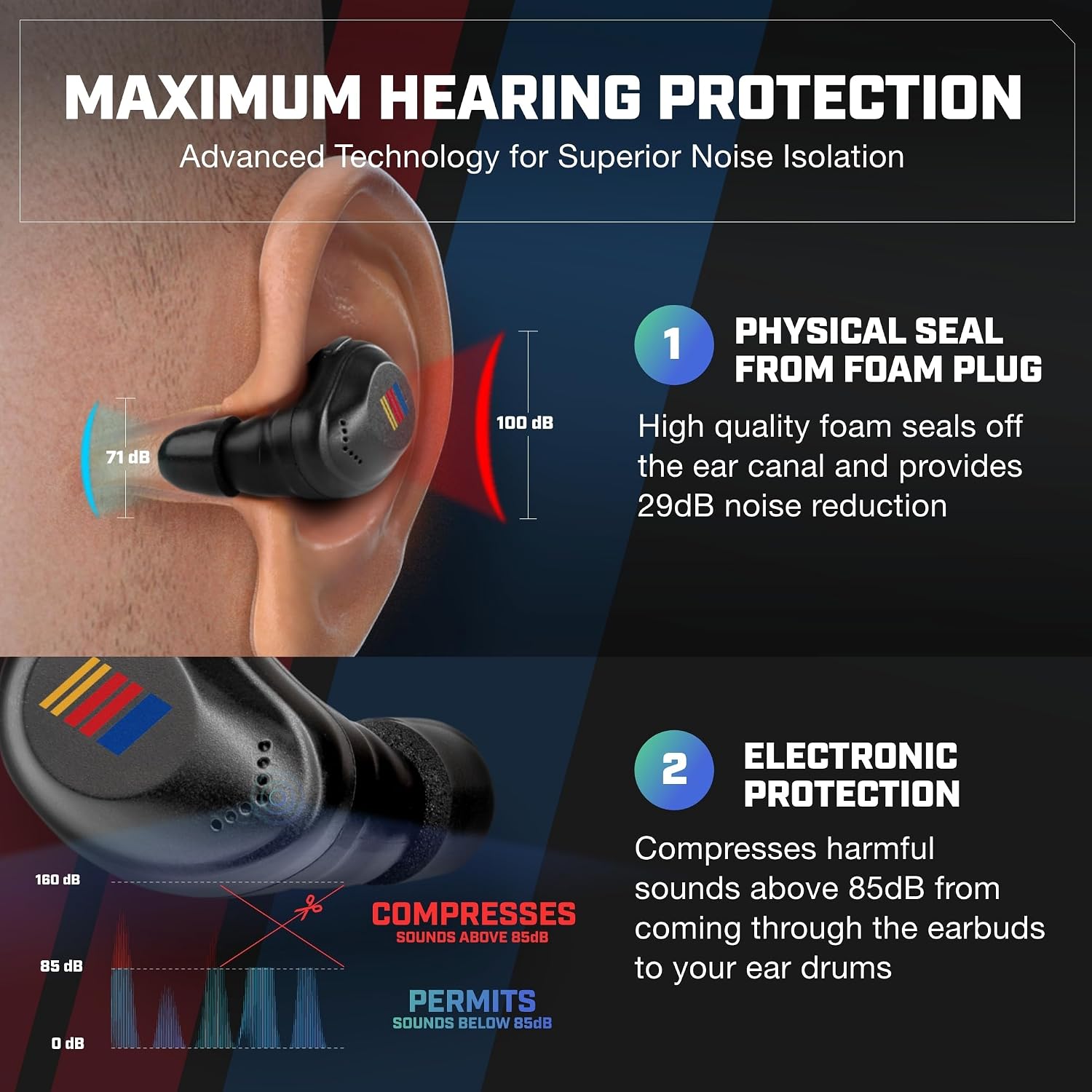
Image: Illustration of how the eartips create a physical seal for noise reduction and how the earbuds electronically compress loud sounds.
3. Bluetooth Pairing
To connect your earbuds to a device via Bluetooth:
- Ensure the earbuds are charged and removed from the charging case. They should automatically enter pairing mode.
- On your device (smartphone, tablet, etc.), go to Bluetooth settings.
- Select "AXIL XCOR" from the list of available devices.
- Once connected, you will hear an audible confirmation.

Image: The earbuds are shown connecting to a smartphone via Bluetooth, alongside examples of their use in tactical, hunting, fitness, and DIY/construction scenarios.
Operating the Earbuds
Touch Controls
The AXIL XCOR NASCAR Earbuds feature intuitive touch controls on each earbud for managing audio, calls, and hearing modes.
| Action | Function |
|---|---|
| Long Press (Touch Control Area) | Turn Hearing Protection ON / OFF |
| Single Tap | Play/Pause Audio, Answer/End Call |
| Double Tap (Right Earbud) | Next Track |
| Double Tap (Left Earbud) | Previous Track |
| Triple Tap | Activate Voice Assistant |
| Volume Button (Hear Control™ & Protection Mode) | Adjust Ambient Sound Volume |

Image: Detailed view of the earbud's touch control area and the dedicated volume button for Hear Control™ and protection modes.
Hearing Protection and Enhancement
These earbuds offer advanced hearing protection and enhancement:
- Digital Hearing Enhancement: The digital microphone provides up to 6X hearing enhancement, allowing you to hear ambient sounds clearly.
- Smart Compression: Sounds over 85 dB are automatically compressed, reducing harmful noise levels without completely blocking out your surroundings. This is ideal for environments with sudden loud noises.
- Active Noise Cancellation (ANC): ANC technology helps reduce background noise during calls or media playback, providing a focused listening experience.

Image: Overview of the earbuds' key benefits, including maximum hearing protection (up to 29 dB SNR), conversation boosting, Bluetooth connectivity, and touch controls.
Maintenance
Proper maintenance ensures the longevity and optimal performance of your earbuds.
- Cleaning: Regularly clean the earbuds and charging case with a soft, dry, lint-free cloth. For eartips, remove them and clean with mild soap and water, ensuring they are completely dry before reattaching. Do not use harsh chemicals or abrasive materials.
- Water Resistance: The earbuds are IPX5 water resistant, meaning they can withstand splashes and light rain. Do not submerge them in water. Ensure the charging port is dry before charging.
- Storage: When not in use, store the earbuds in their charging case to protect them from dust and damage. Store in a cool, dry place away from extreme temperatures.
Troubleshooting
If you encounter issues with your AXIL XCOR NASCAR Wireless Earbuds, try the following solutions:
| Problem | Solution |
|---|---|
| Earbuds not charging | Ensure the charging cable is securely connected to both the case and power source. Check if the charging contacts on the earbuds and inside the case are clean and free of debris. Try a different USB-C cable or power adapter. |
| Cannot pair with device | Ensure earbuds are out of the case and in pairing mode. Turn off and on Bluetooth on your device. Forget "AXIL XCOR" from your device's Bluetooth list and try pairing again. Ensure earbuds are sufficiently charged. |
| No sound or low volume | Check the volume level on both the earbuds (using the volume button) and your connected device. Ensure earbuds are properly seated in your ears for a good seal. Reconnect Bluetooth. |
| Hearing protection not working | Ensure the hearing protection mode is activated via the touch controls (long press). Verify that the eartips provide a tight seal in your ear canal. |
| Touch controls unresponsive | Ensure your fingers are clean and dry. Try restarting the earbuds by placing them back in the case and then taking them out again. |
Specifications
| Feature | Detail |
|---|---|
| Model Name | XCOR-E NASCAR |
| Connectivity Technology | Wireless (Bluetooth 5.2) |
| Bluetooth Range | 10 Metres |
| Noise Control | Active Noise Cancellation, Smart Compression (above 85 dB) |
| Hearing Enhancement | Up to 6X via Digital Mic |
| Water Resistance Level | IPX5 Water Resistant |
| Control Type | Touch Control, Media Control |
| Battery Life (Hear Control Only) | 12 Hours |
| Battery Life (Bluetooth Audio Only) | 6 Hours |
| Battery Life (Hear Control & BT Audio) | 4 Hours |
| Charging Time | Approximately 2 Hours (Earbuds & Case) |
| Material | Plastic |
| Item Weight | 181 g |
| Included Components | Earbuds, Charging Case, USB-C Charging Cord, Eartips |
| Recommended Uses | Exercising, Shooting, Sports |
Warranty and Support
For warranty information, technical support, or service inquiries, please refer to the official AXIL website or contact their customer support directly. Keep your proof of purchase for warranty claims.
AXIL operates with a clear vision that innovation is the heart of its business, providing product designs and advancements to the sporting goods industry.
Related documentsXCOR-E NASCAR


Ask a question about this manual
Ask about setup, troubleshooting, compatibility, parts, safety, or missing instructions. Manuals+ will review the question and use this page’s manual context to help answer it.