
1. Introduction
The Antennas Direct DAX8 is an 8-output distribution amplifier designed to boost and distribute TV signals from your indoor or outdoor antenna or CATV system to up to eight televisions. This amplifier helps overcome signal loss that can occur when distributing signals to multiple TVs or using long coaxial cables, ensuring clear and consistent picture quality and reception. It is compatible with HDTV, analog, and digital antenna installations, as well as legacy CATV systems, supporting ATSC 3.0 NEXTGEN TV, 4K, and 8K UHD signals.
The DAX8 features a precision machine-sealed zinc diecast housing, providing protection against dust, water droplets, and electrostatic discharge. It also offers excellent surge protection on all ports. While primarily recommended for indoor use, it can be installed outdoors when equipped with 75 Ohm F-termination caps, watertight F-connectors, and weather boots. For outdoor installations, a power inserter (not included) is required to supply power through the coaxial cable.
2. Product Overview
2.1 Included Components
- Antennas Direct DAX8 8-Output HDTV Distribution Amplifier
- 12V DC Power Adapter (for indoor use)
- 40-inch High-performance coaxial cable
- 2 x Wall screws
- 2 x Grounding screws
- Installation instructions
2.2 Key Features
- 8-Output Distribution: Distributes amplified signal to up to eight televisions.
- Signal Boost: Strengthens weak TV signals to improve reception and picture quality.
- Wide Frequency Range: Operates within 54-1000 MHz.
- Low Noise Figure: Less than 3 dB for minimal signal degradation.
- High Gain: Provides 6.5 dB gain per port.
- Durable Construction: Zinc diecast housing with excellent surge protection.
- Versatile Use: Suitable for indoor and outdoor (with proper weatherproofing) installations.
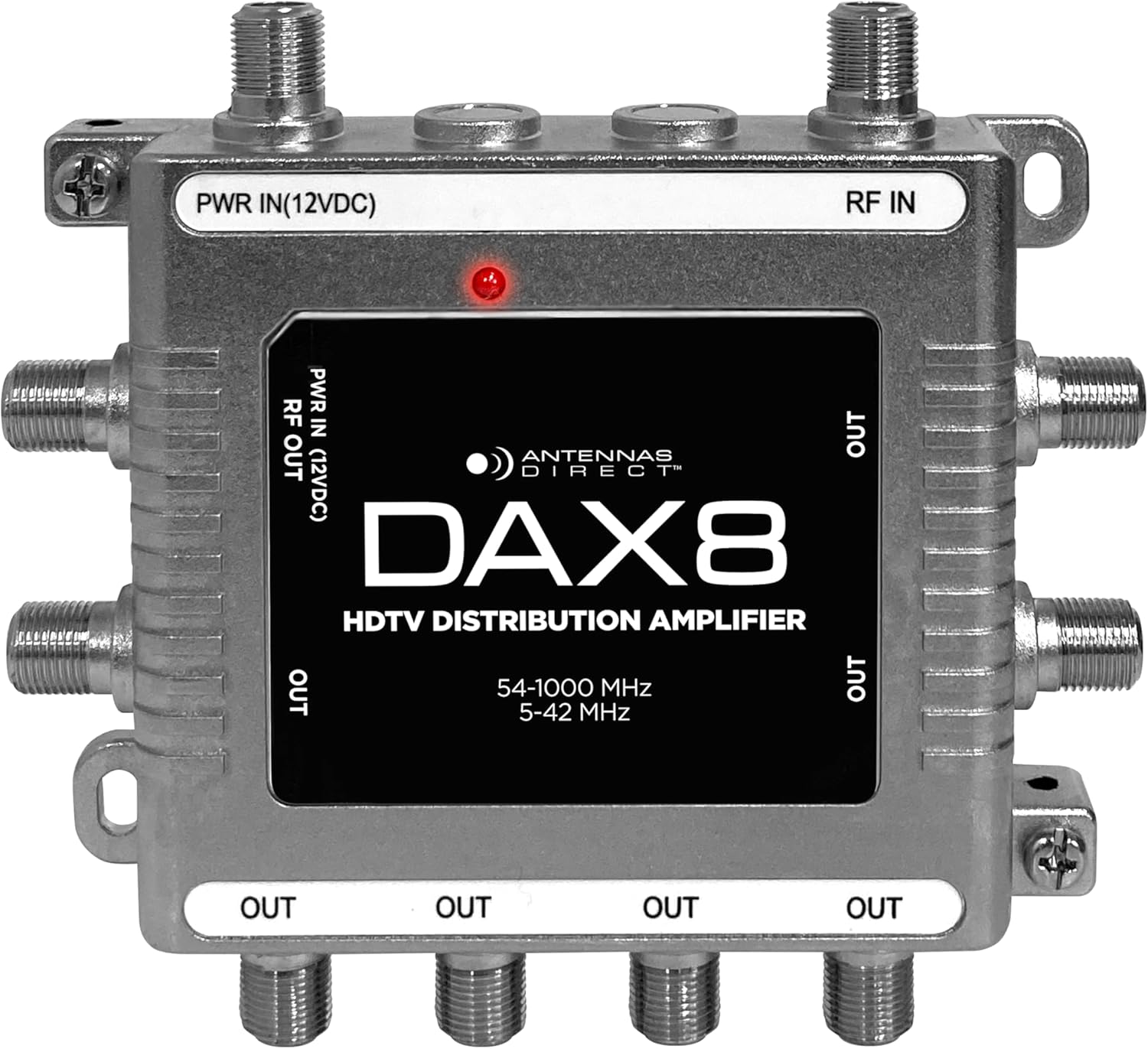
2.3 Amplifier Diagram
3. Setup and Installation
Before beginning installation, ensure all equipment is powered off. Handle coaxial cables carefully to avoid bending or damaging the center conductor.
3.1 Indoor Installation
- Mounting: Choose a dry, protected location near your antenna's main coaxial cable entry point and a power outlet. Mount the amplifier to a solid vertical or horizontal surface using the provided wall screws.
- Connect Antenna/CATV: Connect the coaxial cable from your TV antenna or CATV system to the RF IN port on the amplifier.
- Connect TVs: Connect coaxial cables from each television or digital converter box to the RF OUT ports on the amplifier. You can use up to 8 outputs.
- Connect Power: Connect the included 12V DC power adapter to the PWR IN (12VDC) port on the amplifier. Plug the power adapter into a standard electrical outlet. The LED light on the amplifier will illuminate red when power is connected.
- Grounding (Recommended): For added protection, connect a grounded copper wire (not included) to the grounding screws on the amplifier and to a suitable ground point (e.g., a cold water pipe or electrical ground rod).
3.2 Outdoor Installation (Under an Eave)
The DAX8 can be used outdoors under an eave, provided specific weatherproofing measures are taken. A power inserter (not included) is required for outdoor power delivery.
- Weatherproofing: Ensure all unused RF OUT ports are sealed with 75 Ohm F-termination caps. Use coaxial cables with watertight F-connectors and weather boots for all connections to prevent moisture ingress.
- Mounting: Mount the amplifier in a sheltered outdoor location, such as under an eave, to minimize direct exposure to elements.
- Connect Antenna/CATV: Connect the coaxial cable from your TV antenna or CATV system to the RF IN port.
- Connect TVs: Connect coaxial cables from each television to the RF OUT ports.
- Power with Inserter: Connect a power inserter (not included) to one of the coaxial cables leading from a designated output of the amplifier to an indoor location. The included 12V DC power adapter will then connect to the power inserter indoors, which will send power through the coaxial cable to the amplifier.
- Grounding: Always connect a grounded copper wire to the grounding screws on the amplifier and to a suitable outdoor ground point for protection against lightning and static discharge.
4. Operating Instructions
Once the DAX8 amplifier is installed and powered, it operates automatically to boost and distribute your TV signal.
- Power On: Ensure the 12V DC power adapter is securely connected to the amplifier and plugged into a live electrical outlet. The red LED light on the amplifier indicates that it is receiving power.
- Scan for Channels: On each connected television, perform a channel scan (also known as auto-tune or auto-program) to detect available broadcast channels. Refer to your TV's instruction manual for specific steps.
- Signal Optimization: If you experience issues with certain channels, consider adjusting the orientation of your outdoor antenna (if applicable) and re-scanning for channels.
5. Maintenance
The Antennas Direct DAX8 amplifier requires minimal maintenance.
- Regular Inspection: Periodically check all coaxial cable connections to ensure they are tight and free from corrosion, especially in outdoor installations.
- Cleaning: If necessary, gently wipe the amplifier's housing with a dry, soft cloth. Do not use liquid cleaners or solvents.
- Outdoor Protection: For outdoor installations, regularly inspect the 75 Ohm F-termination caps, watertight F-connectors, and weather boots for any signs of wear or damage. Replace them if necessary to maintain weatherproofing.
6. Troubleshooting
If you encounter issues with your DAX8 amplifier, refer to the following troubleshooting steps:
- No Power / LED Off:
- Ensure the 12V DC power adapter is securely plugged into the amplifier and a working electrical outlet.
- If using an outdoor power inserter, verify its connection and power supply.
- No Signal / Poor Picture Quality:
- Verify all coaxial cable connections are tight at the amplifier, antenna, and televisions.
- Confirm your antenna is properly aimed towards broadcast towers. Obstructions like trees and building materials can affect reception.
- Perform a channel scan on all connected televisions after installation or any adjustments.
- Check if the issue persists on all TVs or only specific ones. If only one TV, the issue might be with that TV's cable or tuner.
- Ensure the amplifier is receiving power (red LED should be on).
- Intermittent Signal:
- Check for loose connections or damaged coaxial cables.
- In outdoor installations, ensure weatherproofing is intact to prevent moisture from affecting connections.
7. Specifications
| Feature | Specification |
|---|---|
| Model Number | DAX8 |
| Number of Outputs | 8 |
| Frequency Range | 54-1000 MHz |
| Gain per Port | 6.5 dB |
| Noise Figure | <3 dB |
| Impedance | 75 Ohms |
| Power Supply | 12V DC Adapter (included) |
| Dimensions (L x W x H) | 4.53" x 4.25" x 1" |
| Weight | 9.1 ounces |
| Housing Material | Zinc Diecast |
| Surge Protection | IEEE 6KV on all ports |
| Compatibility | HDTV, Analog, Digital Antenna, Legacy CATV, ATSC 3.0, 4K, 8K UHD |
8. Warranty and Support
8.1 Warranty Information
The Antennas Direct DAX8 8-Output TV Antenna Distribution Amplifier comes with a 90-day manufacturer warranty for accessories. This warranty covers defects in materials and workmanship under normal use. Please retain your proof of purchase for warranty claims.
8.2 Customer Support
For technical assistance, troubleshooting, or warranty inquiries, please contact Antennas Direct customer support. Visit the official Antennas Direct website for contact information and additional resources.


