Introduction
This manual provides comprehensive instructions for the Samsung BN59-01330A and BN59-01330B Remote Control. It covers essential information regarding setup, operation, maintenance, and troubleshooting to ensure optimal performance and a seamless user experience with your compatible Samsung Smart TV.
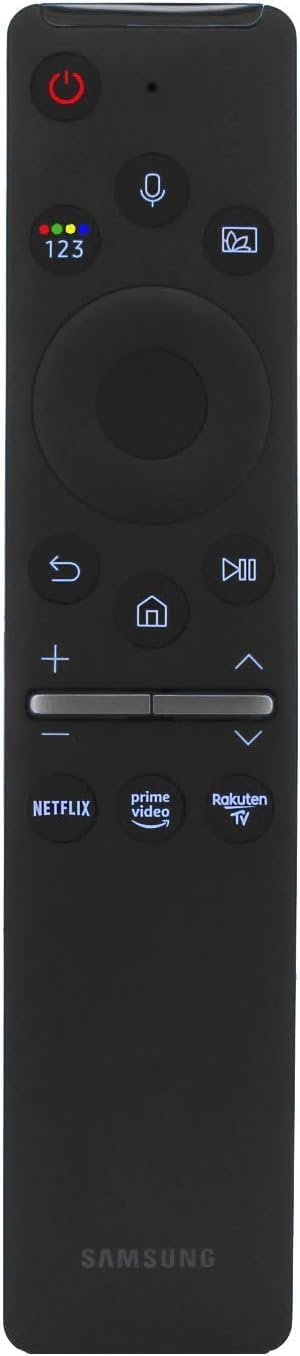
Figure 1: Samsung BN59-01330A/B Remote Control Overview
The remote control is designed for ease of use, featuring dedicated shortcut buttons for popular streaming services and voice control capabilities for hands-free navigation.
Setup
1. Battery Installation
The Samsung BN59-01330A/B remote control requires two (2) 1.5V AA Alkaline batteries. Batteries are not included with the remote control.
- Locate the battery compartment cover on the back of the remote control.
- Slide the cover downwards or press the latch (if present) to open the compartment.
- Insert two AA batteries, ensuring the positive (+) and negative (-) terminals align correctly with the indicators inside the compartment.
- Close the battery compartment cover securely until it clicks into place.
2. Pairing the Remote Control
Before using the remote control, it must be paired with your Samsung Smart TV. This process establishes a Bluetooth connection for full functionality, including voice control.
- Ensure your Samsung Smart TV is powered on.
- Point the remote control towards the TV.
- Simultaneously press and hold the Return button (curved arrow icon) and the Play/Pause button (triangle and two vertical lines icon) for 3 seconds or more.
- A pairing message will appear on your TV screen once the remote control is successfully paired.

Figure 2: Pairing Buttons (Return and Play/Pause)
Operating Instructions
Familiarize yourself with the various buttons and their functions to effectively control your Samsung Smart TV.
Button Functions:
- Power Button (circle with vertical line): Turns the TV on or off.
- Voice Control Button (microphone icon): Activates voice command functionality. Press and hold to speak your command.
- Navigation Pad (circular pad with center button): Use the directional arrows (Up, Down, Left, Right) to navigate menus and content. Press the center button to select an item.
- Return Button (curved arrow icon): Returns to the previous screen or menu.
- Home Button (house icon): Accesses the Smart Hub or Home screen.
- Play/Pause Button (triangle and two vertical lines icon): Plays or pauses media content.
- Volume Buttons (+ / -): Adjusts the TV volume. Press the top (+) to increase, bottom (-) to decrease.
- Channel Buttons (up / down arrows): Changes TV channels. Press the top arrow to go up, bottom arrow to go down.
- Netflix Button: Direct access to the Netflix application.
- Prime Video Button: Direct access to the Prime Video application.
- TV Plus Button: Direct access to the Samsung TV Plus application.
Using Voice Control:
The voice control feature allows for hands-free operation of your TV. To use it:
- Press and hold the Voice Control Button (microphone icon) on the remote.
- Speak clearly into the microphone located at the top of the remote control.
- Release the button when you have finished speaking.
You can use voice commands to search for content, change channels, adjust volume, launch applications, and more.
Maintenance
Cleaning the Remote Control:
To maintain the remote control's appearance and functionality, clean it regularly.
- Ensure the remote control is not in use and, if possible, remove the batteries before cleaning.
- Wipe the surface with a soft, dry, lint-free cloth.
- For stubborn dirt, lightly dampen the cloth with water or a mild, non-abrasive cleaner. Avoid excessive moisture.
- Do not use harsh chemicals, abrasive cleaners, or solvents, as these can damage the remote's finish or internal components.
Battery Replacement:
Replace the AA batteries when the remote control's performance degrades or it stops responding. Follow the battery installation steps outlined in the "Setup" section.
Troubleshooting
If you encounter issues with your remote control, refer to the following common problems and solutions:
| Problem | Solution |
|---|---|
| Remote control is not responding. |
|
| Voice control is not working. |
|
| Shortcut buttons (Netflix, Prime Video, TV Plus) are not working. |
|
Specifications
- Model Numbers: BN59-01330A, BN59-01330B
- Compatible Devices: Compatible with a wide range of Samsung Smart TVs, including Neo QLED, The Frame, Crystal Series Model, and specific models like UN55TU8000FXZA, UN43TU8000FXZA, etc.
- Power Supply: 2 x 1.5V AA Alkaline Battery (not included)
- Special Features: Voice Control, Dedicated Shortcut Buttons (Netflix, Prime Video, TV Plus), Bluetooth Pairing.
- Dimensions: Approximately 5 x 1 x 0.5 inches (12.7 x 2.54 x 1.27 cm)
- Weight: Approximately 2.08 ounces (59 grams)
Warranty and Support
For information regarding product warranty, technical support, or service, please refer to the documentation provided with your Samsung Smart TV or visit the official Samsung support website. This manual does not contain specific warranty terms or direct support contact details.
For further assistance, you may visit the official Samsung support page or contact their customer service.


