
1. Important Safety Instructions
When using electrical appliances, basic safety precautions should always be followed to reduce the risk of fire, electric shock, and/or injury to persons, including the following:
- Read all instructions before operating the hand mixer.
- To protect against electrical shock, do not immerse the mixer body, cord, or plug in water or other liquid.
- Close supervision is necessary when any appliance is used by or near children.
- Unplug from outlet when not in use, before putting on or taking off parts, and before cleaning.
- Avoid contact with moving parts. Keep hands, hair, and clothing, as well as spatulas and other utensils, away from beaters during operation to prevent injury and/or damage to the mixer.
- Do not operate any appliance with a damaged cord or plug, or after the appliance malfunctions or has been dropped or damaged in any manner. Contact customer service for examination, repair, or electrical or mechanical adjustment.
- The use of attachments not recommended or sold by the manufacturer may cause fire, electric shock, or injury.
- Do not use outdoors.
- Do not let cord hang over edge of table or counter.
- Do not let cord contact hot surfaces, including a stove.
- Remove beaters from mixer before washing.
2. Product Overview
The IDO 500 Watt 5-Speed Hand Mixer is designed for efficient mixing, whipping, and kneading tasks in your kitchen. It features a powerful motor, multiple speed settings, and durable stainless steel attachments.

Image: The IDO 500 Watt Hand Mixer in black, shown with its stainless steel beaters and dough hooks detached and placed in front of the mixer unit.
Components:
- Mixer Body: Contains the motor, speed control, and attachment ports.
- Beaters (Stainless Steel): Ideal for whipping eggs, cream, and mixing cake batters.
- Dough Hooks (Stainless Steel): Designed for kneading dough for bread, pizza, and pastries.
- Speed Selector: Knob to adjust between 5 speed settings.
- Turbo Function Button: Provides an extra burst of power at any speed setting.
- Eject Button: Releases the attachments.
3. Setup and Assembly
Before first use, ensure all packaging materials are removed and clean the attachments as described in the 'Maintenance and Cleaning' section.
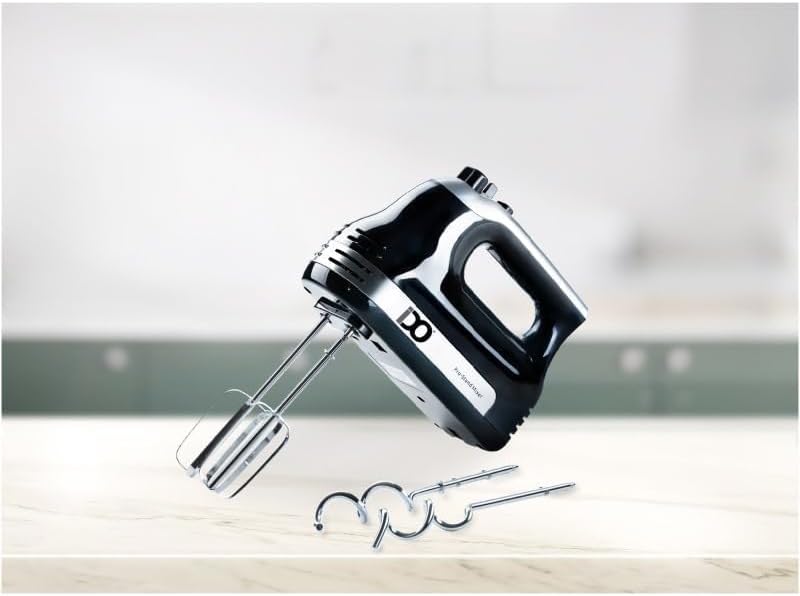
Image: The IDO Hand Mixer unit with its beaters and dough hooks laid out, illustrating the separate components before assembly.
Attaching Beaters/Dough Hooks:
- Ensure the mixer is unplugged from the power outlet and the speed selector is set to '0' (off).
- Insert the beaters or dough hooks into the openings on the underside of the mixer body. Push firmly until they click into place. Note that beaters are identical and can be inserted into either hole. Dough hooks are typically designed to fit specific holes; ensure they are correctly oriented.
- Gently tug on the attachments to ensure they are securely locked.
Power Connection:
Once attachments are securely in place, plug the power cord into a standard electrical outlet. The mixer is now ready for use.
4. Operating Instructions
The IDO Hand Mixer offers 5 speed settings and a Turbo function for versatile mixing.

Image: The IDO Hand Mixer positioned on a kitchen counter next to a bowl of whipped cream and dough hooks, demonstrating its use in a culinary setting.
Using the Speed Settings:
- With the appropriate attachments inserted and the mixer plugged in, immerse the beaters/dough hooks into the ingredients.
- Turn the speed selector knob to your desired speed setting (1-5). Start with a lower speed to prevent splashing and gradually increase as needed.
- Speed 1-2: Ideal for mixing dry ingredients, folding, and slow stirring.
- Speed 3-4: Suitable for mixing batters, gravies, and mashing potatoes.
- Speed 5: Best for whipping cream, eggs, and kneading dough with dough hooks.
Using the Turbo Function:
Press and hold the 'Turbo' button for an immediate burst of maximum power at any speed setting. Release the button to return to the selected speed. This function is useful for quickly incorporating ingredients or achieving extra fluffiness.
Ejecting Attachments:
After use, ensure the speed selector is set to '0' (off) and the mixer is unplugged. Press the eject button firmly to release the beaters or dough hooks. They will pop out for easy removal and cleaning.
5. Maintenance and Cleaning
Proper cleaning and maintenance will ensure the longevity and optimal performance of your IDO Hand Mixer.
Cleaning the Mixer Body:
- Always unplug the mixer before cleaning.
- Wipe the exterior of the mixer body with a damp cloth. Do not use abrasive cleaners or scourers.
- Never immerse the mixer body in water or any other liquid.
- Ensure the mixer body is completely dry before storing or next use.
Cleaning Attachments (Beaters and Dough Hooks):
- After ejecting, wash the stainless steel beaters and dough hooks in warm, soapy water.
- Rinse thoroughly and dry immediately to prevent water spots or corrosion.
- These attachments are generally dishwasher safe, but hand washing is recommended for best care.
Storage:
Store the mixer and its attachments in a clean, dry place. Ensure the cord is neatly wrapped and not kinked.
6. Troubleshooting
If you encounter any issues with your hand mixer, refer to the following common problems and solutions:
| Problem | Possible Cause | Solution |
|---|---|---|
| Mixer does not turn on. | Not plugged in; power outlet malfunction; speed selector not at '0' before turning on. | Ensure plug is securely in outlet; test outlet with another appliance; set speed selector to '0' then select desired speed. |
| Attachments do not stay in place. | Not inserted correctly; eject button partially pressed. | Push attachments firmly until they click; ensure eject button is not stuck. |
| Mixer slows down during operation. | Overloading with ingredients; too thick mixture. | Reduce the amount of ingredients; add liquid to thin the mixture; use Turbo function for short bursts. |
| Unusual noise or smell. | Internal malfunction; motor overheating. | Immediately unplug the mixer. Allow it to cool down. If the problem persists, discontinue use and contact customer support. |
If the problem persists after trying these solutions, please contact customer support.
7. Specifications
- Model: HM500-BK
- Power: 500 Watt
- Speed Settings: 5 Speeds + Turbo Function
- Material: Plastic (Body), Stainless Steel (Beaters & Dough Hooks)
- Color: Black
- Item Weight: Approximately 249 g
- Item Dimensions (D x W x H): Approximately 9D x 9W x 9H centimeters
- Country of Origin: Egypt
8. Warranty and Support
Warranty Information:
This IDO Hand Mixer comes with a 2-Year Warranty from the date of purchase. This warranty covers manufacturing defects and faulty workmanship under normal household use. It does not cover damage resulting from misuse, accident, alteration, neglect, or unauthorized repair.
Customer Support:
For warranty claims, technical assistance, or any questions regarding your IDO Hand Mixer, please contact our customer support team. Please have your model number (HM500-BK) and proof of purchase ready when contacting support.
Contact Information:
Email: support@idoappliances.com
Phone: +1-800-IDO-MIXER (Example, please refer to your purchase documentation for actual contact details)