
1. Introduction
The ATN 10x42 Laser Ballistics Binocular is an advanced optical device combining high-quality 10x magnification binoculars with a precise laser rangefinder, Bluetooth connectivity, and an integrated ballistic calculator. This manual provides essential information for the proper setup, operation, and maintenance of your device to ensure optimal performance and longevity.
This binocular is designed for users requiring accurate distance measurements and ballistic solutions in various outdoor environments, particularly for hunting and observation. Its robust, waterproof construction and ergonomic design ensure reliable use in challenging conditions.
2. Package Contents
Before proceeding, please verify that all items are present in your package:
- ATN 10x42 Laser Ballistics Binocular
- Protective Carrying Case
- Neck Strap
- Lens Cleaning Cloth
- USB-C Charging Cable
- Quick Start Guide
3. Setup
3.1. Charging the Device
Before initial use, fully charge the internal battery. Connect the provided USB-C cable to the charging port on the binocular and to a standard USB power source (e.g., wall adapter, computer USB port). The charging indicator will illuminate during charging and turn off when complete.
3.2. Adjusting Interpupillary Distance
Hold the binoculars up to your eyes. Adjust the distance between the two barrels by moving them closer or further apart until you see a single, clear circular field of view. This ensures comfortable viewing and prevents eye strain.
3.3. Diopter Adjustment
To achieve a sharp image, adjust the diopter for your individual eyesight. Close your right eye and look through the left eyepiece. Rotate the central focus wheel until the image is sharp. Then, close your left eye and look through the right eyepiece. Rotate the diopter adjustment ring on the right eyepiece until the image is sharp. The central focus wheel will then adjust both eyepieces simultaneously.

Image: Close-up view of the ATN 10x42 Binocular eyepiece, showing the diopter adjustment ring and the central focus wheel. This image illustrates the components used for adjusting focus and interpupillary distance.
3.4. Attaching the Neck Strap
Thread the neck strap through the attachment points on the binocular body. Ensure it is securely fastened to prevent accidental drops.
4. Operating the Device
4.1. Powering On/Off
Press and hold the power button (typically located on the top of the device) for a few seconds to power on the binocular. Repeat the action to power off.
4.2. Basic Observation
Use the 10x magnification to observe distant objects. Adjust the central focus wheel for clarity. The 42mm objective lenses provide bright images even in lower light conditions.
4.3. Using the Laser Rangefinder
To activate the laser rangefinder, aim the binocular at your target and press the dedicated rangefinder button. The measured distance will be displayed in the field of view. The device can range targets up to 3000 meters.
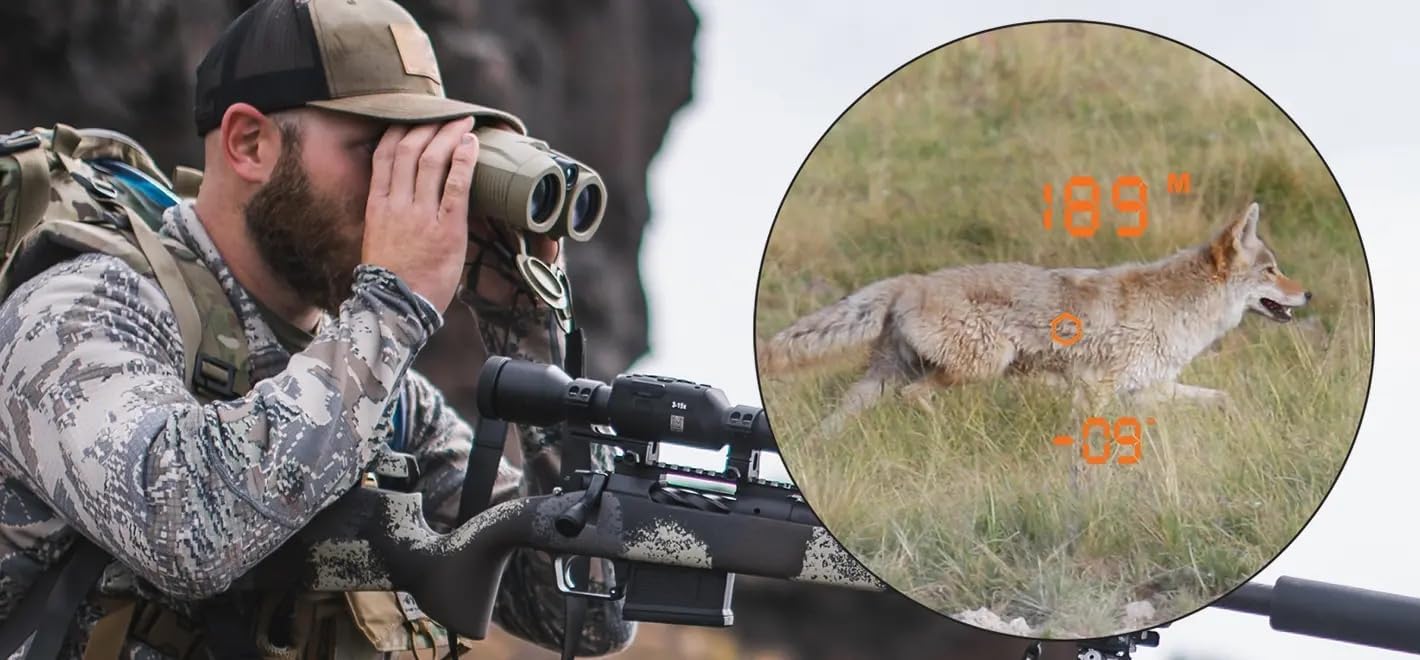
Image: A man in camouflage using the ATN 10x42 binoculars in a field. An inset shows the view through the binoculars, displaying a coyote with a digital overlay indicating a ranged distance of 189 meters and an angle of -09 degrees.

Image: A graphic titled 'LASER RANGEFINDER 3000 Y/M' showing a diagram of the binocular's laser rangefinder mechanism and an example of its output, ranging a coyote at a specific distance.
4.4. Bluetooth Connectivity and Mobile App
The ATN 10x42 binocular features Bluetooth for connecting to a mobile application. Download the official ATN app from your device's app store. Follow the in-app instructions to pair your binocular. This connection enables the ballistic calculator and allows for advanced settings and data management.

Image: The ATN 10x42 Laser Ballistics Binocular positioned next to a modern smartphone, illustrating its capability for mobile application connectivity via Bluetooth.
4.5. Ballistic Calculator Integration
When paired with the mobile app, the binocular's laser rangefinder data is fed into the ballistic calculator. This provides real-time firing solutions and turret adjustments for both ATN Smart Scopes and traditional rifle scopes. Ensure your ballistic profile is correctly configured in the mobile app for accurate calculations.
4.6. Waterproof Construction (IPX6)
The ATN 10x42 binocular is designed with IPX6 waterproof construction, meaning it is protected against powerful water jets. While it can withstand rain and splashes, it is not intended for submersion. Always ensure all port covers are securely closed to maintain water resistance.

Image: A graphic titled 'WATERPROOF CONSTRUCTION' featuring the ATN 10x42 Binocular covered in water droplets, emphasizing its IPX6 rating for protection against water.
5. Maintenance
5.1. Cleaning Lenses
Use the provided lens cleaning cloth or a soft, lint-free cloth to gently wipe the objective and eyepiece lenses. For stubborn smudges, use a specialized optical lens cleaning solution. Avoid using abrasive materials or harsh chemicals, as these can damage the lens coatings.
5.2. Cleaning the Body
Wipe the binocular body with a soft, damp cloth. For the rubberized surface, a mild soap solution can be used if necessary. Ensure the device is completely dry before storage.

Image: A graphic titled 'TACTICAL COMFORT' highlighting the rubberized surface of the ATN 10x42 Binocular, showing close-ups of the texture and how it provides a secure grip.
5.3. Storage
When not in use, store the binocular in its protective carrying case in a cool, dry place, away from direct sunlight and extreme temperatures. Ensure the lens caps are in place to protect the optics.
6. Troubleshooting
- Device not powering on: Ensure the battery is fully charged. If the issue persists, contact customer support.
- Unclear image: Adjust the interpupillary distance and diopter settings as described in Section 3. If the image remains blurry, clean the lenses.
- Rangefinder not working: Ensure the rangefinder button is pressed correctly. Verify there are no obstructions between the binocular and the target. The rangefinder may struggle with highly reflective or non-reflective surfaces, or in heavy fog/rain.
- Bluetooth connectivity issues: Ensure Bluetooth is enabled on your mobile device and the binocular. Try restarting both devices. Make sure the ATN app is up to date.
- Inaccurate ballistic calculations: Double-check your ballistic profile settings in the mobile app, including bullet type, weight, muzzle velocity, and environmental factors.
7. Specifications
| Feature | Specification |
|---|---|
| Brand | ATN |
| Model Name | 10 x 42 |
| Magnification | 10 x |
| Objective Lens Diameter | 42 Millimeters |
| Special Feature | Built-In Rangefinder |
| Rangefinder Distance | Up to 3000 meters |
| Eye Relief | 19 Millimeters |
| Material | ABS plastic and rubber |
| Color | Green |
| Waterproof Rating | IPX6 |
| Specific Uses | Hunting |

Image: A graphic titled 'COMPACT SIZE' displaying the ATN 10x42 Binocular with its dimensions (width: 5.1"/129mm, height: 2.36"/60mm, length: 5.7"/145mm) and weight (25.6 oz/725g).
8. Warranty and Support
Your ATN 10x42 Laser Ballistics Binocular is covered by a limited warranty against manufacturing defects. Please refer to the warranty card included in your package or visit the official ATN website for detailed warranty terms and conditions. For technical support, service, or inquiries, please contact ATN customer service through their official channels.

