
1. Introduction
The Minolta MND60V VLOG Camera Kit is designed for capturing high-quality photos and videos. This kit includes a 64MP camera capable of 4K Ultra HD video at 60 frames per second, along with essential accessories such as a tripod, external microphone, LED light, and wide-angle/macro lenses. This manual provides instructions for setting up, operating, and maintaining your camera kit to ensure optimal performance.

Image 1.1: The Minolta MND60V VLOG Camera Kit, showcasing its core capabilities for high-resolution photography and video recording.
2. Package Contents
Before you begin, please verify that all items listed below are included in your package:
- Minolta MND60V Camera
- Accessory Mount Arms
- LED Video Light
- Carrying Case
- Tripod Pouch
- Stereo Microphone
- Shoulder Strap
- 32GB Memory Card
- Tripod with Remote Control
- Lithium-Ion Battery
- AC Adaptor
- Wide-angle + Macro Lens
- USB Cables
- User Manual (this document)
- Warranty Card

Image 2.1: All components included in the Minolta MND60V VLOG Camera Kit.
3. Setup
3.1 Charging the Battery
- Insert the Lithium-Ion Battery into the camera.
- Connect the AC Adaptor to the camera's USB port and plug it into a power outlet.
- The charging indicator light will illuminate. Once fully charged, the light will change or turn off.
3.2 Inserting the Memory Card
The camera supports Micro SD cards. A 32GB card is included.
- Locate the memory card slot on the camera (refer to the camera diagram).
- Insert the Micro SD card with the gold contacts facing down until it clicks into place.
- To remove, gently press the card until it springs out.
3.3 Attaching Accessories
The kit includes various accessories to enhance your recording experience.

Image 3.1: Minolta MND60V camera with all accessories mounted.
- Tripod: Attach the camera to the tripod's mounting screw. The tripod can be used as a stand, a selfie stick, or a power source with its built-in 2,500mAh battery.
- External Microphone: Mount the stereo microphone onto one of the accessory mount arms and plug its cable into the camera's microphone input jack.
- LED Video Light: Mount the LED light onto another accessory mount arm. Ensure it is charged or has fresh batteries if applicable.
- Wide-angle + Macro Lens: Screw the desired lens onto the front of the camera's main lens.
4. Operating the Camera
4.1 Power On/Off
Press and hold the power button located on the camera body to turn the camera on or off.
4.2 Basic Photo and Video Recording
- Mode Selection: Use the mode dial or menu to select between photo and video modes.
- Framing: Use the 3-inch LCD screen to compose your shot. The screen can be flipped for self-recording.
- Recording/Shutter: Press the dedicated record button for video or the shutter button for photos.
4.3 Using the LCD Screen
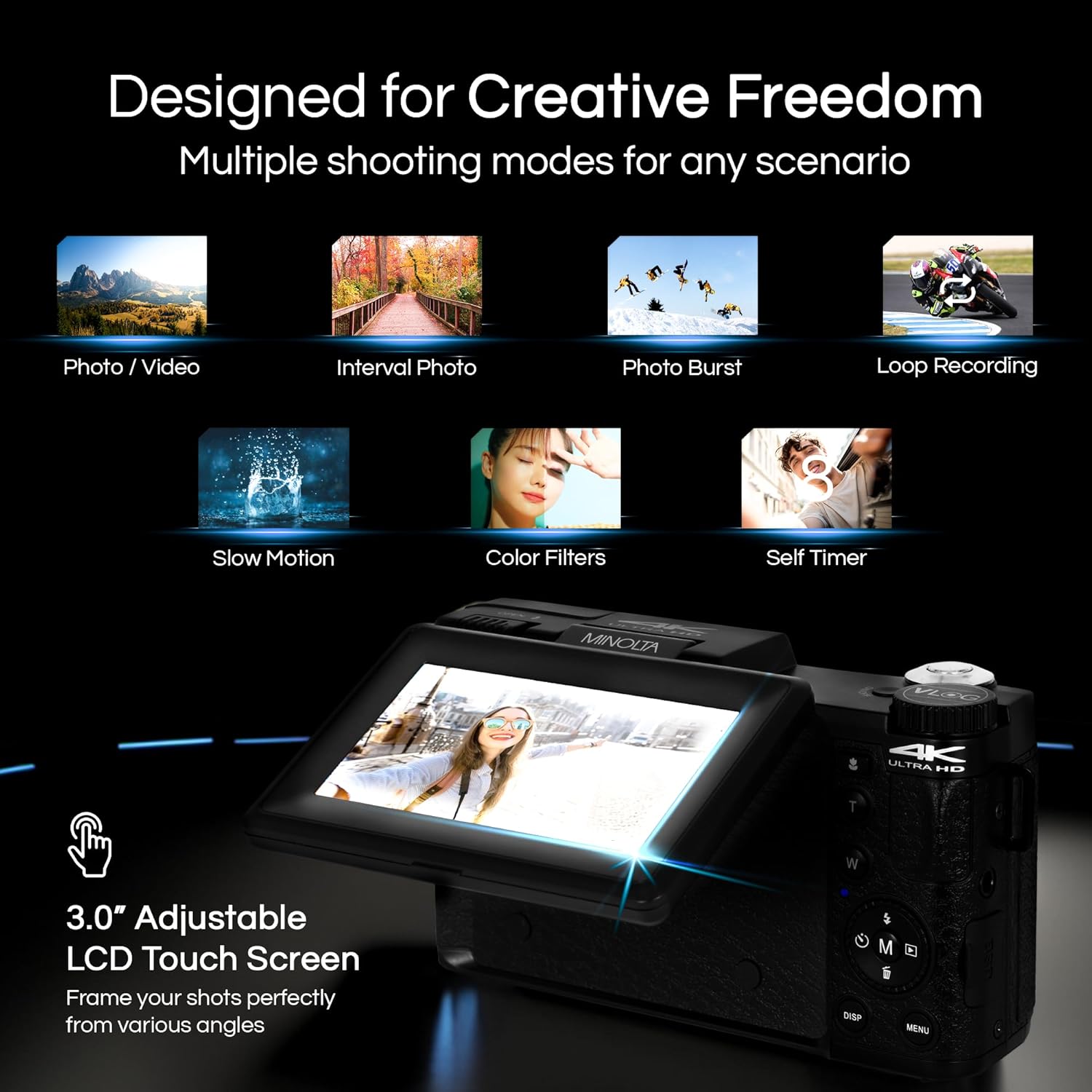
Image 4.1: The adjustable LCD screen showing various shooting modes.
The 3-inch LCD screen provides a live view, access to menus, and playback options. It can be rotated and flipped, making it suitable for vlogging and shooting from various angles. Navigate menus using the touch screen or physical buttons.
4.4 Zoom Function
The camera features 16x digital zoom. Use the zoom lever (often marked 'W' for Wide and 'T' for Telephoto) to adjust the focal length. Note that digital zoom may reduce image quality compared to optical zoom.

Image 4.2: Example of using digital zoom to capture distant details.
4.5 Special Features and Modes

Image 4.3: Icons illustrating the camera's creative modes.
The MND60V offers several creative modes:
- Slow Motion: Records video at a higher frame rate for slow-motion playback.
- Loop Recording: Continuously records video, overwriting the oldest files when the memory card is full.
- Time-Lapse: Captures a series of photos at set intervals and combines them into a video.
- Scene Selection: Pre-set modes optimized for specific shooting conditions (e.g., portrait, landscape).
- Self-Timer: Delays the shutter release for a few seconds, allowing you to get into the shot.
4.6 Using the Remote Control
The included tripod features a built-in wireless remote. This allows you to start/stop recording or take photos from a distance, ideal for group shots or vlogging.
4.7 Transferring Files
Connect the camera to a computer using the provided USB cable. The camera will appear as a removable drive, allowing you to copy photos and videos to your computer.
5. Maintenance
5.1 Cleaning the Camera
- Use a soft, dry cloth to clean the camera body.
- For the lens, use a specialized lens cleaning cloth and solution. Avoid touching the lens surface with your fingers.
- Do not use harsh chemicals or abrasive materials.
5.2 Battery Care
- Charge the battery fully before first use.
- Store the battery in a cool, dry place when not in use.
- Avoid exposing the battery to extreme temperatures.
5.3 Storage
When not in use, store the camera and its accessories in the provided carrying case to protect them from dust, moisture, and physical damage.
6. Troubleshooting
If you encounter issues with your Minolta MND60V camera, refer to the following common problems and solutions:
| Problem | Possible Cause | Solution |
|---|---|---|
| Camera does not power on. | Battery is drained or incorrectly inserted. | Ensure battery is fully charged and correctly inserted. |
| Photos/Videos are blurry. | Autofocus issue, insufficient light, or camera shake. | Ensure proper lighting. Allow camera to focus before capturing. Use the tripod for stability. Avoid excessive digital zoom in low light. |
| Battery drains quickly. | Frequent use of screen/LED light, cold environment, or aging battery. | Reduce screen brightness. Turn off LED light when not needed. Keep battery warm in cold conditions. Consider a replacement battery if performance significantly degrades. |
| Memory card error. | Card is full, corrupted, or incompatible. | Format the memory card (this will erase all data). Try a different compatible Micro SD card. |
| No audio in video recordings. | External microphone not connected or faulty. | Ensure the external microphone is securely plugged into the camera's microphone input. Check microphone settings in the camera menu. |
7. Specifications
Key technical specifications for the Minolta MND60V VLOG Camera Kit:
| Feature | Specification |
|---|---|
| Model Number | MND60V |
| Effective Still Resolution | 64 MP |
| Video Resolution | 4K (3840 Pixels Effective Video Resolution) |
| Video Frame Rate | 60 FPS (for 4K) |
| Photo Sensor Technology | CMOS (2/3-inch Photo Sensor Size) |
| Display | 3 Inches LCD Screen |
| Focus Type | Auto Focus |
| Digital Zoom | 16x |
| Lens Type | Wide Angle (Minimum/Maximum Focal Length: 3.95 mm) |
| Maximum Aperture | 1.8 f |
| Image Stabilization | Digital |
| Flash Memory Type | Micro SD |
| Connectivity Technology | USB |
| Video Capture Format | MP4 |
| Supported Audio Format | AAC |
| Supported Image Format | JPEG |
| Power Source | Lithium-Ion Battery (1 AAA battery required for remote, included) |
| Item Weight | 3.5 Pounds |
| Color | Black |
| Features | Anti-Shake, Built-In Flash, Microphone Input, Remote Control, Slow Motion, Time Lapse, Timer |
8. Warranty Information
The Minolta MND60V VLOG Camera Kit comes with a Limited 1 Year Manufacturer Warranty. Please refer to the included Warranty Card for detailed terms and conditions, including coverage, limitations, and how to make a claim.
9. Customer Support
For further assistance, technical support, or inquiries regarding your Minolta MND60V VLOG Camera Kit, please visit the official Minolta website or contact their customer service department. Contact information can typically be found on the warranty card or the manufacturer's website.
