
SilverStone SST-SG17B
SilverStone Technology SUGO 17 Computer Chassis User Manual
Model: SST-SG17B | Brand: SilverStone
Introduction
The SilverStone SUGO 17 is a premium shoebox-shaped computer chassis designed for enthusiasts seeking a balance between compact size and high-performance PC builds. This manual provides essential information for setting up, operating, and maintaining your SUGO 17 chassis, ensuring optimal performance and longevity.

Figure 1: The SilverStone SUGO 17 Black Premium shoebox-shaped computer chassis.
Setup and Installation
This section guides you through the installation of components into your SUGO 17 chassis.
1. Chassis Overview and Panel Removal
The SUGO 17 features a modular design, allowing for easy removal of all panels to streamline the build process and facilitate future upgrades. This provides excellent accessibility to all internal components.

Figure 2: Exploded view demonstrating the modular design and removable panels of the SUGO 17 chassis.
To access the interior, carefully remove the side, top, and front panels. Refer to the chassis manual for specific instructions on panel removal mechanisms.
2. Motherboard Installation
The SUGO 17 supports Micro-ATX, Mini-ITX, and Mini-DTX motherboards. Ensure your motherboard is compatible with the chassis before installation.
- Compatible Motherboard Form Factors: Micro-ATX (9.6" x 9.6"), Mini-DTX (8" x 6.7"), Mini-ITX (6.7" x 6.7").
- The chassis features a 180-degree motherboard orientation.

Figure 3: Compatibility diagram for motherboards, graphics cards, and CPU coolers within the SUGO 17 chassis.
3. Power Supply Unit (PSU) Installation
The SUGO 17 offers versatile PSU support, accommodating SFX, SFX-L, and ATX power supplies. This allows for flexibility when migrating from larger systems or choosing new components.
- Supported PSU Types: SFX, SFX-L, ATX.
- The power supply mounts at the rear of the chassis.

Figure 4: Illustration of PSU compatibility (SFX and ATX) and maximum graphics card length (400mm).
4. Storage Device Installation
The chassis provides flexible storage options:
- Supports 2 x 2.5" SSDs and 1 x 3.5" HDD,
OR - Supports 3 x 2.5" SSDs.

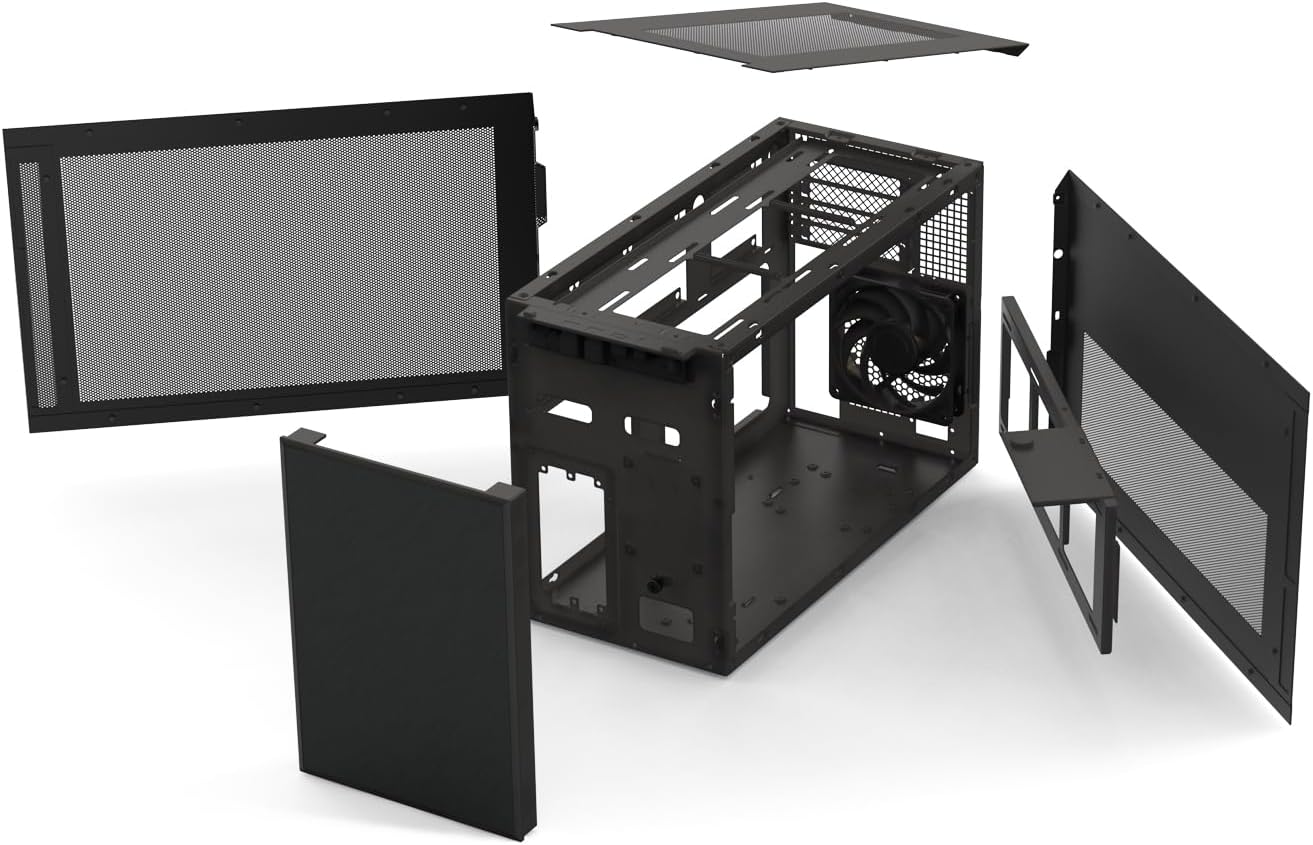
Figure 5: Mounting brackets for 2.5" SSDs (left) and 3.5" HDDs (right).
5. Graphics Card Installation
The SUGO 17 supports high-end graphics cards up to 400mm in length. The 180-degree motherboard orientation allows the graphics card to intake air from the top and exhaust it sideways, optimizing airflow.
6. Cooling System Setup (Fans and Radiators)
The chassis is designed for superior cooling performance with dedicated airflow paths for both CPU and GPU, preventing heat overlap. It can accommodate a maximum of 11 fans and dual 360mm liquid cooling radiators.
- GPU Airflow: Intakes air from the top and exhausts sideways, assisted by 3 x 120mm included fans and elongated side panel vents (with 4 x 80mm fan mounts).
- CPU Airflow: Intakes air from the right side and exhausts out the rear. The right side fan bracket holds 3 x 120mm fans, with an additional 120mm fan mount at the rear.
- Total Fan Capacity: Up to 11 fans (7 x 120mm + 4 x 80mm).
- Radiator Support: Accommodates a single 360mm liquid cooling radiator for each component (CPU and GPU) simultaneously.

Figure 6: Component-focused cooling design with dedicated airflow paths for CPU and GPU.

Figure 7: Unparalleled cooling efficiency diagram, detailing fan and radiator placement options.

Figure 8: Internal view showing the fan bracket, capable of holding multiple fans for enhanced cooling.
7. Front I/O Port Connection
The front I/O panel provides convenient access to essential ports:
- 1 x USB Type-C port
- 2 x USB 3.0 ports
- 1 x Combo audio jack

Figure 9: Close-up view of the front I/O ports, including USB Type-C, USB 3.0, and audio jack.
Operating Guidelines
Once all components are installed, ensure all cables are properly connected and secured. The SUGO 17's design prioritizes efficient airflow, so avoid obstructing the ventilation areas. For optimal performance, ensure all installed fans are operating correctly and configured for the intended airflow direction (intake/exhaust).
Maintenance
Regular maintenance helps preserve the performance and lifespan of your SUGO 17 chassis and its components.
- Dust Cleaning: Periodically clean dust filters and internal components using compressed air. Dust accumulation can impede airflow and lead to overheating.
- Cable Management: Ensure cables are neatly managed to prevent obstruction of airflow and fan blades.
- Ventilation: Keep the chassis in a well-ventilated area, away from walls or other objects that might block airflow.
Troubleshooting
If you encounter issues with your system after building it in the SUGO 17 chassis, consider the following common troubleshooting steps:
- No Power:
- Check all power connections, including the PSU to wall outlet, PSU to motherboard, and front panel power switch header.
- Ensure the PSU switch is in the 'ON' position.
- Overheating:
- Verify all fans are spinning and installed in the correct orientation for optimal airflow.
- Clean any dust buildup on fans, radiators, and filters.
- Ensure CPU cooler and GPU cooler are properly seated and making good contact.
- Component Fit Issues:
- Double-check component dimensions against the chassis specifications (e.g., GPU length, CPU cooler height).
- Ensure standoffs are correctly installed for the motherboard.
For more complex issues, consult the individual component manuals or SilverStone's official support resources.
Specifications
| Feature | Specification |
|---|---|
| Model Name | SUGO 17 |
| Item Model Number | SST-SG17B |
| Dimensions (LxWxH) | 17.76" x 7.95" x 11.26" (451mm x 202mm x 286mm) |
| Item Weight | 15.42 pounds (7 kg) |
| Material | Alloy Steel, Aluminum, Plastic |
| Motherboard Compatibility | Micro-ATX, Mini-ITX, Mini-DTX |
| PSU Compatibility | ATX, SFX, SFX-L |
| GPU Length Support | Up to 400mm |
| Storage Bays | 2 x 2.5" SSDs + 1 x 3.5" HDD OR 3 x 2.5" SSDs |
| Fan Capacity | Max. 11 fans (7 x 120mm + 4 x 80mm) |
| Radiator Support | Dual 360mm (one for CPU, one for GPU) |
| Front I/O Ports | 1 x USB Type-C, 2 x USB 3.0, 1 x Combo Audio |
| Color | Black |

Figure 10: Dimensional specifications of the SUGO 17 chassis.
Warranty and Support
SilverStone Technology provides a standard warranty for its products. For detailed warranty terms and conditions, please refer to the official SilverStone website or the warranty card included with your product.
For technical support, product inquiries, or to access additional resources, please visit the official SilverStone website or contact their customer service department.
Official SilverStone Store: SilverStone Store on Amazon
Ask a question about this manual
Ask about setup, troubleshooting, compatibility, parts, safety, or missing instructions. Manuals+ will review the question and use this page’s manual context to help answer it.