1. Introduction
Thank you for choosing the Orange Rocker 32 30W 2x10 Tube Guitar Combo Amplifier. This amplifier is designed to deliver exceptional tone and versatility, featuring a true stereo valve configuration, two distinct channels, and a stereo effects loop. This manual provides essential information for safe operation, setup, and maintenance of your amplifier.
2. Safety Information
Please read and understand all safety instructions before operating your amplifier. Retain this manual for future reference.
- Electrical Safety: Always connect the amplifier to a grounded power outlet. Do not expose the amplifier to rain or moisture. Disconnect the power cord before cleaning or servicing.
- Tube Amplifier Precautions: Tube amplifiers generate significant heat. Ensure adequate ventilation around the unit. Do not block ventilation openings. Tubes can be hot; avoid touching them during operation or immediately after shutdown.
- Hearing Protection: This amplifier can produce high sound pressure levels. Prolonged exposure to high volume can cause permanent hearing damage. Use appropriate hearing protection.
- Servicing: Refer all servicing to qualified service personnel. Do not attempt to service the amplifier yourself.
3. What's in the Box
Upon unpacking, please verify that all items listed below are present:
- Orange Rocker 32 30W 2x10 Tube Guitar Combo Amplifier, Black
- Pig Hog “Black Woven” Instrument Cable
- 12-Pack Guitar Picks
- Liquid Audio Polishing Cloth
- Power Cable

Image: The Orange Rocker 32 amplifier shown with its bundled accessories: a Pig Hog instrument cable, a variety pack of guitar picks, and a Liquid Audio polishing cloth.
4. Setup
Follow these steps to set up your Orange Rocker 32 amplifier:
- Placement: Place the amplifier on a stable, level surface, ensuring adequate space for ventilation. Avoid placing it near heat sources or in direct sunlight.
- Power Connection: Ensure the amplifier's power switch is in the 'OFF' position. Connect the supplied power cable to the amplifier's IEC inlet and then to a grounded electrical outlet.
- Instrument Connection: Connect your guitar to the 'INPUT' jack on the front panel using a high-quality instrument cable (such as the included Pig Hog cable).
- External Speakers (Optional): If using external speaker cabinets, ensure they are correctly impedance-matched and connected to the appropriate speaker outputs on the rear panel. Refer to the amplifier's specifications for impedance requirements.

Image: Front view of the Orange Rocker 32 amplifier, showcasing its iconic orange grille cloth and black Tolex finish.
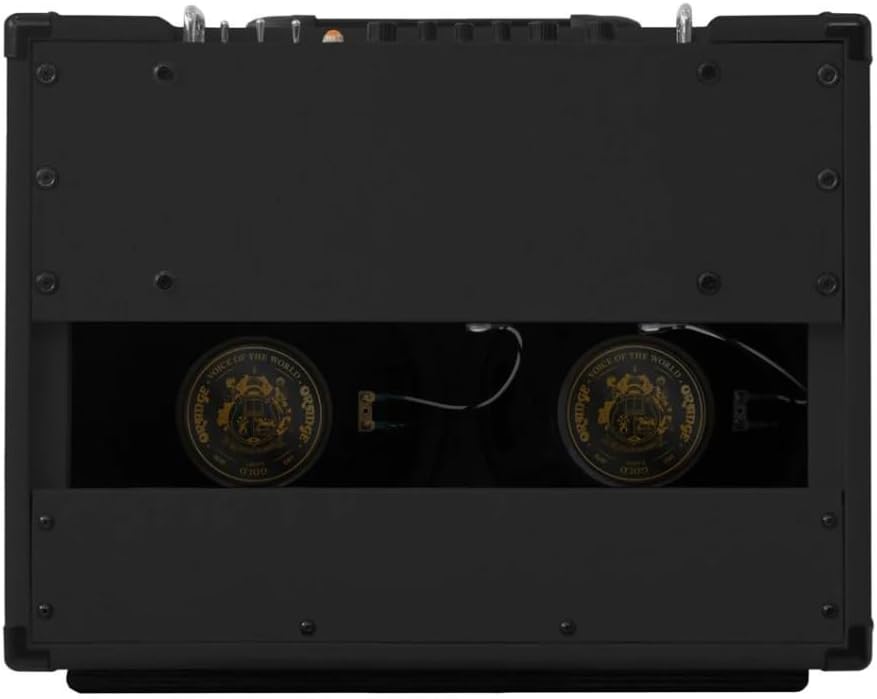
Image: Rear view of the Orange Rocker 32 amplifier, revealing the two 10-inch speakers and the open-back design.
5. Operating Instructions
The Orange Rocker 32 features two channels and versatile stereo options.
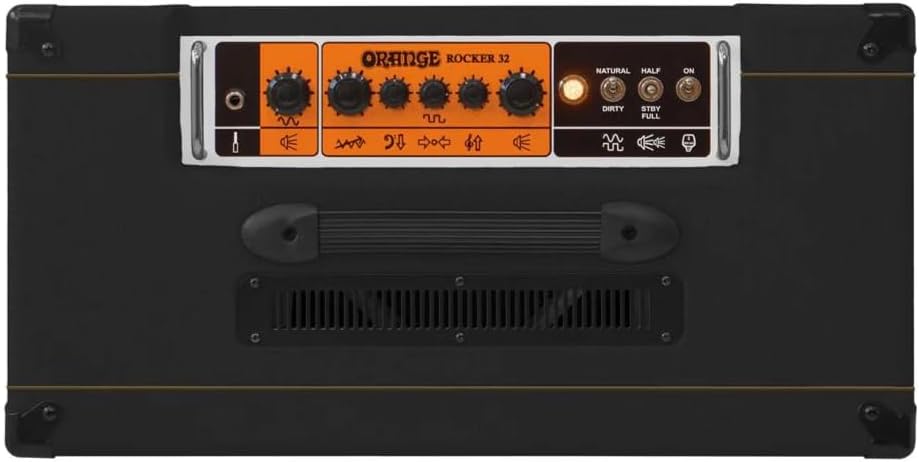
Image: Top view of the Orange Rocker 32 amplifier's control panel, displaying knobs for volume, gain, EQ, and channel/power switches.
5.1. Controls Overview
The front panel features the following controls:
- Input Jack: Connect your instrument here.
- Channel Switch: Toggles between Natural and Dirty channels.
- Natural Channel Controls: Volume.
- Dirty Channel Controls: Gain, Bass, Middle, Treble, Volume.
- Power Switch: Turns the amplifier on/off.
- Standby Switch: Engages standby mode, allowing tubes to warm up or cool down without signal.
- Half/Full Power Switch: Selects between 15W (Half) and 30W (Full) output.
5.2. Natural Channel
The Natural channel is designed for a clean, transparent tone, allowing the true character of your guitar and pedals to shine through. It features a single Volume control. This channel is ideal for players who rely heavily on their pedalboard for tone shaping.
5.3. Dirty Channel
The Dirty channel provides classic Orange British crunch and overdrive. It includes Gain, Bass, Middle, Treble, and Volume controls, offering a wide range of tonal possibilities from subtle breakup to saturated distortion.
5.4. Stereo Effects Loop
The Rocker 32 features a fully buffered, low-impedance stereo effects loop. This allows for seamless integration of your stereo effects pedals. You can operate the loop in full stereo for expansive soundscapes or in a 'wet/dry' configuration, where one speaker carries the dry signal and the other carries the wet (effected) signal, preserving clarity.
5.5. Half Power Mode
The Half Power mode allows you to reduce the amplifier's output from 30 Watts (15W per side) to 15 Watts (7W per side). This feature is useful for achieving power tube saturation at lower volumes, making the amplifier more suitable for home practice or smaller venues while maintaining its characteristic tone.
6. Maintenance
Proper maintenance ensures the longevity and optimal performance of your amplifier.
- Cleaning: Use the included Liquid Audio polishing cloth to gently wipe down the amplifier's exterior. Avoid using abrasive cleaners or solvents.
- Tube Replacement: Vacuum tubes have a finite lifespan. If you notice a decrease in performance, unusual noise, or a change in tone, the tubes may need replacement. This should be performed by a qualified technician. Always use matched sets of high-quality EL84 power tubes and 12AX7 preamp tubes.
- Storage: When not in use, store the amplifier in a dry, temperature-controlled environment.
7. Troubleshooting
If you encounter issues with your amplifier, consult the following table before seeking professional service.
| Problem | Possible Cause | Solution |
|---|---|---|
| No sound | Power not connected, Standby switch engaged, Volume controls at zero, Faulty cable, Faulty instrument. | Check power connection, disengage Standby, increase volume, test with different cables/instrument. |
| Weak or distorted sound | Worn tubes, Incorrect impedance for external speakers, Effects loop issue. | Consider tube replacement (professional service), verify speaker impedance, bypass effects loop to test. |
| Excessive hum or noise | Ground loop, Faulty power outlet, Nearby interference, Worn tubes. | Try a different outlet, move away from other electronics, check cables, consider tube replacement. |
8. Specifications
Key technical specifications for the Orange Rocker 32 amplifier:
- Output Power: 30 Watts (Full Power), 15 Watts (Half Power)
- Speaker Configuration: 2 x 10-inch speakers
- Tube Complement: EL84 (Power), 12AX7 (Preamp)
- Channels: Natural (Clean), Dirty (Overdrive)
- Effects Loop: Fully buffered, low-impedance stereo
- Controls: Natural Volume, Dirty Gain, Bass, Middle, Treble, Dirty Volume, Channel Switch, Half/Full Power Switch, Standby, Power
- Input: 6.35mm Jack
- Dimensions (H x W x D): Approximately 19 x 24 x 17 inches
- Weight: Approximately 52.8 pounds
- Color: Black

Image: Diagram illustrating the dimensions of the Orange Rocker 32 amplifier: 19 inches high, 24 inches wide, and 17 inches deep.
9. Warranty and Support
For warranty information and technical support, please refer to the documentation provided with your purchase or visit the official Orange Amplification website. For inquiries related to the bundled accessories (Pig Hog cable, guitar picks, Liquid Audio polishing cloth), please contact Liquid Audio Inc. directly.
You can visit the Liquid Audio Store for more information: Liquid Audio Store


