1. Introduction
This manual provides detailed instructions for the installation, configuration, operation, and maintenance of your Zyxel WAX300H WiFi 6 AX3000 Dual-Radio NebulaFlex Pro Wall-Plate Access Point. Please read this manual thoroughly before using the device to ensure proper functionality and safety.
2. Safety Information
- Ensure the device is installed in a well-ventilated area to prevent overheating.
- Use only the power source specified for this device.
- Do not expose the device to water or excessive humidity.
- Avoid placing the device near heat sources or in direct sunlight.
- Do not attempt to open or repair the device yourself. Refer all servicing to qualified personnel.
3. Package Contents
Verify that your package contains the following items:
- Zyxel WAX300H Wall-Plate Access Point
- Installation Guide
- CD (may contain documentation or drivers)
4. Product Overview
The Zyxel WAX300H is a WiFi 6 AX3000 Dual-Radio Wall-Plate Access Point designed for hospitality and similar environments, offering robust wireless connectivity and flexible deployment options.
4.1 Front View

Image: Front view of the Zyxel WAX300H Wall-Plate Access Point, showing its sleek white design with the Zyxel logo.
4.2 Rear and Side Views (Ports and Mounting)

Image: Rear view of the Zyxel WAX300H Wall-Plate Access Point, highlighting the Ethernet ports for connectivity.
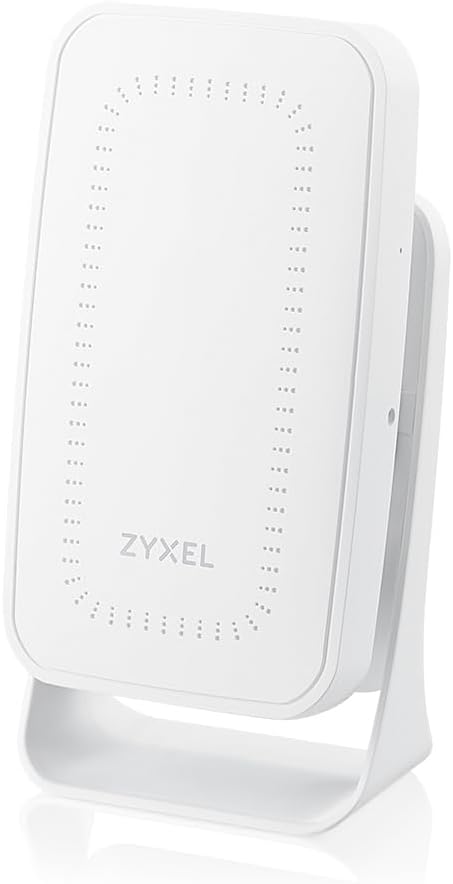
Image: Zyxel WAX300H Wall-Plate Access Point shown mounted on a stand, demonstrating its versatile deployment options.
5. Setup
5.1 Mounting the Access Point
The WAX300H is designed for wall-plate mounting or direct surface mounting. Ensure the chosen location provides optimal Wi-Fi coverage and is near an Ethernet port for Power over Ethernet (PoE+) connectivity.
- Prepare the Location: Identify a standard wall-plate junction box or a suitable flat surface.
- Secure the Device: Use appropriate screws and mounting hardware (not included) to securely attach the access point to the wall or junction box.
5.2 Power and Network Connection
The WAX300H supports Power over Ethernet (PoE+), simplifying installation by delivering both power and data through a single Ethernet cable.
- Connect Ethernet: Plug an Ethernet cable from a PoE+ enabled switch or injector into the designated PoE+ port on the WAX300H.
- Additional Devices: The WAX300H features two Gigabit Ethernet ports, one with PoE support, allowing you to power devices like VoIP phones directly from the access point.
5.3 Initial Configuration (Nebula Cloud Management)
The Zyxel WAX300H is managed via the Nebula Cloud platform, offering centralized control and simplified deployment.
- Register Device: Access the Zyxel Nebula Control Center (NCC) via a web browser (nebula.zyxel.com). Create an account if you don't have one.
- Add Device: Follow the on-screen instructions to add your WAX300H to your Nebula organization. This typically involves scanning a QR code on the device or entering its MAC address and serial number.
- Apply Configuration: Once added, the device will automatically download its configuration from the Nebula Cloud.
For detailed Nebula setup instructions, refer to the Zyxel Nebula documentation available on their official website.
6. Operating the Access Point
6.1 Wi-Fi Connectivity
The WAX300H provides WiFi 6 (802.11ax) AX3000 dual-radio connectivity, supporting both 2.4 GHz and 5 GHz bands for high-speed wireless access.
- SSID Broadcast: The access point will broadcast one or more Wi-Fi network names (SSIDs) as configured in Nebula.
- Connecting Devices: On your wireless devices (smartphones, laptops, tablets), search for available Wi-Fi networks and select the appropriate SSID. Enter the network password if required.
6.2 Key Features
- WiFi 6 (802.11ax): Offers improved efficiency, higher throughput, and better performance in dense environments compared to previous Wi-Fi standards.
- AX3000 Dual-Radio: Provides combined wireless speeds up to AX3000 across 2.4 GHz and 5 GHz bands.
- NebulaFlex Pro: Allows flexible management via Zyxel Nebula Cloud or standalone mode.
- VLAN Tagging: Supports VLAN tagging for enhanced network security and traffic segmentation, crucial for hospitality solutions to isolate guest and staff networks.
7. Maintenance
7.1 Firmware Updates
Firmware updates are typically managed automatically through the Zyxel Nebula Cloud Control Center. Ensure your device is connected to the internet and your Nebula subscription is active to receive the latest updates, which provide performance enhancements and security patches.
7.2 Cleaning
To clean the device, use a soft, dry cloth. Do not use liquid or aerosol cleaners, as they may damage the device.
8. Troubleshooting
If you encounter issues with your Zyxel WAX300H, consider the following common troubleshooting steps:
- No Power: Verify that the Ethernet cable is securely connected to a PoE+ source and that the PoE+ source is active.
- No Wi-Fi Signal: Check the device status indicator. If it's not lit or is blinking abnormally, refer to the LED indicator guide in the full product manual. Ensure the device is properly configured in Nebula.
- Slow Connection: Confirm that your internet service is functioning correctly. Check for potential interference from other wireless devices. Ensure the access point is placed optimally for coverage.
- Cannot Access Nebula: Verify your internet connection. Ensure your Nebula account credentials are correct.
For more complex issues, consult the comprehensive Zyxel WAX300H user guide or contact Zyxel technical support.
9. Specifications
| Model Name | Zyxel WiFi 6 AX3000 Dual-Radio NebulaFlex Pro Wall-Plate Access Point | PoE+ [WAX300H] |
| Wireless Standard | 802.11ax (WiFi 6) |
| Frequency Band Class | Dual-Band (2.4 GHz, 5 GHz) |
| Connectivity Technology | Ethernet (PoE+), Bluetooth |
| Special Feature | Access Point Mode |
| Recommended Uses | Indoor |
| Item Weight | 1.1 pounds |
| Package Dimensions | 7.75 x 5 x 2.25 inches |
10. Warranty and Support
10.1 Warranty Information
Zyxel products typically come with a manufacturer's warranty. Some products, including certain access points, may offer a limited lifetime warranty. For specific warranty terms and conditions applicable to your WAX300H, please refer to the warranty card included with your product or visit the official Zyxel website.
10.2 Technical Support
For technical assistance, product inquiries, or troubleshooting beyond the scope of this manual, please contact Zyxel Technical Support. Support resources, including FAQs, documentation, and contact information, are available on the official Zyxel website:
- Zyxel Support Website: www.zyxel.com/us/en/support
11. Product Video: Zyxel WiFi 6 Access Points NWA Case Study
Video: A case study demonstrating the deployment and benefits of Zyxel WiFi 6 Access Points, including the Nebula Cloud management, in a challenging environment like the Battleship Iowa. This video highlights the ease of setup and improved network reliability.


