
Introduction
This manual provides detailed instructions for the proper setup, operation, and maintenance of your Benro TMTH34C Mammoth Carbon Fiber Tripod. Designed for professional photographers and videographers, this heavy-duty tripod offers exceptional stability and versatility for various shooting environments. Please read this manual thoroughly before using the product to ensure optimal performance and longevity.
Product Overview
The Benro TMTH34C Mammoth Carbon Fiber Tripod is engineered for demanding applications, featuring a robust 10-layer carbon fiber construction. Key components include:
- Leg Sections: Three carbon fiber leg sections for adjustable height.
- Twist Locks: Durable twist-lock mechanisms for secure leg extension and retraction.
- Leg Angle Adjusters: Independent leg angle locks for versatile positioning on uneven terrain.
- 75mm Bowl Adapter: Integrated 75mm half-ball adapter for precise leveling with fluid heads.
- Mounting Plate: Standard 3/8"-16 mounting screw for attaching tripod heads.
- Interchangeable Feet: Oversized rubber feet with optional spiked feet for various surfaces.

Image: The Benro TMTH34C Mammoth Carbon Fiber Tripod in its standard configuration.
Setup
Unpacking and Initial Inspection
Carefully remove all components from the packaging. The box should contain the tripod, a padded carry case, and a set of spiked feet. Inspect all parts for any signs of damage. If any components are missing or damaged, contact Benro customer support.

Image: The Benro TMTH34C Mammoth Carbon Fiber Tripod in its folded state for transport.
Attaching a Tripod Head
The Benro TMTH34C is equipped with a 75mm bowl adapter and a standard 3/8"-16 mounting screw. To attach a tripod head:
- Ensure the tripod legs are securely locked in position.
- If using a flat-base head, ensure the 75mm bowl adapter is securely tightened.
- Thread your tripod head onto the 3/8"-16 mounting screw located on the top plate. Rotate clockwise until it is firmly seated.
- For fluid heads designed for 75mm bowls, place the fluid head into the bowl and secure it using the bowl's locking mechanism.

Image: Detail of the tripod's top plate, showing the 3/8" mounting screw for attaching a tripod head.
Adjusting Leg Angles and Height
Each leg can be independently adjusted to three different angles. To adjust a leg angle:
- Locate the leg angle adjuster at the top of each leg.
- Press the adjuster button or lever to release the lock.
- Move the leg to the desired angle (e.g., standard, wide, or extra-wide spread).
- Release the adjuster to lock the leg securely in place.
To adjust leg height:
- Rotate the twist locks counter-clockwise to loosen the leg sections.
- Extend or retract the leg sections to the desired height.
- Rotate the twist locks clockwise to securely tighten each section. Ensure all sections are fully tightened before placing equipment on the tripod.

Image: Detail of a tripod leg, highlighting the twist locks for height adjustment and the leg angle adjuster.
Interchanging Feet
The tripod comes with oversized rubber feet installed and a set of spiked feet for use on soft or uneven surfaces. To change the feet:
- Unscrew the currently installed rubber feet by rotating them counter-clockwise.
- Screw in the spiked feet by rotating them clockwise until they are firmly attached.
- Ensure both types of feet are securely fastened to prevent loss during use.
Operating Instructions
Extending and Retracting Legs
For quick setup, simultaneously loosen all twist locks on one leg by rotating them counter-clockwise. Extend the leg to its full length or desired height, then tighten all twist locks clockwise, starting from the thickest section downwards, to secure the leg. Repeat for the other two legs.
Leveling the Tripod
The 75mm bowl adapter allows for quick and precise leveling of your camera setup without adjusting individual leg lengths. Once the tripod is set up on uneven ground:
- Loosen the locking knob for the 75mm bowl.
- Adjust the attached fluid head until the bubble level (if present on your head) indicates a level horizon.
- Tighten the locking knob to secure the bowl in its leveled position.
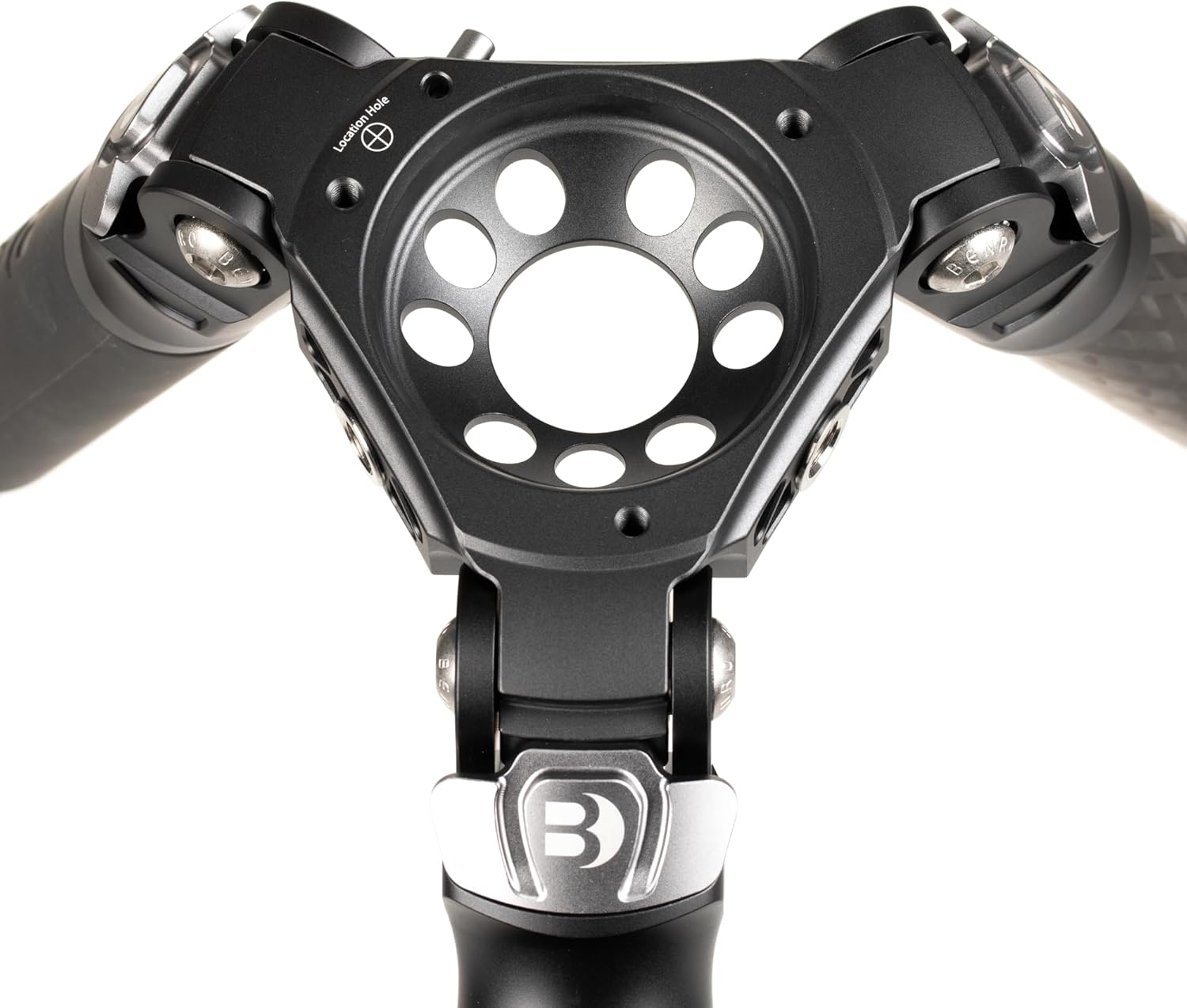
Image: The 75mm bowl adapter, designed for quick and precise leveling of a fluid head.
Load Capacity
The Benro TMTH34C Mammoth Tripod is designed to support equipment up to 44 lbs (20 kg). Always ensure that the total weight of your camera, lens, and tripod head does not exceed this maximum load capacity to maintain stability and prevent damage to your equipment or the tripod.
Maintenance
Cleaning
Regular cleaning will extend the life of your tripod. After each use, especially in dusty, sandy, or wet conditions:
- Wipe down the carbon fiber legs and metal components with a soft, damp cloth.
- For stubborn dirt, use a mild soap solution. Avoid harsh chemicals or abrasive cleaners.
- Ensure all twist locks are free of sand or debris. If necessary, carefully disassemble and clean the locking mechanisms, then reassemble.
- Dry the tripod thoroughly before storage.
Storage
Store the tripod in a cool, dry place, preferably in its padded carry case, to protect it from dust, moisture, and physical damage. Avoid storing in extreme temperatures.
Inspection
Periodically inspect all screws, bolts, and locking mechanisms for tightness. Ensure leg sections extend and retract smoothly. If any part feels loose or damaged, address it promptly to prevent further issues.
Troubleshooting
Tripod Instability
- Issue: Tripod feels wobbly or unstable.
- Solution: Ensure all leg sections are fully extended and their twist locks are securely tightened. Verify that the leg angle adjusters are locked into position. If using a fluid head, ensure the 75mm bowl locking knob is tight. Check that the tripod head is firmly attached to the mounting screw.
Leg Sections Not Extending/Retracting Smoothly
- Issue: Leg sections are stiff or difficult to move.
- Solution: This may be due to dirt or sand inside the twist locks. Clean the leg sections and twist locks as described in the Maintenance section. Avoid forcing the mechanisms.
Lost Spiked Feet
- Issue: Spiked feet detach during use.
- Solution: Always ensure that the interchangeable feet are screwed in tightly before and during use. Periodically check their tightness.
Specifications
| Feature | Detail |
|---|---|
| Model Name | Benro TMTH34C Mammoth Carbon Fiber Tripod |
| Material | Carbon Fiber |
| Number of Leg Sections | 3 |
| Maximum Height | 66.9 inches (170 cm) |
| Minimum Height | 5.31 inches |
| Folded Length | 24.4 inches (62 cm) |
| Load Capacity | 44 lbs (20 kg) |
| Item Weight | 4.3 pounds |
| Tripod Head Type | 75mm Bowl Head |
| Product Dimensions | 8.26 x 7.08 x 28.74 inches |
Warranty and Support
Warranty Information
The Benro TMTH34C Mammoth Carbon Fiber Tripod comes with a standard limited warranty of 3 years from the date of purchase for the original owner. If you register your product online, the warranty is extended by an additional 2 years, totaling 5 years in applicable regions. Please retain your proof of purchase for warranty claims.
Customer Support
For technical assistance, warranty claims, or inquiries regarding your Benro product, please visit the official Benro website or contact their customer service department. Contact information can typically be found on the Benro website or in the product packaging.


