1. Introduction
Thank you for choosing the Playlearn Sensory Light 22cm Glitter Filled Square. This LED mood light is designed to provide a calming and visually stimulating experience with its mesmerizing color-changing effects and glitter movement. It is suitable for various settings, including bedrooms, playrooms, and sensory environments. This manual provides essential information for the safe and effective use of your device.

Image 1.1: The Playlearn Sensory Light 22cm Glitter Filled Square, showcasing its color-changing capabilities in a row of three units.
2. Safety Information
Please read all safety instructions before using the product. Failure to follow these instructions may result in electric shock, fire, or damage to the product.
- Keep the device away from water and moisture.
- Do not attempt to open or repair the device yourself. Refer all servicing to qualified personnel.
- Use only the provided power cable or a compatible USB power source.
- Ensure the device is placed on a stable, flat surface to prevent tipping.
- Avoid dropping the device, as this may damage internal components and affect glitter movement.
- This product is not a toy. Adult supervision is recommended when used by children.
3. Package Contents
Verify that all items are present in the package:
- Playlearn Sensory Light 22cm Glitter Filled Square (Model GFS22)
- USB Power Cable

Image 3.1: Illustration of the square LED lamp and its dimensions (22 x 4 x 22 cm).
4. Setup
- Unpacking: Carefully remove the Sensory Light from its packaging. Retain packaging for future storage or transport.
- Placement: Place the Sensory Light on a flat, stable, and dry surface. Ensure there is adequate space around the unit for air circulation and to prevent accidental knocking. Avoid placing it near heat sources or in direct sunlight.
- Power Connection: Insert the small end of the provided USB power cable into the USB port located on the back or side of the Sensory Light. Plug the other end of the USB cable into a compatible USB power adapter (not included) or a powered USB port (e.g., on a computer or wall adapter).
- No Assembly Required: This product comes pre-assembled and does not require any additional assembly.
5. Operating Instructions
The Playlearn Sensory Light is designed for simple operation.
- Power On/Off: Once connected to power, locate the touch switch. Gently touch the designated area (often indicated by a subtle marking or simply the base of the unit) to turn the light on. Touch it again to turn the light off.
- Color Changing: The light features an automatic color-changing sequence. Upon activation, the LED lights will cycle through various colors, creating a dynamic visual effect. The glitter inside the square will begin to move, enhancing the sensory experience.
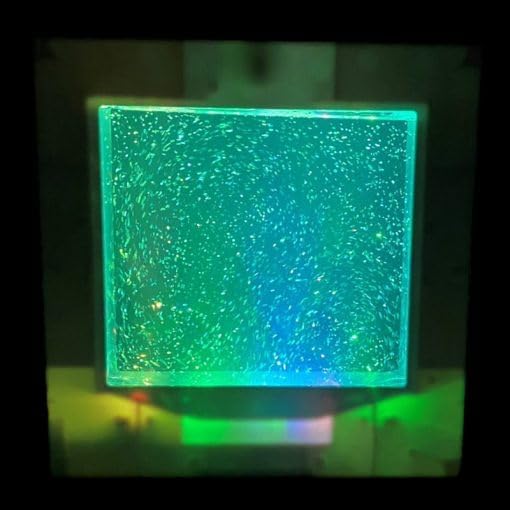
Image 5.1: A close-up view of the Sensory Light illuminated in green, showing the glitter suspended within.
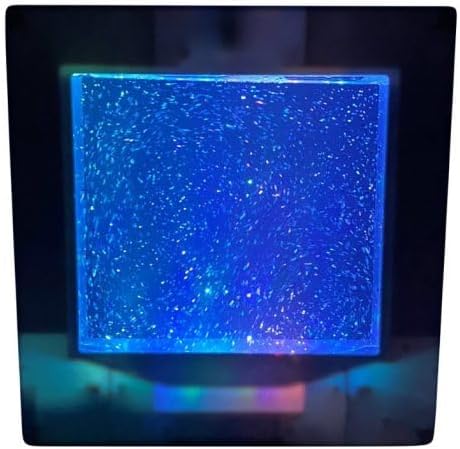
Image 5.2: A close-up view of the Sensory Light illuminated in blue, highlighting the glitter's motion.
6. Maintenance
- Cleaning: Disconnect the power cable before cleaning. Wipe the exterior of the light with a soft, dry, or slightly damp cloth. Do not use abrasive cleaners, solvents, or excessive moisture, as these can damage the finish or internal components.
- Storage: When not in use for extended periods, store the Sensory Light in a cool, dry place, away from direct sunlight and extreme temperatures.
- Glitter Liquid: The glitter liquid is sealed within the unit and does not require refilling or maintenance. Do not attempt to open the unit.
7. Troubleshooting
| Problem | Possible Cause | Solution |
|---|---|---|
| Light does not turn on. | No power or loose connection. | Ensure the USB cable is securely plugged into both the light and a powered USB source. Try a different USB port or power adapter. |
| Glitter is not moving. | Motor malfunction or unit was dropped. | Ensure the light is powered on. If the light is on but glitter is static, gently tap the unit to dislodge any stuck glitter. If the issue persists after a drop, the internal motor may be damaged. Contact customer support. |
| Light flickers or changes erratically. | Unstable power supply. | Try connecting to a different USB power source or adapter to ensure a stable power supply. |
8. Specifications
- Model: GFS22
- Dimensions (D x W x H): 4 x 22 x 22 cm (1.57 x 8.66 x 8.66 inches)
- Item Weight: 1.5 kg (3.3 lbs)
- Power Source: USB Operated
- Included Components: Power Cable
- Assembly Required: No
- Base Material: Plastic
- Shade Material: Plastic
- Switch Type: Touch
- Lamp Type: Mood Light
- Shade Color: Color Changing
9. Warranty and Support
For information regarding warranty coverage, please refer to the warranty card included with your purchase or contact your retailer.
For technical support or inquiries, please contact Playlearn customer service through the contact information provided on the product packaging or the official Playlearn website.