1. Important Safety Information
Please read all instructions carefully before using the Panasonic CP-JNW01CW Pet Water Fountain. Failure to follow these instructions may result in product damage or injury.
- This appliance is for indoor use only.
- Do not immerse the power adapter or plug in water.
- Always unplug the fountain before cleaning or performing maintenance.
- Keep the power cord away from chewing pets.
- Ensure the fountain is placed on a stable, level surface.
- Do not allow pets to chew on any parts of the fountain.
- Use only original Panasonic replacement parts and filters.
- Supervise children near the pet fountain.
2. Product Overview
The Panasonic CP-JNW01CW Pet Water Fountain provides fresh, filtered water for your pets. Its 1.9-liter capacity and ultra-quiet operation make it suitable for small to medium-sized cats and dogs.
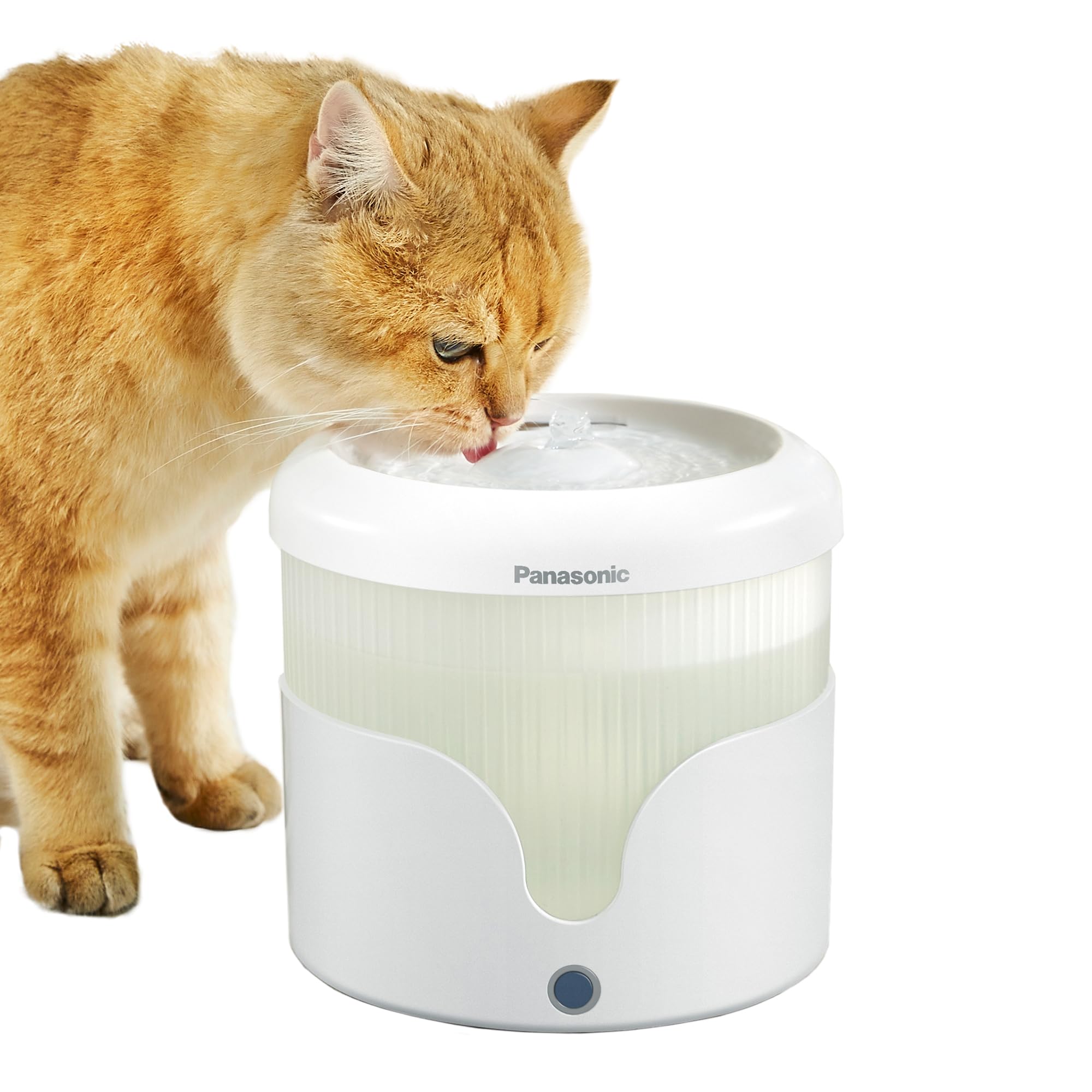
Image 2.1: Fully assembled Panasonic CP-JNW01CW Pet Water Fountain. This image shows the transparent water tank, the white base, and the drinking tray.
3. Package Contents
Verify that all items are present in the package:
- Water Fountain Base
- Water Tank (1.9L capacity)
- Drinking Tray
- Water Pump
- Filter Tray
- 4-Layer Filter Cartridge (1 pre-installed or included)
- Power Adapter
- User Manual (this document)
4. Setup Instructions
Follow these steps to set up your pet water fountain:
- Clean Components: Wash the water tank, drinking tray, and filter tray with mild soap and water. Rinse thoroughly to remove any soap residue. Do not wash the pump or power adapter.
- Install Pump: Place the water pump into the designated area in the fountain base. Ensure the power cord of the pump is routed through the channel in the base.
- Install Filter: Insert the 4-layer filter cartridge into the filter tray. Ensure it is seated correctly.
- Assemble Fountain: Place the filter tray with the filter onto the water tank. Then, place the drinking tray on top, ensuring all components fit securely.
- Fill with Water: Fill the water tank with clean tap water up to the MAX fill line. Do not overfill.
- Connect Power: Connect the power adapter to the fountain's power cord and then plug it into a standard electrical outlet.

Image 4.1: A single 4-layer filter cartridge. This filter is crucial for purifying the water in the fountain.

Image 4.2: Diagram illustrating the multi-layer filtration system. It shows how water passes through different filter components for purification.
5. Operating Instructions
Once set up, the fountain is ready for use:
- Power On: The fountain will start automatically once plugged in.
- Fountain Modes: The Panasonic CP-JNW01CW offers two operating modes:
- Continuous Stream Mode: Provides a constant flow of water.
- Intermittent Mode: Operates for 2 minutes, then pauses for 5 minutes, repeating the cycle.
- Water Level Monitoring: The transparent design allows for easy monitoring of the water level. Refill when the water level is low to ensure continuous operation and prevent pump damage.
6. Maintenance
Regular cleaning and filter replacement are essential for your pet's health and the longevity of the fountain.
6.1. Cleaning the Fountain
Clean the fountain at least once a week, or more frequently if multiple pets use it or if the water appears dirty.
- Unplug the fountain from the power outlet.
- Disassemble all components: drinking tray, filter tray, filter, water tank, and pump.
- Wash the water tank, drinking tray, and filter tray with mild soap and water. Use a soft brush to remove any residue.
- Clean the water pump: Disassemble the pump cover and impeller. Rinse all parts under running water. Use a small brush to clean any debris from the impeller and its housing. Reassemble the pump.
- Rinse all components thoroughly to ensure no soap residue remains.
- Dry all parts before reassembly.
6.2. Filter Replacement
Replace the 4-layer filter cartridge approximately once a month, or more often if the water flow decreases or the filter appears visibly dirty.
- Unplug the fountain and disassemble it as described in the cleaning section.
- Remove the old filter cartridge from the filter tray and dispose of it.
- Rinse the new filter cartridge under running water for a few minutes to remove any loose carbon dust.
- Insert the new filter cartridge into the filter tray.
- Reassemble the fountain and refill with fresh water.
7. Troubleshooting
If you encounter issues with your pet water fountain, refer to the following common problems and solutions:
| Problem | Possible Cause | Solution |
|---|---|---|
| No water flow or weak flow |
|
|
| Fountain is noisy |
|
|
| Water tastes or smells bad |
|
|
8. Specifications
| Feature | Detail |
|---|---|
| Model Number | CP-JNW01CW |
| Brand | Panasonic |
| Capacity | 1.9 Liters |
| Material | Plastic |
| Color | White |
| Dimensions (L x W x H) | 18.5 cm x 17.5 cm x 18.5 cm |
| Item Weight | 1 Kilogram |
| Power Source | Electric Cable |
| Voltage | 5 Volts |
| Energy Label | 5.0 W (normal use), < 0.5 W (standby) |
| Special Features | 4-Layer Filtration System, Ultra-Quiet Operation |
| Intended Use | Indoor |
| Pet Age | All life stages |
| Race Size | Medium |
9. Warranty and Support
For warranty information and customer support, please refer to the documentation included with your purchase or visit the official Panasonic website. Keep your proof of purchase for warranty claims.


