
Taffio CH7102-F6A
Taffio CH7102-F6A 10.25-inch Android Car Radio GPS CarPlay User Manual
Compatible with Mazda 6 (2020-2024)
1. Introduction
This manual provides comprehensive instructions for the installation, operation, and maintenance of your Taffio CH7102-F6A Android Car Radio. This multimedia system is designed to integrate seamlessly with Mazda 6 models from 2020 to 2024, enhancing your in-car experience with advanced navigation, entertainment, and connectivity features.
2. Product Features
- Operating System: Android 12
- Processor: 8-core CPU (Cortex-A75 x 2, Cortex-A55 x 6) at 1.80 GHz
- Memory: 4GB RAM / 64GB Internal Storage
- Display: 10.25-inch Touchscreen
- Navigation: Integrated 3D GPS with up-to-date map material and free lifetime updates
- Smartphone Integration: Built-in Wireless CarPlay and Android Auto functionality (no additional adapter required)
- Connectivity: Integrated Wi-Fi (W-LAN), 3G/4G LTE SIM card slot for faster navigation and streaming, Bluetooth, USB, Ethernet
- Original System Retention: Easy switching between the original system and the Android system; original radio functions, controller, steering wheel controls, vehicle displays, and settings are fully preserved.
- Installation: Plug-and-play design without modification, restriction, or coding of the original system. Simple installation with only one screen and connection cable.
3. Setup and Installation
3.1. Package Contents
Before beginning installation, please verify that all components listed below are present in your package:

Image: Overview of the Taffio CH7102-F6A Android Car Radio package contents, including the Android display, main unit, power cable, LVDS cable, speaker cables, USB cable, mic cable, aux adapter, screws, display cable, GPS antenna, and 4G antenna.
- 1x Android Display Unit
- 1x Main Unit
- 1x Frame (if applicable)
- 1x Power Cable
- 1x LVDS Cable
- Speaker Cables
- 1x USB Cable
- 1x Microphone Cable
- 1x Aux Adapter
- Set of Screws
- 1x Display Cable
- 1x GPS Antenna
- 1x 4G Antenna
- 1x PDF Assembly Instructions (digital)
- 1x Invoice with VAT + 2-year Warranty
3.2. Installation Guide
The Taffio CH7102-F6A is designed for plug-and-play installation. No external housing or complex modifications are required. Refer to the diagram below for connection points.
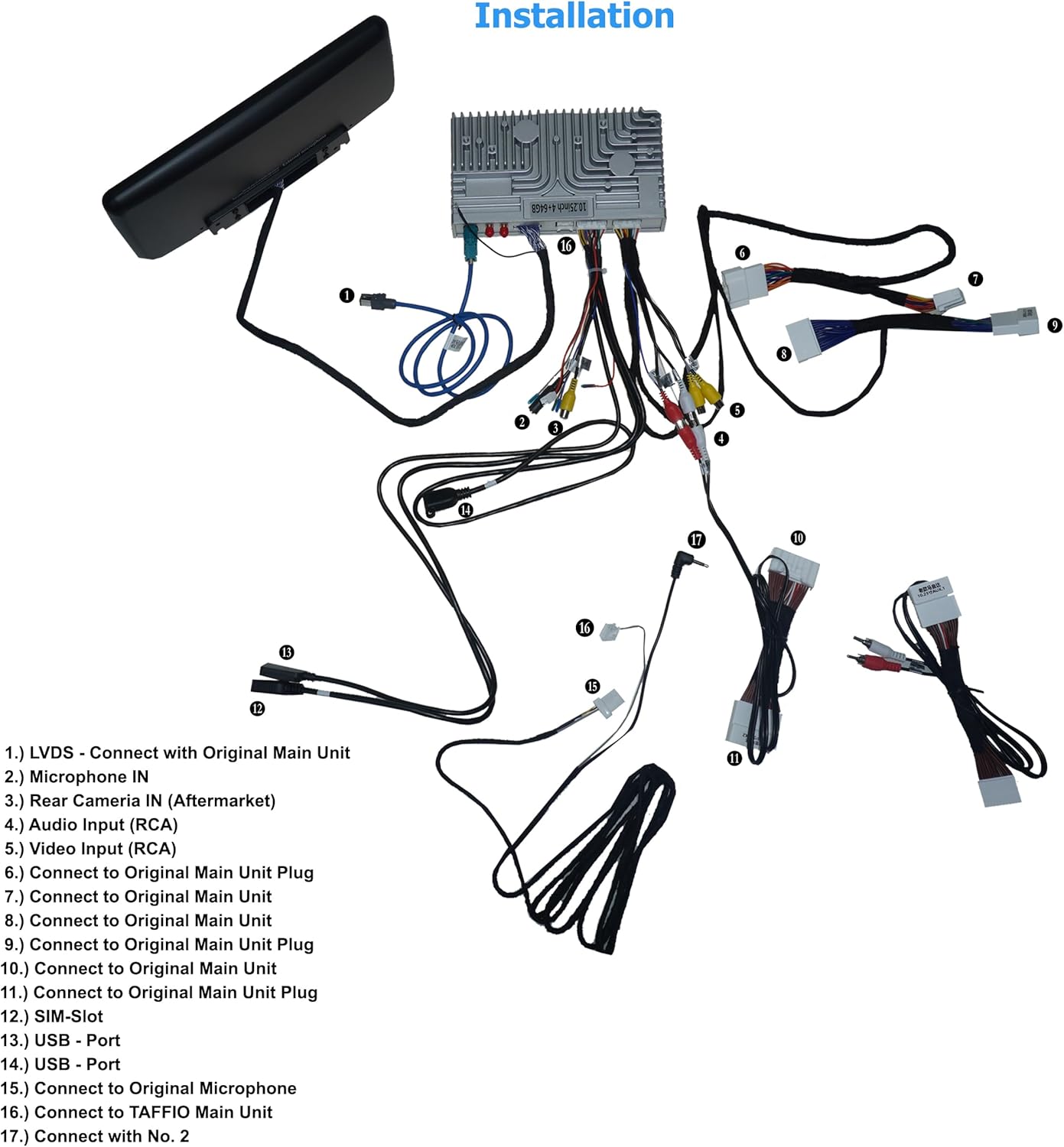
Image: Detailed wiring diagram for the Taffio CH7102-F6A Android Car Radio, showing connections for LVDS, microphone, rear camera, audio input, video input, original main unit plugs, SIM slot, USB ports, and connections to the Taffio main unit.
- LVDS: Connect with the Original Main Unit.
- Microphone IN: Connect the external microphone.
- Rear Camera IN (Aftermarket): Connect an aftermarket rear view camera if desired.
- Audio Input (RCA): For external audio sources.
- Video Input (RCA): For external video sources.
- Connect to Original Main Unit Plug: Connect the provided cable to the original main unit plug.
- Connect to Original Main Unit: Connect the provided cable to the original main unit.
- Connect to Original Main Unit: Connect the provided cable to the original main unit.
- Connect to Original Main Unit Plug: Connect the provided cable to the original main unit plug.
- Connect to Original Main Unit Plug: Connect the provided cable to the original main unit plug.
- Connect to Original Main Unit Plug: Connect the provided cable to the original main unit plug.
- SIM-Slot: Insert your 3G/4G LTE SIM card here.
- USB - Port: Connect USB devices.
- USB - Port: Connect USB devices.
- Connect to Original Microphone: Connect to the vehicle's original microphone.
- Connect to TAFFIO Main Unit: Connect the display cable to the Taffio main unit.
- Connect with No. 2: Refer to the diagram for specific connection point.
For detailed vehicle-specific disassembly instructions, please refer to the provided PDF assembly instructions.

Image: A comparison showing the dashboard of a Mazda 6 before installation with the original smaller screen, and after installation with the larger Taffio 10.25-inch Android Car Radio seamlessly integrated.
4. Operating Instructions
4.1. User Interface Overview
The Taffio CH7102-F6A features an intuitive Android interface, allowing access to various functions and applications.

Image: The main home screen of the Taffio Android Car Radio, displaying large circular icons for key functions like applications, music, navigation, vehicle settings, and general settings.
Navigate through the interface by swiping left or right on the touchscreen to access different screens with various applications.

Image: A screen from the Taffio Android Car Radio showing icons for Gallery, Google, Maps, Music Player, Navi, Operation Guide, Play Store, Screen Master, Settings, and Touch-Assistant.

Image: Another screen from the Taffio Android Car Radio displaying icons for Vehicle Settings, Video Player, Voice Search, and YouTube.

Image: A third screen from the Taffio Android Car Radio showing icons for AUX, Bluetooth, Calculator, Car Link 2.0, Car UI, CarbitLink, Chrome, Control, Equalizer, and File Manager.
4.2. CarPlay and Android Auto
The unit supports both Wireless CarPlay and Android Auto, allowing seamless integration with your smartphone for navigation, communication, and entertainment.
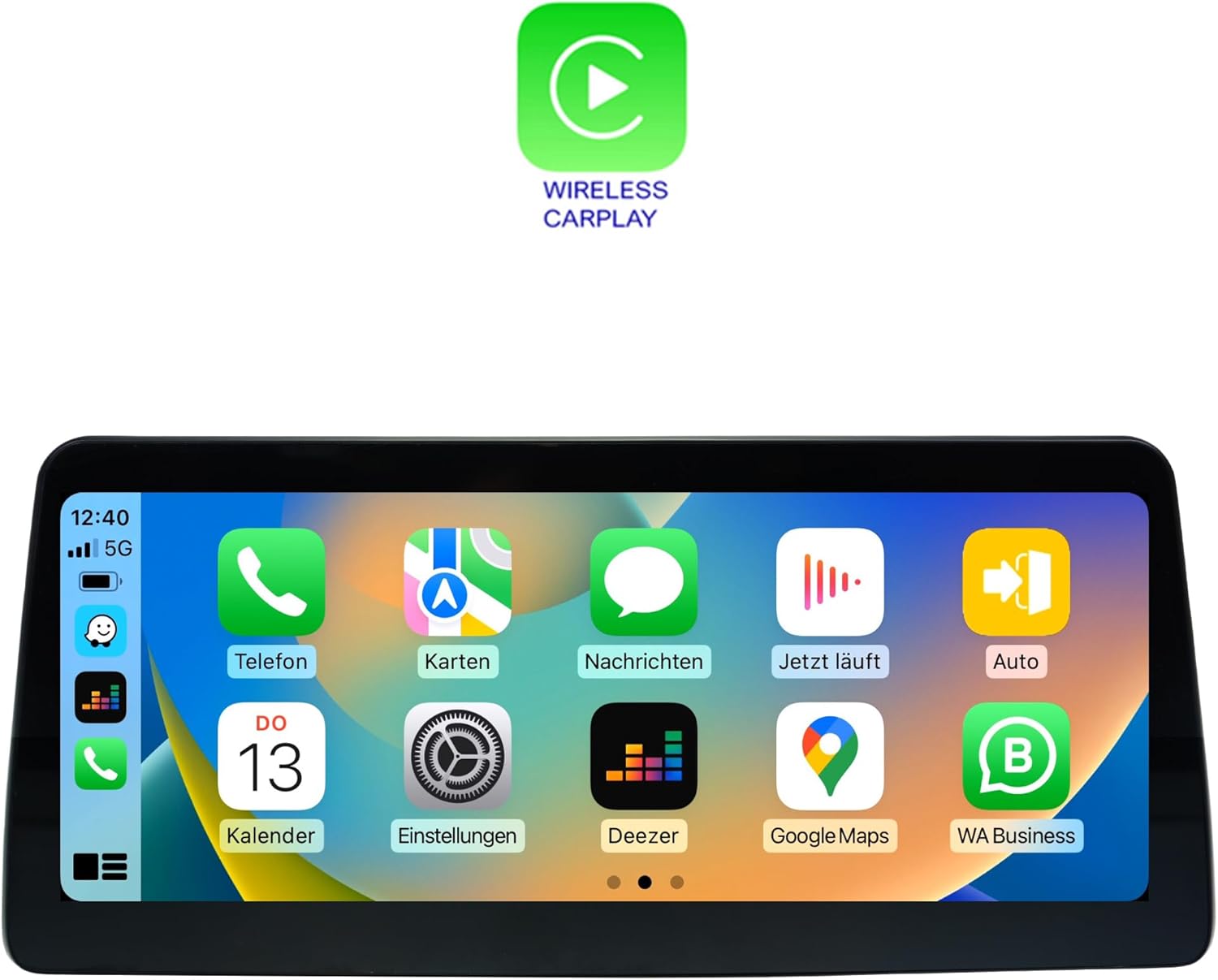
Image: The Taffio Android Car Radio display showing the Wireless CarPlay interface, with familiar iOS app icons such as Phone, Maps, Messages, Now Playing, Auto, Calendar, Settings, Deezer, Google Maps, and WA Business.

Image: The Taffio Android Car Radio display showing the Android Auto interface, featuring Google apps like Maps, Messages, Calendar, and other compatible applications in a car-optimized layout.
To activate CarPlay or Android Auto, connect your compatible smartphone via USB or wirelessly through Bluetooth and Wi-Fi. Follow the on-screen prompts to complete the setup.
4.3. Navigation
The system comes with pre-installed 3D GPS navigation and map material. Updates are available free of charge for the lifetime of the product. Access the navigation application from the main menu.
4.4. Connectivity
- Wi-Fi: Connect to Wi-Fi hotspots or your smartphone's hotspot for internet access.
- 3G/4G LTE: Insert a SIM card into the designated slot for mobile data connectivity.
- Bluetooth: Pair your smartphone for hands-free calling and audio streaming.
- USB: Connect USB drives for media playback or charging.
5. Specifications
| Feature | Specification |
|---|---|
| Brand | Taffio |
| Model Name | CH7102-F6A |
| Vehicle Service Type | Car |
| Screen Size | 10.25 Inches |
| Special Feature | Touchscreen |
| Connectivity Technology | Bluetooth, Ethernet, USB, Wi-Fi |
| Map Type | Worldwide |
| Audio Output Mode | Speaker |
| Mounting Type | Dashboard Mount |
6. Troubleshooting
This section provides solutions to common issues you might encounter.
- No Power: Ensure all power cables are securely connected. Check the vehicle's fuse box for any blown fuses related to the car radio.
- No Sound: Verify speaker connections. Check volume levels on both the unit and your vehicle's original system. Ensure the correct audio output source is selected.
- GPS Signal Loss: Ensure the GPS antenna is installed correctly and has a clear view of the sky. Move the vehicle to an open area if signal is weak.
- CarPlay/Android Auto Not Connecting: Ensure your smartphone is compatible and has the latest software updates. Try restarting both the car radio and your phone. Check USB cable connection if using wired connection, or Bluetooth/Wi-Fi settings for wireless.
- Touchscreen Unresponsive: Try restarting the unit. If the issue persists, contact customer support.
- System Slow or Freezing: Close unnecessary applications. Clear cache or perform a factory reset (note: this will erase all user data).
If you encounter issues not covered here, please refer to the digital PDF assembly instructions or contact customer support.
7. Maintenance
To ensure the longevity and optimal performance of your Taffio CH7102-F6A Android Car Radio, follow these general maintenance guidelines:
- Cleaning: Use a soft, dry, anti-static cloth to clean the touchscreen and unit. Avoid abrasive cleaners or solvents that could damage the display or finish.
- Software Updates: Periodically check for software updates to ensure you have the latest features and bug fixes. Updates can typically be found in the system settings or through the manufacturer's website.
- Temperature: Avoid exposing the unit to extreme temperatures for extended periods.
- Cable Connections: Periodically check that all cables are securely connected to prevent intermittent issues.
8. Warranty and Support
Your Taffio CH7102-F6A Android Car Radio comes with a 2-year warranty from the date of purchase. This warranty covers manufacturing defects and ensures repair or replacement of faulty components.
For warranty claims, technical support, or any inquiries, please contact the seller, REALMEDIASHOP, directly through your purchase platform. Please have your proof of purchase and product model number (CH7102-F6A) ready when contacting support.
Related documentsCH7102-F6A


Ask a question about this manual
Ask about setup, troubleshooting, compatibility, parts, safety, or missing instructions. Manuals+ will review the question and use this page’s manual context to help answer it.