
PowMr POW-HVM6.2K-48V-LIP
Contents
PowMr 6200W Hybrid Solar Inverter User Manual
Model: POW-HVM6.2K-48V-LIP | Brand: PowMr
1. Introduction
This user manual provides essential information for the safe and efficient operation of your PowMr 6200W Hybrid Solar Inverter. Please read this manual thoroughly before installation and use, and keep it for future reference. This inverter is designed to convert 48V DC power from solar panels and batteries into 220V/230V AC power for household appliances, featuring an integrated MPPT 120A charge controller and parallel operation capability for up to 12 units.
2. Safety Information
WARNING: Electrical Shock Hazard!
- Ensure all power sources are disconnected before performing any installation or maintenance.
- Only qualified personnel should install or service this inverter.
- Do not disassemble the inverter. There are no user-serviceable parts inside.
- Ensure proper grounding of the inverter.
- Avoid contact with live terminals.
- Install in a well-ventilated area, away from flammable materials.
- Protect the inverter from direct sunlight, rain, and moisture.
3. Product Overview
The PowMr 6200W Hybrid Solar Inverter is an advanced all-in-one solution for solar power systems. It integrates a solar charge controller, inverter, and battery charger functions to offer uninterruptible power support.

Figure 3.1: Front view of the PowMr 6200W Hybrid Solar Inverter, showing the display and control buttons.

Figure 3.2: Overview of key features including 6200W Pure Sine Wave Inverter, 120A MPPT Solar Charge Controller, 230VAC Output, 50/60Hz Auto-sensing, 48V Battery Support, and support for up to 12 units in parallel.

Figure 3.3: Illustration of battery connection options (GEL, FLD, Li-ion) and maximum PV/AC current ratings for the 48V system.

Figure 3.4: Display of the inverter's multi-protection functions, including overload, charge short, AC reverse, short-circuit, bypass over current, battery over voltage, battery low voltage, and parallel connection error protection.
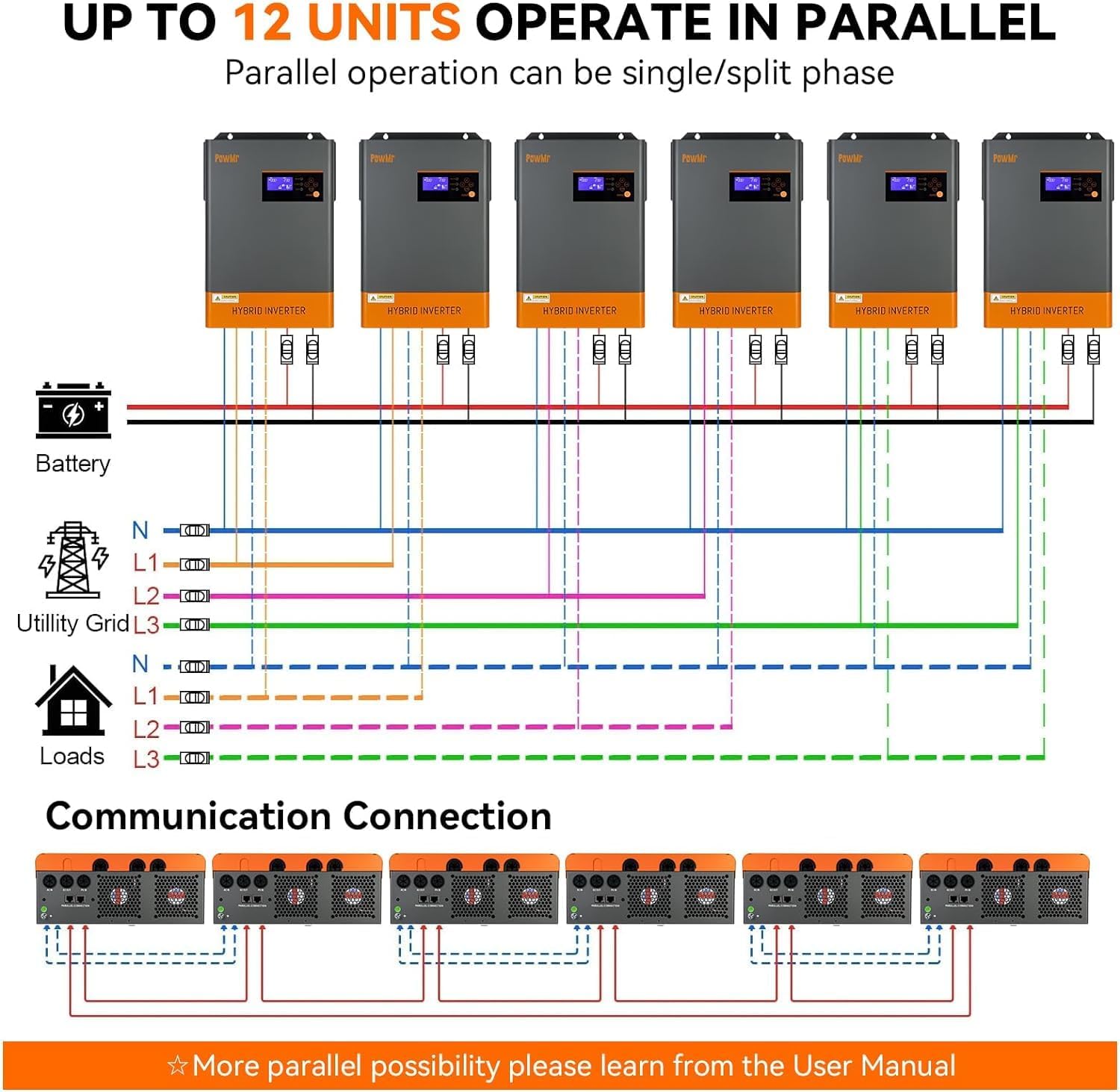
Figure 3.5: Diagram illustrating how up to 12 units of the inverter can operate in parallel for increased power capacity, showing battery, utility grid, and load connections.

Figure 3.6: Visual representation of the four charging modes (Solar first, Utility first, Solar and Utility, Only Solar) and three load output working modes (Utility first, Solar first, SBU first).
4. Setup and Installation
Proper installation is crucial for the safe and efficient operation of your inverter. Follow these steps carefully. For a visual guide, please refer to the installation video below.
Video 4.1: Installation guide for the PowMr POW-HVM6.2K-48V-LIP All-in-one solar inverter. This video demonstrates the step-by-step process of connecting the battery, PV array, AC input, AC output, BMS communication cable, and WiFi module, followed by powering on the inverter.
Installation Steps:
- Preparation: Ensure the inverter is mounted securely in a suitable location with adequate ventilation. Gather all necessary tools and cables.
- Remove Port Cover: Carefully remove the bottom port cover of the inverter to access the connection terminals.
- Connect Battery: Connect the positive and negative battery cables to the designated BAT+ and BAT- terminals. Ensure correct polarity and secure connections.
- Connect PV Array: Connect the positive and negative solar panel (PV) array cables to the PV+ and PV- terminals. Verify the PV array voltage is within the inverter's operating range.
- Connect AC Input: Connect the AC input cable (from utility grid or generator) to the AC IN terminals (L, N, G).
- Connect AC Output: Connect the AC output cable (to your loads) to the AC OUT terminals (L, N, G).
- Connect BMS Communication Cable (Optional): If using a compatible battery management system (BMS), connect the BMS communication cable to the designated port (e.g., RS485).
- Connect WiFi Module (Optional): Insert the WiFi module into its dedicated slot for remote monitoring capabilities.
- Reinstall Port Cover: Once all connections are secure, reinstall the bottom port cover.
- Power On: Turn on the inverter using the power button. The display will illuminate, indicating successful startup.
5. Operating Modes
The PowMr Hybrid Solar Inverter offers flexible charging and output modes to suit various energy management needs.
5.1 Charging Modes:
The inverter supports four distinct charging modes, configurable via the LCD display or monitoring software:
- Solar First (SUL): Prioritizes solar power for charging batteries. Utility power is used only if solar power is insufficient.
- Utility First (UTI): Prioritizes utility power for charging batteries. Solar power is used only if utility power is unavailable.
- Solar and Utility (SNU): Both solar and utility power are used simultaneously to charge the batteries.
- Only Solar (OSO): Only solar power is used for charging the batteries. Utility power is not used for charging.
5.2 Output Modes:
The inverter provides three load output working modes to manage power distribution to connected appliances:
- Utility First (UTI): Prioritizes utility power to supply loads. If utility power fails, the inverter switches to battery power.
- Solar First (SOL): Prioritizes solar power to supply loads. If solar power is insufficient, it switches to utility power or battery power.
- SBU First (SBU): Prioritizes solar power, then battery power, and finally utility power to supply loads. This mode maximizes self-consumption of solar energy.
6. Maintenance
Regular maintenance ensures the longevity and optimal performance of your PowMr Hybrid Solar Inverter.
- Cleaning: Periodically clean the inverter's exterior with a dry, soft cloth. Ensure ventilation openings are free from dust and debris. Do not use liquid cleaners.
- Connection Check: Annually inspect all electrical connections (battery, PV, AC input/output) for tightness and signs of corrosion. Re-tighten if necessary.
- Battery Inspection: If using lead-acid batteries, check electrolyte levels and terminal conditions as per battery manufacturer guidelines.
- Firmware Updates: Check the PowMr official website for any available firmware updates to ensure your inverter has the latest features and bug fixes.
- Environmental Check: Ensure the installation environment remains within specified temperature and humidity ranges.
7. Troubleshooting
This section provides solutions to common issues you might encounter. For more complex problems, please contact customer support.
| Problem | Possible Cause | Solution |
|---|---|---|
| Inverter not powering on. | No battery connection, battery voltage too low, power switch off. | Check battery connections, ensure battery voltage is sufficient, turn on the power switch. |
| No AC output. | Overload, short circuit, AC output breaker tripped, incorrect output mode. | Reduce load, check for short circuits, reset breaker, verify output mode settings. |
| PV charging not working. | PV array disconnected, insufficient sunlight, PV voltage too low/high. | Check PV connections, ensure adequate sunlight, verify PV array voltage. |
| Error code displayed. | Internal fault, specific system issue. | Refer to the detailed error code list in the full manual (if available) or contact support with the specific code. |
8. Specifications
| Feature | Detail |
|---|---|
| Model Number | POW-HVM6.2K-48V-LIP |
| Brand | PowMr |
| Power Source | Solar Powered |
| Input Voltage | 48 Volts (DC) |
| Rated Power (PV) | 6500W |
| Max PV Array Open Circuit Voltage | 500VDC |
| PV Array MPPT Voltage Range | 60VDC~450VDC |
| Max AC Input Voltage | 300Vac |
| Max Input Current | 27A |
| Output Voltage Regulation | 230Vac±5% |
| Waveform | Pure Sine Wave |
| Parallel Function | Supports up to 12 units in parallel |
| Battery Compatibility | Lead-Acid (Sealed, AGM, Gel, Flooded) / Lithium-Ion, or operation without battery |
| Package Dimensions | 53 x 39.2 x 21.9 cm; 10.71 Kilograms |
| Available on Amazon.de since | February 7, 2024 |
| Guaranteed Software Updates until | Unknown |
9. Warranty Information
Warranty terms and conditions for the PowMr 6200W Hybrid Solar Inverter are typically provided at the time of purchase or can be found on the official PowMr website. Please retain your proof of purchase for warranty claims. The warranty generally covers manufacturing defects and malfunctions under normal use conditions.
10. Support
For technical assistance, troubleshooting beyond this manual, or warranty inquiries, please contact PowMr customer support through their official website or the retailer from whom you purchased the product. When contacting support, please have your model number (POW-HVM6.2K-48V-LIP) and purchase details ready.
You can also refer to the PowMr Store on Amazon for additional resources and contact information.
Ask a question about this manual
Ask about setup, troubleshooting, compatibility, parts, safety, or missing instructions. Manuals+ will review the question and use this page’s manual context to help answer it.