1. Introduction
The Hipshotdot Titan Two is a versatile gaming adapter and converter designed to enhance your gaming experience across multiple platforms. This all-in-one device allows you to use your preferred controller on various compatible gaming systems, including PlayStation 5, PlayStation 4, Xbox One, Nintendo Switch, PlayStation 3, Xbox 360, Wii U, PlayStation TV, and PC. It supports advanced features such as programmable scripts, macros, controller remapping, and keyboard/mouse integration.
The Titan Two device is engineered to remain unaffected by console updates, ensuring consistent performance. It replaces the need for multiple gaming adapters and converters, offering a comprehensive solution for gamers.

Image: The Titan Two device, highlighting its 'All in One Gaming Device' capability with a green glow effect.
2. Package Contents
- Titan Two Device
- High Quality Micro-USB Cable (40cm / 1.3 FT)
- Quick Setup Guide
3. Setup Instructions
3.1 Initial Connection
- Connect to Console/PC: Use the provided Micro-USB cable to connect the Titan Two device to your gaming console or PC. The device typically draws power and data through this connection.
- Connect Input Devices: Plug your desired controller, keyboard, or mouse into the USB ports on the Titan Two device. Ensure connections are secure.
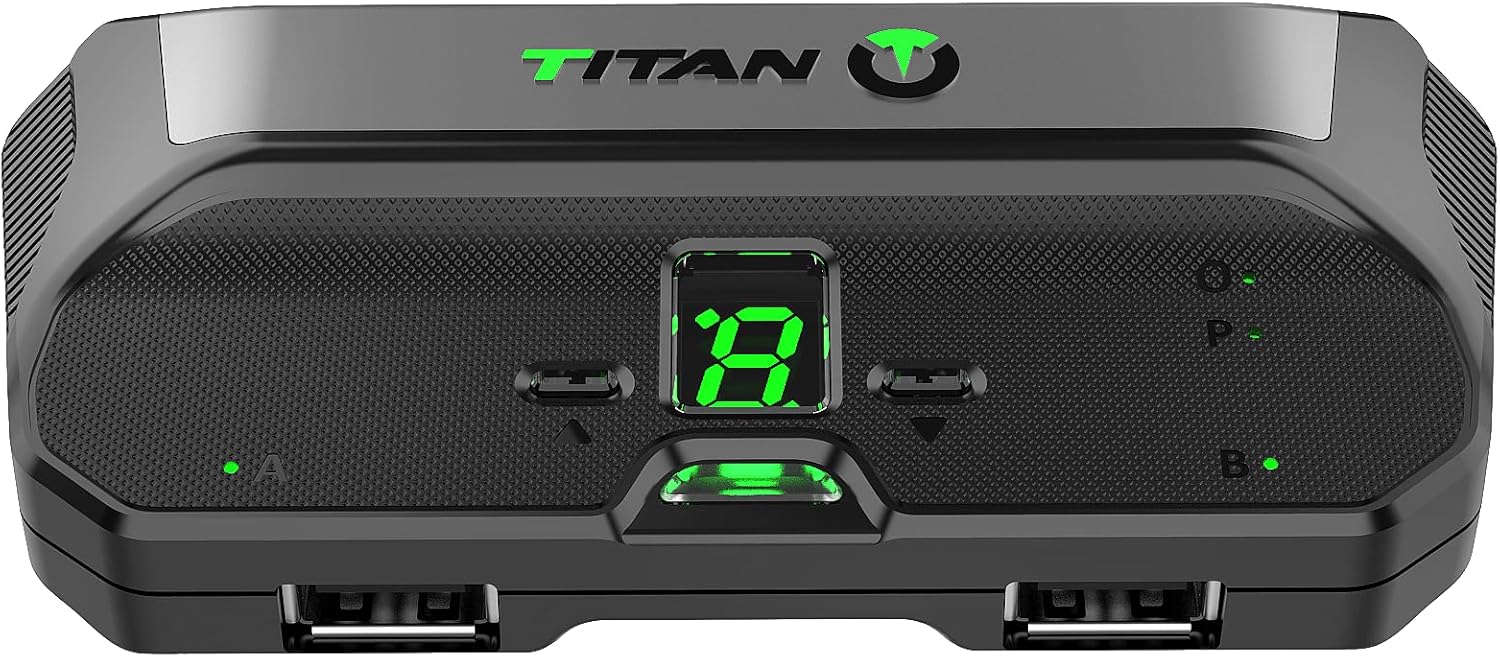
Image: Front view of the Titan Two device, displaying its central digital readout and multiple USB ports for connecting peripherals.
3.2 Software Installation (GTUNER)
To unlock the full potential of your Titan Two device, you need to install the GTUNER IV software. This software is essential for programming, updating firmware, and configuring the device.
- Compatibility: GTUNER IV is available for Windows, Mac, iOS, and Android operating systems.
- Download: Visit the official Consoletuner website (manufacturer of Titan Two) to download the latest version of GTUNER IV.
- Installation: Follow the on-screen instructions to install the software on your computer or mobile device.

Image: Screenshots illustrating the GTUNER IV software interface across desktop, tablet, and mobile devices, demonstrating its cross-platform compatibility.
4. Operating the Titan Two Device
4.1 Controller Crossover and Compatibility
The Titan Two allows you to use almost any controller on any compatible gaming system. Simply connect your desired controller to one of the Titan Two's USB input ports, and then connect the Titan Two to your console. The device will automatically translate controller inputs.
- Wireless Controllers: For Bluetooth-enabled controllers, the Titan Bluetooth Module (sold separately) is required for wireless connectivity. USB wireless adapters are also supported.
- HID Standard: The Titan Two is fully compliant with the HID standard, ensuring compatibility with a wide range of gaming devices, including fight sticks, steering wheels, joysticks, and foot switches.
4.2 Programmable Scripts, Macros, and Mods
The device supports extensive customization through programmable scripts, macros, and Gamepacks. These features allow for advanced control and automation within games.
- Gamepacks: Exclusive MODs, combos, and macros can be easily enabled by dragging and dropping Gamepacks or community-made scripts using the GTUNER software.
- Custom Scripts: You can create your own scripts, combos, and macros with millisecond precision. The device supports automated commands in reaction to in-game events.
- No Hardware Modification: No internal chips or tools are required for these customizations.
4.3 Keyboard and Mouse Support
Play console games with a keyboard and mouse, offering a high level of configuration. Connect your keyboard and mouse directly to the Titan Two, or redirect them from your computer via GTUNER IV for enhanced control.
4.4 Controller Layout Customization and Button Remapping
Customize the layout of buttons and sticks to suit your preferences for any game. This feature can be combined with Gamepacks and custom scripts for a tailored control scheme.
5. Maintenance
To ensure the longevity and optimal performance of your Hipshotdot Titan Two device, follow these general maintenance guidelines:
- Cleaning: Use a soft, dry cloth to clean the exterior of the device. Avoid using liquid cleaners or abrasive materials.
- Storage: Store the device in a cool, dry place away from direct sunlight, extreme temperatures, and high humidity.
- Handling: Handle the device with care to prevent physical damage. Avoid dropping or subjecting it to strong impacts.
- Cable Management: Ensure that all connected cables are not bent sharply or under excessive strain, which can lead to damage over time.
6. Troubleshooting
If you encounter issues with your Titan Two device, consider the following troubleshooting steps:
- Device Not Recognized:
- Ensure all USB cables are securely connected to both the Titan Two and the console/PC.
- Try using a different USB port on your console/PC.
- Verify that the Micro-USB cable is functional.
- Controller Input Issues:
- Confirm that your controller is properly connected to the Titan Two.
- Check for firmware updates for the Titan Two device via GTUNER IV. Outdated firmware can cause compatibility issues.
- Ensure the correct Gamepack or script is loaded for your specific game and controller setup.
- PS5 Disconnections (e.g., every 7.5 minutes):
- While the Titan Two is designed to be robust against updates, specific console behaviors can sometimes lead to disconnections. Ensure you are using the latest firmware for the Titan Two.
- For PS5, the device primarily supports Remote Play. Ensure your Remote Play setup is stable and correctly configured.
- Keyboard/Mouse Not Responding:
- Verify that the keyboard and mouse are connected to the correct USB ports on the Titan Two.
- If using PC redirection, ensure GTUNER IV is running and configured correctly.
- Software (GTUNER IV) Issues:
- Reinstall GTUNER IV if it is not functioning correctly.
- Check your computer's firewall or antivirus settings, as they might interfere with the software.
For further assistance, refer to the official Consoletuner website or contact customer support.
7. Specifications

Image: Bottom view of the Titan Two device, displaying the product label with model number, power requirements, and certifications.
| Feature | Detail |
|---|---|
| Model Number | 2508:0032-02 |
| Brand | Hipshotdot |
| Manufacturer | Consoletuner |
| Package Dimensions | 5.04 x 4.45 x 1.46 inches |
| Item Weight | 11.3 ounces (0.32 Kilograms) |
| Connector Type | Micro USB |
| Compatible Devices | Personal Computer, Video Game Consoles (PS5, PS4, PS3, Xbox One, Xbox 360, Nintendo Switch, Wii U, PlayStation TV, Android Systems, iOS) |
| Power Input (USB) | DC 5V, 200mA - 1.0W |
| Power Input (EXT PWR) | DC 7.5V, 200mA - 1.5W |
8. Warranty and Support
For warranty information and technical support, please refer to the official Consoletuner website or contact Hipshotdot customer service. Keep your purchase receipt as proof of purchase for any warranty claims.
- Manufacturer: Consoletuner
- Brand: Hipshotdot
- Support Resources: Visit the official Consoletuner website for FAQs, forums, and contact information.