
1. Important Safety Instructions
Please read all instructions carefully before using this appliance and retain them for future reference. Failure to follow these instructions may result in electric shock, fire, or serious injury.
- Ensure the voltage indicated on the rating label corresponds to your mains voltage.
- Do not immerse the fan, plug, or cord in water or other liquids.
- Always unplug the fan from the power outlet before cleaning, assembling, or disassembling parts.
- Keep the fan out of reach of children and supervise children when the fan is in use.
- Do not operate the fan with a damaged cord or plug, or after the fan malfunctions or has been dropped or damaged in any manner.
- Avoid placing the fan near curtains or other objects that could be drawn into the fan.
- Do not insert fingers or other objects through the grille when the fan is operating.
- Use the fan only for its intended household purpose as described in this manual.
2. Product Overview
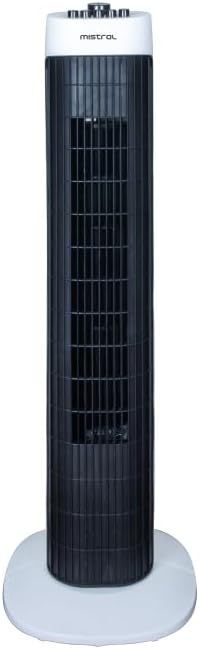
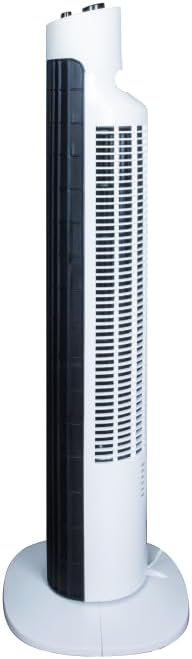
The Mistral MFD310 Tower Fan is designed to provide efficient cooling with convenient features for your home or office. Key features include multiple speed settings, a timer, and an oscillation function.
Product Features:
- 3 Speeds Setting: Choose between High, Medium, and Low for customized airflow.
- 2 Hours Timer: Set the fan to automatically turn off after a specified duration.
- Oscillation Function: Distributes air across a wider area for improved circulation.
- Integral Carry Handle: For easy portability.
- Detachable Base: Simplifies assembly and storage.
Product Views:
3. Assembly and Setup
The Mistral MFD310 Tower Fan requires minimal assembly, primarily involving the attachment of its detachable base.
Assembly Steps:
- Carefully remove all components from the packaging.
- Place the fan body upright.
- Align the detachable base with the bottom of the fan body. Ensure the notches or guides on the base match those on the fan.
- Secure the base to the fan body. This typically involves twisting the base or using screws provided (check packaging for specific fasteners).
- Ensure the base is firmly attached and the fan is stable before proceeding.
Placement:
Place the assembled fan on a firm, level surface. Ensure there is adequate space around the fan for proper air circulation and oscillation.
Power Connection:
Plug the power cord into a standard electrical outlet. Ensure the outlet matches the voltage requirements of the fan.
4. Operating Instructions
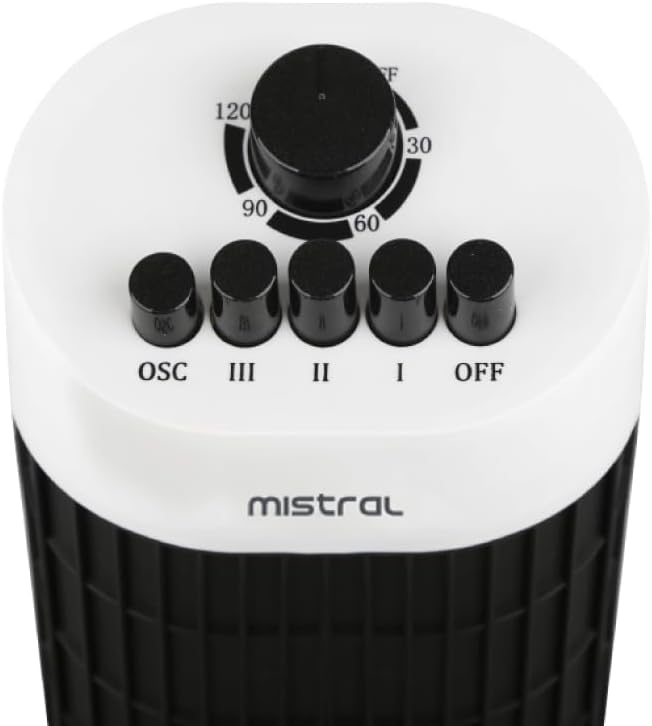
The control panel is located on the top of the fan (refer to Figure 3 for visual reference).
Power and Speed Settings:
- To turn the fan ON, press one of the speed buttons: I (Low), II (Medium), or III (High).
- To adjust the fan speed, press the desired speed button.
- To turn the fan OFF, press the OFF button.
Oscillation Function:
- To activate the oscillation function, press the OSC button. The fan head will begin to rotate from side to side.
- To stop oscillation, press the OSC button again. The fan will stop oscillating and remain in its current direction.
Timer Function:
- The fan features a 2-hour timer. To set the timer, rotate the timer dial clockwise to the desired duration (30, 60, 90, or 120 minutes).
- The fan will operate for the set duration and then automatically turn off.
- To cancel the timer, rotate the dial back to the 'OFF' position.
5. Maintenance and Cleaning
Regular cleaning and maintenance will help ensure the longevity and optimal performance of your tower fan.
Cleaning Instructions:
- Always unplug the fan from the power outlet before cleaning.
- Use a soft, damp cloth to wipe the exterior surfaces of the fan. Do not use abrasive cleaners, waxes, or polishes as these may damage the finish.
- For dust accumulation on the air intake or output grilles, use a vacuum cleaner with a brush attachment or a soft brush to gently remove dust.
- Ensure no water or liquids enter the internal components of the fan.
- Allow the fan to dry completely before plugging it back in and operating.
Storage:
When not in use for extended periods, store the fan in a cool, dry place, preferably in its original packaging, to protect it from dust and damage.
6. Troubleshooting
If you encounter issues with your Mistral MFD310 Tower Fan, refer to the following troubleshooting guide:
| Problem | Possible Cause | Solution |
|---|---|---|
| Fan does not turn on. | No power supply. Fan not plugged in correctly. Timer is active and has expired. | Check if the power outlet is working. Ensure the power plug is fully inserted into the outlet. Check the timer setting and reset if necessary. |
| Weak or no airflow. | Air intake/output grilles are blocked. Fan speed is set too low. | Clean any dust or obstructions from the grilles. Increase the fan speed setting. |
| Fan makes unusual noise. | Fan is not on a level surface. Obstruction inside the fan. | Place the fan on a flat, stable surface. Unplug the fan and carefully check for any foreign objects. Do not attempt to disassemble the fan. |
| Oscillation not working. | Oscillation function not activated. | Press the 'OSC' button to activate oscillation. |
If the problem persists after attempting these solutions, please contact customer support.
7. Specifications
| Brand | MISTRAL |
| Model | MFD310 |
| Item Weight | 2.9 Kilograms |
| Product Dimensions | 24.6D x 24.5W x 78.3H centimetres |
| Power Source | Corded Electric |
| Special Features | Timer, Oscillation |
| Room Type | Bedroom, Dorm Room, Living Room |
| Mounting Type | Floor Mount |
| Included Components | Cord |
| Assembly Required | Yes |
| Number of Pieces | 1 |
| Batteries Required | No |
8. Warranty and Support
For warranty information, please refer to the documentation included with your purchase or visit the official MISTRAL website. Keep your proof of purchase for warranty claims.
If you require further assistance or have questions not covered in this manual, please contact MISTRAL customer support through their official channels.


