
1. Product Overview
The Fixwal Night Stand 8767 is a versatile and modern bedside table designed to enhance your living space. It features a sturdy metal frame, durable engineered wood shelves, and four spacious fabric storage drawers with a stylish PU finish. Integrated into the design is a convenient charging station with two AC outlets and two USB ports, ensuring your devices are always powered. The nightstand also includes an RGB LED lighting strip, offering customizable ambiance with various colors, brightness levels, and dynamic modes controllable via an app or remote. Its compact yet tall design makes it suitable for various rooms, providing both functional storage and contemporary aesthetics.
2. Important Safety Information
WARNING: To prevent tipping, secure this table to the wall using appropriate hardware. Keep electrical components dry and away from heat sources. Do not overload outlets or USB ports. Unplug when not in use.
- Ensure all connections are secure before use.
- Do not exceed the maximum weight recommendation for shelves or drawers.
- Keep children and pets away from electrical components.
- Avoid placing hot items directly on the surface without protection.
- Clean only with a dry or slightly damp cloth.
3. Package Contents
Before assembly, verify that all parts listed below are present and undamaged. If any parts are missing or damaged, please contact customer support.

Image: All components of the Fixwal Night Stand laid out for assembly, including metal frames, wooden panels, fabric drawers, and hardware bags.
- Metal Frame Components
- Engineered Wood Panels (Top, Middle Shelf, Charging Station Panel)
- 4 Fabric Storage Drawers with PU Finish
- Charging Station (2 AC outlets, 2 USB ports, 5 ft power cord)
- RGB LED Lighting Strip with Controller
- Adjustable Feet Pads
- Assembly Hardware (screws, Allen key)
- Instruction Manual
4. Setup and Assembly
Assembly is designed to be straightforward and can typically be completed within 15 minutes. A screwdriver is recommended for tightening screws. Follow the steps below for proper assembly.
4.1. Assembly Steps
- Unpack and Identify Parts: Carefully unpack all components and lay them out on a clean, soft surface to prevent scratches. Identify each part using the provided parts list in the manual.
- Assemble the Frame: Connect the metal frame components according to the diagrams in your manual. Ensure all drawer stops are correctly oriented towards the back.
- Install Shelves: Secure the engineered wood panels (shelves) into the designated slots on the metal frame using the provided screws.
- Attach Charging Station: Insert the charging station panel into its designated slot. You can choose to mount it on the front or the back, depending on your preference for cable management and accessibility. Secure it with screws.
- Install LED Strip: Peel the adhesive backing from the RGB LED lighting strip and firmly press it into place underneath the top shelf or desired location. Connect the LED strip to the charging station.
- Attach Adjustable Feet: Screw the adjustable feet pads into the bottom of the nightstand frame. Adjust them to ensure stability on uneven surfaces.
- Prepare Drawers: Expand the fabric drawers and insert the hard bottom panel into each. Attach the handles to the front of each drawer.
- Insert Drawers: Slide the assembled fabric drawers into their respective slots in the frame.

Image: Detailed dimensions of the assembled Fixwal Night Stand and its individual fabric drawers.
4.2. Assembly Video Guide
Video: A comprehensive assembly guide for the Fixwal Night Stand, demonstrating each step from unpacking to final setup. This video is provided by Momok, the manufacturer.
5. Operating Instructions
5.1. Using the Charging Station
The integrated charging station provides convenient power access for your electronic devices.
- AC Outlets: Plug in your lamps, laptops, or other small appliances into the two 120V/12A AC outlets.
- USB Ports: Use the two 5V/2A USB ports to charge smartphones, tablets, or other USB-powered devices.
- Power Cord: The nightstand comes with a 5 ft long power supply cord. Ensure it is plugged into a functional wall outlet.

Image: A close-up view of the recessed charging station, showing two AC outlets and two USB ports actively charging a smartphone and a tablet.
5.2. Controlling the RGB LED Lighting
The RGB LED lighting strip offers a customizable ambiance for your room.
- Control Methods: The LED lights can be controlled via a dedicated remote control or a smartphone application.
- Color and Brightness: Adjust the color, brightness levels, and various flashing modes to suit your mood or activity.
- Music Sync: The lights can synchronize with music, creating a dynamic visual experience.
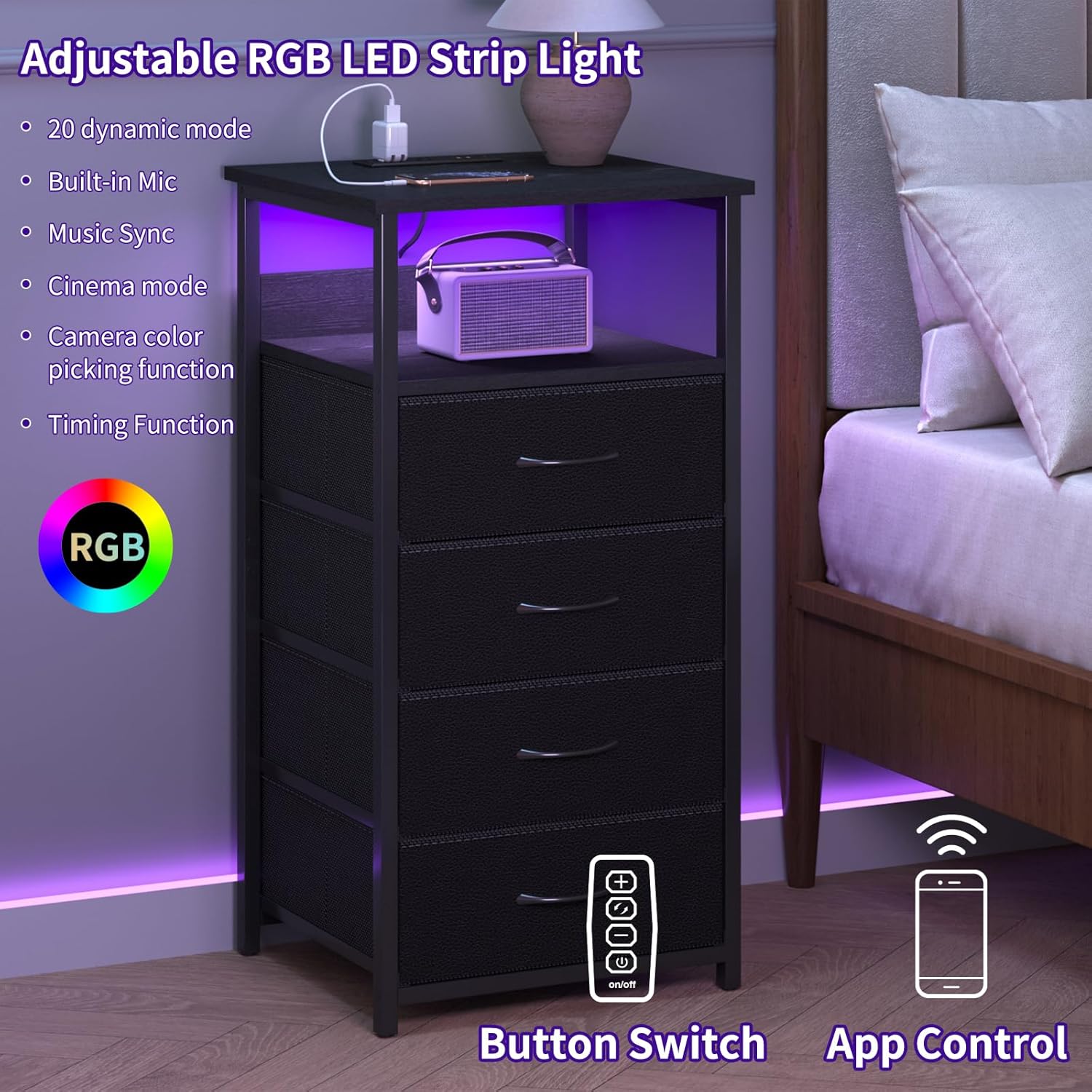
Image: The Fixwal Night Stand illuminated with purple RGB LED lights, illustrating both physical button and smartphone app control options for the lighting.
5.3. Using Storage Drawers and Shelves
The nightstand provides ample storage for various items.
- Fabric Drawers: Utilize the four fabric drawers for organizing personal items such as keys, glasses, small clothing articles, or socks.
- Open Shelves: The two-layer wooden shelf provides additional open storage space for lamps, clocks, photo frames, or decorative items.
6. Maintenance
- Cleaning: Wipe surfaces with a soft, dry cloth. For tougher spots, a slightly damp cloth can be used, followed by immediate drying. Avoid harsh chemicals or abrasive cleaners.
- Drawer Care: The fabric drawers can be spot cleaned with a mild detergent and water. Allow to air dry completely.
- Electrical Components: Ensure the charging station and LED lights remain dry. Do not immerse in water.
- Stability Check: Periodically check and tighten all screws and connections to maintain stability. Adjust the feet pads as needed.
7. Troubleshooting
- Lights Not Working: Check if the LED strip is securely connected to the charging station and if the power cord is plugged in. Ensure the remote control batteries are functional or the app is correctly paired.
- Devices Not Charging: Verify the power cord is securely plugged into a working wall outlet. Check if devices are properly connected to the AC outlets or USB ports. Avoid overloading the charging station.
- Nightstand Wobbles: Adjust the individual feet pads at the bottom of the nightstand to level it on uneven floors. Ensure all assembly screws are tightened.
- Drawers Stick/Don't Slide Smoothly: Ensure the drawers are correctly inserted and not overloaded. Check for any obstructions in the drawer slots.
8. Product Specifications
| Brand | Fixwal |
| Model Name | Fixwal Night Stand 8767 |
| Product Dimensions (D x W x H) | 15.7"D x 11.8"W x 33.1"H |
| Item Weight | 14.11 Pounds |
| Maximum Weight Recommendation | 30 Pounds |
| Frame Material | Metal |
| Top Material Type | Engineered Wood |
| Number of Drawers | 4 |
| Number of Shelves | 2 |
| Charging Station | 2 AC Outlets (120V/12A), 2 USB Ports (5V/2A) |
| Power Cord Length | 5 ft |
| LED Lighting | RGB, App/Remote Control, Music Sync |
| Tools Recommended For Assembly | Screw Driver |
9. Warranty and Support
For any questions, concerns, or assistance with your Fixwal Night Stand 8767, please contact Fixwal customer support. Refer to your purchase documentation for specific warranty details. Extended protection plans may be available through your retailer.