
1. Important Safety Information
Read all instructions carefully before operating the appliance. Keep this manual for future reference.
- This appliance is for indoor use only.
- Ensure the power supply matches the voltage specified on the rating label.
- Do not operate the unit with a damaged cord or plug. If damaged, contact qualified service personnel.
- Keep the unit at least 50 cm away from walls and other objects to ensure proper airflow.
- Do not insert objects into the air inlet or outlet.
- Always unplug the unit before cleaning or servicing.
- Do not use chemical solvents or flammable liquids to clean the unit.
- This appliance is not intended for use by persons (including children) with reduced physical, sensory or mental capabilities, or lack of experience and knowledge, unless they have been given supervision or instruction concerning use of the appliance by a person responsible for their safety.
2. Product Overview
The Mistral MPAC1200R is a 12,000 BTU portable air conditioner designed for cooling, fan, and dry (dehumidification) operations. It features a silver ion filter for air sterilization, low noise operation, and a 24-hour timer, all controllable via a remote.
Key Features:
- 12,000 BTU Cooling Capacity
- Air Sterilisation (Silver Ion Filter)
- Low Noise Operation (55 Decibels)
- 24 Hours Timer Function
- 2 Fan Speeds
- 3 Operating Modes: Cool, Fan, Dry
- Remote Control Included
Unit Components:

Figure 2.1: Front View. This image displays the front of the portable air conditioner, highlighting the air outlet grille at the top and the main body of the unit.
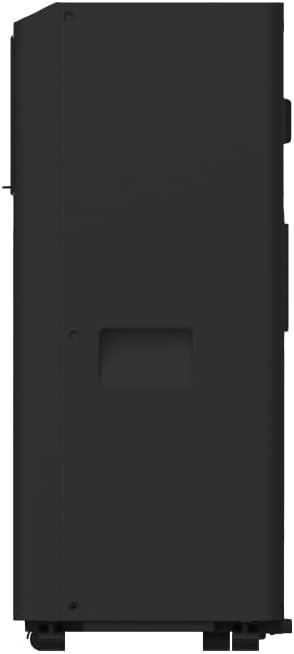
Figure 2.2: Side View. This image shows the side profile of the unit, including the exhaust air outlet and handles for portability.

Figure 2.3: Control Panel. This image details the top-mounted control panel with various function buttons and display.
3. Setup and Installation
3.1 Unpacking
- Carefully remove the air conditioner from its packaging.
- Retain the original packaging for future storage or transport.
- Check for any damage during transit. If damage is found, do not operate the unit and contact your retailer.
3.2 Placement
- Place the unit on a firm, level surface in a location that can support its weight (20.8 kg).
- Ensure there is at least 50 cm of clear space around the unit for proper air circulation.
- Position the unit near a window or opening for exhaust hose installation.
3.3 Exhaust Hose Installation
- Attach the exhaust hose connector to the air outlet on the back of the unit.
- Extend the exhaust hose and attach the window kit adapter to the other end.
- Install the window kit into a suitable window opening, ensuring a secure fit to prevent air leakage.
- Connect the window kit adapter to the installed window kit.
- Ensure the exhaust hose is as short and straight as possible to maximize efficiency. Avoid sharp bends.
3.4 Power Connection
Plug the power cord into a grounded 220 Volt electrical outlet. Do not use extension cords or multi-plugs.
4. Operating Instructions
The unit can be operated using the control panel on top of the unit or the included remote control.
4.1 Control Panel (Refer to Figure 2.3)
- ON/OFF Button: Press to turn the unit on or off.
- MODE Button: Press to cycle through Cool, Fan, and Dry modes.
- FAN SPEED Button: Press to select between Low and High fan speeds.
- TIMER Button: Press to set the auto-on or auto-off timer (up to 24 hours). Use the Up/Down arrows to adjust the time.
- Up/Down Arrows (Temperature/Time): Adjust the desired temperature in Cool mode or set the timer duration.
- Display: Shows the set temperature or timer settings.
4.2 Remote Control
The remote control duplicates the functions of the control panel, allowing convenient operation from a distance. Ensure batteries are correctly inserted.
4.3 Operating Modes
- Cool Mode: Provides cooling. Set desired temperature using Up/Down arrows.
- Fan Mode: Circulates air without cooling. Select fan speed (Low/High).
- Dry Mode (Dehumidification): Reduces humidity. The fan operates at a low speed, and the compressor cycles on and off.
4.4 Air Sterilization (Silver Ion Filter)
The unit is equipped with a silver ion filter to help sterilize the air. This feature operates automatically when the unit is running.
5. Maintenance
Regular maintenance ensures optimal performance and extends the lifespan of your air conditioner.
5.1 Cleaning the Air Filter
- The air filter should be cleaned every two weeks or more frequently depending on usage.
- Turn off and unplug the unit.
- Locate and remove the air filter from the back or side of the unit.
- Wash the filter with lukewarm water and a mild detergent. Rinse thoroughly.
- Allow the filter to air dry completely before reinstalling. Do not expose to direct sunlight.
5.2 Draining Water
During cooling and dehumidifying operations, water will accumulate inside the unit. The unit has a self-evaporative system, but in high humidity conditions, manual draining may be required.
- When the internal water tank is full, the unit may stop operating and display an error code.
- Turn off and unplug the unit.
- Place a shallow pan or tray under the drain outlet at the bottom rear of the unit.
- Remove the drain plug to allow water to flow out.
- Once drained, replace the drain plug securely.
5.3 Cleaning the Unit Exterior
- Wipe the exterior with a soft, damp cloth.
- Do not use abrasive cleaners, waxes, or polishes.
5.4 Storage
- Before storing, ensure all water is drained from the unit.
- Clean the air filter and the exterior.
- Wrap the power cord and store it neatly.
- Store the unit in a dry, upright position, preferably in its original packaging.
6. Troubleshooting
Before contacting service, review the following common issues and solutions:
| Problem | Possible Cause | Solution |
|---|---|---|
| Unit does not turn on | No power supply Power cord not plugged in Internal water tank full | Check power outlet Ensure cord is securely plugged in Drain water from the unit |
| Unit cools insufficiently | Air filter dirty Room too large Windows/doors open Exhaust hose blocked/bent | Clean air filter Ensure unit is suitable for room size Close all windows and doors Check and clear exhaust hose |
| Unit is noisy | Unit not on a level surface Air filter dirty | Place unit on a flat, stable surface Clean air filter |
| Water leakage | Drain plug loose Unit tilted | Ensure drain plug is securely in place Place unit on a level surface |
7. Specifications
| Feature | Specification |
|---|---|
| Brand | MISTRAL |
| Model Name | MPAC1200R |
| Cooling Capacity | 12,000 BTU |
| Product Dimensions (D x W x H) | 28D x 29W x 67.5H centimetres |
| Item Weight | 20.8 Kilograms |
| Voltage | 220 Volts |
| Wattage | 1650 watts |
| Noise Level | 55 Decibels |
| Control Method | Remote Control |
| Included Components | Remote Control |
| Compressor Type | Reciprocating |
| Is Outdoor Unit Required | No |
8. Warranty Information
This Mistral MPAC1200R Portable Air Conditioner comes with a 1 Year Limited Warranty on the entire unit and an additional 5 Years Warranty specifically for the compressor only.
For detailed warranty terms and conditions, please refer to the warranty card included with your product or contact Mistral customer support.
9. Customer Support
If you have any questions, require technical assistance, or need to report an issue with your Mistral MPAC1200R Portable Air Conditioner, please contact Mistral customer support through their official website or the contact information provided in your product documentation.


