
Introduction
This manual provides essential information for the safe and efficient operation of your Mistral 46-inch Blade-Free Fan with Air Purifier, Model MBFAP460. This appliance combines powerful airflow with advanced air purification technology, featuring a DC motor turbo system, HEPA13 filtration, and UV sterilization. Please read these instructions thoroughly before use and retain them for future reference.
Safety Instructions
To reduce the risk of fire, electric shock, or injury, always follow these basic safety precautions:
- Ensure the power supply voltage matches the rating label on the appliance.
- Do not operate the appliance with a damaged cord or plug. If damaged, contact qualified service personnel.
- Keep the appliance away from water or other liquids. Do not immerse any part of the appliance in water.
- Unplug the appliance from the power outlet before cleaning, performing maintenance, or when not in use.
- Do not insert fingers or foreign objects into any openings of the appliance.
- This appliance is for indoor household use only.
- Supervise children to ensure they do not play with the appliance.
Package Contents
Verify that all items are present in the package:
- Mistral Blade-Free Fan with Air Purifier Main Unit
- Remote Control
- HEPA13 Filter (pre-installed or separate)
- User Manual (this document)
Setup
The Mistral MBFAP460 requires minimal assembly. Follow these steps to prepare your unit for operation:
- Unpacking: Carefully remove all components from the packaging. Retain packaging for future storage or transport.
- Base Attachment (if separate): If the base is separate, align it with the main unit and secure it according to the markings. Ensure it clicks into place or is fastened securely.
- Filter Installation: If the HEPA13 filter is not pre-installed, locate the filter compartment (usually at the base or rear of the unit), remove the cover, insert the filter with the correct orientation, and replace the cover.
- Placement: Place the fan on a firm, level surface, ensuring adequate space around the unit for optimal airflow and purification.

Figure 1: Front view of the Mistral MBFAP460 Blade-Free Fan with Air Purifier.
Operating Instructions
Your Mistral MBFAP460 can be operated using the control panel on the unit or the included remote control.
Control Panel Overview

Figure 2: Close-up of the control panel, showing the digital display and touch-sensitive buttons for various functions.
Basic Operation
- Power On/Off: Press the power button (U) on the control panel or remote to turn the unit on or off.
- Air Modes: Cycle through the 5 available air modes: Auto, Turbo, Sleep, Natural, and Normal. Each mode adjusts fan speed and purification settings for different environments.
- Oscillation: Activate or deactivate the automatic left-right oscillation feature. Select from 30, 60, 90, or 120-degree oscillation angles to distribute air across a wider area.
- UV Sterilization: The unit features UV sterilization to kill up to 99.99% of most viruses, airborne bacteria, and mold. This function operates automatically with the air purification system.
- Filter Replacement Indicator: The control panel will display an indicator when the HEPA13 filter requires replacement. Refer to the Maintenance section for instructions.
Maintenance
Regular maintenance ensures optimal performance and longevity of your Mistral MBFAP460.
Cleaning the Unit
- Always unplug the unit before cleaning.
- Wipe the exterior surfaces with a soft, damp cloth. Do not use abrasive cleaners or solvents.
- Ensure no water enters the internal components.
HEPA13 Filter Replacement
The HEPA13 filter removes up to 99.97% of allergens, pollutants, and dust as small as 0.3 microns. Replace the filter when the filter replacement indicator illuminates on the control panel.
- Unplug the appliance from the power outlet.
- Locate the filter compartment, usually at the base of the unit.
- Open the filter compartment cover.
- Remove the old filter and dispose of it properly.
- Insert a new Mistral HEPA13 replacement filter, ensuring correct orientation.
- Close the filter compartment cover securely.
- Plug in the unit and reset the filter indicator (refer to specific instructions in the full manual if a reset button is present).
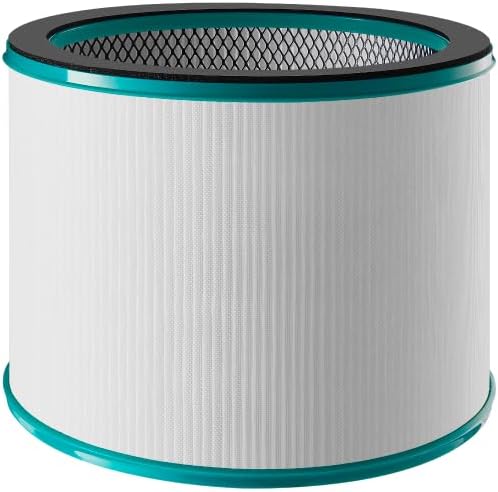
Figure 3: Mistral HEPA13 replacement filter, essential for maintaining air purification efficiency.
Troubleshooting
If you encounter issues with your Mistral MBFAP460, consult the following table for common problems and solutions.
| Problem | Possible Cause | Solution |
|---|---|---|
| Unit does not turn on. | No power supply. Power cord not securely plugged in. | Check if the power cord is firmly plugged into a working outlet. Ensure the power switch (if any) is on. |
| Weak or no airflow. | Air intake/outlet blocked. Filter is dirty or clogged. | Ensure no obstructions are blocking the air intake or outlet. Check and replace the HEPA13 filter if dirty. |
| Unusual noise during operation. | Unit not on a level surface. Foreign object inside. | Place the unit on a stable, level surface. Unplug and carefully inspect for any foreign objects. |
| Filter replacement indicator remains on after filter change. | Filter indicator not reset. | Refer to the full manual for specific instructions on how to reset the filter replacement indicator. |
If the problem persists after attempting these solutions, please contact customer support.
Specifications
| Feature | Detail |
|---|---|
| Model | MBFAP460 |
| Brand | MISTRAL |
| Product Dimensions | 38D x 35.8W x 116.2H centimetres |
| Item Weight | 5.5 Kilograms |
| Power Source | Corded Electric |
| Control Method | Remote |
| Filter Type | HEPA13 |
| Particle Retention Size | 0.3 Micron |
| Floor Area Coverage | 700 Square Feet |
| Special Features | DC Motor Turbo System, UV Sterilisation, 5 Air Modes, Auto Oscillation |
| Assembly Required | Yes |
| Energy Star Certified | Yes |
Warranty and Support
This product comes with a manufacturer's warranty. Please refer to the warranty card included in your package for specific terms and conditions. For technical support, replacement parts, or service inquiries, please contact Mistral customer service through their official website or the contact information provided in your warranty documentation.

