
PSIDE PSTDA 20-Li C3
Parkside PSTDA 20-Li C3 Cordless Pendulum Jigsaw User Manual
Model: PSTDA 20-Li C3 | Brand: PARKSIDE
1. Introduction and Overview
This manual provides essential information for the safe and efficient operation, maintenance, and troubleshooting of your Parkside PSTDA 20-Li C3 Cordless Pendulum Jigsaw. Please read this manual thoroughly before first use and keep it for future reference.
The Parkside PSTDA 20-Li C3 is a versatile cordless jigsaw designed for precise and rapid cutting in various materials such as wood, aluminum, and plastic. It features a 3-level adjustable pendulum stroke, continuously adjustable stroke speed, and an integrated LED work light for optimal visibility.

Figure 1: Overview of the Parkside PSTDA 20-Li C3 Cordless Pendulum Jigsaw. Note that the battery and charger are not included with the tool.
2. Safety Instructions
Always observe basic safety precautions when using electric tools to reduce the risk of fire, electric shock, and personal injury.
2.1 General Power Tool Safety Warnings
- Work Area Safety: Keep your work area clean and well-lit. Cluttered or dark areas invite accidents. Do not operate power tools in explosive atmospheres, such as in the presence of flammable liquids, gases, or dust.
- Electrical Safety: Avoid body contact with earthed or grounded surfaces (e.g., pipes, radiators, ranges, refrigerators). There is an increased risk of electric shock if your body is earthed or grounded.
- Personal Safety: Always wear eye protection. Use dust mask, non-skid safety shoes, hard hat, or hearing protection for appropriate conditions. Dress properly. Do not wear loose clothing or jewelry. Keep your hair, clothing, and gloves away from moving parts.
- Tool Use and Care: Do not force the power tool. Use the correct power tool for your application. Do not use the power tool if the switch does not turn it on and off. Disconnect the plug from the power source and/or the battery pack from the power tool before making any adjustments, changing accessories, or storing power tools.
2.2 Jigsaw Specific Safety Warnings
- Hold the tool by insulated gripping surfaces when performing an operation where the cutting accessory may contact hidden wiring or its own cord.
- Use clamps or another practical way to secure and support the workpiece to a stable platform. Holding the work by hand or against your body leaves it unstable and may lead to loss of control.
- Always ensure the saw blade is securely installed before operation.
- Do not touch the saw blade immediately after operation as it may be hot.
3. Product Features
The Parkside PSTDA 20-Li C3 Jigsaw is equipped with several features to enhance performance and user experience:
- Adjustable Pendulum Stroke: 3 levels plus a fine cut position for optimized cutting performance in different materials.
- Variable Speed Control: Continuously adjustable stroke speed from 0 to 2700 strokes per minute for precise control.
- Integrated LED Work Light: Illuminates the cutting line for improved visibility.
- Quick-Change Saw Blade System: Allows for easy and tool-free blade changes.
- Parallel Stop: For accurate straight cuts, with a quick-release wing screw.
- Dust Extraction Port: Connects to an external dust extraction system for a cleaner work environment.
- Adjustable Cutting Angle: 6 selectable cutting angles for bevel cuts.
- Softgrip Handle: Ergonomic design with anti-slip softgrip for comfortable handling.
- Integrated Allen Key Holder: Convenient storage for the included Allen key.
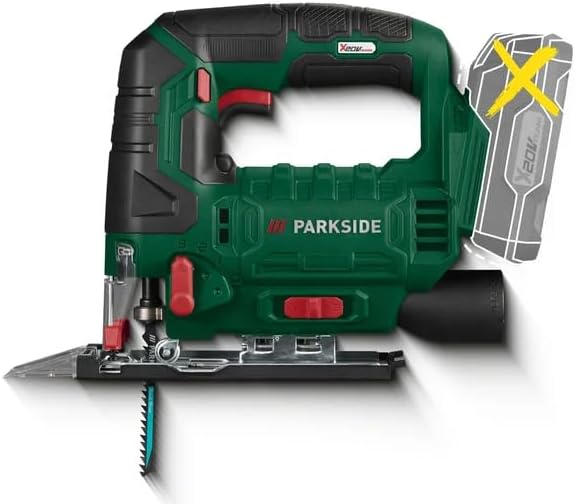
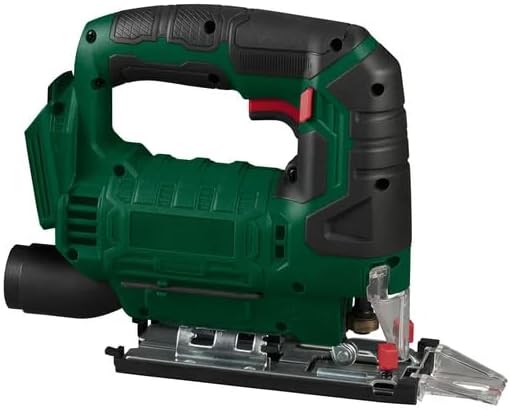
Figure 2: Front and side views of the jigsaw, highlighting its compact design and ergonomic features.
4. Components and Package Contents
The standard package for the Parkside PSTDA 20-Li C3 Jigsaw includes the following items:
- Parkside PSTDA 20-Li C3 Cordless Pendulum Jigsaw (main unit)
- 2 x Wood Saw Blades (Swiss Made)
- 1 x Metal Saw Blade (Swiss Made)
- 1 x Parallel Stop
- 1 x Allen Key (stored on the device)
- 1 x Plastic Sliding Shoe Tip (pre-assembled)
- 1 x Splinter Guard (pre-assembled)
- 1 x Line Guide Adapter (pre-assembled)
- 1 x Reducer (for dust extraction)
- 1 x Storage Case
Note: Battery and charger are NOT included and must be purchased separately.
5. Setup
5.1 Battery Installation
- Ensure the jigsaw is switched off.
- Align the battery pack with the battery port on the tool.
- Slide the battery pack into the port until it clicks securely into place.
- To remove, press the release button on the battery pack and slide it out.
5.2 Saw Blade Installation/Removal
The jigsaw features a quick-change system for saw blades.
- Ensure the jigsaw is switched off and the battery is removed.
- To install, push the saw blade into the blade holder until it locks into place. Ensure the teeth are facing forward.
- To remove, pull the quick-release lever on the blade holder and the blade will eject.
5.3 Attaching the Parallel Stop
- Slide the parallel stop into the guide slots on the base plate.
- Adjust the desired cutting width.
- Tighten the wing screw to secure the parallel stop in position.
5.4 Connecting Dust Extraction
Attach the included reducer to the dust extraction port at the rear of the tool. Connect a suitable vacuum cleaner hose to the reducer for effective dust removal during operation.
6. Operating Instructions
6.1 Powering On/Off
- To turn on, press the safety switch (if applicable) and then press the ON/OFF trigger switch.
- To turn off, release the ON/OFF trigger switch.
6.2 Adjusting Stroke Speed
The stroke speed is continuously adjustable via the trigger switch. Apply more pressure for higher speeds and less pressure for lower speeds. This allows for optimal speed selection based on the material being cut.
6.3 Setting Pendulum Stroke
The pendulum stroke function allows the blade to move forward and backward in addition to up and down, increasing cutting speed. Use the pendulum selector switch to choose from 3 levels or the fine cut position (0).
- Position 0 (Fine Cut): No pendulum action, for very fine cuts and delicate materials.
- Position 1-3: Increasing pendulum action for faster cutting in softer materials like wood.
6.4 Adjusting Cutting Angle (Bevel Cuts)
The base plate can be tilted to make bevel cuts. Use the integrated Allen key to loosen the base plate screws, adjust to one of the 6 selectable angles, and then re-tighten the screws.
6.5 General Cutting Tips
- Always secure the workpiece firmly to prevent movement during cutting.
- Start the saw before contacting the workpiece.
- Apply steady, even pressure. Do not force the tool.
- Allow the blade to cool down during long cutting operations.
7. Maintenance
Regular maintenance ensures the longevity and optimal performance of your jigsaw.
7.1 Cleaning
- Always disconnect the battery before cleaning.
- Clean the ventilation openings regularly to prevent overheating.
- Wipe the tool housing with a soft, damp cloth. Do not use harsh chemicals or abrasive cleaners.
- Remove any sawdust or debris from the blade holder and base plate area.
7.2 Blade Replacement
Replace saw blades when they become dull or damaged to ensure clean and efficient cuts. Refer to section 5.2 for blade installation/removal instructions.
7.3 Storage
Store the jigsaw in its practical storage case in a dry, secure place, out of reach of children. Ensure the battery is removed before storage.
8. Troubleshooting
This section addresses common issues you might encounter with your jigsaw.
| Problem | Possible Cause | Solution |
|---|---|---|
| Tool does not start. | Battery not charged or not properly inserted. | Charge the battery. Ensure the battery is fully inserted until it clicks. |
| Saw blade not cutting efficiently or binding. | Dull or incorrect blade for material; excessive force; incorrect pendulum setting. | Replace the blade. Use the correct blade type. Reduce cutting pressure. Adjust pendulum setting. |
| Excessive vibration. | Loose blade; damaged blade; worn components. | Ensure blade is securely installed. Replace damaged blade. If problem persists, contact customer support. |
| Dust extraction not effective. | Dust port clogged; vacuum cleaner not connected or full. | Clear the dust port. Ensure vacuum cleaner is properly connected and empty. |
9. Specifications
| Attribute | Value |
|---|---|
| Model | PSTDA 20-Li C3 |
| Power Source | Battery Powered (20 V, 2 Ah recommended) |
| No-Load Stroke Rate | 0–2700 strokes/min |
| Pendulum Levels | 3 + 1 (fine cut position) |
| Stroke Length | 20 mm |
| Cutting Depth (Wood) | 80 mm |
| Cutting Depth (Aluminum) | 12 mm |
| Cutting Depth (Metal) | 5 mm |
| Dimensions (without battery) | 23.7 x 19.7 x 7.3 cm |
| Weight (without battery) | 1.74 kg |
| Material | Plastic, Thermoplastic Elastomers/Rubber (handle) |
10. Warranty and Support
For warranty information and customer support, please refer to the documentation provided with your purchase or visit the official Parkside website. Keep your proof of purchase for any warranty claims.
For technical assistance or spare parts, please contact the manufacturer's authorized service center. Information regarding spare parts availability is not provided in this manual.