1. Safety Information
Please read all safety instructions before using the NightBuddy Work LED Light. Failure to follow these instructions may result in electric shock, fire, or serious injury.
- Do not disassemble, modify, or attempt to repair the device. This will void the warranty and may cause damage or injury.
- Keep the device away from extreme temperatures, direct sunlight, and open flames.
- Although the device is waterproof, avoid prolonged submersion in water. Ensure the charging port cover is securely closed when not charging.
- Do not look directly into the LED light when it is on, as it may cause temporary vision impairment.
- Use only the provided USB charging cable or a certified equivalent.
- Keep out of reach of children.
2. Product Overview
The NightBuddy Magnetic Rechargeable Portable Work LED Light is a versatile lighting tool designed for various tasks. It features 1500 lumens of brightness, four distinct lighting modes, a strong magnetic base, a hanging hook, and a foldable stand for flexible positioning. It is USB rechargeable and includes a battery indicator for convenience.

Figure 2.1: NightBuddy Magnetic Work Light and its packaging.

Figure 2.2: The NightBuddy Work Light with its convenient foldable stand, allowing for various angles.
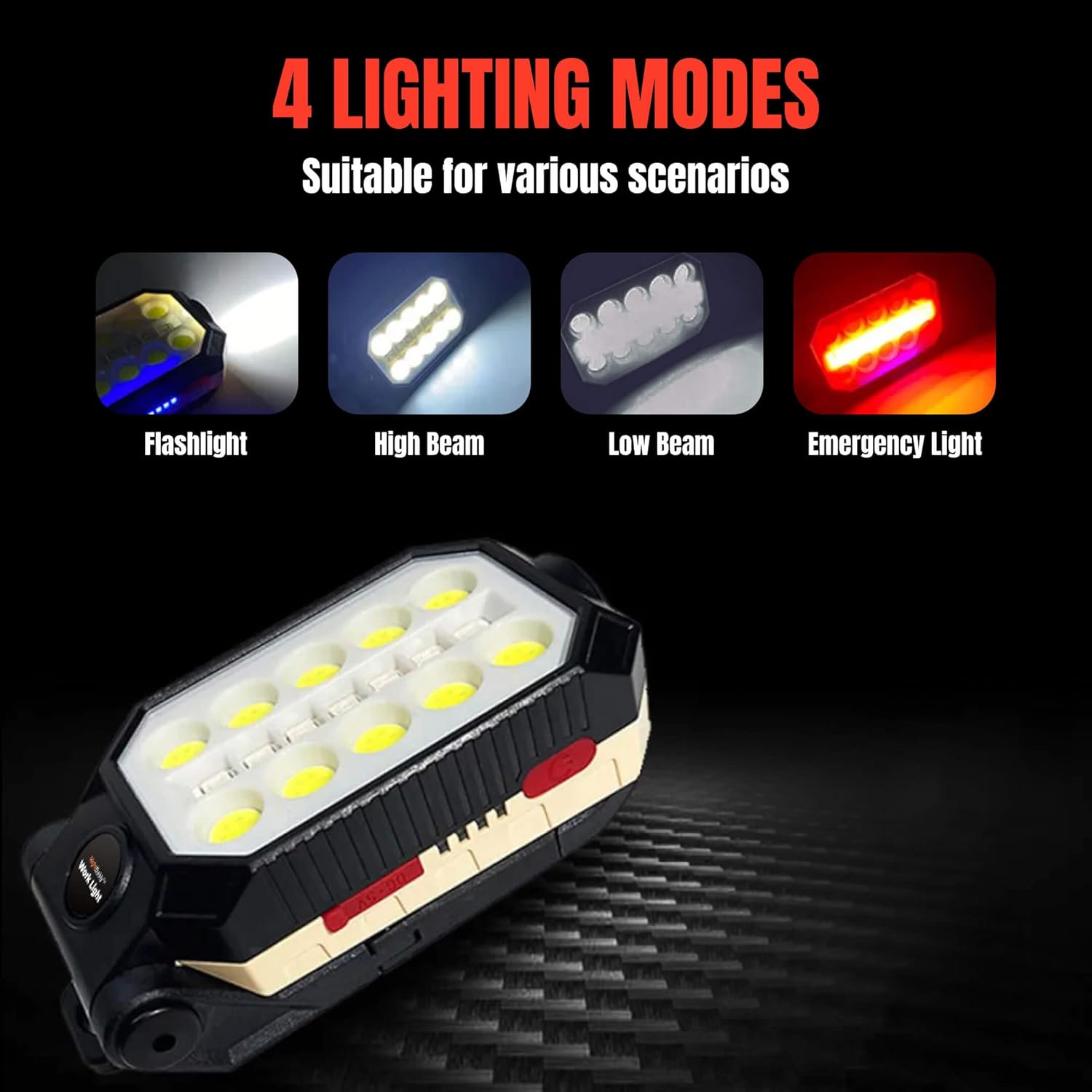
Figure 2.3: Visual representation of the four available lighting modes.

Figure 2.4: The integrated hanging hook, useful for suspending the light.

Figure 2.5: The strong magnetic base, enabling hands-free operation on metal surfaces.
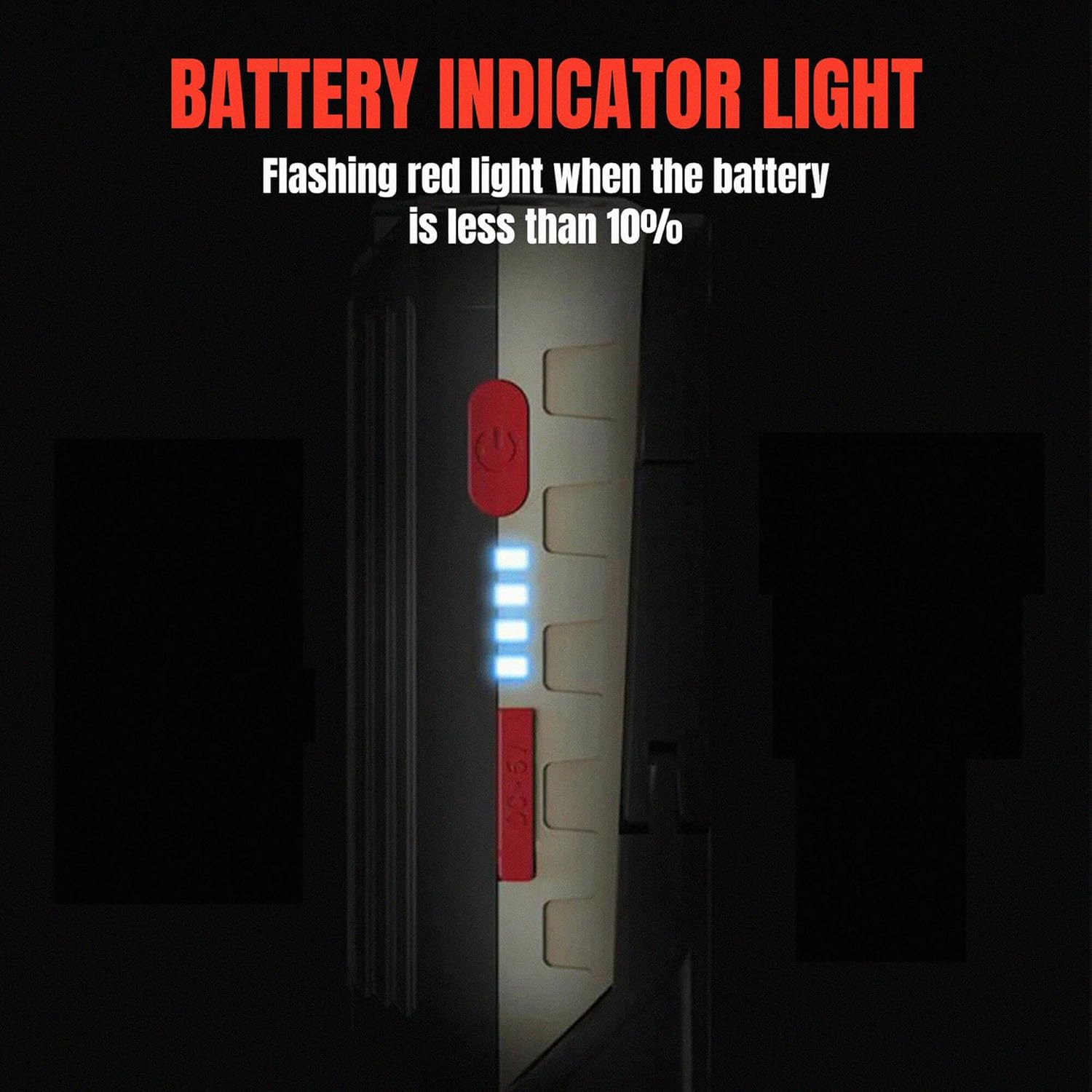
Figure 2.6: The LED battery indicator lights, displaying the current charge level.

Figure 2.7: The 1/4-inch Edison screw mount, suitable for attaching to tripods or other accessories.
3. Setup
3.1 Initial Charging
- Locate the USB charging port on the side of the work light.
- Open the protective cover of the USB port.
- Connect the provided USB charging cable to the light and plug the other end into a compatible USB power source (e.g., wall adapter, computer USB port).
- The LED battery indicator lights will illuminate and flash to show charging progress. All lights will be solid when fully charged.
- For optimal performance, fully charge the light before its first use.
4. Operating Instructions
4.1 Power On/Off and Mode Selection
- Press the power button once to turn on the light in its default mode (Flashlight).
- Press the power button repeatedly to cycle through the four lighting modes: Flashlight → High Beam → Low Beam → Emergency Light (Red/Blue Strobe) → Off.
- To turn off the light from any mode, continue pressing the power button until it cycles to the 'Off' state, or press and hold the power button for 2-3 seconds.
4.2 Using the Foldable Stand
The integrated foldable stand allows you to position the light at various angles for hands-free illumination. Simply adjust the stand to your desired position.
4.3 Using the Magnetic Base
The strong magnetic base allows the light to be securely attached to any ferrous metal surface, such as car hoods, toolboxes, or metal beams. Ensure the surface is clean and flat for maximum adhesion.
4.4 Using the Hanging Hook
Unfold the integrated hanging hook to suspend the light from ropes, branches, or other suitable fixtures, providing overhead lighting.
4.5 Battery Indicator
The LED battery indicator displays the remaining charge. When the battery level drops below 10%, a red light will flash, indicating that recharging is necessary.
5. Maintenance
5.1 Cleaning
Wipe the exterior of the light with a soft, damp cloth. Do not use abrasive cleaners, solvents, or harsh chemicals, as these may damage the finish or internal components.
5.2 Storage
When not in use, store the NightBuddy Work LED Light in a cool, dry place, away from direct sunlight and extreme temperatures.
5.3 Battery Care
To prolong battery life, recharge the device regularly, even if it has not been fully discharged. Avoid leaving the battery completely depleted for extended periods.
6. Troubleshooting
- Light not turning on: Ensure the battery is charged. Connect the light to a power source using the USB cable and allow it to charge for at least 30 minutes before attempting to turn it on. Press the power button firmly.
- Light not charging: Verify that the USB cable is securely connected to both the light and the power source. Try using a different USB port or a different USB charging adapter. Ensure the charging port cover is fully open to allow proper connection.
- Magnet not holding securely: Ensure the metal surface is clean, dry, and ferrous (magnetic). The strength of the magnetic hold can vary depending on the thickness and type of metal surface.
- Reduced brightness or short battery life: The battery may be nearing the end of its lifespan or may not be fully charged. Ensure the light is fully charged before use. If issues persist, contact customer support.
7. Product Video
Video 7.1: An overview demonstrating the features and durability of the NightBuddy Magnetic Work Light, including its waterproof and shockproof capabilities, magnetic attachment, and various light modes.
8. Specifications
| Feature | Detail |
|---|---|
| Brand | NightBuddy |
| Model Number | 1 |
| Brightness | 1500 Lumens |
| Light Source Type | LED |
| Power Source | Battery Powered |
| Battery Cell Composition | Lithium Ion |
| Material | Metal |
| Water Resistance Level | Waterproof |
| Product Dimensions | 2.5 x 5.2 x 2 inches |
| Item Weight | 8.4 ounces |
| Included Components | Work Light and USB Charger |
9. Warranty and Support
NightBuddy products are manufactured to high-quality standards. For information regarding warranty coverage, please refer to the warranty card included with your purchase or visit the official NightBuddy website.
If you encounter any issues or have questions about your NightBuddy Magnetic Rechargeable Portable Work LED Light, please contact our customer support team:
- Website: NightBuddy Official Store
- Email: Refer to product packaging or website for contact email.
- Phone: Refer to product packaging or website for contact number.


