
1. Introduction
Thank you for choosing the SGIN 17-inch Laptop Computer. This manual provides essential information for setting up, operating, maintaining, and troubleshooting your new device. Please read this manual carefully before using the laptop to ensure optimal performance and longevity.

Figure 1.1: SGIN 17-inch Laptop Computer, front view with screen displaying a desktop interface.
2. Product Features
The SGIN 17-inch Laptop Computer is designed for everyday productivity and entertainment, offering a large display and reliable performance.
- Display: 17.3-inch Full HD (1920x1080) IPS display for clear and vivid visuals.
- Processor: Intel Core i3-5005U Processor, providing efficient performance for daily tasks.
- Memory: 4GB DDR4 RAM for smooth multitasking.
- Storage: 128GB SSD for fast boot times and quick application loading.
- Connectivity: Dual-band 2.4G/5G WiFi and Bluetooth 4.2 for reliable wireless connections.
- Battery: Long-lasting 38 Watt Hours battery, offering up to 8 hours of video playback.
- Ports: Equipped with USB 3.2, USB 3.0, Type-C, Mini HDMI, Micro SD card slot, and a Headphone Jack for versatile connectivity.
- Keyboard: Full-size keyboard with a numeric keypad for comfortable typing.
- Cooling: Noiseless heat dissipation design with a heat dissipation hole and dust filter.
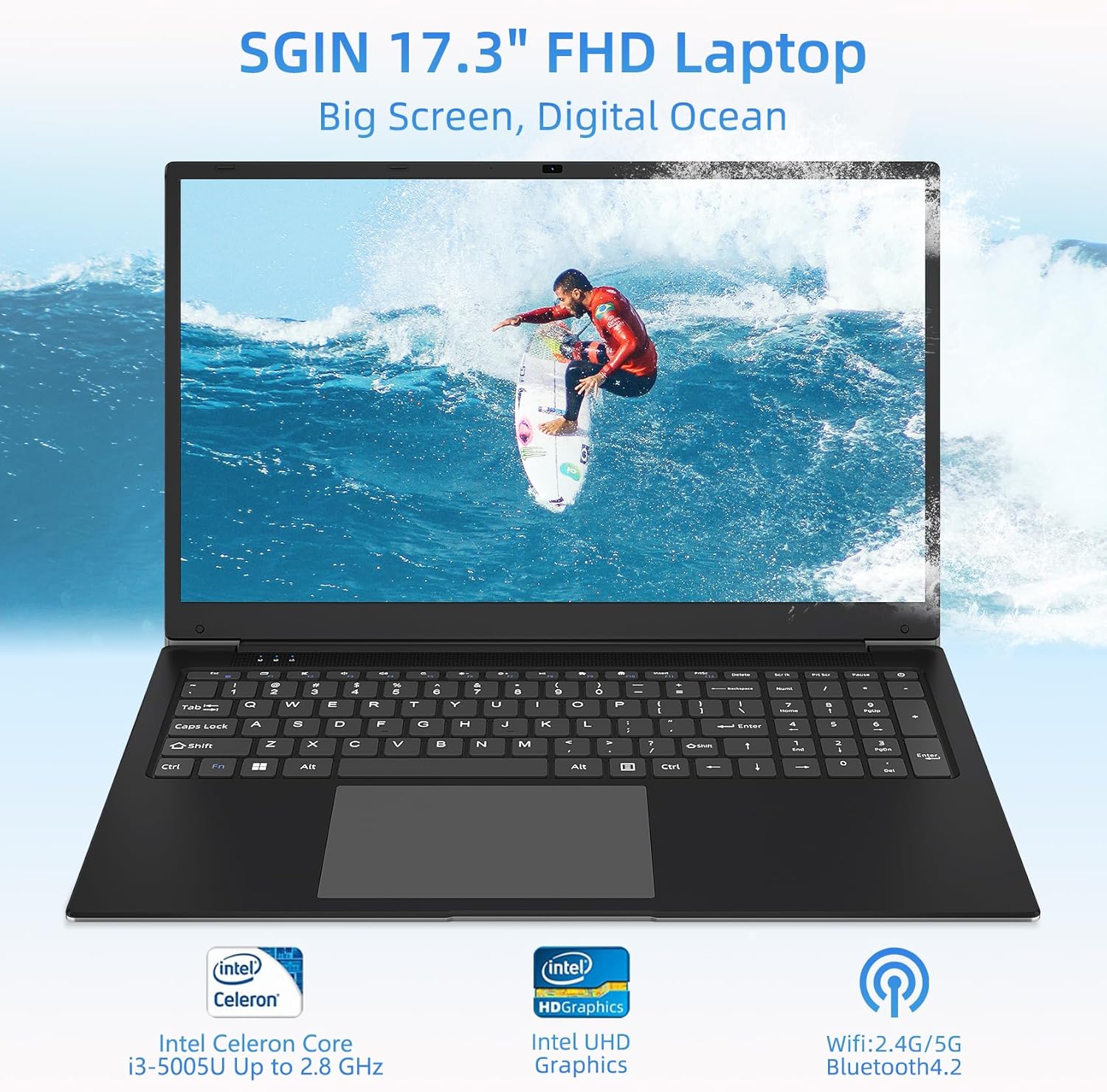
Figure 2.1: Overview of the SGIN 17.3-inch FHD Laptop highlighting key components like the processor, graphics, and wireless capabilities.

Figure 2.2: Illustration of the laptop's internal components, emphasizing the Intel Core i3-5005U processor, 4GB DDR4 RAM, and 128GB storage.

Figure 2.3: Close-up view of the 17.3-inch Full HD IPS display, showcasing its thin bezels and wide viewing angles.

Figure 2.4: Detailed view of the full-size keyboard and integrated numeric keypad, designed for a comfortable typing experience.

Figure 2.5: Visual representation of the laptop's battery, indicating its 7.6V 8000mAh capacity and up to 8 hours of video playback.
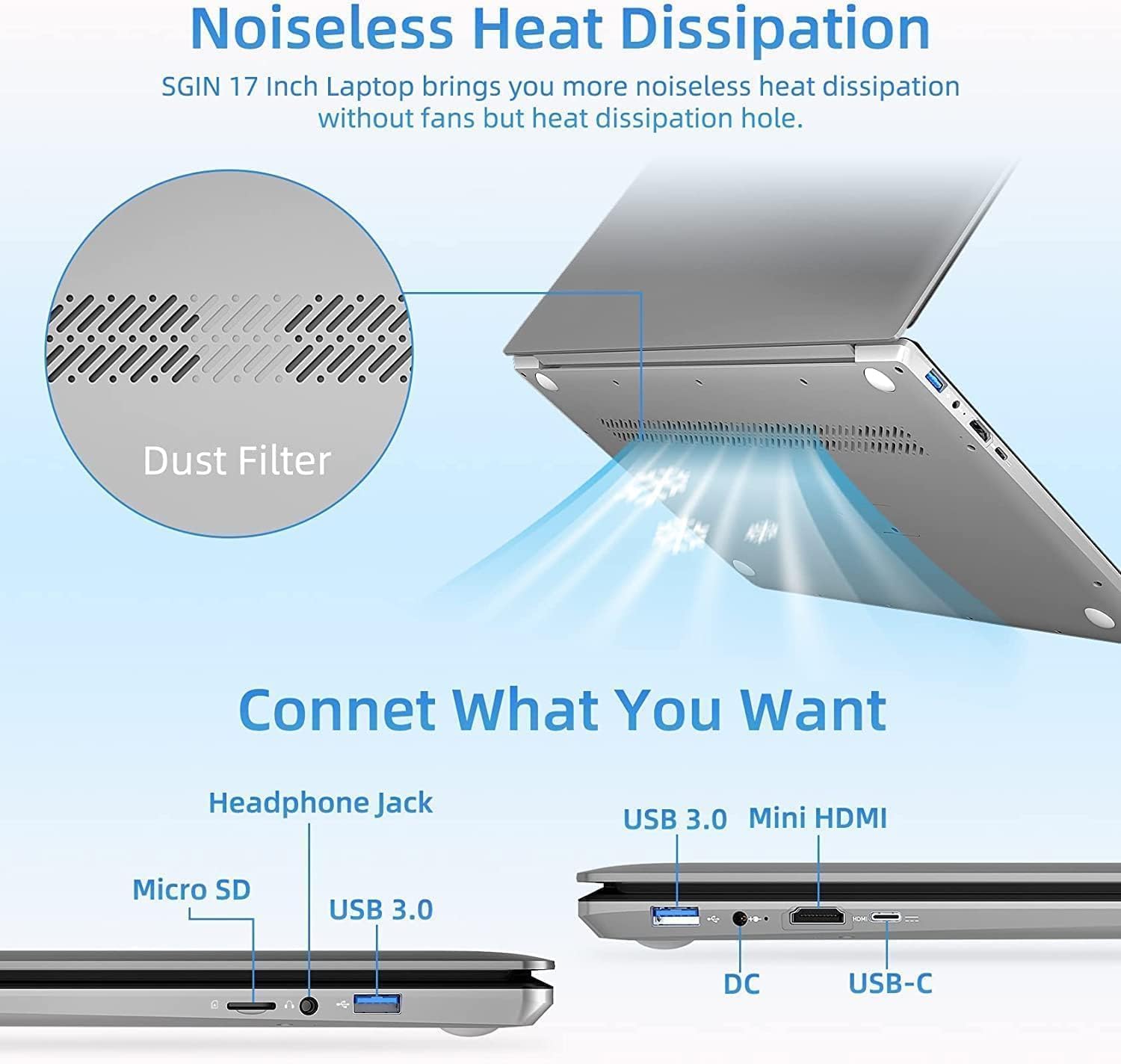
Figure 2.6: Diagram showing the various ports available on the laptop, including USB, HDMI, and Type-C, along with the noiseless heat dissipation design.
3. Setup
3.1 Unpacking
Carefully remove the laptop and all accessories from the packaging. Ensure all components listed below are present:
- SGIN 17-inch Laptop Computer
- Power Adapter
- User Manual (this document)
3.2 Initial Charge
Before first use, fully charge the laptop. Connect the power adapter to the DC-in port on the laptop and then plug it into a power outlet. The charging indicator light will illuminate.
3.3 Powering On and Initial Setup
Press and hold the power button for a few seconds until the screen turns on. Follow the on-screen instructions to complete the initial Windows setup, including language selection, network connection, and user account creation.
4. Operating
4.1 Basic Operations
- Power On/Off: Press the power button to turn on. To shut down, click the Start button, then Power > Shut down.
- Sleep Mode: Close the lid or click the Start button, then Power > Sleep.
- Restart: Click the Start button, then Power > Restart.
4.2 Connecting Peripherals
Utilize the various ports to connect external devices:
- USB Ports: Connect USB devices such as mice, keyboards, or external storage drives.
- Mini HDMI: Connect to an external monitor or TV using a Mini HDMI cable for extended display.
- Headphone Jack: Plug in headphones or external speakers for audio output.
- Micro SD Card Slot: Insert a Micro SD card for additional storage or data transfer.
- Type-C Port: For data transfer and potentially other compatible Type-C devices.
4.3 Wireless Connectivity
- Wi-Fi: Click the Wi-Fi icon in the taskbar, select your network, and enter the password to connect to the internet.
- Bluetooth: Enable Bluetooth in Windows settings to pair with Bluetooth-enabled devices like headphones or speakers.
5. Maintenance
5.1 Cleaning
- Screen: Use a soft, lint-free cloth slightly dampened with water or a screen cleaner. Do not spray liquid directly onto the screen.
- Keyboard and Casing: Use a soft, dry cloth. For stubborn dirt, a slightly damp cloth can be used, ensuring no liquid enters the ports.
- Ventilation: Regularly check and clean the heat dissipation holes to prevent dust buildup, which can affect performance.
5.2 Software Updates
Regularly update your operating system and drivers to ensure optimal performance, security, and compatibility. Go to Windows Settings > Windows Update to check for updates.
5.3 Battery Care
- Avoid fully discharging the battery frequently.
- Store the laptop in a cool, dry place if not used for extended periods.
- Do not expose the laptop to extreme temperatures.
6. Troubleshooting
This section addresses common issues you might encounter with your SGIN laptop.
| Problem | Possible Cause | Solution |
|---|---|---|
| Laptop does not power on. | Low battery; Power adapter issue; Hardware malfunction. | Ensure power adapter is securely connected and plugged into a working outlet. Allow to charge for at least 30 minutes. Try a different outlet. If still no power, contact support. |
| Screen is blank or black. | Sleep mode; Display driver issue; Hardware malfunction. | Press any key or move the mouse to wake from sleep. Restart the laptop. If connected to an external display, disconnect it. Update display drivers. |
| Wi-Fi connection issues. | Router issue; Incorrect password; Driver issue. | Restart your router and laptop. Double-check Wi-Fi password. Ensure Wi-Fi is enabled in Windows settings. Update network drivers. |
| Slow performance. | Too many applications running; Low storage space; Malware. | Close unnecessary applications. Free up disk space. Run a virus scan. Ensure Windows is updated. |
7. Specifications
Detailed technical specifications for the SGIN 17-inch Laptop Computer.
| Feature | Specification |
|---|---|
| Brand | SGIN |
| Model Number | M17S |
| Screen Display Size | 17.3 Inches |
| Screen Resolution | 1920 x 1080 pixels (FHD) |
| RAM | 4 GB DDR4 SDRAM |
| Storage | 128GB SSD |
| Processor Brand | Intel |
| Graphics Processor | Intel UHD Graphics |
| Item Weight | 4.07 pounds (1.85 Kilograms) |
| Product Dimensions | 17.3 x 10 x 0.6 inches |
| Wireless Communication | Bluetooth 4.2, Wi-Fi (2.4G/5G) |
| Lithium Battery Energy Content | 38 Watt Hours |
| Audio Output Type | Headphones |
8. Warranty and Support
8.1 Warranty Information
The SGIN 17-inch Laptop Computer comes with a 1-year warranty from the date of purchase. This warranty covers manufacturing defects and issues arising from normal use. It does not cover damage caused by misuse, accidents, unauthorized repairs, or external factors.
8.2 Customer Support
For technical assistance, warranty claims, or any questions regarding your SGIN laptop, please contact SGIN customer support. Refer to the contact information provided with your product packaging or visit the official SGIN website for the most up-to-date support details.