
1. Introduction
This manual provides instructions for the assembly, operation, maintenance, and troubleshooting of your HOMCOM Garage Workbench, Model B71-052V80. Please read this manual thoroughly before assembly and use to ensure proper function and safety. Keep this manual for future reference.

Figure 1: Fully assembled HOMCOM Garage Workbench with various tools and storage items.
2. Safety Information
- Always assemble the workbench on a flat, stable surface.
- Ensure all fasteners are securely tightened before use. Periodically check and re-tighten as necessary.
- Do not exceed the maximum weight capacities for the tabletop, pegboard, shelf, or drawer.
- Keep children and pets away from the assembly area.
- Use appropriate personal protective equipment (e.g., gloves, safety glasses) during assembly.
- Avoid placing hot items directly on the MDF tabletop.
- Distribute weight evenly across surfaces to prevent tipping.
3. Package Contents
Verify that all components listed below are present before beginning assembly. If any parts are missing or damaged, contact customer support.
- Steel Frame Components
- MDF Tabletop
- Pegboard Panel
- Drawer Assembly
- Cabinet Door and Lock Mechanism (with 2 keys)
- Open Shelf Panel
- 20 Y-shaped Pegboard Hooks
- Assembly Hardware (screws, bolts, nuts, washers)
4. Setup and Assembly Instructions
Assembly typically requires two adults. Refer to the included diagrams for visual guidance. Ensure all parts are correctly oriented before tightening fasteners.
- Unpack and Identify Parts: Carefully remove all components from the packaging. Lay them out and compare them against the parts list to ensure everything is present and undamaged. Separate hardware by type.
- Assemble the Main Frame: Connect the vertical and horizontal steel frame components using the provided hardware. Do not fully tighten all bolts until the entire frame is assembled to allow for minor adjustments.
- Attach the Tabletop: Secure the MDF tabletop to the top of the main frame. Ensure it is flush and centered before tightening the screws.
- Install the Pegboard: Mount the pegboard panel to the rear uprights of the workbench frame.
- Assemble the Drawer: Assemble the drawer components. Pay close attention to the orientation of the drawer slides and ensure they are properly aligned with the frame's mounting points for smooth operation. Secure the drawer handle.
- Install the Open Shelf: Place and secure the open shelf panel within its designated frame section.
- Attach the Cabinet: Assemble the cabinet structure and attach the cabinet door. Install the lock mechanism and ensure it functions correctly with the provided keys.
- Final Tightening: Once all components are in place and aligned, systematically tighten all bolts and screws.
- Attach Leg Bases: Secure the protective leg bases to the bottom of each workbench leg.

Figure 2: Detail of the steel frame connection points during assembly.

Figure 3: Workbench leg with its protective base for stability and floor protection.
5. Operating Instructions
The HOMCOM Garage Workbench is designed for versatile use in various work environments.
5.1 Workbench Surface
The MDF tabletop provides a stable surface for various tasks. It can support up to 44 lbs (20 kg). Avoid placing excessively heavy or sharp objects directly on the surface without protection.
5.2 Pegboard
The integrated pegboard allows for organized storage of frequently used tools. Utilize the 20 included Y-shaped hooks to hang small tools and accessories, keeping them within easy reach. The pegboard can support up to 44 lbs (20 kg).

Figure 4: Pegboard with Y-shaped hooks for hanging tools.
5.3 Storage Drawer
The slide-out drawer provides enclosed storage for smaller items, hardware, or documents. The drawer has a weight capacity of 22 lbs (10 kg).
5.4 Open Shelf
An open shelf is located beneath the drawer, offering accessible storage for larger tools, bins, or equipment. This shelf can support up to 44 lbs (20 kg).
5.5 Lockable Cabinet
The cabinet features a door with a lock mechanism, providing secure storage for valuable tools or hazardous materials. Two keys are included. Ensure the door is properly closed and locked when security is required. The cabinet also includes an internal shelf for organized storage.
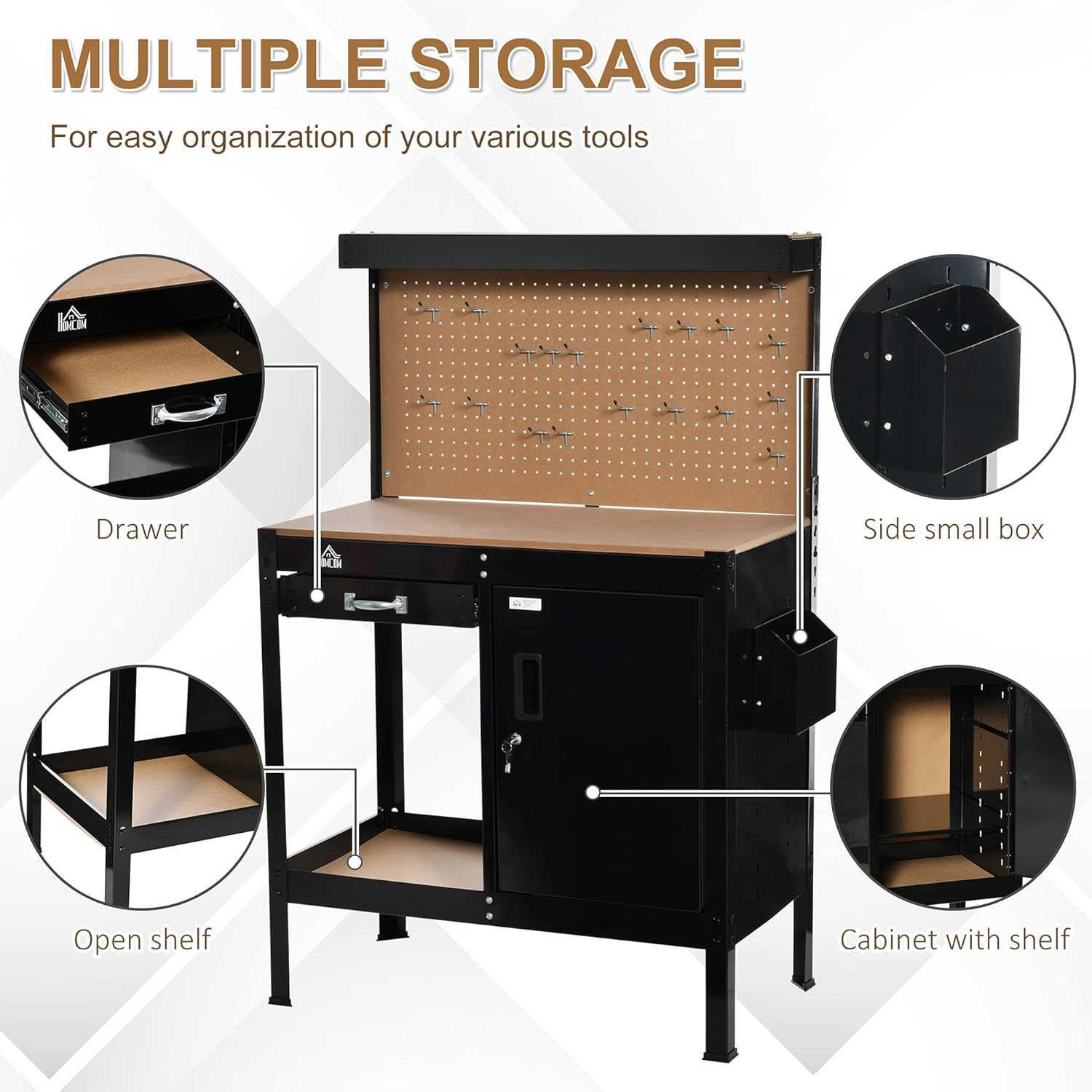
Figure 5: Overview of the workbench's multiple storage compartments.

Figure 6: Detail of the lockable cabinet and included keys.
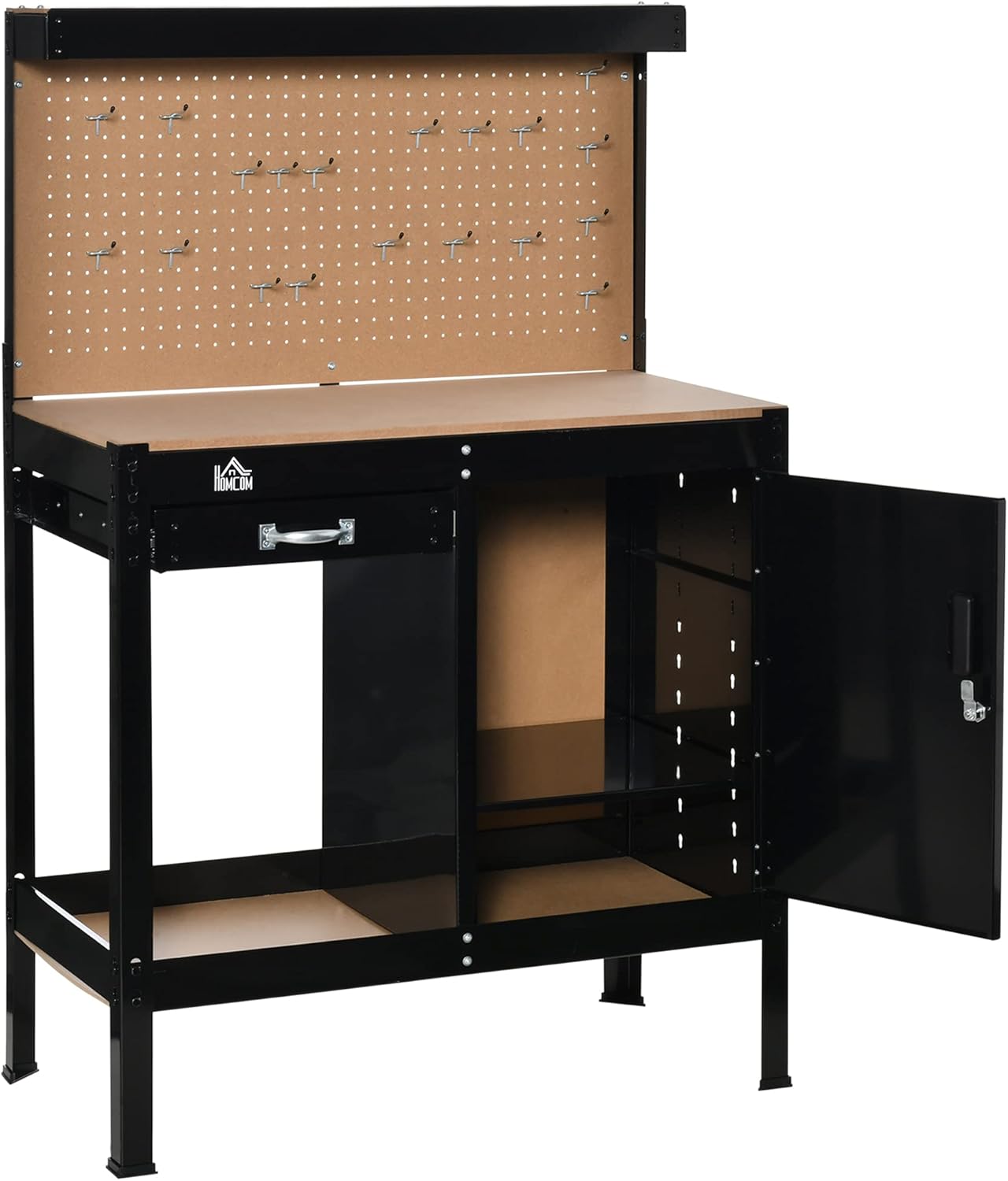
Figure 7: Workbench with the cabinet door open, showing internal storage space.
6. Maintenance
- Cleaning: Wipe down the steel frame and MDF surfaces with a damp cloth. Avoid abrasive cleaners or harsh chemicals that could damage the finish.
- Inspection: Periodically inspect all bolts, screws, and connections to ensure they remain tight. Re-tighten any loose fasteners.
- Drawer Slides: If the drawer becomes stiff, apply a small amount of silicone lubricant to the drawer slides.
- Rust Prevention: In humid environments, consider applying a rust-inhibiting spray to exposed steel parts to prolong the life of the workbench.
7. Troubleshooting
- Workbench is Unstable/Wobbly:
Solution: Ensure all assembly bolts are fully tightened. Check that the workbench is on a level surface. Adjust leg bases if necessary. - Drawer Sticks or Does Not Slide Smoothly:
Solution: Verify that the drawer slides were installed correctly and are aligned. Ensure no objects are obstructing the slides. Lubricate the slides with silicone spray if needed. - Cabinet Door Does Not Close/Lock Properly:
Solution: Check for any obstructions. Ensure the cabinet hinges are properly aligned and tightened. Verify the lock mechanism is correctly installed and the key turns freely. - Missing or Damaged Parts:
Solution: Do not proceed with assembly. Contact customer support immediately for replacement parts.
8. Specifications
| Feature | Specification |
|---|---|
| Model Number | B71-052V80 |
| Overall Dimensions (W x D x H) | 98.5 cm x 48 cm x 140 cm (38.8" x 18.9" x 55.1") |
| Material | Steel frame, MDF panel |
| Color | Black |
| Total Weight Capacity | 220 lbs (100 kg) |
| Tabletop Weight Capacity | 44 lbs (20 kg) |
| Pegboard Weight Capacity | 44 lbs (20 kg) |
| Open Shelf Weight Capacity | 44 lbs (20 kg) |
| Drawer Weight Capacity | 22 lbs (10 kg) |
| Item Weight | 26.44 kg |
| Included Components | Hooks |

Figure 8: Dimensional diagram of the workbench.
9. Warranty and Support
Manufacturer Warranty: This product comes with a 90-day warranty against manufacturer defects.
Returns: Eligible for return or refund within 30 days of receipt.
Customer Support: For assistance with assembly, missing parts, or warranty claims, please contact Aosom Canada. You can reach them at Tel. 1-416-792-6088.

