
1. Introduction
The FeelTech FY6600 series is a high-performance Dual Channel DDS Arbitrary Signal Generator designed for precision signal generation in various applications. It incorporates a professional 14-bit high-speed D/A chip, ensuring superior waveform accuracy compared to 12-bit resistor networks. With a sampling rate upgraded to 250MSa/s and a waveform memory depth of 8192 * 14 bits, the FY6600 can restore high-precision signal details and offers a waveform length four times greater than comparable devices.
Key features include a wide frequency range (sine waves up to 60MHz, square waves up to 25MHz), a phase resolution of 0.1 degrees for precise signal control, and a highly practical Voltage Controlled Oscillator (VCO) function. The device also provides 4 TTL outputs and a 100MHz frequency meter for comprehensive testing and measurement capabilities. Its robust design includes pure copper material for signal output terminals and long-life keys for comfortable operation. The FY6600 can output small signals down to 1mVpp with 1mV resolution, offering stepless adjustment up to 20Vpp.
2. Safety Information
Please read and understand all safety instructions before operating the FeelTech FY6600. Failure to follow these instructions may result in injury or damage to the instrument.
- Ensure the instrument is connected to a properly grounded power outlet.
- Do not operate the instrument in wet or damp conditions.
- Avoid exposing the instrument to extreme temperatures or direct sunlight.
- Do not open the instrument casing; there are no user-serviceable parts inside. Refer all servicing to qualified personnel.
- Use only the power adapter supplied with the instrument.
- Disconnect power before cleaning or moving the instrument.
3. Package Contents
Verify that all items are present in your package:
- 1 x FeelTech FY6600 30M Dual Channel DDS Arbitrary Signal Generator
- 1 x Power Cord (specific to region)
- 1 x USB Communication Cable
- 2 x BNC to Alligator Clip Test Cables
- 1 x User Manual (this document)
4. Product Overview
4.1 Front Panel
The front panel provides access to the main display, control buttons, and output terminals.

An annotated diagram of the FY6600 front panel, highlighting the 2.4-inch TFT Color LCD, function shortcut buttons, knob, direction buttons, input terminal, output terminals (CH1, CH2), power button, and menu button.
- 2.4 Inch TFT Color LCD: Displays waveform parameters, settings, and operational modes.
- Function Shortcut Buttons: Dedicated buttons for WAVE, MOD, SWEEP, COUNTER, VCO, and SYSTEM.
- Knob: Rotary encoder for adjusting parameter values and navigating menus.
- Direction Buttons: Used for menu navigation and cursor movement.
- Input Terminal: For external signal input, typically for the frequency meter function.
- Output Terminals (CH1, CH2): BNC connectors for outputting generated waveforms.
- Power Button: Turns the device on or off.
- Menu Button: Accesses additional menu options.
4.2 Rear Panel
The rear panel houses the power input, communication interfaces, and additional outputs.
The rear panel of the FY6600, illustrating the AC power input, power switch, USB communication interface, 4-channel TTL output, and a special function port.
- AC Power Input: Standard AC power connector.
- Power Switch: Main power toggle for the unit.
- USB Communication Interface: For connecting to a computer for software control and firmware updates.
- 4 Channel TTL Output: Provides four independent TTL level outputs.
- Special Function Port: For specific advanced functionalities or accessories.
4.3 Display Interfaces
The LCD displays various operational screens depending on the selected function.

Detailed view of the FY6600's LCD screen, illustrating different operational modes and settings including main interface, synchronization, sweep, VCO, modulation, burst, counter, frequency meter, and system configuration.
5. Setup
5.1 Power Connection
Connect the provided power cord to the AC power input on the rear panel of the FY6600 and then to a suitable power outlet. Ensure the correct regional plug is used.

Illustration of the different power plug options available for the FY6600, ensuring compatibility with various regional electrical standards (UK, US, AU, EU).
5.2 Initial Power On
After connecting the power, press the power button on the front panel to turn on the instrument. The LCD screen will illuminate, displaying the startup sequence and then the main interface.
5.3 Connecting Test Cables
Connect the BNC test cables to the CH1 or CH2 output terminals on the front panel. Connect the other end of the cables to your testing circuit or oscilloscope.
6. Operating Instructions
6.1 Basic Waveform Generation
To generate a basic waveform:
- Press the WAVE function shortcut button.
- Use the direction buttons to select the desired waveform type (Sine, Square, Ramp, Pulse, Arbitrary, etc.).
- Use the knob to adjust parameters such as Frequency (FREQ), Amplitude (AMPL), Offset (OFFS), and Duty Cycle (DUTY). Press the knob to confirm or move to the next parameter.
- Ensure the output channel (CH1 or CH2) is enabled (indicated on the display).
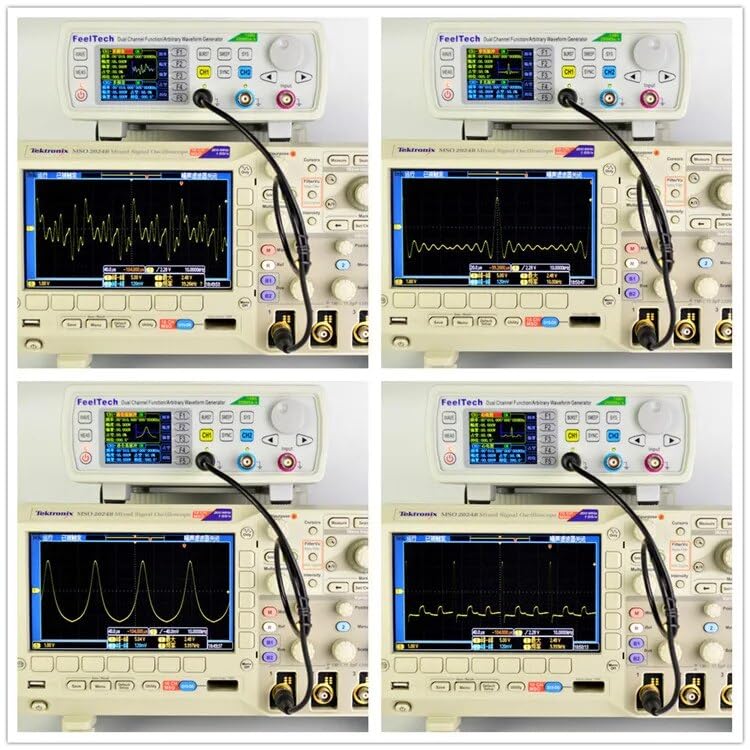
The FeelTech FY6600 connected to an oscilloscope, demonstrating its capability to generate diverse waveforms such as sine, square, and arbitrary signals.
6.2 Advanced Functions
The FY6600 offers several advanced functions accessible via dedicated shortcut buttons:
- MOD (Modulation): Press this button to access various modulation types including AM, FM, PM, ASK, FSK, and PSK. Configure modulation parameters such as carrier frequency, modulation depth, and modulation waveform. <
- SWEEP: Enables frequency sweep functionality. Set start frequency, end frequency, sweep time, and sweep mode (linear or logarithmic).
- VCO (Voltage Controlled Oscillator): Activates the VCO function, allowing external voltage to control the output frequency.
- BURST: Configures burst mode for generating a specific number of waveform cycles.
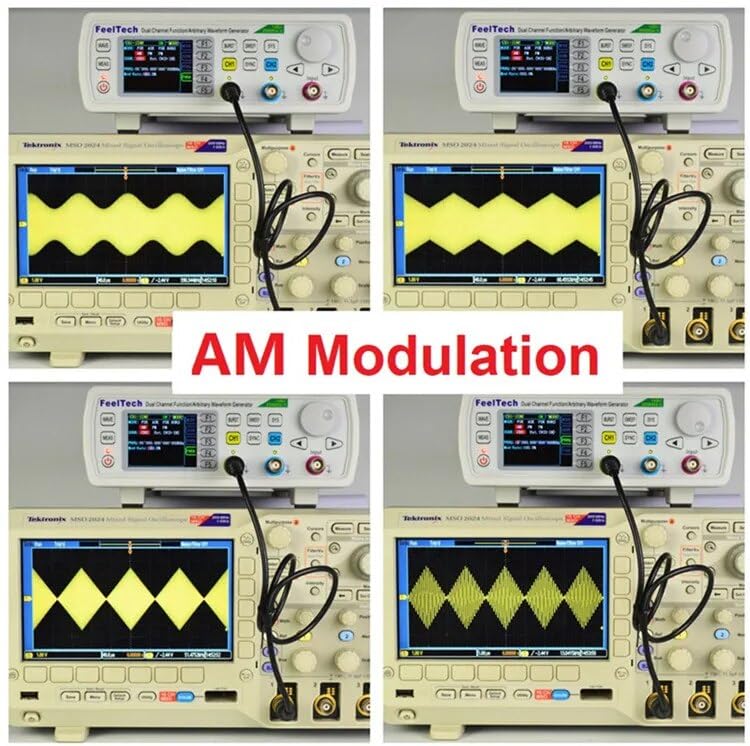
The FY6600 generating an Amplitude Modulated (AM) waveform, as displayed on an external oscilloscope, showcasing its modulation capabilities.
6.3 Measurement Functions
The FY6600 includes built-in measurement capabilities:
- COUNTER: Press the COUNTER button to use the instrument as a frequency counter. Connect the signal to be measured to the input terminal.
- FREQUENCY METER: Measures the frequency of external signals up to 100MHz.
6.4 System Settings
Press the SYSTEM button to access system configurations such as language, display settings, and communication parameters (Uplink).
7. Maintenance
Proper maintenance ensures the longevity and optimal performance of your FY6600.
- Cleaning: Use a soft, dry cloth to clean the exterior of the instrument. Do not use abrasive cleaners or solvents.
- Storage: Store the instrument in a cool, dry place away from direct sunlight and extreme temperatures when not in use.
- Calibration: Periodic calibration by qualified service personnel is recommended to maintain measurement accuracy.
8. Troubleshooting
If you encounter issues with your FY6600, refer to the following common problems and solutions:
- No Power: Check the power cord connection and ensure the power switch on the rear panel is in the 'ON' position. Verify the power outlet is functional.
- No Output Signal: Ensure the output channel (CH1/CH2) is enabled on the display. Check test cable connections. Verify frequency and amplitude settings are not set to zero.
- Incorrect Waveform: Confirm the selected waveform type and parameters (frequency, amplitude, offset, duty cycle) are correct for your application.
- Display Issues: If the display is blank or frozen, try restarting the instrument. If the problem persists, contact customer support.
- Communication Error (USB): Ensure the correct USB drivers are installed on your computer. Check the USB cable connection.
9. Specifications
Detailed technical specifications for the FeelTech FY6600 series:
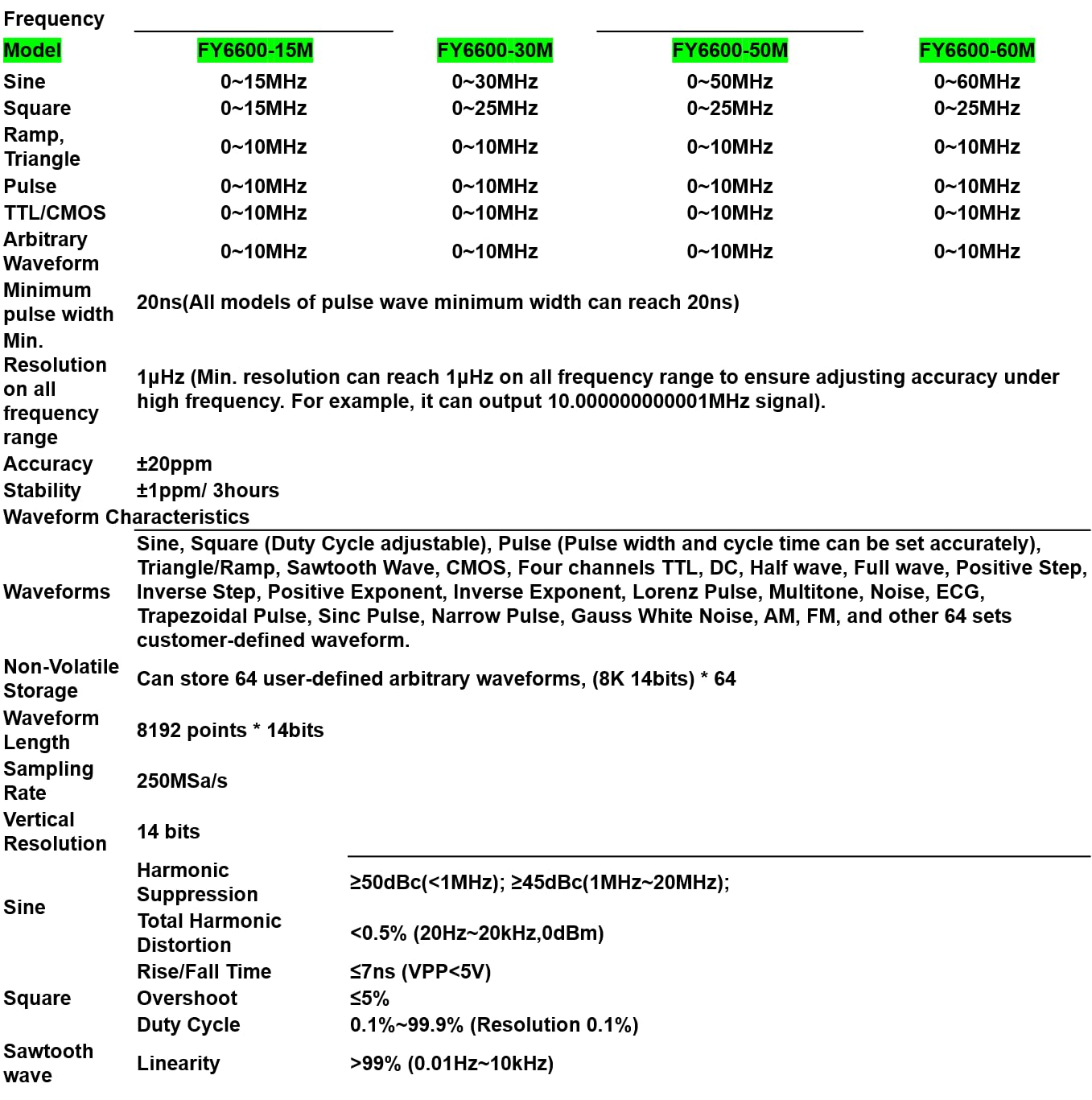
A comprehensive table outlining the technical specifications of the FY6600 series, detailing frequency ranges for various waveforms (Sine, Square, Ramp, Pulse, TTL/CMOS, Arbitrary), minimum pulse width, resolution, accuracy, stability, waveform characteristics, non-volatile storage, waveform length, sampling rate, vertical resolution, and harmonic suppression.
- Model: FY6600 30M
- Sine Wave Frequency Range: 1uHz ~ 30MHz
- Square Wave Frequency Range: 1uHz ~ 25MHz
- Ramp/Triangle/Pulse/TTL/CMOS/Arbitrary Waveform Frequency Range: 1uHz ~ 10MHz
- Minimum Pulse Width: 20ns
- Frequency Resolution: 1uHz (full range)
- Frequency Accuracy: ±20ppm
- Frequency Stability: ±1ppm/3 hours
- Sampling Rate: 250MSa/s
- Vertical Resolution: 14 bits
- Waveform Memory Depth: 8192 * 14 bits
- Output Amplitude Range: 1mVpp ~ 20Vpp (stepless adjustment)
- Output Impedance: 50Ω
- Rise Edge Time (Square Wave 5V): ≤7nS
- Max Measurement Frequency (Counter): 100MHz
- Product Dimensions: 210mm x 195mm x 75mm (9.84 x 7.87 x 5.91 inches)
- Item Weight: 2.2 pounds

Physical dimensions of the FY6600 device, showing its length (210mm / 8.27in), width (195mm / 7.68in), and height (75mm / 2.96in).
10. Warranty and Support
10.1 Warranty Information
The FeelTech FY6600 series is covered by a manufacturer's warranty. Please refer to the warranty card included with your product or contact FeelTech customer support for specific details regarding warranty duration and terms.
10.2 Customer Support
For technical assistance, product information, or support, please visit the official FeelTech website at www.feeltech.net or contact your local distributor. When contacting support, please have your product model (FY6600 30M) and purchase information ready.


