
1. Product Overview
The ANENG GN602 is a portable, pen-type digital moisture meter designed for quick and accurate measurement of moisture content in various materials, including wood, lumber, concrete, bricks, and other building materials. Its compact design makes it suitable for woodworking, water damage restoration, construction, and home improvement projects.
Key Features:
- Pen-Type Design: Convenient pocket-sized form factor for portability.
- High-Precision Pins: Equipped with two sensitive pins for swift and accurate readings.
- Dual Modes & 7 Calibration Scales: Offers two measurement modes and seven material calibration scales for diverse wood types and construction materials, covering a moisture range from 0.0% to 58%.
- Data Hold Function: Allows retention of current readings for stable and precise recording.
- Backlit LCD Screen: Ensures clear visibility of readings in various lighting conditions.
- Energy-Efficient: Features automatic shutdown after 10 minutes of inactivity to conserve battery life.
- Low Battery Indicator: Displays an icon to remind users of timely battery replacement.

Figure 1: ANENG GN602 Pen-Type Moisture Meter with its protective cap removed, showing the measurement pins and the digital display. Two AAA batteries are shown alongside the device.
2. Setup and Battery Installation
Before using the ANENG GN602 moisture meter, ensure that the batteries are correctly installed.
2.1. Battery Installation
- Locate the battery compartment cover on the back of the device.
- Open the cover by sliding or gently prying it off.
- Insert two 1.5V AAA batteries, ensuring correct polarity (+/-) as indicated inside the compartment.
- Replace the battery compartment cover securely.
2.2. Initial Check
After battery installation, power on the device. The display should illuminate. The meter features a self-check function built into the protective cap. To perform a self-check:
- Ensure the protective cap is placed over the measurement pins.
- Gently push the pins through the designated pin holes on the outer top of the cap.
- The meter should display a reading of approximately 20.5% RH. If this reading is shown, the meter is calibrated correctly and ready for use.
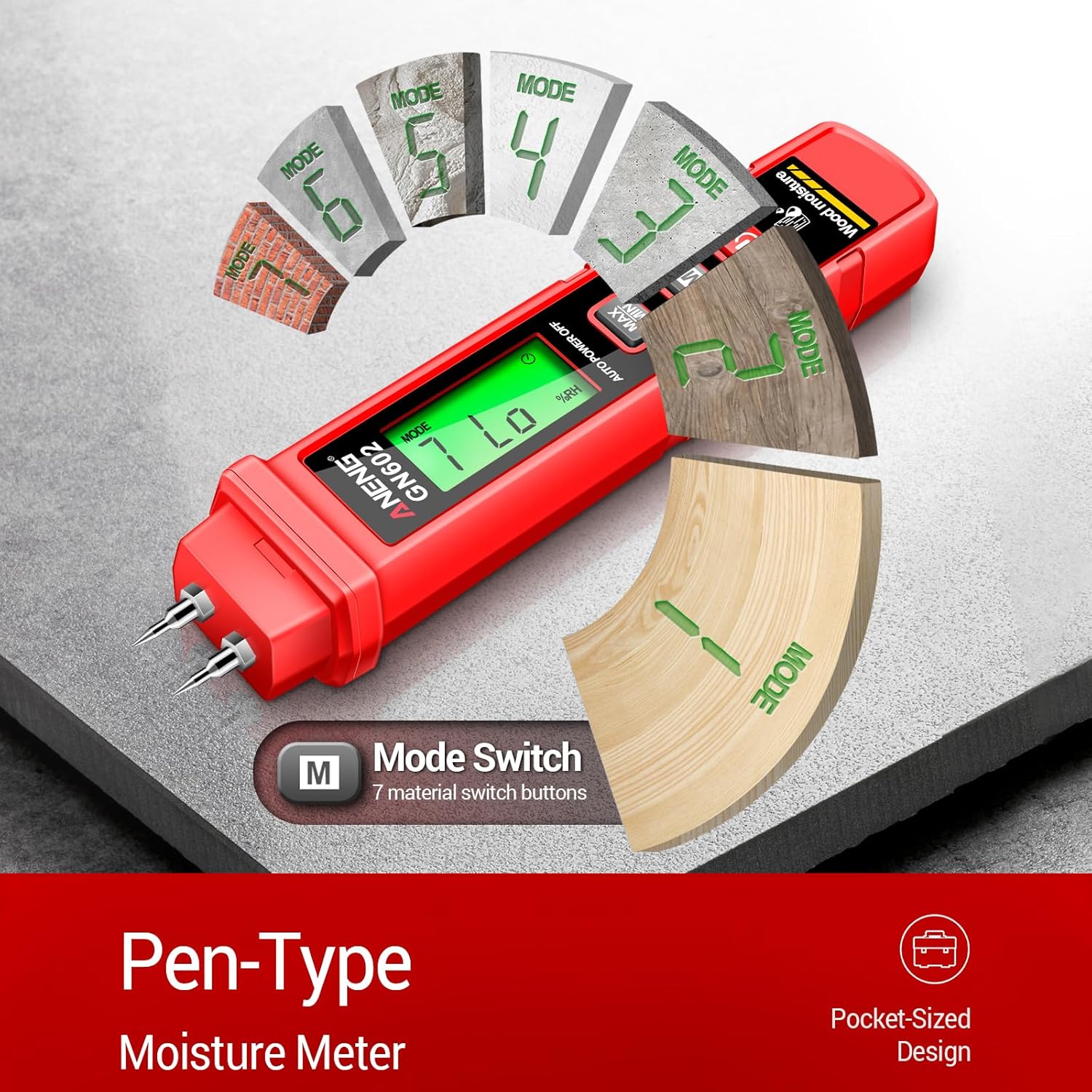
Figure 2: The ANENG GN602 Moisture Meter illustrating its pen-type design and pocket-sized portability, along with a visual representation of its 7 material modes for different types of wood and building materials.
3. Operating Instructions
3.1. Power On/Off
- Press the Power button to turn the meter on.
- The meter will automatically shut down after 10 minutes of inactivity to conserve battery life.
3.2. Selecting Material Mode
The meter offers 7 calibration scales (modes) for different materials. To select the appropriate mode:
- Press the 'M' button to cycle through the available material modes (Mode 1 to Mode 7).
- Refer to the user manual's material chart (not provided in this extract, but typically found in the full manual) to match the mode number with your specific material (e.g., oak, pine, concrete, brick).

Figure 3: The ANENG GN602 Moisture Meter shown in various application scenarios, including wood processing, plank processing, measuring firewood, and detecting moisture on a wall surface.
3.3. Taking a Measurement
- Remove the protective cap from the measurement pins.
- Select the appropriate material mode using the 'M' button.
- Carefully insert the two measurement pins into the material you wish to test. Ensure both pins penetrate the surface adequately for an accurate reading.
- The moisture content percentage will be displayed on the LCD screen.
3.4. Data Hold Function
- Press the 'MAX/MIN' button briefly to activate the data hold function. The current reading will be frozen on the display.
- Press the 'MAX/MIN' button again to release the hold and resume live measurements.
- Holding the 'MAX/MIN' button will display the maximum or minimum recorded values.
3.5. Backlight Control
- Press the light button (often integrated with the power button or a separate button with a light bulb icon) to turn the LCD backlight on or off. This improves visibility in low-light conditions.

Figure 4: Comparison of the ANENG GN602 Moisture Meter's display with the backlight turned on (left) and off (right), demonstrating improved readability in darker environments.
4. Maintenance
- Cleaning: Wipe the meter with a dry, soft cloth. Do not use abrasive cleaners or solvents.
- Storage: When not in use, always replace the protective cap over the measurement pins to prevent damage and injury. Store the device in a cool, dry place, away from direct sunlight and extreme temperatures.
- Battery Replacement: Replace batteries promptly when the low-battery indicator appears on the display to ensure accurate readings and prevent battery leakage.
- Pin Care: Ensure the measurement pins are clean and free from debris for optimal contact with the material.
5. Troubleshooting
| Problem | Possible Cause | Solution |
|---|---|---|
| Meter does not power on. | Dead or incorrectly installed batteries. | Check battery polarity; replace with new 1.5V AAA batteries. |
| Inaccurate or inconsistent readings. | Incorrect material mode selected; pins not fully inserted; dirty pins; material too dry/wet for range. | Ensure correct mode is selected; fully insert pins; clean pins; verify material is within the meter's measurement range (0.0% to 58%). |
| Display is dim or flickering. | Low battery. | Replace batteries. |
| Backlight not working. | Backlight function off; low battery. | Press the light button to activate; replace batteries. |
6. Specifications
| Feature | Detail |
|---|---|
| Model Number | GN602 |
| Measurement Range | 0.0% ~ 58.0% |
| Material Modes | 7 Calibration Scales |
| Power Supply | 2 x 1.5V AAA Batteries |
| Automatic Shutdown | After 10 minutes of inactivity |
| Display | Backlit LCD |
| Dimensions | 158.4 x 33 mm (approx. 6.23 x 1.3 inches) |
| Weight | 118 g |

Figure 5: The ANENG GN602 Moisture Meter displayed with its packaging, showing key dimensions and battery type.
7. Warranty and Support
ANENG provides lifetime service and technical support for the GN602 moisture meter. For any inquiries, troubleshooting assistance, or warranty claims, please contact ANENG customer service through their official channels.
Please retain your purchase receipt for warranty purposes.