
1. Introduction and Overview
The FeelTech FYA2030 is a 20W signal power amplifier designed for digital DDS function signal generators. This device utilizes integrated components to provide full-band amplification for various signal waveforms, including sine, square, pulse, sawtooth, reverse sawtooth, triangle, ECG, saddle, and noise waves. It is capable of stably outputting a power signal greater than 20W, making it suitable for a wide range of electronic testing and design applications.
This manual provides essential information for the safe and effective operation of your FeelTech FYA2030 amplifier.
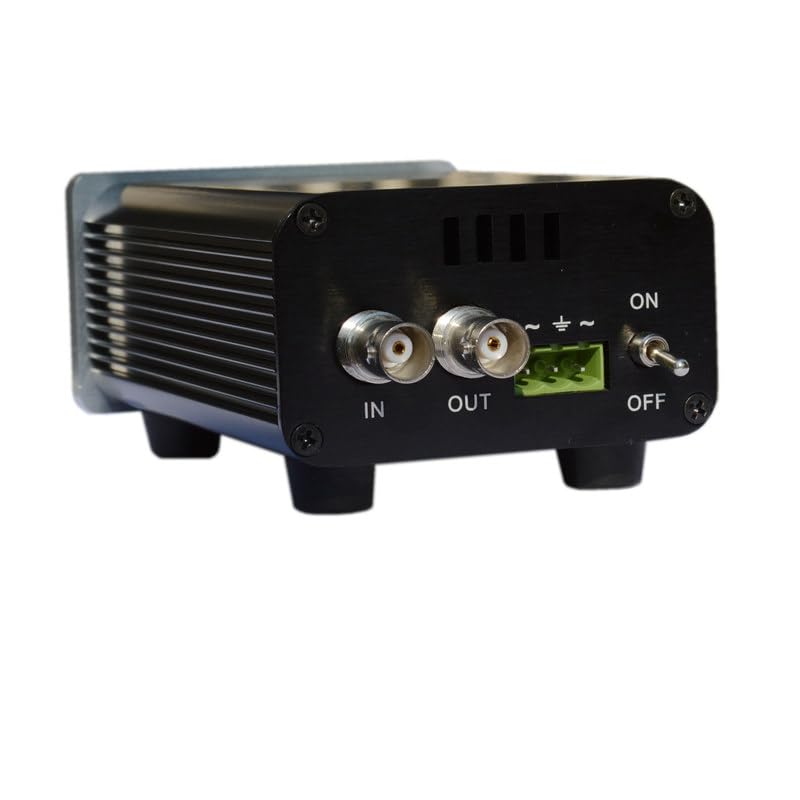
Image 1.1: Front view of the FeelTech FYA2030 Signal Power Amplifier, showing the 'IN' and 'OUT' BNC connectors, power input, and ON/OFF switch.
2. Safety Notes
Please read and understand the following safety guidelines before operating the FeelTech FYA2030 amplifier:
- Before using this instrument, verify that the power supply is normal to ensure proper operation and personal safety.
- This instrument must be operated within its specified technical index range.
- Do not modify the instrument circuit arbitrarily. Unauthorized modifications can damage the equipment or endanger safety.

Image 2.1: A page from the user manual detailing safety notes and the packing list for the FYA2000S series amplifier.
3. Product Features
The FeelTech FYA2030 amplifier offers the following key features:
- Maximum Amplified Signal Frequency: DC-3MHz
- Low Distortion: Provides high precision signal amplification.
- Wide Compatibility: Compatible with all DDS signals.
- Output Voltage: Up to 28V (±14V).
- Output Current: 1000mA (MAX).
- Maximum Output Power: 20W.
- Magnification Options: X2 and X4 selectable.
- Slew Rate: ≥500V/us.
- Power Supply: DC15V.
- Input Impedance: 10KΩ.
- Construction: Exquisite aluminum alloy shell for strong heat dissipation and stable performance.
- Signal Types: Amplifies function signals and arbitrary waveform signals.
- Portability: Small size, easy to carry.
4. Applications
The FeelTech FYA2030 amplifier is suitable for various applications, including:
- Electronic test and design
- Sensor simulation and testing
- Power device and circuit driving
- Education and training
- Selection and testing of piezoelectric components
- Ultrasonic transducer drive
- IF device driver
- Medical cosmetic equipment drive
- Remote sensing and detection equipment, wireless signal amplification

Image 4.1: A document outlining the major applications for the FYA2000 series amplifiers, including electronic testing, sensor simulation, and education.
5. Package Contents
Upon unpacking, please ensure all the following items are included:
- 1 x FeelTech FYA2030 Power Amplifier
- 1 x Power Cable
- 1 x BNC-BNC Cable
- 1 x Q9 Clip Cable
- 1 x User Manual (this document)
- 1 x Quality Certificate
6. Setup
Follow these steps to set up your FeelTech FYA2030 amplifier:
- Placement: Place the amplifier on a stable, flat surface with adequate ventilation to prevent overheating.
- Power Connection: Ensure the amplifier's power switch is in the OFF position. Connect the provided DC15V power adapter to the amplifier's power input port and then plug the adapter into a suitable power outlet.
- Input Signal Connection: Connect your digital DDS function signal generator to the amplifier's IN BNC connector using the supplied BNC-BNC cable.
- Output Signal Connection: Connect your load or measurement device (e.g., oscilloscope, spectrum analyzer) to the amplifier's OUT BNC connector using an appropriate BNC cable.
- Gain Selection: If your model has a physical switch for gain (X2/X4), select the desired magnification before powering on. Refer to the specifications for appropriate gain settings based on your application.

Image 6.1: Close-up view of the amplifier's input side, showing the BNC input connector, power input, and a switch for gain selection (X2/X4).

Image 6.2: Close-up view of the amplifier's output side, highlighting the BNC output connector.
7. Operating Instructions
Once the amplifier is set up, follow these steps for operation:
- Power On: Flip the power switch to the ON position. The power indicator (if present) should illuminate.
- Input Signal: Generate the desired signal from your DDS function generator. Ensure the input signal amplitude is within the specified range (≤14Vp-p) to prevent distortion or damage.
- Observe Output: Monitor the amplified output signal on your connected measurement device.
- Adjustments: Adjust the input signal amplitude from your generator as needed to achieve the desired output level, always staying within the amplifier's operational limits.
- Power Off: When finished, turn the power switch to the OFF position and disconnect the power adapter.
8. Maintenance
To ensure the longevity and optimal performance of your FeelTech FYA2030 amplifier, observe the following maintenance guidelines:
- Cleaning: Keep the device clean and free from dust. Use a soft, dry cloth for cleaning. Avoid liquid cleaners.
- Environment: Avoid exposing the device to extreme temperatures, high humidity, or corrosive environments.
- Ventilation: Ensure that the ventilation fins on the amplifier are not obstructed to allow for proper heat dissipation.
- Servicing: Do not attempt to open or repair the device yourself. Refer all servicing to qualified personnel.
- Storage: When not in use for extended periods, store the amplifier in a dry, cool place, preferably in its original packaging.
9. Troubleshooting
If you encounter issues with your FeelTech FYA2030 amplifier, refer to the following troubleshooting guide:
| Problem | Possible Cause | Solution |
|---|---|---|
| No power indicator / Device does not turn on | Power cable not connected; Power adapter faulty; Power outlet not working | Check power cable connection; Test power adapter; Try a different power outlet |
| No output signal | No input signal; Faulty BNC cables; Incorrect gain setting; Amplifier faulty | Verify input signal from generator; Check BNC cable connections; Ensure correct gain (X2/X4) is selected; Contact support if problem persists |
| Distorted output signal | Input signal too high; Load impedance mismatch; Operating outside frequency range | Reduce input signal amplitude; Ensure load impedance is ≥4Ω; Verify signal frequency is within DC-3MHz range |
| Amplifier overheating | Poor ventilation; Excessive load or continuous high power operation | Ensure adequate space around the amplifier for airflow; Reduce operating time at maximum power or reduce load |
10. Specifications
The technical specifications for the FeelTech FYA2030S amplifier are detailed below:
| Parameter | Specification (FYA2030S) |
|---|---|
| Signal Input Bandwidth | DC~3MHz |
| Maximum Output Power | 20W |
| Power Supply Input Parameters | |
| Input Voltage | DC 15V |
| Input Power | ≥30W |
| Signal Input Parameters | |
| Input Impedance | ≥10KΩ |
| Input Amplitude Range | ≤14Vp-p |
| Signal Output Parameters | |
| Output Amplitude | ≥28Vp-p (no-load) |
| Output Current | 1000mA (MAX) |
| Load Impedance | ≥4Ω (with maximum output power) |
| Slew Rate | ≥500V/us |
| Harmonic Distortion | <1% |
| Other Characteristics | |
| Over-current Protection | Yes |
| Gain Regulation Mode | Fixed magnification, X2 or X4 |
| Environment (Temp/Humidity) | Temperature: 0-60°C, Humidity: <80% |
| Dimensions (L*W*H) | 153 x 84 x 49 mm |
| Weight | 400g (without power supply), accessories 150g |
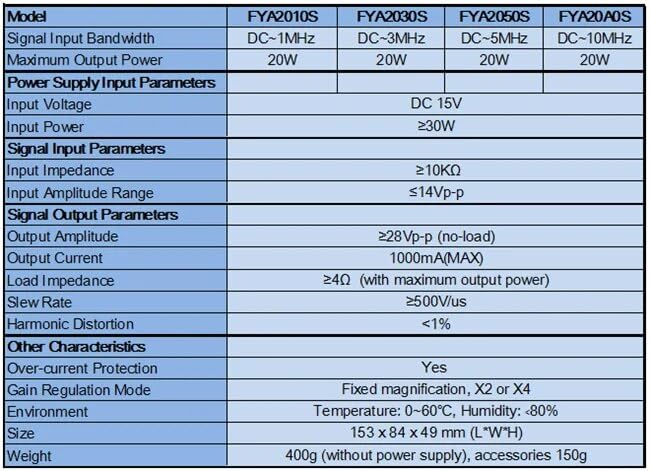
Image 10.1: A table providing detailed technical specifications for various models in the FYA2000S series, including the FYA2030S.
11. Warranty and Support
Warranty Information:
FeelElec (manufacturer of FeelTech products) warrants that its products, including the mainframe and accessories, will be free from defects in materials and workmanship within the respective warranty period. FeelElec guarantees the free replacement or repair of products proven to be defective under normal use. This product typically enjoys a 1-year warranty from the date of delivery.
Damages caused by misuse, vandalism, improper maintenance, or force majeure events are not covered by this warranty. Any unauthorized disassembly or modification of the product will void the warranty rights.
Customer Support:
For technical assistance, warranty claims, or service inquiries, please contact your authorized FeelTech/FeelElec distributor or refer to the contact information provided with your purchase documentation.

Image 11.1: A page from the user manual detailing accessories, optional components, and the warranty policy provided by FeelElec.


