
Veise KS02A and 01C
Veise KS02A and 01C Keyless Door Lock with Handle Set User Manual
Model: KS02A, 01C | Brand: Veise
Introduction
This manual provides comprehensive instructions for the installation, operation, maintenance, and troubleshooting of your Veise KS02A and 01C Keyless Door Lock with Handle Set. Please read this manual thoroughly before installation and use to ensure proper function and safety. This smart lock system offers multiple entry methods including fingerprint, keypad, and traditional keys, designed for enhanced security and convenience.
Safety Information
- Do not attempt to disassemble or repair the lock yourself. Refer to qualified service personnel.
- Use only the specified battery type and ensure correct polarity during installation.
- Keep all keys and access codes in a secure location.
- Avoid exposing the lock to extreme temperatures or direct water spray.
- Regularly check the lock for any signs of damage or wear.
Package Contents
Please verify that all items listed below are included in your package:
- Veise KS02A Keyless Deadbolt
- Veise 01C Door Handle Set
- 2 x Spare Keys
- Screwdriver
- Mounting Hardware (screws, bolts, strike plate, latch)
- User Manual (this document)
Product Overview
The Veise KS02A and 01C system combines a keyless deadbolt with a matching handle set, offering a complete solution for your door security. The deadbolt features a backlit keypad and a biometric fingerprint sensor for convenient access.

Figure 1: Overview of the Veise KS02A Keyless Deadbolt and 01C Door Handle Set. The image displays both the deadbolt with its keypad and fingerprint sensor, and the accompanying door handle, all in a matte black finish.
Installation
Installation of the Veise KS02A and 01C lock set is designed to be straightforward and can typically be completed with a screwdriver in a few minutes. This lock is suitable for all American standard left and right-handed doors and meets ANSI Grade 3 certification standards.
1. Door Preparation and Measurement
Before beginning installation, ensure your door meets the required dimensions. Verify the hole diameter (2-1/8" or 54mm), backset (2-3/8" or 60mm, or 2-3/4" or 70mm), and minimum distance (4" or 101.6mm) from the edge of the door to the center of the deadbolt hole. Confirm your door is compatible (single cylinder, not mortise/integrated).

Figure 2: Diagram illustrating how to check door dimensions and compatibility for the Veise lock installation. It shows measurements for hole diameter, backset, and minimum distance, along with visual checks for latch hole chiseling and door type (left-handed, right-handed, single cylinder).
2. Installing the Latch and Strike Plate
- Insert the latch into the door edge, ensuring the "UP" arrow is facing upwards. Secure it with screws.
- Install the strike plate on the door frame, aligning it with the latch.
3. Installing the Exterior Assembly
- Feed the cable and spindle through the latch hole.
- Align the exterior assembly with the door holes and press it firmly against the door.
4. Installing the Interior Mounting Plate
- Attach the interior mounting plate to the exterior assembly using the provided screws. Ensure the cable passes through the plate.
5. Connecting the Cable and Installing the Interior Assembly
- Connect the cable from the exterior assembly to the interior assembly.
- Mount the interior assembly onto the mounting plate, securing it with screws.
- Install the batteries (4x AA, not included) into the battery compartment.

Figure 3: Image demonstrating the ease of installation and programming of the Veise keyless door lock. A hand is shown using a screwdriver to secure the interior assembly to the door.
6. Installing the Door Handle Set
Follow the specific instructions provided with the Veise 01C door handle set for its installation, ensuring it aligns correctly with the deadbolt and operates smoothly.
7. Door Handing Identification
The lock will automatically detect door handing during the initial setup. If necessary, perform a manual handing procedure as described in the quick start guide to ensure the lock operates correctly for your door's swing direction.
Operation
1. Fingerprint Unlock
The Veise KS02A lock features a biometric fingerprint sensor for quick and secure access. It can identify your fingerprint within 0.3 seconds and unlock the door within 1 second, with a recognition rate of 99.99%.
- Place your registered finger flat on the fingerprint sensor.
- The lock will unlock if the fingerprint is recognized.

Figure 4: Visual representation of the fingerprint unlock feature. A hand is shown placing a finger on the biometric sensor of the Veise lock, highlighting its quick identification and high recognition rate.
2. Keypad Entry (Passcode Unlock)
Enter your programmed passcode on the backlit keypad to unlock the door. The lock supports anti-peeping codes, allowing you to enter random digits before or after your actual passcode to prevent others from guessing your code.
- Touch the keypad to activate it.
- Enter your passcode (up to 20 user codes can be stored).
- Press the '#' key to confirm.
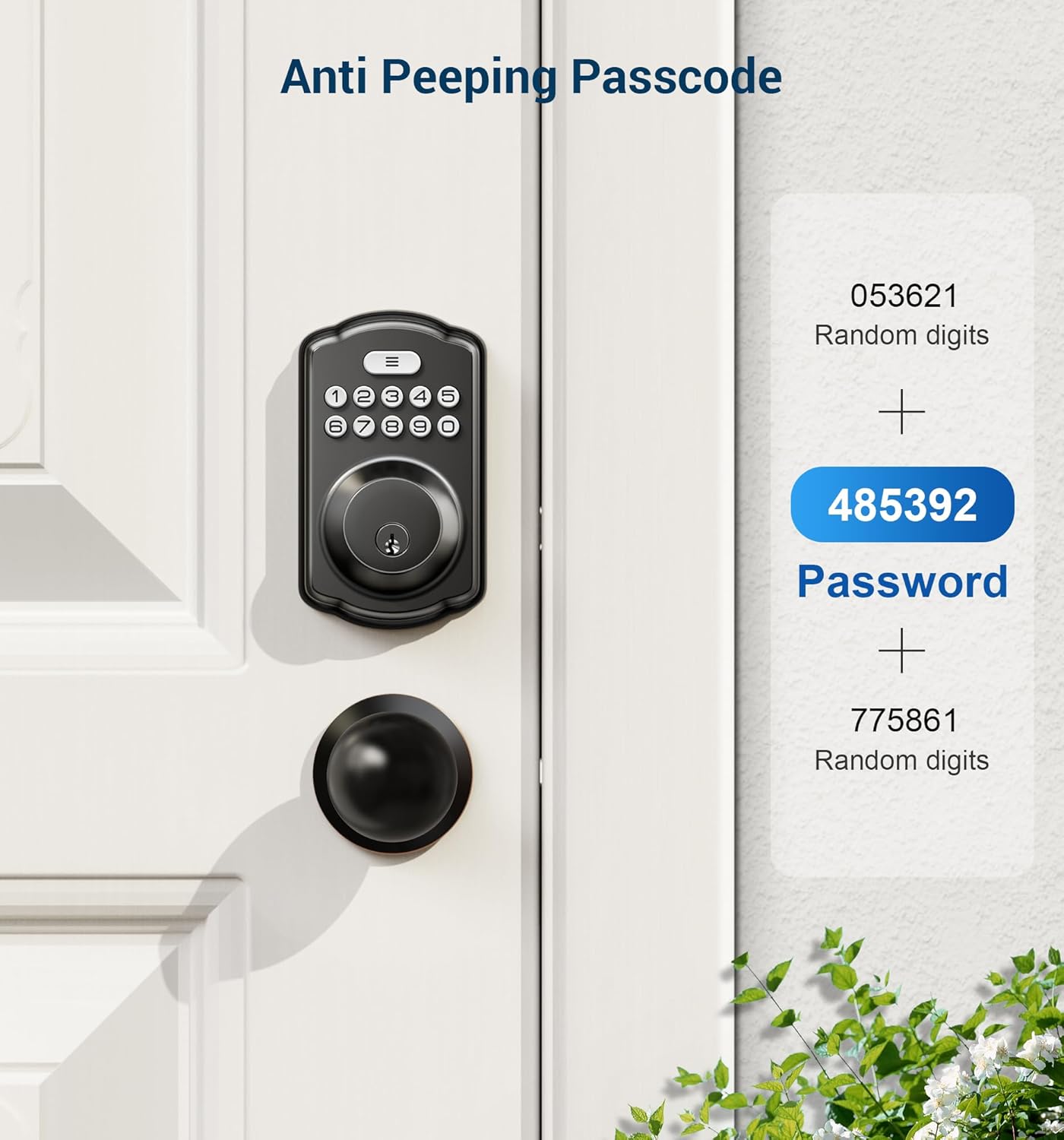
Figure 5: Illustration of the anti-peeping passcode feature. The image shows how random digits can be entered before and after the actual password to obscure it from onlookers, enhancing security.
3. One-Time Passcodes
Generate temporary one-time passcodes for guests or service personnel. These codes are valid for a single use.
4. Key Unlock
In case of battery depletion or electronic malfunction, the lock can always be opened using the provided physical keys.
5. Auto-Lock & One-Touch Lock
The lock features an adjustable auto-lock function, which can be set to automatically lock the door after 10-99 seconds. For immediate locking, simply press and hold any key on the keypad for 2 seconds (One-Touch Lock).

Figure 6: Depiction of the auto-lock and one-touch lock features. The image highlights the automatic locking mechanism that engages after a set time (10-99 seconds) and the quick one-touch locking capability.
6. User Code Management
The lock supports up to 20 fingerprints and 20 passcodes. Refer to the programming guide for detailed steps on adding, modifying, or deleting user fingerprints and passcodes.
7. Mute Mode & Vacation Mode
- Mute Mode: Deactivates all sound prompts from the lock, useful for quiet environments.
- Vacation Mode: Disables all user codes and fingerprints, allowing only physical key access. Ideal for extended periods away from home.
Maintenance
- Cleaning: Wipe the lock's exterior with a soft, dry cloth. Avoid abrasive cleaners or solvents that could damage the finish or electronic components.
- Battery Replacement: The lock will provide low battery alerts. Replace all four AA batteries promptly when indicated to ensure continuous operation. Do not mix old and new batteries.
- Lubrication: Periodically lubricate the latch and deadbolt mechanisms with a silicone-based lubricant to ensure smooth operation.
Troubleshooting
| Problem | Possible Cause | Solution |
|---|---|---|
| Lock does not respond to keypad/fingerprint. | Low batteries; incorrect code/fingerprint; system error. | Replace batteries; re-enter code/re-scan finger; try physical key; reset lock. |
| Lock makes unusual noises. | Misalignment; internal mechanism issue. | Check alignment of latch and strike plate; lubricate mechanism; contact support. |
| Auto-lock not functioning. | Auto-lock disabled; incorrect setting. | Enable auto-lock in settings; adjust delay time. |
| Fingerprint not recognized. | Finger dirty/wet; sensor dirty; fingerprint not properly enrolled. | Clean finger/sensor; re-enroll fingerprint; try different finger. |
Specifications
| Feature | Detail |
|---|---|
| Brand | Veise |
| Model | KS02A and 01C |
| Lock Type | Keypad, Fingerprint, Key |
| Material | Metal |
| Color | Matte Black |
| Special Features | Keyless, Anti-peeping codes, Backlit keypad, Low battery alerts, Mute mode, Vacation mode, Auto-Lock, One-touch Lock |
| Fingerprint Recognition | 0.3 seconds identification, 99.99% recognition rate |
| User Capacity | 20 Fingerprints, 20 Passwords, One-time Passwords |
| Power Source | 4 x AA Batteries (not included) |
| Door Compatibility | American standard left and right handed doors |
| Certifications | ANSI Grade 3 |
| Recommended Uses | Residential Doors, Commercial Doors, Vacation Homes, Smart Homes |
Warranty and Support
Veise offers a minimum 1-year warranty for the KS02A and 01C Keyless Door Lock with Handle Set. For any inquiries, technical assistance, or warranty claims, please contact Veise customer support:
- Phone Support: Available Monday to Friday, 9 AM to 5 PM PST.
- Email Support: Available 24/7 for after-sales service.
- Please refer to the official Veise website or your purchase documentation for specific contact details.
Related documentsKS02A and 01C


Ask a question about this manual
Ask about setup, troubleshooting, compatibility, parts, safety, or missing instructions. Manuals+ will review the question and use this page’s manual context to help answer it.