
1. Introduction
This manual provides detailed instructions for the installation, operation, and maintenance of your Marine Audio MA100 Compact Bluetooth Stereo. The MA100 is a robust, IPX6 waterproof audio system designed for marine environments, featuring AM/FM radio, USB input, Bluetooth streaming, and app control capabilities. Please read this manual thoroughly before operating the device to ensure proper use and longevity.
2. Safety Information
Always observe the following safety precautions to prevent injury or damage to the unit:
- Ensure the power supply is disconnected before installation or maintenance.
- Connect the unit only to a 12V DC power system with a negative ground.
- Do not expose the unit to extreme temperatures outside the specified operating range (-4°F to 149°F).
- While the unit is IPX6 waterproof, avoid direct high-pressure water jets.
- Do not attempt to disassemble or modify the unit. Refer all servicing to qualified personnel.
- Ensure all wiring is correctly connected to prevent short circuits or electrical hazards.
3. Package Contents
Please check that all items are present in the package:
- Marine Audio MA100 Stereo Unit
- Mounting Hardware (screws, brackets)
- Wiring Harness
- User Manual (this document)
- (Note: Specific accessories may vary. Refer to your product packaging for a complete list.)
4. Installation and Setup
The MA100 is designed for easy installation. Follow these steps carefully:
- Mounting Location: Choose a suitable location that is protected from direct impact and allows for proper ventilation. The unit has an overall package dimension of approximately 3.5" diameter x 6.3" depth.
- Cutout: Create a circular cutout for the unit. Refer to the provided diagram for precise dimensions.
- Wiring:
- Connect the 12V DC power system (2-wire connection).
- Connect speaker wires (4 channels, 40W x 4 max output).
- Connect the AM/FM antenna.
- If using, connect the rear USB input for MP3 devices and the rear AUX input (RCA).
- If using, connect the line-out audio (RCA).
- Secure Unit: Insert the unit into the cutout and secure it using the supplied mounting hardware.
- Power On: Once all connections are secure, connect the main power supply to the unit.

Figure 1: Installation diagram showing front, side, and top views with dimensions for the Marine Audio MA100 stereo. This diagram is crucial for proper mounting and cutout preparation.
5. Operating Instructions
The MA100 features a simple user interface with a daylight-readable segmented LCD display and LED backlit buttons.
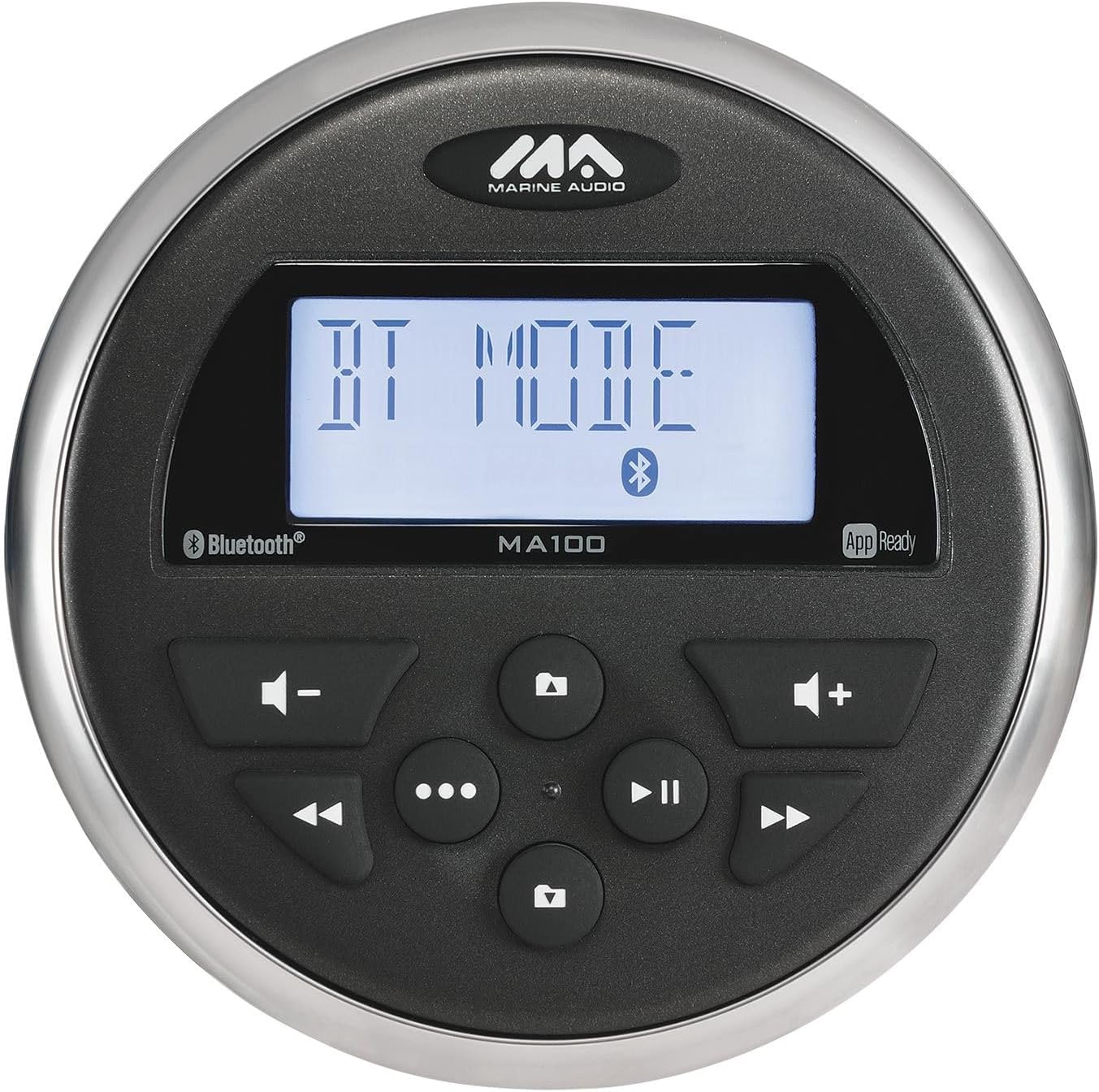
Figure 2: Front view of the Marine Audio MA100 stereo, showing the LCD display, control buttons, and branding. The display shows "BT MODE" indicating Bluetooth mode.
5.1 Power On/Off
Press and hold the power button (usually marked with a power symbol) to turn the unit on or off.
5.2 Source Selection
Press the MODE button (often labeled with three dots or "MODE") to cycle through available sources: AM/FM Tuner, Bluetooth, USB, and AUX input.
5.3 Volume Control
Use the volume up (+) and volume down (-) buttons to adjust the audio level.
5.4 AM/FM Tuner
- Tuning: Use the seek/track buttons (left/right arrows) to tune to the next or previous station.
- Presets: The unit supports 12 programmable presets (6 AM, 6 FM). To save a station, tune to the desired frequency, then press and hold a preset button until you hear a confirmation beep. To recall a preset, simply press the corresponding preset button.
5.5 USB Playback
Insert a USB device containing MP3 files into the rear USB input. The unit will automatically switch to USB mode and begin playback. Use the seek/track buttons to navigate tracks and the play/pause button to control playback.
5.6 AUX Input
Connect an external audio device to the rear RCA AUX input. Select AUX mode using the MODE button. Audio will be played through the connected device.
6. Bluetooth Pairing and Operation
The MA100 supports Bluetooth streaming audio (A2DP/AVRCP) for wireless connection to your smartphone or other Bluetooth-enabled devices.
- Enter Bluetooth Mode: Press the MODE button until "BT MODE" or "Bluetooth" appears on the display. The unit will automatically enter pairing mode, indicated by a flashing Bluetooth icon.
- Enable Bluetooth on Device: On your mobile device, go to the Bluetooth settings and ensure Bluetooth is enabled.
- Select MA100: Search for available devices and select "MA100" (or similar name) from the list.
- Confirm Pairing: Once connected, the Bluetooth icon on the MA100 display will stop flashing and remain solid. You can now stream audio from your device.
- Playback Control: Use the play/pause and seek/track buttons on the MA100 or your connected device to control audio playback.
7. App Control
The Marine Audio MA100 is compatible with a dedicated app for both iOS and Android devices, providing enhanced control over the stereo's functions.
- Download App: Search for the official Marine Audio control app in the Apple App Store (for iOS) or Google Play Store (for Android).
- Connect: Ensure your mobile device is paired with the MA100 via Bluetooth as described in Section 6.
- Launch App: Open the app on your device. It should automatically detect and connect to the MA100.
- Control Functions: The app allows for remote control of various functions, including source selection, volume adjustment, audio settings, and more.
8. Audio Settings
The MA100 allows for electronic adjustment of audio settings to optimize your listening experience.
- Bass: Adjust the low-frequency output.
- Treble: Adjust the high-frequency output.
- Balance: Adjust the audio output balance between the left and right speakers.
- Fader: Adjust the audio output balance between the front and rear speakers.
Access these settings through the unit's menu system (refer to the display for navigation) or via the dedicated mobile app.
9. Maintenance
To ensure the longevity and optimal performance of your Marine Audio MA100, follow these maintenance guidelines:
- Cleaning: Use a soft, damp cloth to clean the unit's exterior. Avoid abrasive cleaners or solvents.
- Water Exposure: While IPX6 waterproof, it is recommended to wipe down the unit after exposure to saltwater to prevent salt buildup.
- UV Resistance: The unit features UV resistant finishes/materials, but prolonged direct sunlight exposure can still cause degradation over time.
- Circuit Boards: The conformal coated circuit boards provide protection against moisture and corrosion, but avoid opening the unit.
10. Troubleshooting
If you encounter issues with your MA100, refer to the following common problems and solutions:
| Problem | Possible Cause | Solution |
|---|---|---|
| No Power | Loose power connection; Blown fuse; Incorrect wiring. | Check all power connections; Inspect and replace fuse if necessary; Verify wiring against installation diagram. |
| No Audio Output | Volume too low; Mute activated; Incorrect source selected; Loose speaker connections. | Increase volume; Deactivate mute; Select correct audio source; Check speaker wiring. |
| Bluetooth Not Connecting | Unit not in pairing mode; Device Bluetooth off; Interference; Already connected to another device. | Ensure MA100 is in BT MODE and flashing; Turn device Bluetooth off/on; Move closer to unit; Disconnect from other devices. |
| Poor Radio Reception | Antenna not connected; Damaged antenna; Weak signal area. | Check antenna connection; Inspect antenna for damage; Try tuning to a stronger station or relocate. |
| USB Not Playing | Unsupported file format; Corrupt USB device; USB not fully inserted. | Ensure files are MP3 format; Try a different USB device; Re-insert USB device firmly. |
If the problem persists after trying these solutions, please contact customer support.
11. Specifications
| Feature | Detail |
|---|---|
| Power System | 12V DC (2 Wire) |
| Operating Voltage Range | 10V to 16V |
| Current Draw (12V) | Idle: 145mA, Nominal: 1.5A, Maximum: 10A |
| Output Power | 160 watts (40W x 4 Max), 15W x 4 (RMS) |
| Bluetooth | Streaming Audio (A2DP/AVRCP) |
| Waterproof Rating | IPX6 |
| Tuner | AM/FM Tuner with 12 Programmable Presets (6 AM, 6 FM) |
| Inputs | Rear USB (MP3 enabled), Rear AUX (RCA) |
| Outputs | Line-out Audio (RCA) |
| Display | Daylight-readable Segmented LCD Display, LED Backlit Buttons |
| Audio Settings | Electronic (Bass/Treble/Balance/Fader) |
| Operating Temperature | -4°F to 149°F (-20°C to 65°C) |
| Overall Package Dimensions | 3.5" diameter x 6.3" depth (approx.) |
| Weight | 1.2 pounds |
| Certifications | FCC/CE certified |
| App Control | Compatible with iOS and Android Devices |
12. Warranty and Support
This product is sold as "Renewed" by Amazon Renewed. For specific warranty information, please refer to the terms and conditions provided by Amazon Renewed or the seller at the time of purchase. Typically, renewed products come with a limited warranty.
For technical support, troubleshooting assistance beyond this manual, or warranty claims, please contact the seller or Amazon Renewed customer service directly. Have your product model number (MA100) and ASIN (B0CTRV1DQQ) ready when contacting support.
Online Resources: For additional information or updates, you may visit the official Marine Audio website or the product page on Amazon.com.


