Introduction
This manual provides comprehensive instructions for the setup, operation, maintenance, and troubleshooting of your ALLIWAVA PR850 Portable Mini Projector. Please read this manual thoroughly before using the product to ensure proper function and longevity.

Image: The ALLIWAVA PR850 Portable Mini Projector, shown with its remote control. The projector is black and grey with a prominent lens on the front.
What's in the Box
Upon unboxing, verify that all the following items are included:
- ALLIWAVA PR850 Projector
- Remote Control (batteries not included)
- HDMI Cable
- Power Cable
- Cleaning Tool
- User Manual
Setup Guide
1. Placement and Power Connection
Place the projector on a stable, flat surface. Connect the power cable to the projector and then to a power outlet. Ensure adequate ventilation around the device.
2. Initial Power On and Automatic Adjustments
Press the power button on the projector or the remote control to turn on the device. The PR850 features built-in auto focus and 6D/4P auto keystone technology. Upon startup, the projector will automatically adjust the image for clarity and correct geometric distortion, typically completing this process within 3 seconds.

Image: A projector displaying an image on a wall, with visual cues indicating automatic keystone correction, autofocus, and screen fit adjustments. This process ensures a clear and properly shaped projection.
3. Screen Size Adjustment (Zoom Function)
The projector supports an adjustable image size from 80% to 100% without requiring physical movement of the unit. This zoom function can be accessed through the projector's settings menu. For optimal image quality, a projection distance of 2-4 meters is recommended, allowing for an immersive experience on a screen up to 300 inches.
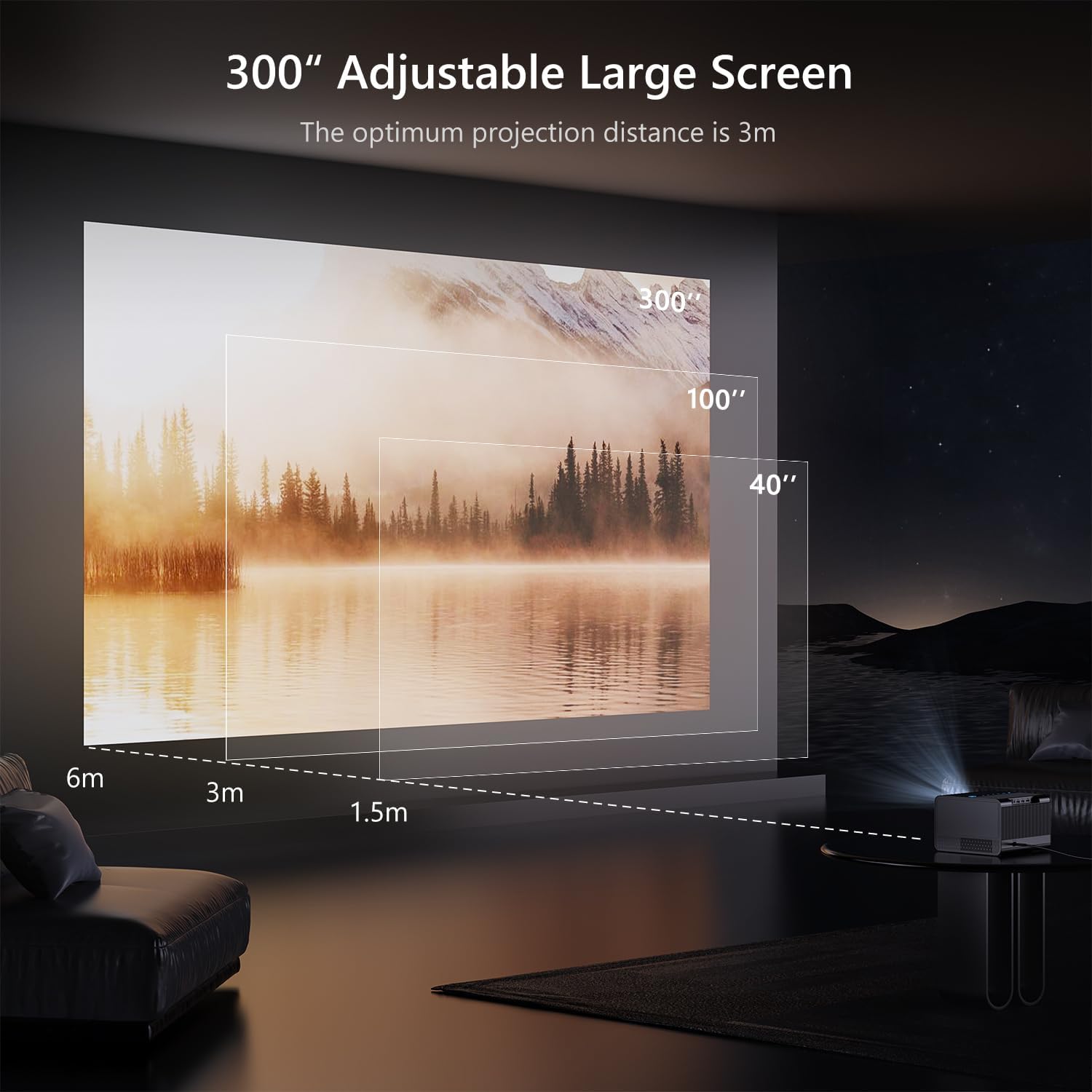
Image: A visual representation of the projector's ability to adjust screen size from 40 inches to 300 inches, illustrating different projection distances and their corresponding screen dimensions.
Operating Instructions
1. Connectivity Options
The PR850 projector offers multiple connectivity options for various devices:
- Wireless Connectivity: Supports 5G WiFi 6 and Bluetooth technology for faster and more stable transmissions. This allows for smooth movie watching and gaming experiences.
- Wired Connectivity: Equipped with HDMI 2.0, USB 2.0 (x2), AV, RJ45, and audio ports. These ports facilitate easy connection to devices such as smartphones, computers, and TV sticks.

Image: A projector displaying a screen with "2.4G+5G WiFi 6" indicating advanced wireless connectivity, compared to "2.4G WiFi Only". Icons for iOS, Android, and Windows are visible, signifying broad compatibility.
2. Audio Output
The projector features built-in 4Ω5W*2 Hi-Fi speakers, providing a 360° surround sound experience. External audio devices can also be connected via the audio port.

Image: An internal view diagram of the projector highlighting its dual Hi-Fi speakers, emphasizing the immersive audio experience.
3. Navigating the Interface
The projector supports an upgrade to Android 12.0, allowing for the installation and use of various applications. The interface can be navigated using the remote control or the backlit touchscreen controls located on the top of the projector.


Image: Left: A hand placing the compact ALLIWAVA projector into a bag, demonstrating its portability. Right: Both black and white models of the ALLIWAVA projector displayed on a table, showcasing design variations.
4. Video Playback
The PR850 supports native 1080P resolution and 4K video input, providing a high-quality visual experience. The fully sealed optical design helps prevent dust from entering, reducing black spots and image loss, and prolonging the projector's lifespan.

Image: A split image comparing the brightness of the ALLIWAVA projector (800 ANSI Lumens) against other projectors, demonstrating superior clarity and vividness. Icons for 1080P Native, 4K Supported, and HDR are also shown.
Note on Streaming Services: Due to copyright protections, some streaming applications like Netflix, Amazon Prime Video, and Hulu may not support direct screen mirroring. For these services, it is recommended to use a compatible streaming device connected via HDMI or to install the apps directly if the Android 12.0 upgrade is applied.
Maintenance
1. Cleaning the Lens
Regularly clean the projector lens using the provided cleaning tool or a soft, lint-free cloth. Avoid using abrasive materials or chemical cleaners that could damage the lens coating. The fully sealed optical engine design helps minimize dust accumulation, but periodic cleaning is still recommended for optimal image quality.
2. General Cleaning
Wipe the exterior of the projector with a soft, dry cloth. Do not use liquid cleaners directly on the device. Ensure ventilation openings are clear of dust and debris to prevent overheating.
3. Storage
When not in use for extended periods, store the projector in a cool, dry place, away from direct sunlight and extreme temperatures. It is advisable to use the original packaging or a protective case to prevent dust and physical damage.
Troubleshooting
This section addresses common issues you might encounter with your ALLIWAVA PR850 projector.
| Problem | Possible Cause | Solution |
|---|---|---|
| Projector does not turn on. | No power, loose connection, remote control batteries dead. | Ensure power cable is securely connected. Check power outlet. Replace remote control batteries (note: batteries are not included with the remote). |
| Image is blurry or out of focus. | Projector moved, lens dirty, auto-focus issue. | The projector has auto-focus. If bumped, it should auto-correct. If not, try restarting the projector. Clean the lens with the provided cleaning tool. |
| Image is distorted (trapezoid shape). | Projector not perpendicular to screen, auto-keystone issue. | The projector has auto-keystone correction. If distortion persists, try restarting the projector or manually adjusting keystone settings if available in the menu. |
| No sound or low sound. | Volume too low, external audio device not connected properly, internal speakers off. | Increase volume using the remote or projector controls. Ensure external audio devices are correctly connected. Check audio output settings in the projector menu. |
| Cannot screen mirror certain apps (e.g., Netflix, Hulu). | Copyright protection. | These apps often block screen mirroring. Use an HDMI-connected streaming device (like a Fire TV Stick) or upgrade to Android 12.0 and install the apps directly on the projector. |
| Colored spots or circles on the screen. | Internal dust, optical engine issue, lamp degradation. | The projector has a fully sealed optical engine to prevent dust. If spots appear, contact customer support for assistance. This may indicate an internal component issue. |
| Projector turns on/off by itself. | Power fluctuations, internal malfunction. | Ensure stable power supply. If the issue persists, contact customer support. |
Product Specifications
| Feature | Detail |
|---|---|
| Brand | ALLIWAVA |
| Model Number | PR850 |
| Display Resolution | Native 1920 x 1080P (Supports 4K) |
| Brightness | 800 ANSI Lumens |
| Contrast Ratio | 1500:1 |
| Connectivity Technology | Bluetooth, HDMI, Wi-Fi (5G WiFi 6) |
| Special Features | Auto Focus, Auto 6D/4P Keystone Correction, Zoom Function (80%-100%), Fully Sealed Optical Engine, Built-in Hi-Fi Speakers, Android 12.0 Upgrade Support, Backlit Touchscreen |
| Recommended Projection Size | Up to 300 inches |
| Product Dimensions | 8.66 x 6.29 x 9.37 inches |
| Item Weight | 8.67 pounds |
| Color | Black |
| Certifications | FCC/CE/ROHS |

Image: A graphic summarizing key specifications of the ALLIWAVA PR850 projector, including Blue Light Protection, HD Quality 1080P, 800 ANSI Lumens, Built-in Box Speaker, Autofocus, Keystone Correction, Screen Fit, 300" Supersize, WiFi 6 & Bluetooth 4.2, and 1500:1 Contrast Ratio.
Warranty and Support
Warranty Information
ALLIWAVA provides a full 1-year product warranty from the date of purchase. This warranty covers manufacturing defects and ensures the product functions as intended under normal use.
Customer Support
ALLIWAVA is committed to providing excellent customer service. We offer:
- Quick Reply: Expect a response to your inquiries within 24 hours.
- Return Policy: 30 days no-reason return policy.
- After-Sales Assistance: Lifetime after-sales technical support.
If you have any questions, issues, or require technical assistance, please contact ALLIWAVA customer support via email. Refer to the contact information provided on the product packaging or the official ALLIWAVA website.

Image: A banner displaying the ALLIWAVA brand logo and the motto "Technology for daily life" with text explaining their focus on technological innovation, thoughtful design, reliable quality, frustration-free packaging, and friendly customer service.
Official Product Videos
No official product videos from the seller were available for embedding in this manual based on the provided data.
