
BAKON BK602S-Yellow
BAKON BK602S Soldering Iron & Desoldering Gun 2-In-1 Set
User Instruction Manual
1. Introduction
The BAKON BK602S is a versatile 2-in-1 rework station that integrates a high-power soldering iron and a hot air gun into a single compact unit. This design optimizes workspace and provides independent control over each function. It is engineered for precision and efficiency, making it ideal for a wide range of electronic repair, soldering, and desoldering applications.
Key features include rapid heating, precise PID temperature control, adjustable airflow, and intelligent auto-sleep functions to prolong tool lifespan. The large display and intuitive controls ensure ease of use for both beginners and experienced professionals.

Figure 1.1: The BAKON BK602S 2-in-1 Soldering Iron & Hot Air Rework Station, shown with included accessories such as soldering tips, solder wire, flux, and desoldering tools.
2. Package Contents
Upon opening the package, verify that all components listed below are present and in good condition. If any items are missing or damaged, please contact customer support.
- BK602S Main Unit (Soldering Station & Hot Air Rework Station)
- Soldering Iron with Heat-Resistant Anti-Slip Handle
- Hot Air Gun with Handle
- Soldering Iron Holder
- Gun Stand (for hot air gun)
- Tin Wire Rack
- Brass Cleaner
- Cleaning Sponge
- Solder Sucker
- Anti-static Tweezers
- 30G Solder Wire
- Flux
- 5 Soldering Iron Tips (various types)
- 2 Hot Air Nozzles (various sizes)
- Power Cord
- User Manual
Video 2.1: An overview of the BAKON BK602S Hot Air Rework Station, demonstrating the unboxing process and showcasing the various components and accessories included in the package.

Figure 2.2: Detailed view of the BAKON BK602S unit, highlighting key components such as the wind gun mouth, heat gun handle, air gun bracket, set key, plus key, USB charging port, shortcut key, minus key, soldering iron switch, tin wire rack, heat-resistant anti-slip handle, soldering iron tip placement slot, cleaning ball, and sponge.
3. Setup
Follow these steps to set up your BAKON BK602S rework station for first use:
- Unpack Components: Carefully remove all items from the packaging.
- Install Wind Gun Bracket: Attach the wind gun bracket to the main unit by aligning the slots and pressing firmly until it clicks into place. Ensure it is securely fastened.
- Place Soldering Iron: Insert the soldering iron into its designated holder on the main unit.
- Connect Power: Plug the power cord into the back of the main unit and then into a suitable power outlet (110V AC).
- Optional: Install Tin Wire Rack: If desired, attach the tin wire rack to the designated slot on the unit for convenient solder wire dispensing.

Figure 3.1: The BAKON BK602S unit demonstrating its 2-in-1 functionality, with both the soldering iron and hot air gun ready for use. This image highlights the integrated design for efficient workspace utilization.
4. Operating Instructions
4.1 Power On/Off
Locate the main power switch on the back of the unit. Flip the switch to the 'ON' position to power on the station. The display will illuminate. To power off, flip the switch back to 'OFF'.
4.2 Independent Control
The soldering iron and hot air gun have independent power switches and controls. This allows you to use one tool while the other remains off, or to operate both simultaneously with separate settings.
- Soldering Iron Switch: Press the dedicated button on the control panel to activate/deactivate the soldering iron.
- Wind Gun Switch: Press the dedicated button on the control panel to activate/deactivate the hot air gun.
Video 4.1: A demonstration of the BAKON 602S Hot Air Rework Station's operational features, including independent control of the hot air gun and soldering iron, temperature adjustments, and the shortcut button functionality.
4.3 Temperature and Airflow Adjustment
Use the '+' and '-' buttons on the control panel to adjust the temperature for both the soldering iron and the hot air gun. The hot air gun also features 17 levels of airflow adjustment (F01-F17).
- Soldering Iron Temperature Range: 356-896°F (180-480°C)
- Hot Air Gun Temperature Range: 212-932°F (100-500°C)

Figure 4.2: Illustration of the PID Temperature Control System, showing the 550W Hot Air Gun with high-frequency eddy current heating technology (heats up to 896°F in 7 seconds) and the 90W Soldering Iron with ceramic heating core (10 seconds to reach the melting point of 662°F).
4.4 Shortcut Buttons (CH1, CH2, CH3)
The unit features three shortcut buttons (CH1, CH2, CH3) that allow you to save and quickly recall frequently used temperature and airflow settings for both the soldering iron and hot air gun. To set a shortcut:
- Adjust the desired temperature and airflow settings for the active tool.
- Press and hold one of the CH buttons (CH1, CH2, or CH3) until the display indicates the setting has been saved.
- To recall a saved setting, simply press the corresponding CH button briefly.
4.5 Auto-Sleep Function
Both the soldering iron and hot air gun feature an auto-sleep function to conserve energy and extend the lifespan of the heating elements. The sleep duration can be adjusted in the settings.
- Soldering Iron: Automatically enters sleep mode (temperature reduces) after 60-600 seconds of inactivity when placed in its holder. It will automatically heat up when picked up.
- Hot Air Gun: Automatically cools down to 212°F (100°C) and enters sleep mode after 1-60 seconds of inactivity when placed in its bracket. It will automatically heat up when picked up.

Figure 4.3: Visual representation of the Auto Sleep Design and Anti-Static Design features of the BAKON BK602S, emphasizing safety and longevity.
4.6 USB Charging Port
The unit includes a 5V USB charging port, allowing you to conveniently charge small electronic devices directly from the station.

Figure 4.4: The compact design of the BAKON BK602S, showcasing the large display control panel, 5V USB charging port, soldering wire holder, soldering iron holder, integrated iron stand, and cleaning sponge and wire. This design saves workbench space.
5. Maintenance
Regular maintenance ensures optimal performance and extends the lifespan of your BAKON BK602S rework station.
- Soldering Iron Tip Cleaning: Always clean the soldering iron tip before and after use. Use the included brass cleaner or damp sponge to remove excess solder and oxidation. This helps maintain efficient heat transfer and prevents tip corrosion.
- Hot Air Nozzle Cleaning: Ensure hot air nozzles are free from debris or blockages. Clean them periodically with a soft brush or cloth when the unit is cool.
- General Unit Cleaning: Wipe down the main unit and handles with a soft, dry cloth. Avoid using abrasive cleaners or solvents that could damage the casing or display.
- Storage: When not in use, store the unit in a clean, dry environment away from dust and moisture. Ensure the soldering iron and hot air gun are properly seated in their respective holders.
- Tip Replacement: Replace soldering iron tips when they become excessively worn or corroded to maintain soldering quality. The included 5 soldering iron tips offer various shapes for different applications.
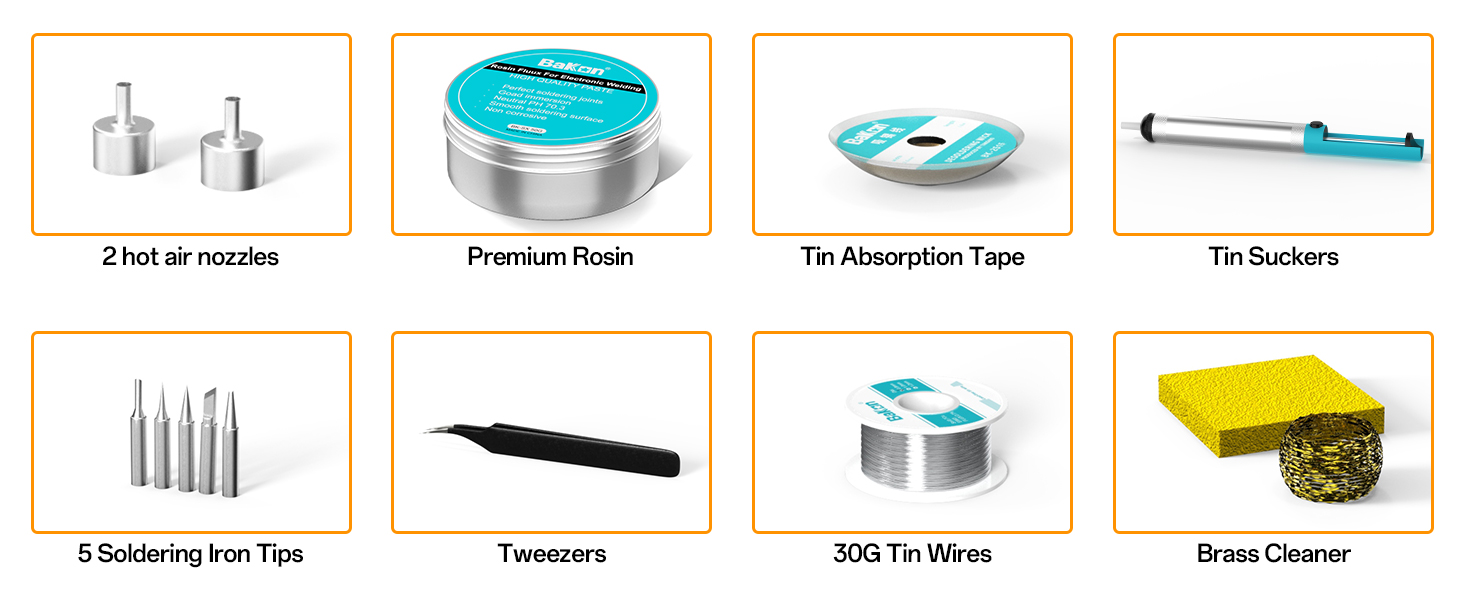
Figure 5.1: A display of the comprehensive accessories included with the BAKON BK602S, such as 2 hot air nozzles, premium rosin, tin absorption tape, tin suckers, 5 soldering iron tips, tweezers, 30G tin wires, and a brass cleaner, all essential for effective maintenance and operation.
6. Troubleshooting
This section provides solutions to common issues you might encounter with your BAKON BK602S rework station.
6.1 Unit Does Not Power On
- Ensure the power cord is securely plugged into both the unit and a working electrical outlet.
- Check the main power switch on the back of the unit to ensure it is in the 'ON' position.
- Verify that the power outlet is functional by plugging in another device.
6.2 Soldering Iron Not Heating
- Ensure the soldering iron switch on the control panel is activated.
- Check the temperature setting on the display; increase if it is too low.
- Verify that the soldering iron tip is properly installed and making good contact with the heating element.
- If the iron was recently placed in the holder, it might be in auto-sleep mode. Pick it up to reactivate.
6.3 Hot Air Gun Not Producing Air/Heat
- Ensure the wind gun switch on the control panel is activated.
- Check the temperature and airflow settings on the display; increase if too low.
- Verify that the hot air gun is properly seated in its bracket if it was recently placed there, as it might be in auto-sleep mode.
- Inspect the nozzle for any blockages.
For issues not covered here, please refer to the detailed troubleshooting section in the full user manual or contact BAKON customer support.
7. Specifications
| Feature | Specification |
|---|---|
| Model Number | BK602S-Yellow |
| Main Machine Output Power | 640W (Max) |
| Input Voltage | AC 110V 50Hz |
| USB Output Voltage | 5V |
| Product Dimensions | 6.32 x 6.52 x 4.15 inches |
| Item Weight | 3.56 pounds |
| Hot Air Gun Output Power | 550W (Max) |
| Hot Air Gun Temperature Range | 212°F-932°F (100°C-500°C) |
| Hot Air Gun Airflow | 120 L/Min |
| Soldering Part Output Power | 90W (Max) |
| Soldering Part Temperature Range | 356°F-896°F (180°C-480°C) |
| Temperature Stability | ±2°C (Static) |
| Display Type | LCD or LED |
| Material | Copper (tips) |
| Country of Origin | China |
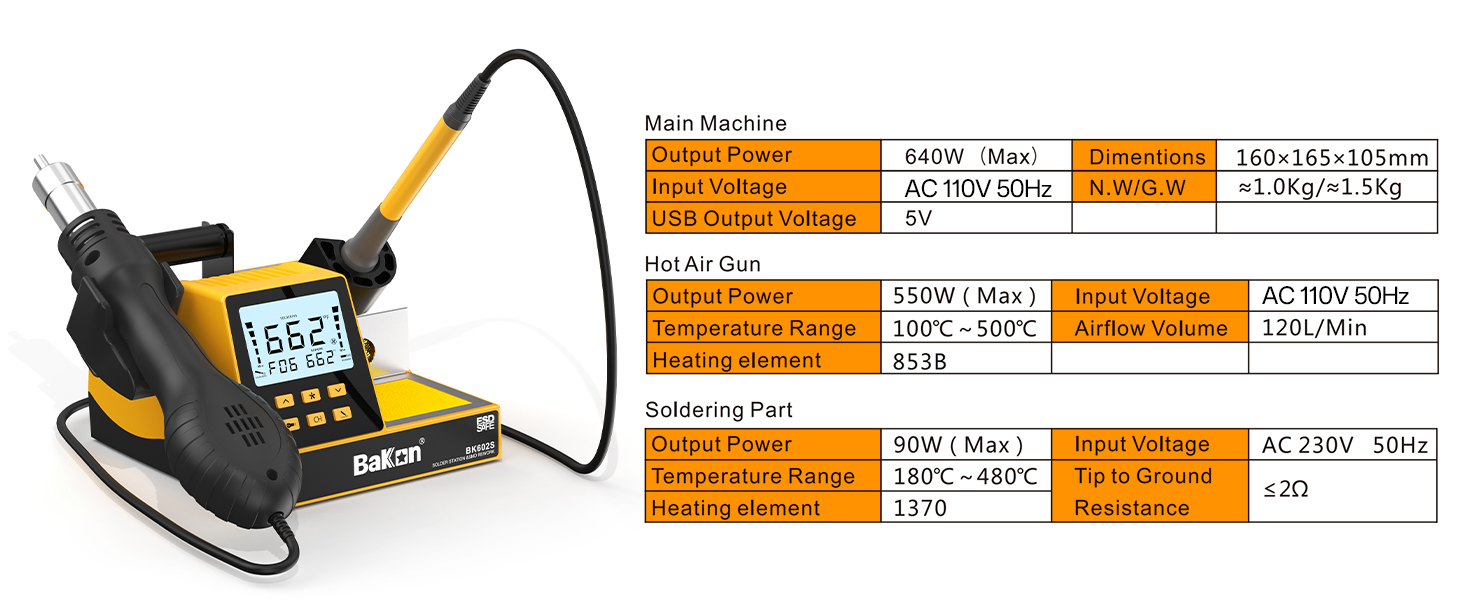
Figure 7.1: A detailed table outlining the technical specifications for the BAKON BK602S main machine, hot air gun, and soldering part, including power, temperature ranges, and dimensions.
8. Warranty and Support
BAKON products are manufactured to high-quality standards and are backed by a manufacturer's warranty. For specific warranty terms, duration, and conditions, please refer to the warranty card included in your product packaging or visit the official BAKON website.
If you encounter any issues or require technical assistance, please contact BAKON customer support through the contact information provided in your product documentation or on the official BAKON website. When contacting support, please have your product model number (BK602S-Yellow) and purchase details ready.
Ask a question about this manual
Ask about setup, troubleshooting, compatibility, parts, safety, or missing instructions. Manuals+ will review the question and use this page’s manual context to help answer it.